onedrive
194 Topics
MCP Integration for OneDrive/SharePoint
Hi OneDrive Team, I'm reaching out to explore Model Context Protocol (MCP) server integration for OneDrive and SharePoint. I am looking to integrate OneDrive/SharePoint data access into ThoughtSpot application using MCP solution. Are there existing MCP server implementations (official or community-driven) for OneDrive/SharePoint? If available, what are the connection endpoints and authentication details needed to set up the MCP server? If no MCP server currently exists, are there any upcoming plan on this and is there any alternate recommended approach present. Also could you please provide a SPOC from your team who can support further discussions and technical guidance on this integration? I'd like to schedule a follow-up conversation to explore the best path forward and discuss the use case. Thanks in advance for your help.14Views0likes0Comments
Working with ONE DRIVE
Good evening, everyone. I’d like to ask a few questions about OneDrive: If I have OneDrive active and am working on a Word document stored on my local drive, when I finish and click "Save," where is it saved—locally or on OneDrive? If I pause synchronization with OneDrive—or, better yet, uninstall the OneDrive app—what happens to the files currently in the OneDrive cloud? Will they be lost? I would appreciate your feedback. Regards. Luis Fernando.53Views0likes1CommentOneDrive stuck on "Processing 7 changes" for weeks. Can't identify what the 7 files are.
After upgrading from windows 10 to 11 and reinstalling onedrive several weeks ago, it got stuck "processing 7 changes". It was actually more than 7 at first, but I was able to find some of the files that were stuck and deleting them reduced the number to 7. But now I can't find the last 7 that are stuck processing. The files I managed to find had the wheel icon that indicates they are syncing, but I can't find any more files with that icon now. I have thousands of files in thousand of folders/subfolders, so I can't manually check every folder to see if a file has the syncing icon. Other than that everything seems to be working. Onedrive syncs new files and downloads files on demand correctly. It's just that "processing 7 changes" message never goes away. If Onedrive named the files it was trying to process, I could easily go to them and delete or replace them, but there doesn't seem to be a way to identify the files.87Views0likes1Comment
OneDrive desktop client continues to experience authentication problems
We're currently investigating a widespread OneDrive desktop client authentication issue affecting many users. Initially, users experienced continuous login prompt loops. In cases where authentication succeeded, OneDrive would repeatedly connect and disconnect, asking users to re-enter their credentials multiple times. We've already attempted: Resetting OneDrive Uninstalling and reinstalling the client Removing and recreating Windows Credential Manager entries Signing users out and back into Microsoft 365 None of these steps resolved the issue. A key finding is that OneDrive Online (browser access) works normally while connected to the corporate network. Users can access their files through the web without issue. However, the OneDrive desktop client continues to experience authentication problems. Today we identified an interesting workaround: when users connect through an external network (such as a mobile hotspot), OneDrive immediately authenticates and syncs successfully. Once we go back on the corporate network and reset OneDrive, the issue returns. No firewall, VPN, or known network configuration changes have been made, and current reviews have not shown any obvious blocked traffic. Given that: OneDrive Online works internally The desktop client fails internally The desktop client works externally (hotspot) We're trying to determine what network, authentication, proxy, DNS, SSL inspection, Conditional Access, or Microsoft 365 endpoint-related issue could be impacting the OneDrive desktop client specifically. Has anyone encountered similar behavior or have recommendations on where to investigate next?478Views0likes2Comments
😅 OneDrive Upload/Download Speed Help
Does anyone know of how I can improve my OneDrive download speeds? I cannot get my computer to download from OneDrive faster than 3.5-4.7Mbps. I've ensured my OneDrive settings do NOT limit my downloads I went so far as to plug my computer directly into my modem; even with 350Mpbs download and 650Mbps upload - still limited to really sub-4.0Mbps download speed from OneDrive. I understand my laptop hardware isn't limiting anything: CPU - 11th gen Intel(R) Core(TM) i5-1135G7 @2.40GHz Memory - 2x 16gb DDR4 Thank you for any and all recommendations, exploratory questions, or knowledge sharing!!!2.5KViews0likes4Comments
OneDrive embedded PowerPoint slides showing blank page or error
I embed PowerPoint files from OneDrive into eLearning courses using the standard embed links. As of today, all of them have stopped working. All my embedded PowerPoint slides are currently down across several live eLearning courses. What I've tried: Tried in a private/incognito browser window - still broken Created a brand new embed link from scratch - still broken Tried a completely different PowerPoint file - still broken So it doesn't seem to be a problem with one specific file or link - it's affecting all my embeds at once. What I see: Sometimes the page shows: "Something went wrong. This is a temporary issue, so try again in a few minutes." with reference codes: Ref A: 137479770EE248B2BD8767C1500F6314 Ref B: SG2EDGE2019 Ref C: 2026-08-25T04:41:15Z Other times the page just loads completely blank, with no error message at all. I also checked the browser's technical console, and it shows one of the files OneDrive needs to display the slides is failing to load (a 404 error on Microsoft's side), which is likely why the page won't display anything. Has anyone else run into this, or is there a known issue being tracked? Happy to share more detail if it's useful.422Views1like5Comments
OneDrive Access Issue – User Unable to Access OneDrive Despite Multiple Troubleshooting Attempts
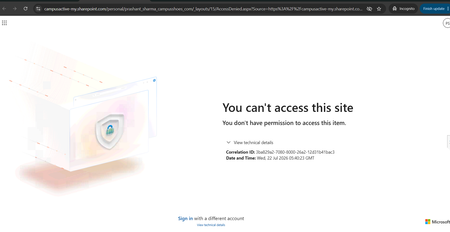
Hello Community, We are facing an issue with a user who is unable to access their OneDrive. Whenever the user tries to access OneDrive, the same error message continues to appear (screenshot/error attached). We have already performed the following troubleshooting steps: Removed and re-assigned the Microsoft 365 license. Executed the required PowerShell commands and confirmed that the user has a valid OneDrive URL and access permissions. Verified OneDrive and SharePoint settings from the SharePoint Admin Center. Used Microsoft Support and Recovery Assistant (SaRA) and reviewed the recommendations provided. Attempted to re-provision the user's OneDrive site. Despite completing all the above steps, the issue persists and the same error continues to be displayed. Additional Information: User has a valid Microsoft 365 license assigned. OneDrive service is enabled for the user. SharePoint Online is functioning normally for other users. Re-provisioning OneDrive did not resolve the issue. Has anyone encountered a similar issue or can suggest additional troubleshooting steps to identify the root cause? Any guidance would be greatly appreciated.534Views0likes2Comments
Missing data
I recieved several emails from Microsoft that were legit. I was advised I am 290+ GB over my quota for 5GB I realize my Clipchamp was saving to my personal OneDrive NOT my business OneDrive (where I have 5TB) Anyway, I opened a ticket with Microsoft and they confirmed my personal OneDrive has 1GB of data in it -- not 290+ Looks like my data vanished... Can you please contact me and help with resolution?112Views0likes1Comment
Inefficient OneDrive Synchronization Causes Windows Explorer Slowdowns
OneDrive has become a significant performance bottleneck in daily Windows usage. Its synchronization process frequently consumes excessive disk resources, directly impacting Windows Explorer performance and making file browsing noticeably slow, regardless of the desktop PC's hardware specifications. What is even more concerning is that this issue has persisted for years. Many users have reported the same problem, yet the recurring response is simply that the team is "aware of the issue." Despite these acknowledgments, there have been no meaningful improvements, no clear action plan, and little transparency regarding progress or future fixes. The lack of communication and visible progress creates the impression that the user experience is not receiving the attention it deserves. For a service as important and deeply integrated into the Windows ecosystem as OneDrive, users expect greater transparency, stronger commitment, and continuous improvements to performance and reliability. At this point, OneDrive is becoming less of a practical productivity solution and more of a source of frustration for many users. We hope Microsoft will give these concerns the priority they deserve and provide a clearer roadmap for improving both the performance and overall reliability of the service. --- Sincronização ineficiente do OneDrive causa lentidão no Windows Explorer O OneDrive tem se tornado um gargalo significativo no uso diário do Windows. A sincronização frequentemente consome recursos de disco de forma excessiva, afetando diretamente o desempenho do Windows Explorer e tornando a navegação de arquivos lenta, independentemente da configuração do computador utilizado. O mais preocupante é que essa situação persiste há anos. Muitos usuários relatam o mesmo problema e, apesar das respostas recorrentes de que a equipe está "ciente da situação", não percebemos melhorias concretas, um plano de ação claro ou atualizações transparentes sobre o andamento das correções. A falta de comunicação e de avanços visíveis passa a impressão de que a experiência do usuário não está recebendo a atenção necessária. Para um serviço tão importante e amplamente integrado ao ecossistema Windows, seria fundamental haver mais transparência, comprometimento e evolução contínua da plataforma. Atualmente, o OneDrive está deixando de ser uma solução prática para muitos usuários e se tornando uma fonte constante de frustração. Esperamos que a Microsoft trate essas questões com a prioridade que merecem e forneça um posicionamento mais claro sobre os planos futuros para melhorar o desempenho e a confiabilidade do serviço.359Views0likes3Comments