one drive
27 Topics
Restrict access to
What is best way to easily restrict OneDrive access? I do not see 'One Drive' listed as a Target resource in a conditional access policy. So basically, looking for ways to easily setup restrictions do Microsoft entra hybrid joined, Microsoft entra registered, Microsoft Entra joined. Just not seeing a clear-cut way to restrict.291Views1like3Comments
File handler configuration does not update
Hi team, We recently had an integration with Microsoft file handler. During the deployment of the application, we encountered some issues, so we updated the file handler configuration via the manifest file. Some users who installed our application still see the old file handler configuration and are experiencing problems because of it. They want to either update it to the latest configuration or remove it completely so they can continue their work normally. We did try to guide them to reset the file handler cache as in: https://learn.microsoft.com/en-us/onedrive/developer/file-handlers/reset-cache?view=odsp-graph-online But seems like only some of them got the updated config, while the rest keep getting the old one, even after 1-2 weeks. Do you have any advice on how to completely resolve this issue?384Views0likes4Comments
Assistance Required for Account Recovery
Hello, I am having trouble accessing my account: r.**@*.*). When I attempt to log in, I receive the message: "Something went wrong" (without any error code). Upon trying to reset my password, I discovered that a different email (er*****@talktaik.online) is linked to the account, which raises concerns that my account may have been compromised. Despite entering all the required information for recovery, I am informed that it’s insufficient. Could you please assist in resetting the password or provide a way to send the recovery link to the correct email: r.**@*.*? Any alternative solutions would be greatly appreciated. Thank you in advance for your support. Best regards,1.9KViews2likes1Comment
EXCEL
Estimados Sincronizamos el One Drive de un nuevo empleado en nuestra empresa y le aparecen todos los archivos en su computadora, pero a la hora de modificar un Excel no se hacen los cambios. Le aparece en modo lectura Ya probé con compartirselo, con sincronizarlo nuevamente y nada. La única solución fue que lo modifique online, lo cual no sería lo más cómodo. Me darían una mano para solucionarlo? Gracias546Views0likes1Comment
OneDrive DLP false positive issue
Hi, We are currently facing a very absurd issue, we have opened the support case with Microsoft and seems like they are unable to resolve the issue. We have a DLP policy implemented where any file shared to outside of organization through One Drive or Sharepoint will trigger the policy. Currently there are thousands of alerts in Activity explorer for policy hits. however, investigation shows that its just user files syncing to one drive and still DLP policy is being triggered. any one has experienced the same issue?1KViews0likes1Comment
Newly created folder (with Power Automate) not syncing automatically on Windows
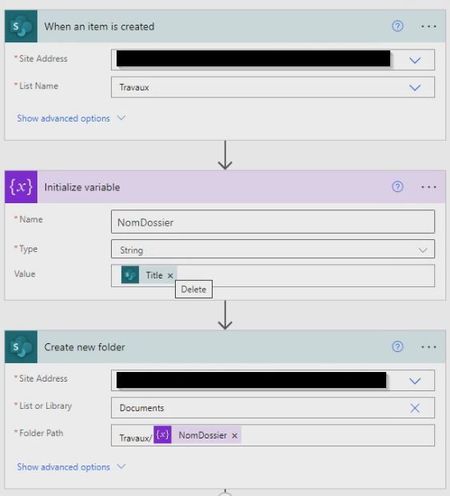
Hi everyone, I don't know if this is a temporary bug, but I have not found any other topic discussing this and I figured that maybe someone has already come across the same issue. Our customers use a List and when they create a new line in it, a Cloud Flow triggers and creates a Sharepoint folder with the same name as in the List Title, and then copies the Sharepoint folder link into a column in the List. This part works fine. What is weird is that any folder created with this flow doesn't sync automatically on Windows Explorer. If we manually create a file, either from Windows or Sharepoint, then everything syncs (even the folder created by Flow). Are we missing something in the flow, or is something else causing this that we are not aware of? Thanks a lot for any help that you will be able to provide 🙂One Drive Photo sync clarity
I had the following queries for One Drive (they apply to both iOS and Android): 1) I wanted to know how often, and how quickly, photos from 'My Photos' folder will sync with One Drive (if I 'sync on mobile data' is enabled). From experimenting it isn't instantaneous, but usually done within an hour or two, and trying to understand the justificaiton for the time. Does One Drive 'check' every hour for example)? 2) If I delete the copy that has uploaded to my one drive, but not in my photos folder, will it re sync to One Drive next time the App syncs 'checks'? I contacted Microsoft and they responded (in a surprisingly efficient and informative way which is a nice change for any custoemr servcie team) with the following, which I believe helped answer my Qs: "When Use Mobile Network option is enabled in the Camera upload settings, photos or videos from the phone's gallery will be uploaded to OneDrive even when your phone is not connected to the Wi-Fi. The time taken to upload the photos to OneDrive can vary depending on the size of the file, number of files being uploaded, speed of the Mobile data received. When the Camera upload is enabled from OneDrive Settings, OneDrive will continuously check for new photos and videos from your gallery. For example, your photos and videos has completely uploaded to OneDrive, but if you take a fresh picture or record a new video, the same will be uploaded immediately. Please note, this applies only when you have allowed to upload both on Wi-Fi and Mobile Data from the settings. OneDrive does not upload a photos or videos twice from the same device if the file that has been uploaded to OneDrive is deleted as the same metadata will be recorded in the OneDrive. This is to ensure that your photos or videos are not duplicated. Yet, you will be able to manually select the files from the gallery and upload it to OneDrive. We hope this answers your question. Please let us know if you have any doubts or questions. Best regards, Chothe M. OneDrive Support"4.2KViews0likes0Comments