office apps
125 Topics
Word friert ständig ein
Hallo, bei mir friert seit einer Woche immer wieder die Word App ein und ich weiß nicht, was ich tun soll. Ich habe alles geupdated, automatisches Speichern abgestellt, mein IPad neugestartet, das Internet immer wieder aus und angemacht und ich weiß einfach nicht weiter. Ich schreibe nicht mal einen ganzen Satz und schon friert alles ein und ich darf es schließen und erneut öffnen, nur damit dasselbe wieder geschieht. Ich brauche dringend Hilfe!76Views0likes0Comments
Formatting issues in Word Microsoft 365 Copilot online.
I am experiencing formatting issues in Word (Microsoft 365 Copilot online). I am a student, and I have a problem formatting my thesis in M365 Copilot after previously working on this file on an older device with an older version of Word. I recently purchased a new laptop, where I no longer have access to that same version of Word. My only option now is to use Word in the browser. However, the file that formatted correctly on the old device is now not formatting properly. The automatic table of contents is breaking. After clicking “Update,” Word assigns random page numbers, most often all entries show as page “8,” or, for example, the “Introduction,” which is actually on page 3 (I manually set page numbering in the old version), suddenly appears as page 5 in the table of contents. Every chapter and subchapter is shown as being on the same page, usually page 8. The formatting options and capabilities also seem worse compared to the interface of the older version. The same issue occurs on my student account. Please help, I am currently writing my thesis.993Views0likes5Comments
Word Copilot attachments fail with NoTokenObtained
Word Copilot cannot read local or cloud attachments with my Microsoft account. Cloud file attachment opens OneDrive Picker but fails with NoTokenObtained, timeout, or “Sorry, something went wrong.” Local files are accepted but reported as empty/corrupted. The same files work correctly in Microsoft 365 Copilot Chat with the same account. The issue reproduces on different computers, different networks, new Edge profile, new Windows user, and Word for the web without Office desktop installed. Word Copilot can read the active document, so only the attachment pipeline appears broken. Correlation IDs: 49a92ea2-7068-2001-bf16-3cf7d0c388fd and b39b30a2-b012-f000-cf51-72bd844c5dea. Please escalate to Word Copilot / OneDrive File Picker / Microsoft 365 Copilot engineering.370Views0likes1CommentOffice.js: Is there any supported way to retrieve multiple non-contiguous text selections in Word?
Hi everyone, I'm developing a Word Office Add-in using Office.js. In Microsoft Word (Windows Desktop), users can select multiple non-contiguous text ranges by holding Ctrl while selecting text. However, when I use: context.document.getSelection() It only returns a single Word.Range, and I couldn't find any API to detect or retrieve all the selected ranges. I came across this related discussion: Microsoft Tech Community – Support for Retrieving Multiple Selected Ranges in Word via Office.js My questions are: 1. As of 2026, is there any supported Office.js API to retrieve multiple non-contiguous text selections? 2. Is there any workaround to detect that the user has selected multiple ranges? 3. Or is this still a platform limitation? Our use case is an AI-powered legal research add-in, where users may want to select multiple clauses from different parts of a document and send them together as context. Any guidance would be appreciated. Thanks!325Views0likes4Comments
Add-in Error of complements in Word Online with my Personal Account
Hi, I am getting an error when trying to insert any add-in (such as Mendeley Cite) in Word Online using my personal account. Error message: "Add-in Error: We couldn't connect to the catalog server for this document" (Original Spanish error: "Error de complemento: no pudimos conectarnos con el servidor del catálogo {0} para este documento") Here are the details and the troubleshooting I've already done: - Account-specific: It works perfectly with my old University account, but fails with my new Personal account. - Platform-specific: The add-in works fine on the Word Desktop App, but fails on Word Online (web browser). - Browsers: I have tried different browsers (Chrome, Firefox) and the issue persists. It seems to be a configuration or permission restriction specific to my personal account on the web version. How can I fix this? Thank you!209Views0likes1Comment
Word Similarity Checker fails in desktop and web: “Something went wrong”
Hello, I am having an issue with Microsoft Word Similarity Checker. The Similarity Checker consistently fails with the message: “Something went wrong. Try again.” This happens in both: - Microsoft Word desktop - Word for the web / Microsoft 365 web version Product/account details: - Microsoft 365 subscription is active - Word shows activated under File > Account - Connected experiences are enabled - Word desktop version: Microsoft 365 Apps, Version 2606, Build 20131.20112 Click-to-Run Current Channel Troubleshooting already completed: 1. Confirmed Word is activated under File > Account. 2. Confirmed connected experiences are enabled: - Experiences that analyze your content: ON - Experiences that download online content: ON - All connected experiences: ON 3. Ran Office Update Now. 4. Restarted Windows. 5. Ran Quick Repair. 6. Ran Online Repair. 7. Tested in a brand-new blank Word document. 8. Tested on mobile hotspot instead of normal network. 9. Confirmed ProtonVPN was turned off. 10. Cleared Office Wef cache contents at: %LOCALAPPDATA%\Microsoft\Office\16.0\Wef\ 11. Checked Microsoft Edge WebView2 Runtime. The installer says it is already installed for the system. 12. Signed out of Word/Microsoft 365, restarted Windows, and signed back in. 13. Tested again in Word desktop. 14. Tested again in Word for the web. 15. The same “Something went wrong. Try again” Similarity Checker error still occurs. I also previously saw a script error when clicking Update License in Word: URL shown included: https://oc.officeapps.live.com/odc/v2.1/hrd Error: 'Hrd' is undefined Because the issue occurs in both desktop Word and Word for the web after these troubleshooting steps, this seems like a Microsoft 365/Word Similarity Checker service-side or account-side issue rather than a local installation problem. Can someone from Microsoft confirm whether there is a known issue with Similarity Checker right now, or whether this needs to be escalated as an account/service-side problem?362Views0likes1Comment
Word freezes when using modern comments with tables
Hi everyone, I’m running into a very frustrating issue with Microsoft Word and I’m hoping someone has seen this before. Word Desktop consistently freezes when I try to use modern comments with tables. The freeze happens after typing into the comment field and trying to save the comment. The application becomes unresponsive and needs to be force-closed. What’s strange: The exact same document works perfectly fine in Word for the Web. I can add and edit comments in tables there without any issues. Brand new Lenovo laptop (Windows 11) Microsoft 365 (latest version) Issue started immediately on this device Same workflow worked fine on my previous laptop What I’ve already tried: Running Word in safe mode (winword /safe) Creating a new Windows user profile Quick Repair and Online Repair of Office Fully reinstalling Microsoft 365 Disabling / removing McAfee antivirus Testing with a completely new document Disabling modern comments (old comments work, but are not ideal) Testing local vs OneDrive files (same behavior) Any help would be greatly appreciated. Thanks in advance!537Views1like1CommentWord freezes or crashes when pressing the G key in the file search
When pressing the letter G in the file search on Word, it either just freezes and doesn't respond or crashes immediately. Regardless of whether Word is in Safe Mode or not. It also pops up a "Word couldn't start last time" pop-up when I try to open the app again and asks if I want to open it in Safe Mode. Which, as I said, still has the same problem. As far as I can tell, that's the only issue with Word. Everything else works great so far. This does not happen with other apps like PowerPoint or Excel. I have only recently reinstalled all the apps and it does not seem to have helped. Windows 11 25H2414Views0likes12CommentsVBA concern: support for macros or controls not installed
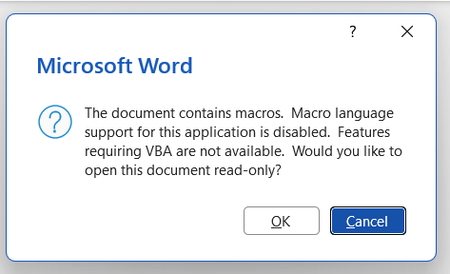
Background: installed Zotero, a citation manager, to use on Word but it uses macros My Word doesn't seem to have VBA installed. Every time I open the app, error boxes appear. Screenshotted below: I have tried a few things to fix this but without benefit: Macros enabled in the trust centre VBA enabled in the trust centre Rapid and online repair completed I have attempted to 'change' the program in the Control Panel in order to access the 'expand/add features' option but this does not exist as an option for me. When I press 'change' only repair options appear for me. Screenshotted below: My impression is that somehow VBA was not installed when I downloaded Office form my account. I appreciate VBA is downloaded automatically but this has not been the case for me. Please advise on next steps. Thanks in advance.276Views0likes3CommentsPrinting/exporting messes up the document
I have a 67-page document with a lot of pictures too, and I use multilevel headings. When I try to print or export to .pdf, it messes up the whole document, I have now 102 pages, sometimes 92, the approx. 5000 word count is now 7000, and the order of the headings is messed up, so some parts of the document are moved across the document. What on Earth is this? I changed all the fonts to Arial. Tried every kind of printing setting. Nothing works.727Views0likes3Comments