office 365
102 Topics
Generic Resources - Team Assignment Pool Yes or No?
Our On-Prem Project Server environment was set up with Generic Resources marked "No" for Team Assignment Pool. It seems we would want this to be a "Yes", so that tasks assigned to a Generic resource would be visible by Project Server users with the same role, and those users could then self-assign those tasks and provide updates. Our generic resources are meant to represent a "pool" of people in different labor categories, so that we can look at potential areas of under or over utilization. It seems that marking them as a Team Assignment Pool would reflect our intended use. For most of our generic resources, we don't plan to replace them with a specific person (such as production work). However, for some resources such as engineers, we would like them to be able to self-assign tasks and give updates in Project Server. Is there a particular reason to keep our Generic Resources marked "No" for Team Assignment Pool? Does changing to "Yes" affect their capacity, availability, or Work/Cost values?Solved488Views0likes3CommentsIs there a way to graphically highlight all of the tasks under a summary?
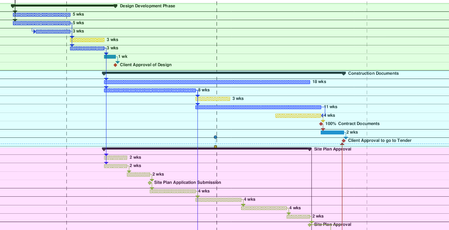
Looking to create what would essentially be a coloured background for all of the tasks in the gantt chart, under a summary. Been looking online and watching tutorials, but cant find what I am looking for. The image shows what I am trying to do (was done after the fact with a PDF reader, would prefer to do it straight in MS project).460Views0likes1Comment
Visual report don’t work
Hi I am using msproject 2016 stand alone together with office365. And I get an "unknown error" when I try to use Visual Report. anyone knows how to solve this? I have read somewhere that I need to rollback MS Project to a specific build no. I don’t know if this is the solution. If so. How do I do this and to what build version? Br Rune202Views0likes0CommentsWorkload by week/ month export to Excel
I like to use Visual report, but that doesn’t work.. I have MSProject 2016 and office 365. so I have tried to use save as (export) as xls. But I can’t get the load or week or month. anyone that can help out setup in table format. I think… the I can build the rest in Excel if needed br runeSolved592Views0likes4Comments
A colored column representing holidays
I am looking for ideas as to how to create a transparent, colored visual column within an MS gantt chart representing a date range that correlates with the Christmas holidays. Basically, just a vertical bar crossing all tasks that visually indicates the holiday date range (say 12/22/25- 01/02/26) so that as you scroll through all your tasks, that bar remains constant in the gantt chart. I can do a single date bar using Status Date, but have not found a way to perform a similar function for a date range. Any ideas or tricks?Solved326Views0likes1CommentCreating a Calendar Template
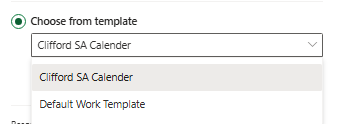
Good day MS Project Community, I am in need of some assistance, My question to the forum is: Could I create a custom calendar template that takes public holidays, weekends, and an annual shutdown into consideration? I would love to be able to use this in Project for the Web. The snapshot attached above are the 2 templates that were prepopulated in Project before I started working here and I do not have the admin rights to change these. Could I please get some assistance on how to create a new template that can be utilized within Project for the Web? Thank you in advance56Views0likes0CommentsYou don't have permission to access items on this site
Hi All, One of my users is facing an issue with the Roadmaps feature in Microsoft Project. The user is assigned a Project Plan 3 license. I have the following settings enabled. However, when the user tries to use this feature, they encounter the following error: ": https://contoso.sharepoint.com/sites/pwa. Change your default PWA site or request permission to this site." I am not familiar with this site. When I checked the SharePoint active sites, I found this site with the following details: Site Name: Project Web App Site Address: https://contoso.sharepoint.com/sites/pwa Do I need to provide access to this site for the user to use the Roadmaps feature? Please guide me.277Views0likes1Comment
Inconsistent Values from PWA Custom Field Formula
Hello community. Greetings from first time poster. I created the following formula (“FY Project Completion”) to assign a Financial Year value based on Project Finish Date (“Finish”): if the project ends on or before June 30, 2024, Financial year will be FY24, if the project end date falls between Jul 1, 2024 and June 30, 2025, the Financial Year will be FY25, and so on. IIf([Finish] >= CDate(#7/1/2024#) And [Finish] <= CDate(#6/30/2025#), "FY25", IIf([Finish] >= CDate(#7/1/2025#) And [Finish] <= CDate(#6/30/2026#), "FY26", IIf([Finish] >= CDate(#7/1/2026#) And [Finish] <= CDate(#6/30/2027#), "FY27", IIf([Finish] >= CDate(#7/1/2027#) And [Finish] <= CDate(#6/30/2028#), "FY28", "FY24")))) Surprisingly, the formula gives inconsistent FY values, even for projects with same Finish Date: sometimes it is blank, other times it assigns different FY values. I am attaching a representative listing of about 40 projects, 23 of which have wrong FY value. I will very much appreciate it if somebody can please guide me where I need to make change in the formula to get correct values? Dummy Project Name Start Finish FY Project Completion Project in Row 2 11/13/2018 4/30/2021 FY24 Project in Row 3 3/24/2023 3/24/2023 FY25 Project in Row 4 12/14/2020 3/29/2023 Project in Row 5 3/2/2020 7/31/2023 FY24 Project in Row 6 10/25/2023 11/22/2023 FY25 Project in Row 7 1/3/2022 12/31/2023 FY25 Project in Row 8 4/6/2020 2/9/2024 FY24 Project in Row 9 9/7/2023 3/1/2024 FY25 Project in Row 10 1/3/2023 3/29/2024 FY24 Project in Row 11 4/1/2024 4/1/2024 FY24 Project in Row 12 4/1/2024 4/1/2024 FY24 Project in Row 13 4/8/2024 4/8/2024 FY24 Project in Row 14 4/8/2024 4/8/2024 FY24 Project in Row 15 3/29/2024 5/9/2024 FY24 Project in Row 16 5/16/2024 5/16/2024 FY25 Project in Row 17 11/14/2023 5/28/2024 FY24 Project in Row 18 6/11/2024 6/11/2024 FY25 Project in Row 19 7/26/2023 6/28/2024 FY24 Project in Row 20 1/3/2023 6/28/2024 FY25 Project in Row 21 1/2/2024 6/28/2024 FY25 Project in Row 22 1/3/2023 6/28/2024 FY25 Project in Row 23 1/3/2023 6/28/2024 FY24 Project in Row 24 1/3/2023 6/28/2024 FY24 Project in Row 25 1/3/2023 6/28/2024 FY26 Project in Row 26 1/3/2023 6/28/2024 FY24 Project in Row 27 7/27/2023 6/28/2024 FY25 Project in Row 28 1/24/2024 6/28/2024 FY25 Project in Row 29 1/3/2023 6/28/2024 FY24 Project in Row 30 1/3/2023 6/28/2024 FY26 Project in Row 31 1/3/2023 6/28/2024 FY24 Project in Row 56 1/3/2023 6/28/2024 Project in Row 57 1/3/2023 6/28/2024 FY26 Project in Row 58 1/3/2023 6/28/2024 FY26 Project in Row 59 5/24/2023 6/28/2024 FY24 Project in Row 60 1/17/2023 6/28/2024 FY26 Project in Row 61 1/3/2023 6/28/2024 FY26 Project in Row 62 9/1/2022 6/28/2024 FY26 Project in Row 63 1/23/2023 6/28/2024 Project in Row 64 7/3/2023 6/28/2024 Project in Row 65 10/28/2020 6/28/2024 FY25Solved485Views0likes10Comments
MS Project - Different links between operations in print and processing view
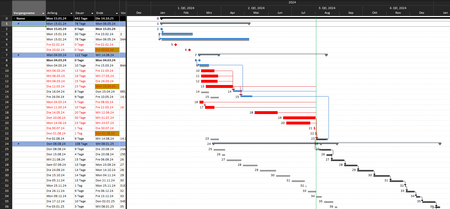
Dear Community, I have a problem with the links of my processes. In order to be able to compare the former dates (target dates) with the actual dates (actual) or the postponed dates, I have carried out a target/actual comparison via the GANTT diagram monitoring view. However, something does not seem to work with the display of the link lines between the tasks. The following problem description: In my Gantt chart view (image 1), the links are displayed correctly by the system, just as I would like them to be. The actual dates (on the right-hand side) are linked with connecting lines. However, if I then want to print the plan, the links refer to the target dates (on the left) of the activities and no longer to the postponed or actual dates (on the right). I would also like to have the views from image 1 as a print view so that I can send it to the customer as a PDF. What could be the problem? My thoughts go in the direction of the different stored dates (Fig. 3) or bar types (see Fig. 4). However, I have tried everything and have not found a solution to the problem. Can anyone help me? Figure 1: Figure 2: Figure 3: Figure 4:224Views0likes0Comments
Project for the web - view only user
Hi, is it possibile on project for the web assign role to each users in the plan? Some users should not modify data but just look at them! Actually everyone can add task, modify dates etc.. that's a huge issue! Only PM should do that ThanksSolved310Views0likes1Comment