office 365
223 Topics
**bleep**. Security Update (like KB5101650) breaking SmartCard Authentication for Office 2024 apps to O365
Looking for some support on this issue. I have Win11 clients that were upgraded from 24H2 to 25H2 last year. They were functioning well until earlier this year when the Cumulative Updates started breaking smartcard authentication on our clients (day after installing/rebooting/cache clearing). This seems to be a known issue but are there any real fixes? Symptom is that after the update is installed, next day (after a reboot or cache cleared) the user starts their Outlook or Teams application, when receiving the prompt that says "you will be prompted for your PIN" nothing follows, you will see the blue dots circling and after 5 or so minutes it times out. Clicking on the "..." shows an informational message error #50058, which says that not enough information was provided. The authentication process is failing... BTW - web authentication works just fine, it's just the local application (Teams, Outlook, etc.) that fail. I found that creating a new account on the system seems to work just fine, but for people that have established accounts and program environments that are setup for them to work, creating a new account is very unappealing to them. I'd like to be able to just get their current accounts working. Creating a new profile, wiping current profile info from registry doesn't seem to work thanks to automagic backups the OS is doing, but even that would still require setting up a new profile and copying over non AAPDAT file structure info... Does Microsoft not have a fix to this "known" issue? I spent a few weeks really digging into this and the best I can find as a work around is to disable the automatic backups of the NTUSER.DAT, blow away current profile info in registry, rename current profile structure, and then have the user login "anew". Again, this still requires a copy of the non-AAPDAT data back into the new structure (at least permissions won't be an issue) but that will not restore all application-based information for that user--that still will have to be re-created, which I think the users will not want to do because it means starting over from scratch.507Views0likes2Comments
Unable to access Global Admin, username not recognised, need tenant recovery billing active
Unable to access Global Admin account for Microsoft 365 tenant. Username not recognised and I need tenant recovery. Billing is still active. I am the billing owner of a Microsoft 365 Business subscription for yutoriacupuncture.com.au but I have lost access to all Global Admin accounts. The original admin account email is returning “username may be incorrect”. No other admin or business emails are recognised. I have a business email associated with the admin account i can still log into. I recently briefly cancelled and reinstated my domain which may have affected tenant linkage. I also recently joined a university Microsoft 365 organisation which may be affecting sign-in routing? I have tried login.microsoftonline.com, admin.microsoft.com, password resets, and incognito browsers with no success. I have tried contacting support via phone and email but keeps cutting out, saying it can't identity me, or sends me into a loop hole with the support chat bot. I need Microsoft to escalate this to tenant recovery or Data Protection team to restore Global Admin access using billing and domain ownership verification.161Views0likes2CommentsAAD multiple accounts from same realm is not supported by clients.
I've signed out of Excel for iPadOS 2.101.25100311. I've closed (not forced shutdown) and reopened the app. I'm trying to sign in with a different Microsoft account. However, it shows the error: "Another account from your organization is already signed in on this device". How can I completely sign out of that other account? The troubleshooting details are below. Correlation Id: 5520852a-4877-ec4c-97be-f3de2c079058 Timestamp: 2026-06-21T22:49:29.000Z DPTI: FAF41146-8AF4-425C-95EE-1654DD13C47C Message: AAD multiple accounts from same realm is not supported by clients. Tag: 5pzx9Solved549Views0likes1Comment
mail@mydomain is causing a cert mismatch error in all browsers for Outlook.com
Hello, I have created a CNAME for our users in my domain so that they can access webmail. For example, it's called mail.mycustomdomain.com, and it is directed to Outlook.com But when I try to visit mail.mycustomdomain.com, it shows a security warning and recommends going back. I can understand because the SAN name in the certificate presented by Outlook doesn't include my CNAME. Is there anything I can do as a workaround so our users can enter the CNAME without encountering a Certificate Mismatch Error? It is causing repeated calls to the helpdesk, and we would like them to use something simple they can remember. Thanks389Views0likes3Comments
How do I find the account linked to an Office Home & Student 2013 key?
Hello everyone, Microsoft's after-sales service redirected me here because they no longer provide updates for this type of product, nor even security support. I have two Microsoft accounts. However, when I try to reconnect my key to one of them, it tells me the key is already linked to another Microsoft account. But which one?! How can I find that account or regain ownership of my Office key ? Thanks for your help.99Views0likes2Comments
Hotmail to Outlook Migration Broke My Account
A year or two ago, I updated my Microsoft account to try and migrate from hotmail.com to @outlook.com. Since then, my Microsoft account is broken. I log in with my @outlook.com email, but account.microsoft.com displays my hotmail.com email everywhere. Mobile apps will not stay logged in properly and kick me out after a day. On my account info page my @outlook.com email isn't even listed and hotmail.com is listed as primary, but only logging in with @outlook works. I'm pretty sure when I originally tried to migrate my account some exception wasn't handled properly part way through the process and my account is in some sort of database limbo. Is there anyone at Microsoft here that can help with this? Also, sorry if this isn't the right place to post this, but a call with Microsoft support pointed me here and there doesn't seem to be a "Microsoft Account Support" hub or space on this platform. If anyone knows of a better location feel free to suggest that as well. Thanks!203Views0likes1CommentExcel authentication token reuse for access to Log Analytics
I have noticed that Excel is not able to reuse the authentication token when accessing Log Analytics workspaces if an expired token was renewed for a single sheet in a workbook. Scenario: 1 workbook with 1+ worksheets Each worksheet is a different query to LA (KQL query displayed in Excel for ease and consolidation) Access to LA is protected by the usual access controls (Conditional Access; Security Reader role + Session control) After a period of time, session and token expire and require renewal User receives a prompt stating the token has expired and needs to be renew User clicks on "Sign-in" and successfully completes the prompts (u/n+pwd+MFA) Expected result: The new token will be reused for subsequent connections to LA within the same workbook Actual result: User is prompted to re-authenticate for each and every connection in the workbook resulting in as many auth requests as there are connections Workaround: After successfully completing the first auth request, close Excel and re-open it and run "Refresh all" This successfully completes refresh of all data without any additional re-auth requests Is this behaviour by design or due to a configuration? Is there a way to address this so that the first token is re-used by all other connections without having to close and reopen the workbook?Solved215Views0likes2CommentsOld Microsoft Office 2010 (Unknown version) license
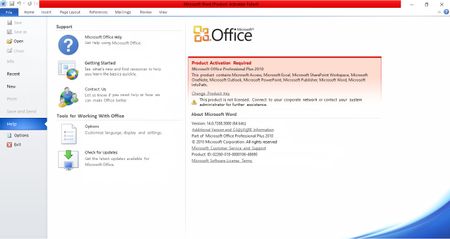
Hello everybody, I've been having an annoying activation problem with my old Microsoft Office 2010 license because of a number of reasons. In order to provide relevant details of my case, I've made a list of peculiar characteristics of this device and this Office 2010 license bought long ago and installed in a corporate CPU now under maintenance. Original Microsoft Office 2010 (Unknown version) license provided in a DVD case was bought in 2011 or 2012 for corporate purposes, purchase not performed by me. The software was originally installed in my corporate CPU, but the case with original intallation DVD was lost over the years after several administrative changes Serial product number was carefully kept by me in an anticipation of the possibility this DVD could be lost, which came true over the years. CPU is monitored in a corporate environment and has a specific Microsoft Windows 10 license unknown by me, which DOES NOT INCLUDE Microfost Office, though. This CPU is an Intel i3 with 16 Gb of RAM memory on a 64-based Windows 10 Home Single Language OS, version 22H2. Microsoft no longer provides support for Office versions older than 2013, therefore preventing me from finding a solution in Microsoft documentation and automated Microsoft Internet tutorials/assistants. I've risked downloading and installing a non-official Microsoft Office 2010 on this CPU from a third-party website with no relationship to Microsoft because of its absence from Microsoft official sources with good results. Activation fails continuously, though, even when I copy and paste the correct serial Microsoft Office 2010 serial number I have in my backups. I have a strong suspicion this has to do with the wrong software version (Home & Student X Pro), but I am not entirely sure of it. Product number error code is 0x8007232B My corporate environment does not provide Microsoft Office to all of its computers because of budgetary constraints and the availability of alternative freeware. Moreover, they are located in an institution completely separated from where I work, because the Windows 10 version I currently use is registered with the local regional Government under an institutional corporate e-mail completely apart from this centralized IT facility. This organization is called PRODESP (https://www.prodesp.sp.gov.br), which in turn is understaffed and deals with all kinds of issues, with a particular focus dedicated to financial issues, because of the countless employees the Government of Sao Paulo State (Brazil, South America) possesses accross the entire State. Recently I tried some alternative Office suites but neither option I tried had an advanced "Find and Replace" tool which only Microsoft Office has, which made me even more strongly attached to my user experience with Microsoft Office 2010 and this is why I would like to continue using it despite this license being now almost 15 years old, and its broad operational compatibility with the current Microsoft Office 365 version, particularly with regards to file formats, recorded MACROs and many other aspects not of interest and neither discussed here. An illustrative screenshot with my problem shown on it is provided below here too. Any help from whoever is able to help me solve this problem would be greatly appreciated, particularly if provided by a Microsoft representative. Thank you.645Views1like1Comment
Evolution with business account (oauth2)
Recently domainFactory migrated mail to Microsoft 365 business accounts. I used to use the Evolution mail client (Fedora Linux, flatpak version) for mail. Unfortunately I am not able to login to my account with Evolution. You can find my discussion here: https://gitlab.gnome.org/GNOME/evolution-data-server/-/issues/515#note_2384010 I also noticed that the login is no problem with a personal account. Does anybody have experience with this?3KViews0likes5Comments