office 365
685 Topics
😅 OneDrive Upload/Download Speed Help
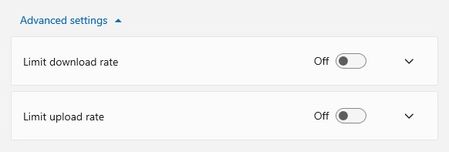
Does anyone know of how I can improve my OneDrive download speeds? I cannot get my computer to download from OneDrive faster than 3.5-4.7Mbps. I've ensured my OneDrive settings do NOT limit my downloads I went so far as to plug my computer directly into my modem; even with 350Mpbs download and 650Mbps upload - still limited to really sub-4.0Mbps download speed from OneDrive. I understand my laptop hardware isn't limiting anything: CPU - 11th gen Intel(R) Core(TM) i5-1135G7 @2.40GHz Memory - 2x 16gb DDR4 Thank you for any and all recommendations, exploratory questions, or knowledge sharing!!!2.3KViews0likes4Comments
OneDrive is soooooooooooooooooooooo slow!
Why is OneDrive for Business so unacceptably slow? I've had a case open with Microsoft Support since February and to date they have involved several different teams, run numerous diagnostics and tests remotely on my computer, but still haven't been able to improve let alone resolve the very poor download speeds we are getting across the company. They can see the issue with their own eyes, and the under-performing tests are appearing in their diagnostic logs, but for whatever reason they cannot fix their own systems! We have a fibre-optic leased line, 100Mbit over a 1Gbit bearer. Running a speed test, I am getting the full 100Mbit up and down, and yet when I am downloading a file (whether it's a few MB or a few hundred MB) from OneDrive, the download rate hovers between 500Kb/s and 800Kb/s. Uploading the OneDrive for Business is fine - the upload rate is between 7Mb/s and 9Mb/s. It's just the download rate that's the issue. Whenever any of our users save anything to OneDrive and the document is no longer cached, they have to wait for what feels like an eternity for the file to be downloaded before it can be opened. If they're opening the file via an application, then that application will hang and stop responding until the file has been downloaded from their OneDrive. Before we switched to Microsoft 365, we hosted everything locally. Anything we tried to open would do so almost instantly. But using OneDrive feels like we have travelled back in time to the days of 56K/ISDN. If this is how OneDrive has been designed, then it should not be labelled as a business service. There are other solutions out there from competitors that outperform OneDrive, and unfortunately if these issues are not resolved soon, I doubt we will be the only business who migrates away from OneDrive or even Microsoft altogether.31KViews6likes18Comments
Windows 10 Update (KB5001716) Broke My OneDrive on Windows 10 22H2
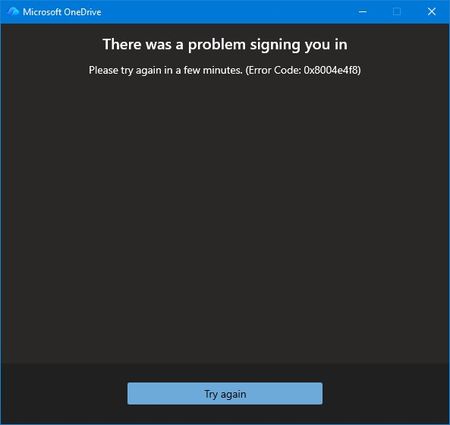
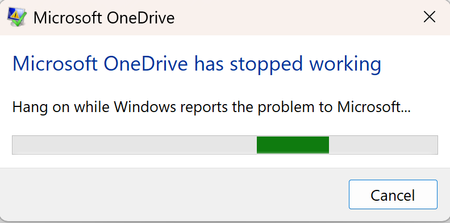
Prior to the August update all was well. I couldn't log into OneDrive from my desktop. No issues through my phone or online. Login screen fades away with no error just ghost One Drives filling my taskbar because multiple instances of OneDrive appear in Task Manager. At first, I thought maybe the update exposed some file corruption. A quick uninstall of OneDrive and re-install. Of course nothing is easy. I thought this would be the perfect opportunity to use AI to assist my troubleshooting. The AI found multiple issues with Windows Update Cleanup & WebView2 Runtime. I was all in the registry and services application. In the end, nothing worked and I threw the bomb at the desktop. Clean Windows install from a USB. Reinstalled Microsoft 365 and thought all would be well. Nothing is ever easy. The exact same issue. Microsoft validates my login but the hand-off to OneDrive fails. I got an actual error message for the first time from OneDrive. I reached out to tech support. AI seemed to think it's not a desktop issue because of the clean install. Because I'm on a Windows 10 machine my support person disclaimed limited support. I understood and was gracious. I had the opportunity to relay to my support person that I may have a backend issue and specifically error 0x8004e4f8 after a full clean install is the smoking gun. This error does not come from Windows. It comes from Microsoft’s cloud identity backend rejecting your OneDrive token request. I also performed these actions prior to reaching out: Full clean install All Windows updates Fresh OneDrive install Fresh Microsoft 365 install Fresh WebView2 Fresh Edge New password New recovery email Removal of old identity methods Device reboot Device registration reset I also relayed to my support person that AI thought Microsoft needed to perform these actions due to the error code: It requires a Microsoft engineer to: Reset your OneDrive service flags Rebuild your OneDrive tenant metadata Regenerate your OneDrive provisioning state Clear corrupted backend identity tokens Re‑provision your account on the OneDrive service My support person disagreed because my online OneDrive still works. He proved it using Quick Assist. We even tried using a new profile to see if OneDrive would work. No. Same issue. Window accepts me through authentication but when logging into OneDrive I receive the error message, try again later, or fades away. That was the end of my official Microsoft technical support. They suggested I post on here so here I am. Anyone else?123Views0likes1Comment
# OneDrive AutoSave Stopped Working After Update to Version 26.007.0112 on macOS
**Product:** Microsoft 365 and Office | OneDrive | For home | macOS ## Summary Since OneDrive automatically updated to version 26.007.0112 (26007.0112.0002) a few days ago, I am experiencing multiple issues with how Office files interact with OneDrive on my Mac. AutoSave no longer works, files that are stored locally now take noticeably longer to open, and attempting to work around the problem through Word/Excel directly results in upload failures and outdated file versions. Prior to this update, everything was working perfectly. ## Environment - **macOS version:** Tahoe 26.1 - **OneDrive version:** 26.007.0112 (26007.0112.0002) - **Office version:** Version 16.105.2 (26012530) - **Account type:** Business ## Symptoms ### 1. AutoSave no longer activates when opening files from Finder Opening any .docx or .xlsx file from the OneDrive folder in Finder results in AutoSave being off. The title bar shows "Saved on My Mac" instead of the OneDrive location. Attempting to toggle AutoSave on prompts me to "upload" the file — even though it is already in the OneDrive sync folder and marked as "Always Keep on This Device." ### 2. Files that are stored locally now open slowly Previously, opening an Office file from the OneDrive folder in Finder was instantaneous, as you would expect for a file stored on the local drive. Now, even though the files are marked as "Always Keep on This Device" and should be fully available locally, there is a noticeable delay when opening them. It appears that OneDrive or the Office app is downloading or re-fetching the file from the cloud rather than simply opening the local copy, which defeats the entire purpose of keeping files on the device. ### 3. Opening from within Word/Excel results in "Upload Failed" and serves an older version As a workaround, I tried opening files from within Word using File > Open and selecting the OneDrive location. However, this now produces an "Upload Failed" error message, and the file that opens is an older version — not the most recent version I had been working on. This is extremely concerning, as it suggests the sync between the local copy and the cloud copy may be broken, and there is a real risk of data loss or overwriting recent work with outdated content. ## Steps to Reproduce 1. Ensure files are in the OneDrive folder and marked as "Always Keep on This Device." 2. Open a .docx or .xlsx file by double-clicking it in Finder. Notice: the file takes several seconds to open (previously instant), AutoSave is off, and the title bar says "Saved on My Mac." 3. Close the file. Open Word or Excel, go to File > Open, and navigate to the OneDrive location. Open the same file. Notice: an "Upload Failed" message appears, and the file that opens is an older version, not the most recent one. ## Expected Behavior - Files stored locally via "Always Keep on This Device" should open instantly, just as any local file would. - AutoSave should be enabled automatically when opening files from the synced OneDrive folder. - Opening a file from within Word/Excel via the OneDrive location should open the current version of the file without upload errors. All of this worked exactly as expected before the update to version 26.007. ## What I've Tried - Verified that "Always Keep on This Device" is enabled for the affected folders. - Confirmed I am signed into the same Microsoft account in both OneDrive and the Office apps. - Verified files are in modern formats (.docx, .xlsx), not legacy formats. - Checked that OneDrive sync is not paused. ## Impact This is a severe workflow disruption. The combination of broken AutoSave, slow file access, and the "Upload Failed" error serving stale file versions means I cannot trust that I am working on the latest copy of my documents. There is a genuine risk of data loss — if the cloud version is out of sync with the local version, saving could overwrite recent work with an older copy. I am currently unable to rely on OneDrive for day-to-day work on my Mac. ## Additional Notes This appears to be a regression introduced by the recent OneDrive update to version 26.007. I have seen numerous other users reporting similar AutoSave and sync issues across Microsoft Q&A, Apple Community forums, and MacRumors, dating back to the original Files On-Demand changes on macOS. However, my setup was working correctly until this latest update. Relevant threads with related issues: - https://learn.microsoft.com/en-us/answers/questions/5419331/onedrive-says-saved-on-mac-autosave-not-working - https://learn.microsoft.com/en-us/answers/questions/5371608/one-drive-auto-save-no-longer-working-on-mac-os - https://learn.microsoft.com/en-us/answers/questions/5402091/onedrive-app-on-mac-not-working-for-autosave-and-t - https://forums.macrumors.com/threads/onedrive-autosave-disabled-when-opening-files-from-onedrive-folder.2442775/ I would appreciate any guidance from the community or the Microsoft team. Is this a known regression in version 26.007? Is a fix in progress? Is there a way to roll back to a previous OneDrive version that was working? Thank you.1.7KViews4likes4CommentsOneDrive suddenly became empty after university storage policy change Is recovery still possible?
Hello everyone, I am looking for technical guidance regarding a serious OneDrive for Business issue under Microsoft 365 Education. Environment - Microsoft 365 Education tenant. - University-managed account. - OneDrive for Business. - My account is still active and I can sign in normally. What happened On July 16, 2026, I signed into my OneDrive and discovered that my entire "My files" folder was empty. I verified the following: - I am signed into the correct account. - "My files" is completely empty. - The OneDrive Recycle Bin is empty. - "Restore your OneDrive" does not show any mass deletion event. - My OneDrive site is accessible, but there are no files. - I unfortunately do not have a complete local backup. A few days later, my university informed students that they had reduced the OneDrive storage quota from 5 TB to 30 GB due to a Microsoft/provider policy update. I suspect my OneDrive contained more than 30 GB because I had stored backups from my previous computer together with years of academic, personal and work files. However, I would like to understand whether exceeding the new storage quota could actually cause an existing OneDrive site to appear completely empty, or whether this suggests another issue such as: - OneDrive reprovisioning - Site replacement - License reassignment - Site deletion - Storage migration - SharePoint issue - Other administrative problem The university initially described this as a temporary Microsoft incident, but later told me that the files had been deleted because of the OneDrive application, without providing any technical explanation. I have already asked the university IT department to investigate: - Deleted Sites in SharePoint Admin Center - Second-stage Recycle Bin - Retention policies - Previous OneDrive site - Licensing history - Possible restore options My question to Microsoft experts is: 1. Can a storage quota reduction (5 TB → 30 GB) ever make an existing OneDrive appear completely empty? 2. Are there other administrative scenarios that could produce this behavior while leaving the account active? 3. Is there anything specific I should ask my Microsoft 365 administrator to verify that is commonly overlooked? Any guidance would be greatly appreciated because these files represent several years of academic, professional and personal work. Thank you very much.374Views0likes2Comments
Onedrive sooo annoying but great a same time
I have an some what unwanted computer issue here with Microsoft Onedrive! I have Office 365 and use Onedrive however, it has deleted over 5,500 pictures (yes I have backups and yes I deleted them off OneDrive HOWEVER these pictures were on my computer first so why does Onedrive delete the files even one my PC is the question - is there some setting to prevent this). However, this is so annoying, especially with documents, and IF you stop syncing a folder, OneDrive will delete that folder from your PC - why, especially since the folder was originally on my computer first. So it "seems" Onedrive does things without our consent people tell me BUT I say there must be a setting - anyone know where it is?267Views0likes1Comment
Onedrive LOSES my data!
So I spent time adding lots of entries to a stock management spreadsheet, saved it to my onedrive and made sure it said 'saved' at the top of the excel window. Opened the sheet again today to see that all of my changes are gone and I have effectively lost my stock because the absolute imbeciles at Microsoft can't code. How do I get my work back? When are microsoft going to sort their sloperating system out?1KViews0likes2Comments