notifications
34 Topics
Custom notification sounds on multiple accounts in New Outlook
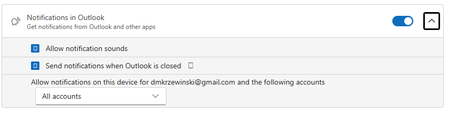
So, with this configuration/setting, am I correct in assuming that whatever sound I choose for a New Mail notification should apply to all accounts (I have four)? No matter what I do, I can configure only the Primary account sound, while all others insist on using the default sound. Very frustrating...318Views0likes3Comments
Techcommunity Follow email notification no longer working
Hello, Not sure if this is the right place to post this issue but I could not find another method to report this issue.. As an Exchange Admin in our invironment it's very usefull to stay up to date on the latest new posted in a variety of blogs on this website (Exchange Blog, M365 Blog, ...) This all went well until a few months ago where I started noticing I didn't receive any weekly updates anymore regarding new blogposts & tried to manually go check periodically, thinking it would be a temporary system. After investigation i've noticed that i'm not the only admin in our company that no longer receives these emails from mailto:email address removed for privacy reasons So I wonder if something bigger is up or if it's only my company being affected, not receiving these follow notifications anymore? Is there any other way that I should report this issue, to those managing this website so it can be investigated in detail if it's only us? Already tried to unfollow/delete follows in my profile - save - follow again, same on the respective blog pages, but this does not seem to change anything.219Views0likes2Comments
Bookings Page not sending confirmation emails to customers
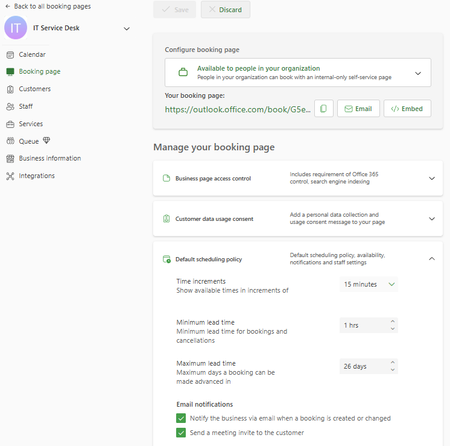
Hello, I am the main technician for my company's service desk. We have a Bookings page, but any time anyone books a time slot, they receive a message indicating that they will receive a confirmation email, but no email comes to them. In the settings, it shows the checkbox to send a confirmation email is checked. I have also looked in Exchange Admin and run a message trace and cannot find any confirmation email sent to myself or other testers. In Bookings, I have unchecked the confirmation email checkbox, saved, checked, saved, and tested - same result. Additionally, this Bookings page is only for internal users, and all of them are 'customers' with their full organization email address. In researching, I found that there was mention of the Bookings needing to have an Exchange account as a shared mailbox, which I do not believe we have - when I search the email that confirms for me that someone has booked with me, it is a long string of seemingly random letters and numbers with an internal domain address. I have also tried searching in Exchange Admin for 'IT' 'Service Desk' 'Service', and 'Desk', none of which have any results under Mailboxes (which would include shared mailboxes). Any advice/suggestions would be greatly appreciated. Screenshot:1.6KViews0likes2Comments
SSRS: Display 10 Rows from Two Tables Per Page with Pagination
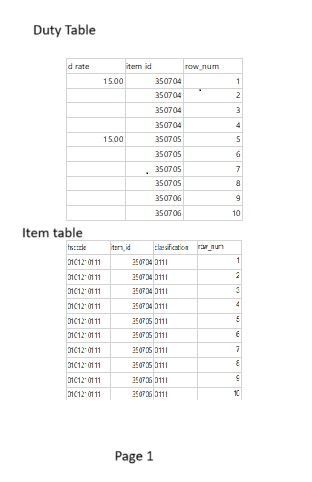
Question: I’m working on an SSRS report where I need to display data from two tables on a single page. The requirement is to show a total of 10 rows combined from both tables on each page. If there are more than 10 rows, the next set of rows should be printed on the subsequent pages, maintaining the same pattern. Example: Page 1: Rows 1-10 from both tables combined. Page 2: Rows 11-20 from both tables combined. And so on... Expected Result: How can I achieve this in SSRS? What is the best approach to ensure that I correctly paginate 10 rows per page from both tables combined? Any guidance or example would be greatly appreciated!396Views0likes1CommentHow to hide "Updated 1 item" in SP Online Document Library Web Part.
Hi, I added a Document library web part to a page and selected the folder that I needed for that web part. I also selected the "Video Gallery" view which was formatted using JSON. However, when someone clicks the Like/Unlike button, a notification appears saying "Updated 1 item" as shown below. Is there a way to hide this notification?155Views0likes1Comment
Mailing responders with a link to their reponse BY DEFAULT.
I have a need to send the hyperlink of the response to the responder. Whilst there is a tick box for them to manually tick to receive such an email. I need this to be mandatory as the link is to be copied and posted onto our CRM. The link certainly exists as it works fine when the box is ticked by the respondent but when they fail to do so it is a pain as the only people able to access the response are the form owners. I would use Power Automate but the link is not available in there to add to the email and as it uses a response token that we don't get to view I can't construct the url dynamically. Is there any way around this?498Views0likes3Comments
Microsoft 365 Groups Email Notifications Delayed in Outlook
I'm experiencing an issue with Microsoft 365 Groups email notifications in Outlook on Windows 10/11. When an email is sent to a M365 Group, it is delivered, and I can open and read it without any issues. However, the problem is with the notification of unread emails. Specifically, I do not receive a notification next to the group name in the left-hand navigation pane immediately after the email is delivered. If I don't read the email and wait, the unread email count notification eventually appears, but it takes more than 30 minutes for the notification to show up. There seems to be a noticeable delay between when an email is sent to a group and when the unread email notification is displayed in Outlook. Has anyone else encountered this issue, or is there a known solution? I am seeing the same behaviour on different M365 Tenants.693Views0likes0CommentsEXCELL Conditional formatging
I have a spreadsheet that I download from our turnstyle in/out system. I use conditional formatting to see who leaves early (before 5:20, before 4:00 and before 2:00) we are building a power plant and we have 2 sites side by side so several employees go back and forth... I ONLY NEED HIGHLIGHTED THE LAST CLOCK OUT FOR EACH EMPLOYEE and not every time they punched the clock out in a days time.... Can you please assist me... @links to members1.5KViews0likes8Comments