modern apps
130 TopicsIntroducing a Guided Copilot Experience for Building Azure Apps in VS Code
Today we're previewing a new way to build cloud apps with GitHub Copilot in VS Code: a guided Copilot experience that takes you from idea to a deployed Azure app through a structured, predictable workflow instead of a free-form chat session that may or may not land where you need it to. The problem: Copilot is powerful, but unpredictable Ask Copilot to "build me a Node.js API on Azure Functions with a Postgres database" today, and you might get a working project, or you might not. Sometimes Copilot scaffolds the app but skips infrastructure. Sometimes it generates a deployment script that fails halfway through. Sometimes it forgets what you were building three prompts later. The underlying model is capable. The problem is the shape of the experience: an open-ended chat with no checkpoints, no guardrails, and no consistent path from "I have an idea" to "it's running in Azure." How it works The guided Copilot experience adds to that open-ended flow with three clear, explicit stages: 1. Project scaffolding: Describe your app in plain language. Copilot proposes an architecture and asks for anything that is missing (e.g., language, app type, Azure services) through simple forms and pickers, not more back-and-forth chat. You review and approve the plan before any code is written. 2. Local development: Your project is scaffolded then Copilot checks for the runtimes, emulators, and tools you'll need and helps you install what's missing, so the project runs locally from the very first launch. Debug configurations are wired up automatically, so you can test and iterate on your app before it ever touches Azure. 3. Deployment: Copilot shows the tools that will be used for deployment along with a summary of all resources that will be created and a cost estimate so you can be confident in what you're getting. Infrastructure files are created for your app to ensure a consistent and reproducible deployment environment for testing and staging before going to production. Deployment runs through the same reliable tooling used across Azure (az and azd), so if something goes wrong, you get a clear explanation and a concrete next step instead of a wall of CLI output. Once your app is live, the guided experience doesn't disappear, Copilot retains context about your project's architecture, so coming back later to add a service or make a change picks up right where you left off. 🎉 What this means for how you work Determinism over guesswork. The same input reliably produces the same kind of outcome, so no more wondering which "mode" Copilot is going to be in. First try success. Projects are built to run and deploy on the first attempt, not after several rounds of manual repair. Structure over chat walls. Decisions that matter such as architecture choices, missing configuration, and deployment targets are surfaced through real UI, so you're not parsing paragraphs of text to figure out what Copilot needs from you. Stay in VS Code. The entire journey, from planning through deployment, happens without leaving your editor. What's in the initial preview The first version focuses on JavaScript and TypeScript projects, including web apps, Azure Functions, Container Apps, and Static Web Apps, with support for PostgreSQL, Azure Storage, Azure Key Vault, and Azure OpenAI. .NET and Python support are on the roadmap for a future release. Nothing about your existing Copilot workflows changes, the guided experience is an additional, opinionated path alongside the free form chat you already know, for when you want a reliable, structured way to go from zero to deployed. What's next This is an early look at a broader shift in how we think about AI-assisted development on Azure: less "ask and hope," more structured collaboration with clear checkpoints and real UI where it counts. We're continuing to expand language support, refine the deployment experience, and incorporate feedback from developers using it in the wild. Install othe Azure Tools extension pack and open an empty folder to try the guided Copilot experience and let us know what you think. File issues or share feedback on the GitHub repo.56Views0likes0CommentsAzure App Service is now a trigger destination for Azure Managed Connectors
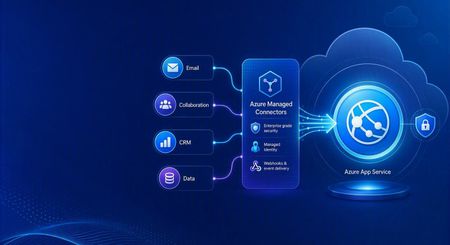
Azure Managed Connectors, currently in public preview, now lets you choose Azure App Service as a trigger destination. Connector events can be delivered directly to applications running on App Service, including ASP.NET Core, Java, Node.js, and Python applications. This is a new capability in the Managed Connectors public preview. It is not the announcement of a separate App Service preview. What's new When you create a trigger in the Managed Connectors portal, App Service now appears as a first-class destination alongside Azure Functions and the generic HTTP endpoint option. After selecting an existing App Service app, you configure: The application route that receives the event. New triggers default to POST /api/webhook , and the route can be edited. The Connector Namespace managed identity used to authenticate the callback. The Microsoft Entra audience expected by the receiving application. Managed Connectors then records the selected App Service resource, route, managed identity, and audience as part of the trigger configuration. You no longer need to select the generic HTTP destination and manually assemble the App Service callback URL. What are managed connectors? Managed connectors provide a consistent way for applications to integrate with services such as Office 365, SharePoint, Teams, Dataverse, and Salesforce. A Connector Namespace manages connections and connector operations so developers do not need to build a separate OAuth flow and service-specific client for every integration. Managed connectors support both directions: Triggers deliver events to your application, such as a new Outlook email or a file added to SharePoint. Actions let your application call operations such as posting a Teams message, flagging an email, or creating a list item. The App Service destination makes the trigger side a first-class option for existing web applications and APIs. How it works In the Managed Connectors portal, create a trigger and select App Service as its destination. Select the web app, callback route, Connector Namespace managed identity, and Microsoft Entra audience. When the source event occurs, Managed Connectors requests a token using the selected managed identity and sends the event to the App Service route. App Service built-in authentication validates the token before the request reaches application code. The application processes the event and can use Managed Connectors actions to continue the workflow. The callback is an ordinary authenticated HTTP request, so the application can use its normal framework, routing, dependency injection, logging, monitoring, and deployment practices. Configure receiving-app authentication The App Service destination configures the Managed Connectors side of the callback. The receiving application must still be configured to trust it. The reference sample uses App Service built-in authentication, also known as Easy Auth, with: A Microsoft Entra application that identifies the receiving application and its audience. A secretless federated credential configuration. The Connector Namespace managed identity pinned as an allowed principal. Authentication required for requests reaching the application. This configuration rejects unauthenticated requests and allows callbacks carrying the expected managed-identity token. The Managed Connectors trigger wizard does not currently create or update the App Service authentication configuration automatically. Try the end-to-end sample The Managed Connectors on Azure App Service email-triage sample demonstrates a complete workflow: An Office 365 Outlook trigger delivers a new email to an ASP.NET Core application on App Service. App Service built-in authentication validates the managed-identity callback. The application classifies the message and enriches the sender through the Office 365 Users connector. Important mail produces a Microsoft Teams triage card. The application flags the source email in Outlook. The repository includes the application, Bicep infrastructure, App Service authentication configuration, Connector Namespace connections, and an Azure Developer CLI deployment flow. We validated the complete workflow end to end: the authenticated callback reached POST /api/webhook , the application processed the event, a Teams card was posted, and the source Outlook message was flagged. Current limitations The capability is configured through the Managed Connectors portal, not the App Service portal. The wizard configures the Managed Connectors trigger but does not configure App Service built-in authentication on the selected web app. The current sample authentication setup requires a Microsoft Entra application, audience configuration, federated credential, and allowed-principal configuration. Depending on the application's Easy Auth configuration, authentication can apply to the whole application rather than only the connector callback route. The reference sample validates one push-trigger scenario; it is not a compatibility statement for every connector and operation. What's next The first-class App Service destination removes the generic callback URL step and provides an App Service-aware trigger experience in Azure Managed Connectors. We are also exploring ways to simplify receiving-side authentication so applications can establish connector-scoped trust without manually assembling the App Service authentication configuration. Try the reference sample and share feedback on the connectors and App Service scenarios you want to use.300Views0likes0CommentsWhat the New API Management AI Gateway Tier Changes for App Service-Hosted Agents
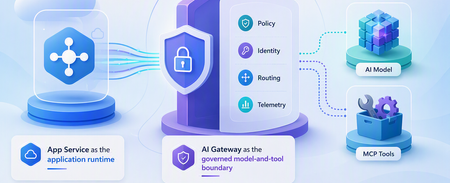
A runnable App Service agent sample that uses the dedicated API Management AI Gateway tier for governed model and MCP tool access, streaming, policy enforcement, identity separation, and telemetry.600Views0likes0CommentsAnnouncing public preview: Markdown for Agents in Azure App Service
Why Markdown for Agents? Web pages often contain scripts, styles, and HTML markup that are useful to browsers but add noise when the content is sent to an AI model. Markdown for Agents removes that extra markup and returns a smaller, text-focused response that is easier for agents to process and can reduce token usage. In internal testing across more than 637,000 pages, converted Markdown responses were 97 percent smaller at the median than the source HTML, with a median conversion time of 2 milliseconds. Results vary based on the page and its content. Public preview availability Markdown for Agents is available in public preview for Windows apps on Azure App Service in all public regions. The app must use an App Service plan in the Basic tier or higher. No additional authentication setup is required for Markdown conversion. Your app's existing authentication, authorization, and network access controls continue to apply. This feature is only supported on Windows App Service at this time. Support for Linux apps will come later this year. Enable Markdown for Agents During the public preview, you can enable the feature through the REST API, ARM/Bicep template, or the Azure CLI using az rest . Dedicated Azure CLI commands and portal support are planned for a future update. Azure CLI with az rest Replace the placeholders with your subscription ID, resource group, and app name: az rest --method patch --url "https://management.azure.com/subscriptions/<SUBSCRIPTION_ID>/resourceGroups/<RESOURCE_GROUP>/providers/Microsoft.Web/sites/<APP_NAME>?api-version=2026-03-15" --headers "Content-Type=application/json" --body '{"properties":{"aiIntegration":{"markdown":{"enabled":true}}}}' Verify the setting: az rest --method get --url "https://management.azure.com/subscriptions/<SUBSCRIPTION_ID>/resourceGroups/<RESOURCE_GROUP>/providers/Microsoft.Web/sites/<APP_NAME>?api-version=2026-03-15" --query "properties.aiIntegration.markdown" To disable the feature, send the same PATCH request with enabled set to false . ARM template Add the following property to your Microsoft.Web/sites resource using API version 2026-03-15 : "properties": { "aiIntegration": { "markdown": { "enabled": true } } } Bicep resource webApp 'Microsoft.Web/sites@2026-03-15' = { name: appName location: location properties: { serverFarmId: appServicePlanResourceId aiIntegration: { markdown: { enabled: true } } } } Request a Markdown response After enabling the feature, request an HTML page from your app with the Accept: text/markdown header: curl -i -H "Accept: text/markdown" "https://<APP_NAME>.azurewebsites.net/" A successfully converted response includes these headers: Content-Type: text/markdown; charset=utf-8 x-markdown-source: easy-markdown The response body contains Markdown generated from the page's HTML. Common content such as headings, paragraphs, links, lists, images, emphasis, and code is preserved, while script and style content is removed. Pages that cannot be safely converted may return their original HTML. Clients should check the Content-Type and x-markdown-source response headers before processing the response as Markdown. What's next Linux support is planned before the feature reaches general availability. We also plan to add dedicated Azure CLI commands and a portal experience in future updates. Share your feedback Try Markdown for Agents with your Windows App Service apps and let us know how it works for your agent scenarios. Share feedback, questions, and feature requests in the comments below.1.1KViews0likes0CommentsMicrosoft Foundry Now Has an AI Gateway Control Plane — What Changes for App Service
Microsoft Foundry can now create or associate an APIM-based AI Gateway. Here is what changes for App Service agents, what remains in APIM, and the v2-tier requirement that affects existing gateways.2.1KViews1like1CommentOrchestrate Azure Container Apps Jobs with Apache Airflow
Azure Container Apps (ACA) Jobs are a great way to run work that starts, does something, and finishes: nightly batch, data processing, ETL, ML scoring, report generation. They scale to zero, bill per execution, and run any container you give them. But the moment your "one job" becomes "a set of jobs that depend on each other," a gap appears: How do I run twenty jobs in parallel, wait for all of them, then run one more job only if they all succeeded — and retry just the one that failed? A single ACA Job can't express that on its own. What you're describing is an orchestrator, and the most widely adopted one in the data world is Apache Airflow. This post introduces two open-source templates that connect the two, so Airflow becomes the brain and ACA Jobs become the muscle. Pick the one that matches what you already run: airflow-on-aca-jobs: you already have Airflow. Drop in an operator and point it at ACA Jobs. Host nothing new. airflow-hosted-on-aca: you don't have Airflow. Get a full one running on Azure Container Apps with one command. Both use the same operator and the same DAGs, so you can start with one and move to the other later without rewriting your workflows. See Airflow orchestrate real ACA Job executions with parallel fan-out, dependency ordering, and automatic retries. Why ACA Jobs need an orchestrator A plain ACA Job is great at one thing: run this container to completion, then stop. That covers a scheduled job or a one-off task perfectly. Real pipelines need more than that: Dependency ordering: step B runs only after step A succeeds. Parallel fan-out: launch one execution per file, per store, or per partition, all at once, then wait for the whole batch. Per-task retries: if one execution in a batch of fifty fails, retry just that one, not the other forty-nine. Backfills and scheduling: re-run yesterday's pipeline, or run every night with a full history of what happened. These are the problems an orchestrator solves. Instead of building that logic yourself, you let Airflow handle the graph, the scheduling, and the retries, while ACA Jobs run the compute. You get serverless, scale-to-zero workers, and you didn't have to stand up a scheduler to get them. The operator that ties them together Both templates ship the same small plugin: an Airflow operator called AzureContainerAppsJobOperator . In a DAG it looks like any other task: report_sales = AzureContainerAppsJobOperator( task_id="report_store_sales", subscription_id="{{ var.value.azure_subscription_id }}", resource_group="{{ var.value.aca_resource_group }}", job_name="{{ var.value.aca_job_name }}", image="python:3.12-slim", command=["python", "-c", MY_PROGRAM], env_vars={"STORE_NAME": "Seattle"}, deferrable=True, ) A few things make this operator easy to work with: Per-execution overrides. It takes the ACA Job you point it at and overrides the image , command , args , and env_vars for that run. You can drive many different workloads from a single ACA Job definition, and you don't need to build or push a custom image just to try something. The example above runs the stock python:3.12-slim image with an inline program. Deferrable by default. With deferrable=True , Airflow frees its worker slot while the ACA Job runs and resumes when it finishes. That means your fan-out width is bounded by ACA, not by how many Airflow workers you have. You can launch dozens of parallel executions cheaply. No secrets required. Authentication resolves in a sensible order: an Airflow Connection if you set one, otherwise an AZURE_ACCESS_TOKEN environment variable, otherwise DefaultAzureCredential (managed identity). In Azure, the hosted template uses a managed identity so nothing sensitive is stored in Airflow at all. Because both templates share this operator, a DAG written for one runs unchanged on the other. Option 1: Bring your own Airflow (host nothing) Choose airflow-on-aca-jobs if you already run Airflow: Azure Managed Airflow, MWAA, Astronomer, or your own deployment. You keep that Airflow exactly as it is and simply teach it to talk to ACA Jobs. +------------------------------------------+ | Your Airflow (you host it, unchanged) | | runs AzureContainerAppsJobOperator | +------------------------------------------+ | | ACA Jobs REST API v +------------------------------------------+ | ACA Job (Azure Container Apps) | | | | store 1 | store 2 | ... | store N | | parallel executions -> scale to zero | +------------------------------------------+ Your existing Airflow runs the operator; ACA Jobs run the work. You host nothing new. Adoption is three small steps: Copy the operator into your Airflow's plugins/ folder. Add a DAG that uses AzureContainerAppsJobOperator . Set three Airflow Variables so the operator knows which job to drive: Airflow Variable Value azure_subscription_id your subscription id aca_resource_group the resource group holding the ACA Job aca_job_name the ACA Job name That's the whole integration. Nothing new to host, no extra scheduler or database, no custom image. ACA Jobs just become another task type Airflow can call. If you want a job to point at first, the template includes an Azure Developer CLI ( azd ) deployment that stands up a sample ACA Job for you: git clone https://github.com/hetvip2/airflow-on-aca-jobs cd airflow-on-aca-jobs azd up # deploys a sample ACA Job, prints its resource group + name Then copy airflow/plugins/ and airflow/dags/ into your Airflow, set the three Variables, and trigger the DAG. Option 2: Airflow hosted on ACA (turnkey) Choose airflow-hosted-on-aca if you don't already have an orchestrator and want one running next to your jobs. One command provisions the whole thing on Azure Container Apps: azd up | v +------------------------------------------+ | Airflow control plane on ACA | | web | scheduler | triggerer | | Postgres (metadata) + Azure Files (dags)| | Managed Identity - no secrets stored | +------------------------------------------+ | | ACA Jobs REST API v +------------------------------------------+ | ACA Job (Azure Container Apps) | | | | store 1 | store 2 | ... | store N | | parallel executions -> scale to zero | +------------------------------------------+ One command deploys the whole Airflow control plane on ACA, right next to the jobs it drives. git clone https://github.com/hetvip2/airflow-hosted-on-aca cd airflow-hosted-on-aca azd env new my-airflow azd up # prints your Airflow URL when it finishes azd up deploys a complete, working Airflow control plane on ACA: airflow-web, airflow-scheduler, and airflow-triggerer running as Container Apps on LocalExecutor, so there's no Celery or Redis to operate. A Postgres metadata database. A user-assigned managed identity with permission to call the ACA Jobs API, so the operator authenticates with no secrets stored in Airflow. A sample ACA Job for Airflow to drive out of the box. Your DAGs and plugins live on a mounted Azure Files share, so you ship new workflows by re-uploading files rather than rebuilding an image: cp my_dag.py airflow/dags/ azd hooks run postprovision # uploads dags + plugins to the share Airflow picks up the change within a minute. You now own a real orchestrator, hosted serverlessly on the same platform as your jobs. Which one should you pick? Option 1: airflow-on-aca-jobs Option 2: airflow-hosted-on-aca Best when You already run Airflow You don't have Airflow yet Setup Copy the operator + a DAG + 3 Variables azd up (one command) Who hosts Airflow You do (unchanged) Azure Container Apps Authentication Connection or short-lived token Managed identity, nothing stored Ownership Lowest: nothing new to run Turnkey: a full orchestrator you own The important part: the workload never changes. The same DAG and the same operator drive the same ACA Job executions in both. Start wherever you are today, and switch later with zero changes to your pipelines. See it end to end Picture a retailer that wants one number every night: total sales across all stores. Each store reports its own sales as a separate ACA Job execution, all running in parallel. When every store is in, a final job adds them into the company total. That one workflow exercises exactly what a plain Job can't do alone: parallel fan-out: one ACA Job execution per store, all at once dependency ordering: the roll-up runs only after every store reports per-task retries: if a store's execution fails, Airflow retries just that store, and the nightly total still lands In Airflow's Graph view you watch the store tasks light up together, then the roll-up run last. In the Azure portal you watch real executions appear under your ACA Job and scale back to zero when they finish. Same job, same DAG, whichever template you chose. Call to action If you run batch, ETL, or any multi-step work on Azure Container Apps Jobs, give one of these templates a try: Already have Airflow? Start with airflow-on-aca-jobs. Need an orchestrator? Start with airflow-hosted-on-aca. Both are open source, deploy with azd up , and share the same operator so you can move between them freely. Try them out and let us know what you orchestrate.520Views1like3CommentsFrom AI Adoption to AI Governance - Using APIM as the Gateway for Azure AI Foundry
Co-authored by Gaurav Jain (Senior Cloud Solution Architect @ Microsoft) and Abhishek Mittal (Cloud Solution Architect @ Microsoft) Enterprises move through three phases of AI adoption: evaluating models, building apps and agents, and operationalizing them in production. The first two are easier to accelerate. The third is where governance becomes critical. Once multiple teams share an AI endpoint, leaders need clear answers to practical questions: which model consumed tokens, which team used them, and who is authorized to call it? This post shows how to place Azure API Management (APIM) in front of Azure AI Foundry as an AI Gateway, turning a shared endpoint into a governed control point for per-model token visibility, chargeback, and budget alerts — with no changes to client code. It also shows where Azure Front Door and Web Application Firewall (WAF) fit in a secure AI Landing Zone. The problem: AI adoption is outpacing AI governance A common starting point is an Azure OpenAI resource running multiple models. The team already has operational telemetry, but governance needs a different view: per-model token usage for chargeback, budget alerts, and capacity planning, captured in one place. Azure gives you rich resource-level telemetry out of the box, and that is exactly where we started: Azure Monitor — Metrics blade: shows token usage split by model and deployment in near real time. Diagnostic settings: stream the resource's metrics and request logs into Log Analytics (the AzureMetrics and AzureDiagnostics tables). Azure Monitor provides useful resource-level telemetry, including metrics and diagnostic logs. A governance view needs something different: model identity and token counts correlated in a single record, so teams can build a per-model, month-to-date ledger for chargeback and alerting. The AzureMetrics table carries the token totals, aggregated at the resource level. The AzureDiagnostics logs carry the model and deployment name at the request level. Each stream does its job well. Correlating them into one per-model, month-to-date ledger — and alerting on it — is a governance concern that sits above any single resource. Azure Monitor metric alerts, for instance, work on a rolling 24-hour window that maps cleanly onto a per-day token budget; a month-to-date, per-model chargeback ledger is simply a different shape of question — and a natural fit for a dedicated control point. This transition is the focus of this post: moving from AI adoption to AI governance by introducing a control point where model identity and token usage are captured together by design. The natural home for that control point is an AI gateway — and we build it next with Azure API Management in front of Azure AI Foundry. The pattern: APIM as the AI Gateway for Azure AI Foundry The AI gateway in Azure API Management is a set of capabilities to secure, scale, monitor, and govern the AI models, agents, and tools behind your apps. It isn't a separate product — it extends the existing API Management gateway. As Microsoft's guidance puts it, as AI adoption matures the gateway helps you authenticate and authorize access to AI services, load balance across endpoints, monitor and log AI interactions, and manage token usage and quotas across multiple applications. APIM becomes the governed front door for Azure AI Foundry. Clients continue calling an OpenAI-compatible endpoint; APIM authenticates to Foundry with a system-assigned managed identity, forwards the request, and emits per-model token telemetry to Azure Monitor and Application Insights. The result is per-model visibility without client-side changes. Models behind the gateway The gateway can front any model deployment in Azure AI Foundry — Azure OpenAI models, other Foundry models, or a mix — and the pattern is identical no matter which you run. For a concrete reference, the walkthrough in this post sits in front of two existing deployments: Deployment Model Provisioned capacity (TPM) gpt-4.1 gpt-4.1 500K gpt-5 gpt-5 50K Example deployments referenced throughout this post. Note the deliberate capacity gap — gpt-5 at 50K TPM versus 500K for gpt-4.1 — exactly the kind of asymmetry that makes per-model visibility a governance requirement, not a nice-to-have. Architecture Figure 1 — Architecture / component flow: consumers call one governed API; the inbound policy authenticates with a managed identity, resolves the model, and emits per-model token metrics to Azure Monitor and Application Insights. The starting point (“before”): a pass-through without a usage signal By default, APIM operates as a straightforward proxy. If you import a Foundry API and keep the default configuration, the policy simply selects the backend service: <policies> <inbound> <base /> <set-backend-service id="apim-generated-policy" backend-id="foundry-backend" /> </inbound> <backend><base /></backend> <outbound><base /></outbound> <on-error><base /></on-error> </policies> A plain pass-through API. It forwards traffic faithfully — it simply doesn't surface a usage signal yet. This is our “before.” Pass-through configuration works, but it does not distinguish traffic by model. All requests flow through the same stream, with no per-model chargeback signal, no capacity warning, and no clear view of which deployment is driving consumption. To govern the workload, the gateway must understand the traffic — not just relay it. The governed gateway (“after”): a policy that sees every token The custom inbound policy below is the heart of the pattern. It does four things in order: set-backend-service — select the Azure AI Foundry backend. authentication-managed-identity — obtain an Entra ID token for cognitiveservices.azure.com using the APIM system-assigned identity. No keys ever leave the gateway. set-variable deployment-id — resolve the model name from either the URL path or the request body (more on why below). azure-openai-emit-token-metric — emit prompt, completion, and total token counts to Azure Monitor, dimensioned by model. <policies> <inbound> <base /> <set-backend-service backend-id="foundry-backend" /> <authentication-managed-identity resource="https://cognitiveservices.azure.com" /> <!-- Resolve the model/deployment name. The Foundry Model Inference API (/models/chat/completions, /models/embeddings, /anthropic/v1/messages) passes it in the JSON body as "model". The Azure OpenAI-style surface (/openai/deployments/{name}/...) passes it in the URL path. Handle both. --> <set-variable name="deployment-id" value="@{ var path = context.Request.Url.Path ?? ""; var m = System.Text.RegularExpressions.Regex.Match(path, "/deployments/([^/?]+)"); if (m.Success) { return m.Groups[1].Value; } try { var body = context.Request.Body?.As<JObject>(preserveContent: true); var model = body?["model"]; if (model != null && !string.IsNullOrEmpty(model.ToString())) { return model.ToString(); } } catch (Exception) { } return "unknown"; }" /> <!-- Emit token-usage metrics dimensioned by model, so consumption can be sliced per model in Azure Monitor / Application Insights. --> <azure-openai-emit-token-metric namespace="genai-tokens"> <dimension name="ModelDeploymentName" value="@((string)context.Variables["deployment-id"])" /> <dimension name="ModelName" value="@((string)context.Variables["deployment-id"])" /> <dimension name="APIId" value="@(context.Api.Id)" /> <dimension name="Subscription" value="@(context.Subscription?.Id ?? "none")" /> <dimension name="Client IP" value="@(context.Request.IpAddress)" /> <dimension name="Product ID" value="@(context.Product?.Id ?? "none")" /> </azure-openai-emit-token-metric> </inbound> <backend> <base /> </backend> <outbound> <base /> </outbound> <on-error> <base /> </on-error> </policies> The full custom policy, applied at API scope. The highlighted value is the model-name resolution feeding a per-model token metric. Request flow, end to end Figure 2 traces a single chat request from top to bottom — from the caller, through the gateway's inbound policy, out to Azure AI Foundry, and into your telemetry. Figure 2 — Per-request flow: authentication, model resolution, forwarding, and token-metric emission. The request flow is straightforward: the client calls the APIM endpoint, the gateway selects the Foundry backend, authenticates with managed identity, resolves the model name, forwards the request, emits token metrics, and returns the response unchanged. Governance is added at the gateway without requiring client-side changes. Why dual-shape model resolution matters The azure-openai-emit-token-metric policy can emit usage, but it still needs a model dimension. Different API surfaces place the model name in different locations: Foundry Model Inference and Anthropic-style requests use the body, while Azure OpenAI-compatible calls use the URL path. The policy handles both shapes, so one gateway can govern all callers consistently. Observability: per-model token visibility and chargeback Metrics land in Azure Monitor / Application Insights under the namespace genai-tokens. The policy records Total Tokens, Prompt Tokens, and Completion Tokens, each tagged with Model Name, Model Deployment Name, API Id, APIM Product Subscription, Client IP, and Product ID. The data can then be queried directly. Per-model consumption over time: customMetrics | where name == "Total Tokens" | where timestamp >= startofmonth(now()) | extend ModelName = tostring(customDimensions["ModelName"]) | summarize TotalTokens = sum(valueSum), Calls = sum(valueCount) by ModelName Per-model token consumption (Application Insights customMetrics). And a per-model, per- API product subscription view for chargeback: customMetrics | where name == "Total Tokens" | where timestamp >= startofmonth(now()) | extend Model = tostring(customDimensions["ModelName"]), Sub = tostring(customDimensions["Subscription"]) | summarize Tokens = sum(value) by Model, Sub, name | order by Tokens desc Chargeback: tokens by model and consuming subscription. The gateway records model identity and token usage together, so the chargeback view is built in. The same signal supports dashboards, daily budget alerts, capacity planning, and cost allocation by subscription or product — without changing client code. Turning the signal into a Cost Guardrail: a 24-hour token alert Because the token totals now carry the model name, you can put a hard guardrail on spend. Wrap a query in an Azure Monitor log search alert rule that sums Total Tokens over the last 24 hours per model and returns only the deployments that breach a daily budget: // Rolling 24-hour token-budget guardrail — returns any model over its daily cap let dailyTokenBudget = 50000; // max Total Tokens per model in a rolling 24h window customMetrics | where name == "Total Tokens" | where timestamp > ago(24h) extend Model = tostring(customDimensions["ModelName"]) | summarize TokensLast24h = sum(value) by Model | where TokensLast24h > dailyTokenBudget | extend OverBudgetBy = TokensLast24h - dailyTokenBudget | project Model, TokensLast24h, DailyBudget = dailyTokenBudget, OverBudgetBy A rolling 24-hour token-budget check. The alert rule fires whenever this query returns one or more rows. Configure this as a scheduled log search alert: evaluate on a short cadence (for example, hourly over the trailing 24-hour window), set the alert logic to fire when the result count is greater than zero, and attach an action group that notifies the team through an email distribution list or Microsoft Teams channel. When any model crosses its rolling 24-hour token budget, the owning team is alerted, so overspend is detected within the day rather than at invoice time. Tune dailyTokenBudget per model, or add a single all-up cap, and translate token budgets into estimated daily cost ceilings to maintain continuous spend visibility. Completing the picture: securing the AI Landing Zone with Front Door + WAF APIM governs model usage; Azure Front Door with WAF governs public access. Placing WAF at the edge protects the AI endpoint from common web attacks, malicious bots, abusive callers, and unwanted source IP ranges before traffic reaches APIM or Foundry. What Front Door + WAF adds OWASP protection: The Azure-managed Microsoft_DefaultRuleSet_2.1 helps defend against OWASP Top 10 web attacks and known CVEs; Microsoft_BotManagerRuleSet_1.0 helps block malicious bots. Run the policy in prevention mode so offending requests are rejected with a 403, not just logged. IP restriction and rate limiting: Custom WAF rules restrict access to known IP ranges and throttle abusive callers before they reach APIM or Foundry. Global edge: Front Door terminates TLS at the edge and provides a single, DDoS-protected public entry point for the workload. Defense in depth across the landing zone Layered against the Azure AI Foundry landing zone baseline, the request path looks like this: Defense in depth: WAF at the edge, governance at the gateway, isolation on the network, Foundry reachable over a private endpoint. The baseline Azure AI Foundry landing zone reinforces every layer: private endpoints keep PaaS services (Foundry, Key Vault, Storage, AI Search) off the public internet; a system-assigned managed identity helps remove API keys; a hub-and-spoke topology routes egress through Azure Firewall; Azure Key Vault holds the Front Door TLS certificate; and Azure Policy enforces guardrails across the subscription. The gateway pattern from Sections 2–6 slots directly into this architecture as the governed control point for model traffic. Outcomes and what to extend next With APIM and the security edge in place, the shared endpoint supports per-model chargeback, capacity planning, zero client changes, and a stronger security baseline. The same gateway pattern can then be extended with token quotas, semantic caching, content safety, resiliency, and a unified model API (preview). Closing thoughts Moving from AI adoption to AI governance does not require re-architecting every app; it requires a control point. APIM in front of Azure AI Foundry provides that point: one policy turns token usage into a per-model governance signal, and Front Door with WAF provides a hardened edge. Start with visibility, then add quotas, safety, and resiliency as adoption scales. References AI gateway capabilities in Azure API Management — Microsoft Learn Baseline Microsoft Foundry Chat Reference Architecture in an Azure Landing Zone - Azure Architecture Center Protect Azure OpenAI using Azure Web Application Firewall on Azure Front Door — Microsoft Learn LLM token limit policy — Microsoft Learn Emit token consumption metrics (llm-emit-token-metric) — Microsoft Learn2KViews1like0CommentsAzure Container Apps Express for Shipping Container Apps Fast
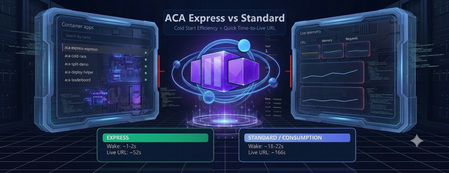
ACA Express Apps are a strong fit for teams that need to ship quickly and can't afford long platform setup cycles. This includes startups, internal platform teams, and product groups deploying APIs, web apps, or agent endpoints that scale with uneven demand. If the priority is fast path-to-production, predictable wake-up behavior, and minimal infrastructure overhead, this model is likely the right choice. To put real numbers behind that, I built a live demo that races Express against a Consumption environment on the same app. The measurements below come from that demo, not from a spec sheet. MicroVMs make cold starts practical Cold start delays usually come from rebuilding runtime state whenever an app wakes up. ACA Express Apps reduce that overhead with MicroVM-based startup paths built for fast boot and isolation. The result is faster instance readiness without trading off security. The gap shows up clearly when both apps have scaled all the way to zero. Waking from a genuine cold start, Express comes back in about 1.5 seconds. The same app in a Consumption environment takes about 20 seconds to answer the first request. Both were measured live in the browser, from request to first response. Disk and memory state restore is the speed multiplier State restoration skips the app's internal boot sequence entirely. Instead of replaying the same initialization work on every start, ACA Express Apps can restore disk and memory state so the app starts closer to ready. That reduces time-to-first-request and smooths scale events, especially for framework-heavy workloads. It's also what lets scale-to-zero stay practical: the app costs nothing while idle, but the wake-up penalty stays in the low single-digit seconds instead of the tens of seconds you'd otherwise pay. Environmentless changes the deployment experience Skipping the environment setup completely changes the deployment workflow. Teams can ship the container app without first managing environment sprawl, while still getting the runtime foundations they need. For fast-moving teams, that means less setup overhead and a shorter path to production. You can see how little there is to fill in. Creating an Express app is a single short form. There is no environment to stand up first. And once it's created, the manage view gives you the live URL, status, and the basics you need to operate it. The numbers, side by side Everything below was measured on the same container image, in the West Central US region. What's measured Express Consumption Cold start from zero (request to first response) ~1.5 s ~20 s Environment provisioning ~14 s ~120 s First-time deploy (environment + app, zero to live URL) ~52 s ~166 s App deploy only (environment already exists) ~30 s ~30 s Express is much faster on the two steps that build infrastructure from scratch: cold start and environment provisioning. Once an environment already exists, the two are about the same. Express isn't a different app runtime, it's the same platform with the first-time setup cost stripped down. Get started Express is in public preview. You can have a container on a live URL in the time it takes to read this post. 📖 Azure Container Apps Express overview — concepts, capabilities, and the current feature support matrix. 🚀 Create your first Express app — the CLI commands and portal steps to get an app running. 🛠️ New Container Apps portal — create and manage Express apps in the streamlined UI. 🧪 Test Express apps locally — validate your container before you deploy. ❓ Express FAQ — preview status, limits, regions, and how Express relates to standard Container Apps. 👉 Deploy an Express app · Read the docs · Browse the FAQ When speed matters, ACA Express is the best tool for deploying containers. It skips the platform setup delays without sacrificing reliability under load.645Views2likes1Comment
ArchAngel: Skilling the next developer generation for the Agentic transformation.
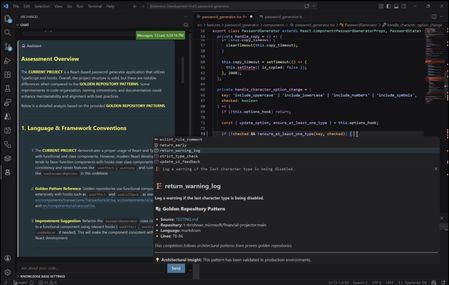
AI is transforming the SDLC at speed but there's a quieter question following close behind. If the code is being written for your junior developers, when do they learn the skills to become senior ones and how can they use these tools without losing understanding of what they've made? Most tools try to solve this by catching issues after the commit, but by then the teaching moment is already gone. What if your developers could learn why something is wrong and how to fix it, as they write it? ArchAngel is built around a simple idea: What if your team’s best engineering practices could exist directly inside the IDE and guide developers as they work? It turns your team's collective wisdom into a mentor that scales to every new hire, every sprint, every repo. GitHub Copilot has led to great strides in reducing developer toil. It allows teams to move faster, automate repetitive work, and spend more time on higher-level design decisions that drive real impact. As these capabilities evolve, especially with more agentic workflows, developers now have even more powerful ways to generate and iterate on code. The next challenge for engineering teams isn’t adoption. It’s how to make the most of these capabilities while maintaining strong engineering standards, consistency, and shared understanding across teams. Even with powerful tools in place, teams still face familiar challenges. Standards are often spread across repositories, documentation, and conversations. Best practices evolve over time but aren’t always easy to discover or apply consistently. Reviews can become repetitive, and senior engineers spend a lot of time reinforcing patterns rather than focusing on system design. AI accelerates development, but it doesn’t automatically understand how your team builds software, the architectural decisions, trade-offs, and conventions that make systems consistent over time. Technically correct code doesn't mean its organisationally aligned. __________________________________________________________________ The Solution: ArchAngel is built for and by developers. It provides a developer driven, AI coding assistant that teaches without taking autonomy. Rather than waiting for devs to commit their code to pick up issues, ArchAngel sits beside through the coding process to guide and provide iterative live feedback. By connecting ArchAngel to your project bases, ArchAngel can be grounded in your 'golden repositories'; The agreed best practices, existing approved repos and organisational standards. ArchAngel can also generate Code Style and Wiki Docs for a quick look summary guide to your best practices, prompting further research. Let's define the tech stack behind this and what makes ArchAngel work: Semantic Kernel and Microsoft Agent Framework (MAF) - Semantic Kernel is a lightweight, open-source development kit that lets you easily build AI agents and integrate the latest AI models. MAF is an orchestration framework that is used to create agents and conversation history to create and support iterative design. Served via Foundry. Introduction to Semantic Kernel | Microsoft Learn Microsoft Agent Framework Overview | Microsoft Learn Microsoft Foundry documentation | Microsoft Learn Language Server Protocol (LSP) - LSP allows you to invoke ArchAngel from any IDE. For VSCode, command palette is used to invoke certain functionality for ArchAngel such as document generation. Official page for Language Server Protocol SQLite - Store your search database locally with SQLite. Config - Setup just like your other dev tools. For VScode, simply load your base repos into archangel.json, authenticate with github and run the "Index from config file" in your command palette. __________________________________________________________________ Meet Priya: A Senior Software Engineer Responsibilities: Design & build scalable software — Architect and deliver high-quality, maintainable systems from concept through to production. Drive engineering excellence — Lead code reviews, enforce best practices, and champion CI/CD, testing, and observability standards. Mentor junior engineers — Coach and develop less experienced team members, fostering technical growth and a collaborative culture. Collaborate cross-functionally — Work with Product, Design, and stakeholders to translate business needs into robust technical solutions. Innovate & improve continuously — Stay ahead of industry trends, reduce technical debt, and drive adoption of tools and processes that elevate team productivity. Meet Joe: A Junior Software Engineer Responsibilities: Write and maintain clean code — Develop, test, and debug features under guidance from senior engineers, following established coding standards. Learn the codebase & tech stack — Ramp up quickly on existing systems, tools, and workflows to become a productive contributor. Participate in code reviews — Submit code for review and actively learn from feedback, while reviewing peers' work to build technical judgement. Collaborate with the team — Contribute to sprint ceremonies, ask questions, flag blockers early, and communicate progress clearly. Invest in personal growth — Pursue learning through documentation, certifications, pair programming, and internal knowledge-sharing sessions. A day in the life Priya is responsible for Joe's development and guiding him to progress his career, however, Priya is extremely busy and she is managing two other junior devs. So reviewing each junior's code to identify the architectural antipatterns and documentation decisions that deviate from best practice, takes time away from the senior work she brings most value to. Enter ArchAngel New hire/Junior joins 4 months into the project with no clue what repos are being used as an example? The dev team used ArchAngel to create Code Style and Wiki Docs so the junior can at a glance view a few of the standards from the repos. The dev team also has the 'golden repos' linked in the ArchAngel config file, so now all the junior has to do is clone, index and start coding. The junior devs use ArchAngel in their VSCode IDE and receive feedback and critique that is educational directly in their IDE as they code, before anything is committed for formal review. Repository informed chat, code completions and docs make onboarding, learning and guiding junior devs an asynchronous task. Giving Priya some breathing room and improving the quality of the PRs her juniors produce! The ArchAngel's educational, constructive criticism and repository-backed way of reviewing code can also be an asset to learn the PR process itself! Learning what ArchAngel looks out for each time, helps to teach juniors to look out for it themselves in PRs and how to critique it with possible alternatives. __________________________________________________________________ Example Architecture: Project Repo: Your project repository, where your team syncs your config files. Setup for success at a team level. Cloud Environment: Where ArchAngel's brainpower comes from. Secure, scale, monitor and govern with the Azure platform to align organisationally. User Environment: Where you and your teams code, build and create the software that powers the business. Fit to your dev team and extend to your tools. Golden Repos: Your golden base of knowledge. This is the indexed and cited source of your coding standards, the team's guiding principle knowledge and the codebases that your team is striving to match at a code quality and standards level. Next Steps: Making ArchAngel For You Configure + Customise ArchAngel to suit your development environment! VNETs (Virtual Networks) enable secure networking configurations within a cloud environment. Enabling your resources and any tools you wish to setup to communicate in secure channels. Azure Virtual Network Documentation - Tutorials, quickstarts, API references | Microsoft Learn Microsoft Foundry - Engage Foundry's full toolset to make ArchAngel customisable and compliant for your organisation. Microsoft Foundry documentation | Microsoft Learn Foundry Tools: What are Foundry Tools? - Foundry Tools | Microsoft Learn API Management (AI Gateway) - Use AI Gateway and APIM to secure, scale, monitor and govern your agents and connections to Microsoft Foundry. API Management documentation | Microsoft Learn LSP (Language Server Protocol) - Add custom event and event handlers through the LSP channels across IDEs. Official page for Language Server Protocol Customisable Document Generation - Refine the prompts that are used to create the documents and format as you wish! The base version is a skimmed document with a few snippets as source designed to be simple to extend. Find the github repo here: rohitmadhavk/ArchAngel: An education coding assistant to help junior devs learn best practice482Views2likes0CommentsDesigning for High Availability: The Operational Reference for Running a Geo-Replicated ACR
By Johnson Shi, Zoey (Zhuyu) Li, Huangli Wu Introduction Three of the most common questions we hear from enterprise teams running geo-replicated Azure Container Registries (ACR) are: "How do I control which region serves my traffic?" — When my AKS clusters are spread across regions, can I pin each one to its co-located replica, or am I stuck with however the global endpoint routes? "What happens during a regional incident — is failover automatic or do I have to act?" — If the registry in one region degrades, does the global endpoint reroute on its own, or do I need to manually disable the affected replica? "What happens after the region recovers — does traffic return on its own?" — Is there a cooldown, a quarantine, or any manual step before failback? We answer those head-on, then go deeper on the operational details that come up when you actually run a geo-replicated registry: authentication across endpoint switches, throttling under load concentration, eventual-consistency failure modes, home region outage scope, webhooks, and private endpoint interaction. We draw on the official geo-replication docs, the global endpoint health-aware failover blog, the regional endpoints engineering design implementation, the regional endpoints public preview and private preview announcements, and the ACR reference for various registry endpoints, . This post also draws notes from the ACR product team on roadmap items that aren't yet documented elsewhere. Key Takeaways Health-aware failover is automatic. When the registry in a region degrades, the global endpoint reroutes away from it on the order of minutes, evaluated per-registry. No customer action required. Failback is automatic too. Once health-aware failover marks a region healthy again, the global endpoint resumes routing to it. There is no cooldown period. Health-aware failover applies only to global endpoint operations. It does not apply to regional endpoints (you're talking to one replica, period) or to dedicated data endpoints (the redirect is per-region). Health-aware failover is not triggered by throttling. It responds to regional ACR service health and Azure infrastructure health, not HTTP 429 responses. Use regional endpoints to manage per-replica throttling. Regional endpoints (Step 2a) give you explicit per-region URLs for workloads that need affinity, capacity planning, push/pull consistency, troubleshooting, or client-side failover. Use myregistry.<region>.geo.azurecr.io . Regional endpoints are available on Premium SKU registries. For workloads that don't need pinning, do nothing (Step 2b). The global endpoint plus health-aware failover handles routing automatically. Re-authenticate when switching endpoints. Each global or regional endpoint is its own authenticated surface; re-auth via az acr login , SDK auth, or the Kubernetes ACR credential provider on endpoint change. Don't run a long-lived DNS cache for the global endpoint. ACR purges DNS server-side on disable and during failover; a long-lived client cache works against that. For production workloads, enable dedicated data endpoints for security and DNS predictability on layer downloads. ACR is working on bounded staleness consistency for cross-replica eventual-consistency failure modes; see the FAQ. Background What is ACR geo-replication? Geo-replication is a Premium SKU feature that turns a single ACR registry into a multi-region, multi-write service. Every geo-replica in every region is writable — you can push, pull, and delete from any of them — and content syncs asynchronously between replicas under an eventual consistency model. Per-push replication time scales with the size and number of images being pushed. Similarly, when creating a new geo-replica, the time to populate the new geo-replica scales with the total size of the registry. A geo-replicated registry exposes a global endpoint at myregistry.azurecr.io . Behind that endpoint, ACR uses an internal traffic manager to direct each request to the replica with the best network performance profile for the caller — usually the closest replica, but not always. When clients are equidistant from multiple replicas, or when the closest replica is experiencing Azure infrastructure degradation, requests may be routed elsewhere. A geo-replicated registry also exposes a regional endpoint at myregistry.<region>.geo.azurecr.io , which allows clients to pin API requests to a specific geo-replica in lieu of global endpoints, which has Azure-managed routing among geo-replicas. Zone redundancy is always enabled for geo-replicas in regions where Azure has multiple availability zones — in those regions, ACR automatically spreads replica data across multiple availability zones within each region to protect against zonal outages. Endpoints and data endpoints: what goes where A common point of confusion: when you push or pull, not every request goes to the same place. The registry endpoints (global endpoint and regional endpoints), as well as the data endpoint, do different jobs. Your choice of data endpoint configuration has real consequences for security and resilience. Two kinds of traffic flow during a typical pull: Registry API traffic — authentication, manifest reads/writes, tag resolution, referrers, repository operations, blob location lookups, listing, metadata. This is everything except the actual layer (blob) bytes. All these API requests go to the global endpoint ( myregistry.azurecr.io ) or, if you've pinned your clients to call these APIs to a specific geo-replica, a geo-replica's regional endpoint ( myregistry.<region>.geo.azurecr.io ). Behind the scenes, the global endpoint internally proxies these requests to a specific geo-replica. Layer (blob) downloads — when the client asks for a blob, the registry doesn't serve the bytes itself. It returns an HTTP 307 redirect to a regional data endpoint (separate endpoint from the global endpoint or regional endpoints), and the client follows the redirect to download the layer from that region. Where that 307 sends you depends on whether you've enabled the registry's dedicated data endpoints feature: Configuration Layer downloads redirect to Default (no dedicated data endpoints) *.blob.core.windows.net (the underlying Azure storage account) Dedicated data endpoints enabled myregistry.<region>.data.azurecr.io for the region you were routed to Private endpoints enabled myregistry.<region>.data.azurecr.io for the region you were routed to Regional by design. Dedicated data endpoints always land you on a specific geo-replica's data endpoint — there is no "global data endpoint." With the global endpoint as your registry endpoint, the 307 redirect picks the data endpoint for whichever region the global endpoint chose to serve you. With a regional endpoint pinned to a specific region, the 307 always redirects you to that same region's data endpoint — never cross-region. Why dedicated data endpoints matter. Dedicated data endpoints are a Premium SKU feature that exists primarily to address security and firewall scoping. By default, layer downloads redirect to *.blob.core.windows.net — a wildcard storage FQDN. Firewall rules to allow that wildcard either let all Azure storage accounts through or none of them, which raises data exfiltration concerns and isn't tightly scoped to your registry. Dedicated data endpoints replace the wildcard with a fully qualified domain in your registry's own domain — myregistry.<region>.data.azurecr.io — so firewall rules can be scoped tightly to your specific registry, in your specific regions. That same design choice can also make layer downloads more predictable during routing changes. With dedicated data endpoints, the data endpoint FQDN is known ahead of time and lives in the registry's domain — one predictable hostname per region, configured once. Without them, the layer download has to resolve a wildcard storage FQDN that points to whichever storage account the registry happens to have provisioned, which is a separate DNS resolution path with its own routing behavior and its own caching profile. Dedicated data endpoints simplify the DNS picture by aligning the data path with the registry path and keeping the entire pull experience inside one set of predictable, scoped FQDNs. For any geo-replicated registry where security and high availability matter, enable dedicated data endpoints. Note: Health-aware failover applies only to operations against the global endpoint, not to regional endpoints or dedicated data endpoints. Take note that health-aware failover only kicks in and directs traffic away from a geo-replica when an Azure region is experiencing significant infrastructure degradation. At this stage, it does not kick in to redirect traffic to another geo-replica if a client's data plane API requests are throttled. See the relevant section below for the full scope when health-aware auto failover kicks in or not. The three traffic control tools ACR geo-replication gives you three complementary tools for controlling where traffic lands. Each one solves a different class of problem, and customers most often run into trouble when they reach for the wrong one. We name them up front and use these names throughout the post: Tool Who controls it What it does Use cases Health-aware failover Platform (automatic) Reroutes the global endpoint away from a region whose registry can't reliably serve requests Regional incidents, automatic recovery Replica enable/disable for global routing Customer (manual) Excludes a specific replica from global endpoint routing without deleting it; data continues syncing DR rehearsals, planned maintenance, quarantining a replica without losing it Regional endpoints Customer (per request) Dedicated per-region URLs ( myregistry.<region>.geo.azurecr.io ) that bypass the internal traffic manager entirely Pinning AKS clusters to co-located replicas, push/pull consistency, capacity planning, troubleshooting, client-side failover Health-aware failover and replica enable/disable both act on the global endpoint. Regional endpoints are a separate URL surface that coexists with the global endpoint — enabling them does not disable the global endpoint myregistry.azurecr.io . You can use both simultaneously and choose per workload. The behavior in question When the registry in one region experiences a real degradation, there are three possible answers to "what happens?": (A) Nothing automatic. The customer must manually disable the affected region's endpoint to stop traffic from being routed there. (B) The system detects the regional front-door failure and reroutes within seconds. (C) A per-registry health evaluation detects the degradation and reroutes the global endpoint within minutes, with no customer action. After the region recovers, routing resumes automatically. The answer today is (C). Before health-aware failover, customers were stuck closer to (A) — the system could see whether the regional reverse proxy responded, but not whether the registry could actually serve real pull and push traffic end to end. Health-aware failover closes that gap. We walk through all three tools in the next section, in order: setting up geo-replication, using regional endpoints to pin specific workloads, keeping the global endpoint for everything else, the manual replica disable mechanism, re-enabling participation in global routing, and what to expect when health-aware failover triggers. Walkthrough The following steps assume an existing Premium SKU registry and the Azure CLI logged in. We use myregistry as the registry name, myrg as the resource group, and eastus as the home region. Substitute <your-registry> , <your-rg> , and <your-region> for your environment. Prerequisites A Premium SKU ACR registry (geo-replication requires Premium) Azure CLI ( az ) installed and logged in For regional endpoints (Step 2a): Azure CLI 2.86.0 or later. All regional endpoints commands ( --regional-endpoints , az acr show-endpoints , az acr login --endpoint ) are available natively in Azure CLI 2.86.0+. If you previously installed the acrregionalendpoint private preview CLI extension, uninstall it with az extension remove --name acrregionalendpoint to prevent conflicts with the built-in CLI commands. Step 1: Add a West US replica to a registry that lives in East US Geo-replication requires the Premium SKU. The create call below fails on Basic or Standard. # Confirm the registry is Premium az acr show --name myregistry --resource-group myrg \ --query sku.name --output tsv # Premium # Create a West US geo-replica az acr replication create --registry myregistry --location westus # Confirm both replicas are present az acr replication list --registry myregistry --output table NAME LOCATION PROVISIONING STATE STATUS REGION ENDPOINT ENABLED ------ ---------- -------------------- -------- ----------------------- eastus eastus Succeeded online True westus westus Succeeded online True Pushes and pulls continue working through the existing replica throughout initial sync. Because the registry is multi-region, multi-write, the existing replica keeps serving traffic while the new replica catches up in the background. Initial replica seeding time is a function of registry size — the total number and cumulative size of images already in the registry that need to be replicated to the new replica — not the size of any single image. Step 2a: Pin workloads to specific regions using regional endpoints Use regional endpoints when a workload needs explicit per-region control. The five common cases: Regional affinity — an AKS cluster in East US should pull from the East US replica, every time, without ever hopping to a more distant replica because of a network performance fluctuation. Predictable routing — workloads that need to know exactly which replica will serve them, for benchmarking, capacity planning, or in-region traffic SLAs. Push/pull consistency — pinning both ends of a publish-then-deploy flow to the same replica eliminates eventual-consistency races. Troubleshooting — reproducing an issue on a specific replica requires sending traffic to that specific replica. Client-side failover — customers with their own health checks and business rules want to implement failover on their own terms, on signals only they can see. Enable regional endpoints on the registry: az acr update -n myregistry -g myrg --regional-endpoints enabled When enabled, ACR automatically creates per-region login server URLs for every existing geo-replica. No per-region configuration is needed. Note: Regional endpoints can be enabled on any Premium SKU registry, even without geo-replication. A registry without geo-replication has a single geo-replica in the home region, which gets one regional endpoint URL. However, the feature is most useful when your registry has at least two geo-replicas, where you can pin different workloads to different replicas for routing control and capacity distribution. Push to a specific region using its regional endpoint: # Log in to the West US regional endpoint az acr login --name myregistry --endpoint westus # Tag and push using the regional endpoint URL docker tag myapp:v1 myregistry.westus.geo.azurecr.io/myapp:v1 docker push myregistry.westus.geo.azurecr.io/myapp:v1 Pin AKS deployments to their co-located replica by using regional endpoint URLs in the deployment manifest. The example below shows two clusters in different regions; each cluster references the regional endpoint for its own region's replica (assuming replicas exist in both eastus and westeurope ): # East US-based AKS cluster pulls from the East US replica apiVersion: apps/v1 kind: Deployment metadata: name: myapp-eastus spec: template: spec: containers: - name: myapp image: myregistry.eastus.geo.azurecr.io/myapp:v1 --- # West Europe-based AKS cluster pulls from the West Europe replica apiVersion: apps/v1 kind: Deployment metadata: name: myapp-westeurope spec: template: spec: containers: - name: myapp image: myregistry.westeurope.geo.azurecr.io/myapp:v1 This eliminates cross-region pulls when global routing would otherwise prefer a different replica for a given client, and it gives you a per-region traffic profile you can plan capacity against. Regional endpoint operational tips View all endpoints. Use az acr show-endpoints to see all endpoint URLs for your registry — global, regional (if enabled), and dedicated data endpoints (if enabled): az acr show-endpoints --name myregistry --resource-group myrg Import from a specific geo-replica. When importing images between registries, you can use a regional endpoint to import from a specific geo-replica of the source registry. This is useful when you want predictable network paths or need to import from a replica in a specific region: az acr import \ --name mydownstreamregistry \ --source myupstreamregistry.westeurope.geo.azurecr.io/myapp:v1 \ --image myapp:v1 Firewall rules for regional endpoints. If you use firewall rules, allow access to the following endpoints for each geo-replica that clients connect to: Endpoint Purpose myregistry.<region>.geo.azurecr.io Regional endpoint for registry operations myregistry.azurecr.io Global endpoint (if also used) myregistry.<region>.data.azurecr.io Layer downloads (if using private endpoints or dedicated data endpoints) *.blob.core.windows.net Layer downloads (if not using private endpoints or dedicated data endpoints) For the full list of endpoint types and FQDN patterns, see the ACR reference for various registry endpoints. DNS-based routing without changing manifests. If you don't want to maintain different deployment manifests per region, you can keep all manifests pointing to the global endpoint ( myregistry.azurecr.io ) and use software-defined networking or a regional traffic manager to resolve the global endpoint to the appropriate regional endpoint based on the originating region's traffic. This achieves the same co-location goals as regional endpoints — predictable routing and reduced latency — without embedding region-specific URLs in your deployment manifests. Step 2b: Keep using the global endpoint for everything else For workloads that don't need explicit pinning, do nothing. The global endpoint at myregistry.azurecr.io continues to work exactly as before, and the global endpoint plus health-aware failover gives you intelligent routing across replicas without configuration. ACR picks the best replica for each client based on network performance and reroutes during regional incidents. Regional endpoints coexist with the global endpoint — enabling them does not disable myregistry.azurecr.io . You can use both simultaneously and choose per workload, mixing pinned workloads (Step 2a) with workloads that ride the global endpoint (Step 2b) in the same registry. Step 3: Take a replica out of global endpoint routing Use this when you need to keep a replica alive but stop it from serving global-endpoint traffic — for DR rehearsals, planned maintenance, or troubleshooting an isolated replica. # Exclude the West US replica from global endpoint routing az acr replication update --registry myregistry --name westus \ --global-endpoint-routing false Confirm the change: az acr replication list --registry myregistry --output table NAME LOCATION PROVISIONING STATE STATUS REGION ENDPOINT ENABLED ------ ---------- -------------------- -------- ----------------------- eastus eastus Succeeded online True westus westus Succeeded online False Requests to myregistry.azurecr.io no longer route to West US. The replica still receives replicated content — and continues to replicate its own content out to other replicas — and storage quota and per-replica costs continue to accrue. If regional endpoints are enabled, the West US regional endpoint URL also continues to work; --global-endpoint-routing controls only the replica's participation in global endpoint routing. A note on naming. The CLI flag --global-endpoint-routing (on az acr replication update ) and the regional endpoints feature (enabled via az acr update --regional-endpoints enabled ) are two different things despite the similar names. --global-endpoint-routing controls whether a replica participates in global endpoint routing. The regional endpoints feature creates per-region URLs ( myregistry.<region>.geo.azurecr.io ) that bypass the global endpoint entirely. They are independent controls. In Azure CLI 2.86.0 and later, the old --region-endpoint-enabled flag has been renamed to --global-endpoint-routing . The old flag name is deprecated and will be removed in Azure CLI 2.87.0 (June 2026). If you have existing scripts or automation that use --region-endpoint-enabled , update them to use --global-endpoint-routing . CLI flags quick reference: Flag Scope Purpose --regional-endpoints Registry-level ( az acr create or az acr update ) Enables dedicated regional endpoint URLs ( myregistry.<region>.geo.azurecr.io ) for all geo-replicas. --global-endpoint-routing Per-geo-replica ( az acr replication create or az acr replication update ) Controls whether the global endpoint routes traffic to a specific geo-replica. Set to false to temporarily exclude a geo-replica from global routing. --data-endpoint-enabled Registry-level ( az acr create or az acr update ) Enables dedicated data endpoints ( myregistry.<region>.data.azurecr.io ) for layer blob downloads. Auto-enabled when at least one private endpoint is configured. This bidirectional sync during disable is intentional. When you re-enable the replica, every image pushed to the registry while the replica was disabled — from any region — is already present, so the replica can serve traffic immediately with no catch-up window. If we stopped syncing on disable, re-enabling would leave the replica with stale data and force a long catch-up before it could safely serve pulls. Step 4: Re-enable the replica to participate in global endpoint routing Re-enable the replica: az acr replication update --registry myregistry --name westus \ --global-endpoint-routing true NAME LOCATION PROVISIONING STATE STATUS REGION ENDPOINT ENABLED ------ ---------- -------------------- -------- ----------------------- eastus eastus Succeeded online True westus westus Succeeded online True There is no cooldown. The global endpoint resumes routing requests to the West US replica as soon as the change takes effect on ACR's side. Because data continued syncing while the replica was disabled (Step 3), the replica is immediately ready to serve pulls — no catch-up window. Note on DNS during disable/enable. When you take a replica out of global routing, ACR purges its own DNS records for that replica from the global endpoint on a fast path — there is no waiting on a published TTL on ACR's side. If clients run their own DNS cache for the global endpoint, however, those clients will keep resolving to the disabled replica until the client cache expires. We can't control client-side caches. The recommendation: do not run a long-lived DNS cache for the global endpoint. A short-lived DNS pin for the duration of a single push (covered in the DNS and Client-Side Considerations section) is fine and even helpful — but a long-lived DNS cache will make --global-endpoint-routing false look broken from the client's perspective. Step 5: What to expect when health-aware failover triggers Health-aware failover is automatic. ACR evaluates registry health on a per-registry basis, and when a registry in a region can't reliably serve requests, the global endpoint reroutes that registry's traffic to a healthy replica. There is no customer-invocable trigger — that's the point. End-to-end timing is on the order of minutes — fast enough to catch real regional degradation, slow enough to ride out transient errors that resolve on their own. DNS TTL may add additional propagation delay before all clients switch to the new region. Scope of health-aware failover. Health-aware failover applies only to operations against the global endpoint — the registry API calls (auth, get manifest, get tag, get referrers, get blob location). It evaluates health when those API calls come in; it does not trigger mid-operation. Two important consequences: Regional endpoints are not in scope. When you talk to a regional endpoint like myregistry.westus.geo.azurecr.io , you're talking to that one replica. There is no automatic reroute. If you've pinned a workload to a regional endpoint and that region degrades, you implement client-side failover by switching the workload to a different regional endpoint. Dedicated data endpoints are not in scope. Once a registry endpoint has redirected you to a dedicated data endpoint, you stay on that region's data endpoint for the duration of the layer download. There is no automatic reroute of an in-flight blob download. The region targeted by the redirect is decided up front by whichever registry endpoint served the blob-location call: the global endpoint chooses based on its per-registry health evaluation, and a regional endpoint always targets its own region. The signals you can use to confirm a failover is in progress: # Check replication status az acr replication list --registry myregistry --output table You can also check Resource Health for the registry in the Azure portal — navigate to your registry and select Resource health under the Help section to see platform-side degradation signals. You'll typically see: Increased pull latency as traffic shifts to a more distant replica Resource Health flagging known issues in the affected region Replication status indicating which replicas are online After the region recovers, the per-registry health evaluation marks it healthy again and the global endpoint resumes routing — automatic, no cooldown, no customer action. Note that health is evaluated per registry, not per region: if a degradation affects only a subset of registries in a region, only those registries are rerouted, and other registries in the same region continue to be served locally with no unnecessary latency penalty. Not triggered by throttling. Health-aware failover is DNS-based and responds to regional ACR service health and Azure infrastructure health. It does not reroute traffic based on HTTP 429 (throttling) responses. If a geo-replica is throttling your requests but the region's infrastructure is healthy, the global endpoint continues routing you to that geo-replica. To manage throttling, use regional endpoints to spread workloads across multiple geo-replicas for better capacity distribution. Note on long-running pushes during a failover. A multi-layer push that spans a failover boundary can land layers and the manifest on different replicas — exactly the failure mode that DNS bouncing produces during a single push. ACR is actively tightening health-aware failover behavior to minimize cross-replica scatter during these scenarios, and the recommendation today remains: pin pushes to a single replica via a regional endpoint when push/pull consistency matters. Common Questions Q1. Performance impact during initial replica creation on a live registry Because ACR is multi-region, multi-write, the existing replica continues serving pull and push traffic throughout the period when a new replica is being seeded. Replication is asynchronous and content propagates in the background; the time to populate a new geo-replica scales with the size of the registry — the cumulative number and total size of images already in the registry — not with any single image. The docs do not publish a quantified degradation percentage or a throttling window for this period, and they do not promise zero performance impact — the safe operating assumption for a live production registry is that existing replicas continue serving traffic normally, with the new replica catching up in the background. Q2. Restricted/updating state during initial sync There is no "restricted" state for the registry during normal replica creation. Writes, control-plane operations, and pushes/pulls against existing replicas continue normally. The only time configuration changes are unavailable is during a home region outage — see the relevant FAQ item later on for the full data-plane-versus-control-plane breakdown. Q3. Cooldown periods and non-straightforward failback scenarios There is no cooldown before failback, manual or automatic. Re-enabling a replica's participation in global endpoint routing takes effect immediately on ACR's side. Health-aware failover returns traffic to a region as soon as its per-registry health evaluation passes again. The failback case that is not seamless: if a recently pushed image has not yet replicated to the failover region, a pull from that region may not find the image until replication catches up. This is a function of eventual consistency, not failback timing — and it's part of a broader class of issues we cover in Q4. Q4. Common pull and push failure modes during the eventual-consistency window DNS bouncing during a single push is one well-known problem, but it isn't the only one. The eventual-consistency window between geo-replicas surfaces in several recurring failure modes worth knowing about: Push-then-immediate-pull-cross-region. Pushing myapp:v1 to one region and immediately pulling it from a different region can fail with manifest unknown until replication catches up. This shows up most painfully in CI/CD pipelines where one CI runner pushes an image and thousands of pods across other regions all try to pull from their local geo-replicas at the same time. Today, customers work around this with indeterminate sleeps before scheduling expensive compute, or with retry logic, or by waiting on a replication-complete signal — none of which is a clean planning story. Tag overwrite races. Pushing myapp:v1 , then re-pushing myapp:v1 shortly after with a fix (same tag, different digest), can leave different replicas resolving the same tag to different digests during the eventual-consistency window. Delete propagation. Deleting a tag or repository in one region takes some time to propagate to other replicas. Pulls from regions where the delete hasn't yet propagated can return the supposedly-deleted content. Mid-push failover scatter. A multi-layer push that spans a health-aware failover boundary or a DNS bouncing event can land layers on one replica and the manifest on another, surfacing as manifest validation errors or blob unknown on subsequent pulls. What ACR is doing about this. We're working on bounded staleness consistency for pushed images across all geo-replicas worldwide, which addresses these four failure modes directly. This will be covered in an upcoming blog post. If you're hitting eventual-consistency brittleness today and want to talk through your scenario, reach out to us on the Azure Container Registry GitHub repository — we want the customer signal to land in the design. Mitigations available today: Pin pushes to a single replica via a regional endpoint. Every sub-request in the push — login, blob uploads, manifest upload — goes to the same replica, eliminating the DNS bouncing and mid-push scatter classes entirely. Use a short-lived client-side DNS cache like dnsmasq scoped to the duration of a single push, only when you're not using regional endpoints. Do not run a long-lived DNS cache for the global endpoint — it interferes with --global-endpoint-routing false and with health-aware failover routing. Build retry logic into pulls that immediately follow a cross-region push. Either retry with backoff or check replication status with ACR webhooks before pulling. ACR can detect and notify you when an image or tag is available for pull in a geo-replica (say geo-replica B), after it has been pushed to another geo-replica (geo-replica A) and background replication has succeeded to geo-replica B. Design publish steps to be idempotent so retries triggered by mid-push failover are safe. Q5. Auth behavior across endpoint switches For safety, treat each global endpoint and each regional endpoint as its own authenticated surface. All registry APIs except the actual blob downloads (auth, manifests, tag resolution, referrers) flow through whichever endpoint you've chosen. If you switch from the global endpoint to a regional endpoint, or from one regional endpoint to another, re-authenticate. That means az acr login , fresh SDK auth, or — for AKS — letting the Kubernetes ACR credential provider handle re-auth, which it does automatically when the endpoint changes. Q6. Throttling under failover and pinning Throttling limits on registry API operations are per-replica, not per-registry. This has two operational implications: During health-aware failover, traffic that was spread across replicas can shift heavily onto whichever replicas remain in the global endpoint's routing pool. Capacity plan to spread traffic across two or three healthy replicas during a failover scenario rather than concentrating onto one — the global endpoint's routing already does this for you when multiple healthy replicas exist, but registries with only two regions configured can hit per-replica limits more easily during a failover. To mitigate, use regional endpoints to spread workloads across multiple geo-replicas and plan per-replica capacity. When pinning via regional endpoints (Step 2a), you concentrate traffic on whichever replica you've pinned to. If you've pinned all your AKS clusters to a single regional endpoint, you may hit that replica's per-region throttling limits at peak. Mitigations: pin different workloads to different regional endpoints across multiple regions for better topology mapping and capacity distribution, or use the global endpoint (Step 2b) for workloads where you don't need explicit pinning so ACR's routing can spread load. We're also working on improving the throttling metrics surfaced during health-aware failover events. Note: Health-aware failover does not reroute traffic based on HTTP 429 (throttling). If you're experiencing throttling but the region's infrastructure is healthy, the global endpoint continues routing you there. Use regional endpoints to explicitly spread load across replicas for capacity planning. Q7. Home region outage scope Geo-replication provides high availability for the data plane. During a home region outage, the control plane is unavailable, which means you can't create or delete replicas, modify network rules, or change replication settings until the home region recovers. ACR Tasks are also bound to the home region and don't run while it's unavailable. The data plane keeps working: Global endpoint continues routing pulls and pushes to healthy replicas. Regional endpoints continue working — you talk directly to specific replicas, and your client-side logic decides which region to use. Authentication, manifests, blob downloads, webhooks continue functioning through any healthy replica. The home region of a registry is fixed at creation and cannot be changed afterward. Microsoft's registry relocation guidance describes a redeployment procedure — creating a new registry in a different region — not an in-place change to an existing registry's home region. Note: If your registry uses a customer-managed key, review the key vault failover and redundancy guidance for maximum resilience. Key vault availability directly affects the registry's ability to encrypt and decrypt data. Q8. Webhooks during failover Webhooks fire from the replica that received the push. Because ACR also replicates content to other geo-replicas, webhooks fire from each geo-replica as the image syncs to it — so a single push results in webhook events from the receiving replica plus an event from each replica as replication completes. During a failover where pushes are routed to a different region, webhooks from those pushes fire from the new region; once the original region recovers and replication catches up, webhook events fire from there too. Webhook consumers should be designed to handle multiple events per pushed image and deduplicate as needed. Q9. Private endpoints with regional endpoints and dedicated data endpoints When a private endpoint is created against a registry, the private endpoint covers all of the registry's endpoint surfaces — the global endpoint, every regional endpoint (if regional endpoints are enabled), and every regional dedicated data endpoint. A single private endpoint in one VNet can reach the global endpoint (which routes you to a suitable replica), any regional endpoint in the same or a different region, and any region's dedicated data endpoint for blob downloads. The trade-off is private IP allocation: each endpoint surface consumes IPs in the VNet. With many replicas plus regional endpoints plus dedicated data endpoints all enabled, private endpoint creation can fail if the VNet runs out of available private IPs. IP address consumption per feature: Configuration IPs consumed per VNet Initial private endpoint (global endpoint + home region dedicated data endpoint) 2 Each geo-replication region added +1 (regional dedicated data endpoint) Regional endpoints enabled +1 per geo-replica Example: A registry with 3 geo-replicas and regional endpoints enabled consumes 7 private IPs per VNet: 1 (global) + 3 (data) + 3 (regional). Without regional endpoints, the same registry requires 4 private IPs: 1 (global) + 3 (data). Subnet sizing: Use at minimum a /27 (32 addresses) subnet for PE subnets on geo-replicated registries, and /24 where possible. To check how many private IPs are already consumed on a subnet: az network vnet subnet show \ --name <subnet-name> \ --vnet-name <vnet-name> \ --resource-group <resource-group> \ --query "{addressPrefix:addressPrefix, usedIPs:length(ipConfigurations || \`[]\`)}" \ --output table See the ACR private endpoints documentation for the full IP-allocation math and sizing guidance. Q10. Geo-replica creation stuck for private endpoint-enabled registries When creating a geo-replica for a registry that has private endpoints configured, the replica provisioning can get stuck in a Creating state if the identity performing the operation doesn't have sufficient permissions to create private endpoint networking resources. Solution: Manually delete the geo-replica that got stuck in the provisioning state. Ensure the identity has the permission Microsoft.Network/privateEndpoints/privateLinkServiceProxies/write before creating the geo-replica again. Also verify that every PE subnet connected to the registry has free IP capacity — if any PE subnet across any connected VNet does not have enough free IPs, the replication provisioning fails and rolls back. The replica appears briefly in a Creating state and then is removed. The resulting error does not identify which subnet or VNet is exhausted. Q11. Metrics, logs, and alerts for the three phases We map each phase to the signals available in the Monitoring Guidance section below. The headline: Resource Health (in the Azure portal) and az acr replication list give you the platform-side signals; Azure Monitor platform metrics are collected automatically, and resource logs require Diagnostic Settings to be enabled on the customer side. Behavior summary Scenario Automatic? Customer Action Required Notes Registry in a region degrades Yes None Health-aware failover; per-registry; minutes-scale; global endpoint operations only Region recovers after a degradation event Yes None No cooldown Pin AKS clusters to co-located replicas No Use regional endpoint URLs in deployment manifests (Step 2a) Coexists with global endpoint No pinning needed for most workloads Yes None — keep using myregistry.azurecr.io (Step 2b) Global endpoint plus health-aware failover Push/pull from the same replica (consistency) No Use a regional endpoint for both push and pull Eliminates DNS bouncing and mid-push scatter Capacity planning per region No Spread workloads across multiple regional endpoints Per-replica throttling; avoid concentrating on one replica DR rehearsal: take a replica out of global routing No az acr replication update --global-endpoint-routing false Data continues syncing both directions; costs continue accruing Re-enable replica participation in global routing No az acr replication update --global-endpoint-routing true No cooldown; replica is immediately ready Switch a workload between endpoints No Re-auth ( az acr login , SDK auth, or Kubernetes ACR credential provider) Each endpoint is its own authenticated surface Initial replica seeding on a live registry N/A None Existing replica continues serving traffic; seeding time scales with registry size Long-running push during a failover No Retry; design publishes to be idempotent Pin via regional endpoint to avoid mid-push scatter; ACR is tightening this behavior Pull of a recently pushed image from a different region No Wait for replication, retry with backoff, or check replication status Eventual consistency; bounded staleness consistency in development Home region outage Data plane: yes; control plane: no Use global or regional endpoints for data plane operations Control plane (replica config, network rules) requires home region DNS and Client-Side Considerations DNS bouncing during a single push is the most common geo-replication push problem in customer threads, and it warrants a section of its own. The failure mode. A docker push is a sequence of HTTP requests: blob uploads for each layer, then a manifest upload that references those layers by digest. If the Linux DNS resolver on the client doesn't cache myregistry.azurecr.io consistently for the duration of the push, individual sub-requests can resolve to different replicas. Because replication is eventually consistent, the manifest can land on a replica that doesn't yet have the layers it references, and the manifest validation fails. The two mitigations: Regional endpoints pin the push to a single replica end-to-end. Every sub-request — login, blob uploads, manifest upload — goes to the same replica. This is the cleanest fix and the one we recommend for any pipeline where push/pull consistency matters. A short-lived client-side DNS cache like dnsmasq scoped to the duration of a single push. For Linux VMs in Azure, follow the DNS name resolution options guidance. The pin should last the push and no longer. For other clients performing pushes, you can customize your stack's DNS resolver to have a similar short-lived DNS cache to pin the global endpoint's resolved DNS for only the duration of an image push operation. A note on long-lived DNS caching for the global endpoint. Don't run a long-lived DNS cache for myregistry.azurecr.io . ACR purges its own DNS records on the server side when a replica is taken out of global routing (Step 3) and during health-aware failover; a long-lived client-side cache will keep clients pointed at the old region after our purge, which makes both the manual disable mechanism and health-aware failover look broken from the client's perspective. Retry behavior: In-flight pushes during a failover may fail. Design publish steps to be idempotent so retries are safe. Pipelines that push in one region and immediately pull from a different region should retry with backoff or check replication status — eventual consistency means the pull may race ahead of replication. ACR is working on bounded staleness consistency that addresses this directly by enabling proxying (on ACR infrastructure) an image pull request from one geo-replica (if it does not have the image) to another geo-replica that has the image; see the relevant FAQ item. Note: Specific retry counts, back-off intervals, and push timeout values are application-layer decisions. The platform behavior is documented; the retry policy belongs to your client. Monitoring Guidance We map the three phases to the signals available from each source. Where a signal requires customer-side configuration, we flag it. Phase A: Initial replication (after creating a new replica) az acr replication list and az acr replication show — confirm the new replica reaches provisioningState: Succeeded and status: online , and view per-replica status. Azure Monitor platform metrics — push count, pull count, and other registry metrics are collected automatically and visible in the Azure portal under Metrics. No customer configuration is needed to view platform metrics. To export metrics or enable resource logs (detailed operation logs), configure Diagnostic Settings on the registry. Phase B: Failover (planned via replica disable, or automatic via health-aware failover) Per-replica regionEndpointEnabled state via az acr replication list — confirms whether a manual disable took effect, i.e. which replicas are currently eligible for global endpoint routing. Note: this flag reflects the manual configuration for configuring a geo-replica's global endpoint routing eligibility; it does not indicate whether health-aware failover has actively rerouted traffic away from a replica. Resource Health for the registry (in the Azure portal under Help > Resource health) — surfaces platform-side degradation signals during incidents. ACR does not yet expose a definitive "this region is currently serving your traffic" signal; Resource Health and client-side latency changes are the best available indicators. Pull latency from clients — increased latency from a more distant replica is the client-observable signal that traffic has rerouted. Azure Monitor platform metrics — visible per-region in the Azure portal Metrics blade. To export metrics or query them programmatically, enable Diagnostic Settings. Phase C: Failback (replica returns to global routing) az acr replication list — confirms regionEndpointEnabled: True (manual) or online status across all replicas (automatic). Pull latency normalizing as clients reach the recovered replica again. Resource Health clearing for the registry (visible in the Azure portal). Note: The health-aware failover blog calls out ongoing work to surface richer signals — including notifications for when routing changes and which region is currently serving your traffic. The signals listed above are what's available today. Pricing Considerations Storage billing vs. storage quota: Storage is billed per geo-replica — a 1 GiB image replicated to 5 geo-replicas is charged as 5 GiB of storage (1 GiB × 5 geo-replicas). However, storage quota (the tier's maximum storage limit) counts the image only once — the same 1 GiB image counts as 1 GiB toward your tier's maximum, not 5 GiB. Data transfer: Geo-replication can reduce costs by enabling in-region image pushes and pulls, which avoids cross-region data transfer charges during these push or pull operations. However, cross-region data transfer charges still apply when ACR replicates pushed content to other geo-replicas as part of eventual consistency. Disabled replicas still cost: When you take a replica out of global routing with --global-endpoint-routing false , storage and per-replica costs continue accruing because data continues syncing bidirectionally. For more information, see ACR pricing. Cleanup Run these commands to undo the walkthrough setup. Order matters: disable regional endpoints before deleting replicas, since regional endpoint URLs depend on which replicas exist. # Disable regional endpoints if you enabled them in Step 2a az acr update -n myregistry -g myrg --regional-endpoints disabled # Re-enable any replicas you disabled in Step 3 (no-op if already enabled) az acr replication update --registry myregistry --name westus \ --global-endpoint-routing true # Delete the West US replica created in Step 1 az acr replication delete --registry myregistry --name westus # Confirm only the home region replica remains az acr replication list --registry myregistry --output table Note: Replica deletion is a control-plane operation that requires the home region to be available. During a home region outage, replica configuration cannot be modified. Summary Table Question Answer When should I use regional endpoints vs the global endpoint? Use regional endpoints (Step 2a) for workloads that need affinity, predictable routing, push/pull consistency, troubleshooting, or client-side failover. Use the global endpoint (Step 2b) for everything else and let health-aware failover handle routing. What should I enable for secure, resilient layer downloads? Enable dedicated data endpoints. They scope firewall rules tightly to your registry and replace wildcard storage DNS with predictable per-region FQDNs. How do I avoid DNS-bouncing manifest validation failures on push? Pin pushes to a single replica via a regional endpoint. A short-lived client-side dnsmasq for the push duration is also fine if you're not using regional endpoints. Should I run a long-lived DNS cache for the global endpoint? No. ACR purges DNS server-side on disable and during failover; client-side caching works against that. Do I need to re-auth when switching endpoints? Yes. Each global or regional endpoint is its own authenticated surface. az acr login , SDK auth, or the Kubernetes ACR credential provider handles the re-auth. What happens during a home region outage? Data plane keeps working through any replica via the global endpoint or regional endpoints. Control plane operations (replica configuration, network rules) are unavailable until the home region recovers. The home region is fixed at registry creation. What's ACR doing about eventual-consistency pain? Bounded staleness consistency for cross-replica pushed images is in development and will be covered in an upcoming blog post. Reach out via GitHub if you want to share your scenario. For the full automation matrix — what's automatic, what requires customer action, and what to expect for each scenario — see the behavior summary above. If you have further questions about ACR geo-replication routing, pinning, capacity planning, eventual consistency, or failover behavior, reach out to us on the Azure Container Registry GitHub repository or file feedback through the Azure portal.351Views0likes0Comments