modern apps
130 TopicsAnnouncing the reliable web app pattern for .NET
Reliable web app pattern is a set of best practices built on the Azure Well-Architected Framework that helps developers successfully migrate web applications to the cloud and set a foundation for future modernization in Azure.56KViews11likes4CommentsBuild next-gen apps with OpenAI and Microsoft Power Platform
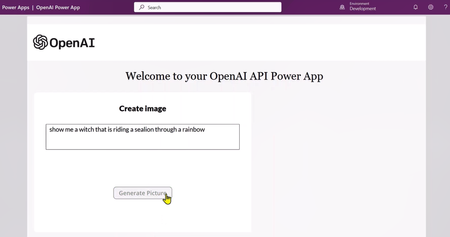
Let's discuss how developers can leverage OpenAI's APIs to build next-gen application using Microsoft Power Apps. We will use DALL·E 2 (a new AI system model) to create realistic images and art from a description in natural language.32KViews8likes5CommentsIntroducing Azure Container Apps Express!
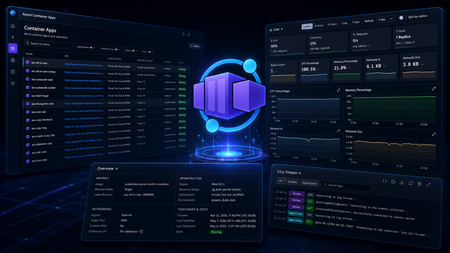
Three years ago, a 15-second cold start was industry-leading. Today, developers and AI agents expect sub-second. The speed bar has moved, and the tooling needs to move with it. After running Azure Container Apps for years, we've learned something important: for most developers, the ACA environment is an unnecessary construct. It adds provisioning time, configuration surface, and cognitive overhead — when all you really want is to run your app with scaling, networking, and operations handled for you. At the same time, a new class of workloads has emerged. Agent-first platforms — systems where AI agents deploy endpoints on demand, spin up tool-use APIs, and tear them down when work is done — demand an even more radical focus on speed and simplicity. Every second of provisioning delay is wasted agent productivity. Today, we're launching Azure Container Apps Express in Public Preview — the fastest, simplest way to go from a container image to an internet-reachable app on Azure, ready for many production-style workloads. What Is ACA Express? ACA Express removes the infrastructure decisions. There's no environment to provision, no networking to configure, no scaling rules to write. You bring a container image, Express handles everything else. Behind the scenes, Express runs your container on pre-provisioned capacity with sensible defaults baked in — so you skip environment setup without giving up ACA's serverless model. There's more coming in this space soon — keep watching. Here's what that means in practice: Instant provisioning — your app is running in seconds, not minutes Sub-second cold starts — fast enough for interactive UIs and on-demand agent endpoints Scale to and from zero — automatic, no configuration required (full scaling controls coming soon) Per-second billing — pay only for what you use Production-ready defaults — ingress, secrets, environment variables, and observability are built in Express is purpose-built for two audiences: developers who want to ship fast (SaaS apps, APIs, web dashboards, prototypes) and agents that deploy on demand (MCP servers, tool-use endpoints, multi-step workflow APIs, human-in-the-loop UIs). If you've ever waited for an ACA environment to provision, only to realize you didn't need half of the configuration options it asked you for — Express is your answer. What You Can Do Today Note: West Central US is currently the only available region. We will expand to new regions through the coming days. Express is in Public Preview starting today. It's a deliberate early ship — there's a meaningful feature gap compared to the existing Azure Container Apps offering, and we're filling it fast. New capabilities are landing on a rapid cadence throughout the preview, and by Microsoft Build in June, Express should be close to feature-complete. For the current list of supported features, known gaps, and what's on the way, see the Express documentation. We'd rather put valuable technology in your hands early and iterate with you than wait behind closed doors for perfection. Who Is Express For? Scenario Why Express SaaS apps and APIs Deploy and scale without infrastructure planning AI app frontends Chat UIs and copilot frontends that scale with usage spikes MCP servers Expose API endpoints for AI agents in seconds Agent workflows Spin up endpoints on demand, tear down when done Prototypes and startups Go from idea to production in minutes Web dashboards Internal tools with instant availability Get Started Express is available now in Public Preview. Try it: Azure Container Apps Express overview — concepts, capabilities, and the current feature support matrix Deploy your first app with the Azure CLI — step-by-step quickstart New Azure Container Apps Portal — create and manage Express apps alongside your existing Container Apps resources Have questions? Check the Azure Container Apps Express FAQ for answers to common questions about pricing, limits, regions, and the road to GA. We're building Express in the open and we want to hear from you. Tell us what features matter most, what works, and what doesn't — reach out on the Azure Container Apps GitHub or in the comments below.16KViews7likes6CommentsThe Agent that investigates itself
Azure SRE Agent handles tens of thousands of incident investigations each week for internal Microsoft services and external teams running it for their own systems. Last month, one of those incidents was about the agent itself. Our KV cache hit rate alert started firing. Cached token percentage was dropping across the fleet. We didn't open dashboards. We simply asked the agent. It spawned parallel subagents, searched logs, read through its own source code, and produced the analysis. First finding: Claude Haiku at 0% cache hits. The agent checked the input distribution and found that the average call was ~180 tokens, well below Anthropic’s 4,096-token minimum for Haiku prompt caching. Structurally, these requests could never be cached. They were false positives. The real regression was in Claude Opus: cache hit rate fell from ~70% to ~48% over a week. The agent correlated the drop against the deployment history and traced it to a single PR that restructured prompt ordering, breaking the common prefix that caching relies on. It submitted two fixes: one to exclude all uncacheable requests from the alert, and the other to restore prefix stability in the prompt pipeline. That investigation is how we develop now. We rarely start with dashboards or manual log queries. We start by asking the agent. Three months earlier, it could not have done any of this. The breakthrough was not building better playbooks. It was harness engineering: enabling the agent to discover context as the investigation unfolded. This post is about the architecture decisions that made it possible. Where we started In our last post, Context Engineering for Reliable AI Agents: Lessons from Building Azure SRE Agent, we described how moving to a single generalist agent unlocked more complex investigations. The resolution rates were climbing, and for many internal teams, the agent could now autonomously investigate and mitigate roughly 50% of incidents. We were moving in the right direction. But the scores weren't uniform, and when we dug into why, the pattern was uncomfortable. The high-performing scenarios shared a trait: they'd been built with heavy human scaffolding. They relied on custom response plans for specific incident types, hand-built subagents for known failure modes, and pre-written log queries exposed as opaque tools. We weren’t measuring the agent’s reasoning – we were measuring how much engineering had gone into the scenario beforehand. On anything new, the agent had nowhere to start. We found these gaps through manual review. Every week, engineers read through lower-scored investigation threads and pushed fixes: tighten a prompt, fix a tool schema, add a guardrail. Each fix was real. But we could only review fifty threads a week. The agent was handling ten thousand. We were debugging at human speed. The gap between those two numbers was where our blind spots lived. We needed an agent powerful enough to take this toil off us. An agent which could investigate itself. Dogfooding wasn't a philosophy - it was the only way to scale. The Inversion: Three bets The problem we faced was structural - and the KV cache investigation shows it clearly. The cache rate drop was visible in telemetry, but the cause was not. The agent had to correlate telemetry with deployment history, inspect the relevant code, and reason over the diff that broke prefix stability. We kept hitting the same gap in different forms: logs pointing in multiple directions, failure modes in uninstrumented paths, regressions that only made sense at the commit level. Telemetry showed symptoms, but not what actually changed. We'd been building the agent to reason over telemetry. We needed it to reason over the system itself. The instinct when agents fail is to restrict them: pre-write the queries, pre-fetch the context, pre-curate the tools. It feels like control. In practice, it creates a ceiling. The agent can only handle what engineers anticipated in advance. The answer is an agent that can discover what it needs as the investigation unfolds. In the KV cache incident, each step, from metric anomaly to deployment history to a specific diff, followed from what the previous step revealed. It was not a pre-scripted path. Navigating towards the right context with progressive discovery is key to creating deep agents which can handle novel scenarios. Three architectural decisions made this possible – and each one compounded on the last. Bet 1: The Filesystem as the Agent's World Our first bet was to give the agent a filesystem as its workspace instead of a custom API layer. Everything it reasons over – source code, runbooks, query schemas, past investigation notes – is exposed as files. It interacts with that world using read_file, grep, find, and shell. No SearchCodebase API. No RetrieveMemory endpoint. This is an old Unix idea: reduce heterogeneous resources to a single interface. Coding agents already work this way. It turns out the same pattern works for an SRE agent. Frontier models are trained on developer workflows: navigating repositories, grepping logs, patching files, running commands. The filesystem is not an abstraction layered on top of that prior. It matches it. When we materialized the agent’s world as a repo-like workspace, our human "Intent Met" score - whether the agent's investigation addressed the actual root cause as judged by the on-call engineer - rose from 45% to 75% on novel incidents. But interface design is only half the story. The other half is what you put inside it. Code Repositories: the highest-leverage context Teams had prewritten log queries because they did not trust the agent to generate correct ones. That distrust was justified. Models hallucinate table names, guess column schemas, and write queries against the wrong cluster. But the answer was not tighter restriction. It was better grounding. The repo is the schema. Everything else is derived from it. When the agent reads the code that produces the logs, query construction stops being guesswork. It knows the exact exceptions thrown, and the conditions under which each path executes. Stack traces start making sense, and logs become legible. But beyond query grounding, code access unlocked three new capabilities that telemetry alone could not provide: Ground truth over documentation. Docs drift and dashboards show symptoms. The code is what the service actually does. In practice, most investigations only made sense when logs were read alongside implementation. Point-in-time investigation. The agent checks out the exact commit at incident time, not current HEAD, so it can correlate the failure against the actual diffs. That's what cracked the KV cache investigation: a PR broke prefix stability, and the diff was the only place this was visible. Without commit history, you can't distinguish a code regression from external factors. Reasoning even where telemetry is absent. Some code paths are not well instrumented. The agent can still trace logic through source and explain behavior even when logs do not exist. This is especially valuable in novel failure modes – the ones most likely to be missed precisely because no one thought to instrument them. Memory as a filesystem, not a vector store Our first memory system used RAG over past session learnings. It had a circular dependency: a limited agent learned from limited sessions and produced limited knowledge. Garbage in, garbage out. But the deeper problem was retrieval. In SRE Context, embedding similarity is a weak proxy for relevance. “KV cache regression” and “prompt prefix instability” may be distant in embedding space yet still describe the same causal chain. We tried re-ranking, query expansion, and hybrid search. None fixed the core mismatch between semantic similarity and diagnostic relevance. We replaced RAG with structured Markdown files that the agent reads and writes through its standard tool interface. The model names each file semantically: overview.md for a service summary, team.md for ownership and escalation paths, logs.md for cluster access and query patterns, debugging.md for failure modes and prior learnings. Each carry just enough context to orient the agent, with links to deeper files when needed. The key design choice was to let the model navigate memory, not retrieve it through query matching. The agent starts from a structured entry point and follows the evidence toward what matters. RAG assumes you know the right query before you know what you need. File traversal lets relevance emerge as context accumulates. This removed chunking, overlap tuning, and re-ranking entirely. It also proved more accurate, because frontier models are better at following context than embeddings are at guessing relevance. As a side benefit, memory state can be snapshotted periodically. One problem remains unsolved: staleness. When two sessions write conflicting patterns to debugging.md, the model must reconcile them. When a service changes behavior, old entries can become misleading. We rely on timestamps and explicit deprecation notes, but we do not have a systemic solution yet. This is an active area of work, and anyone building memory at scale will run into it. The sandbox as epistemic boundary The filesystem also defines what the agent can see. If something is not in the sandbox, the agent cannot reason about it. We treat that as a feature, not a limitation. Security boundaries and epistemic boundaries are enforced by the same mechanism. Inside that boundary, the agent has full execution: arbitrary bash, python, jq, and package installs through pip or apt. That scope unlocks capabilities we never would have built as custom tools. It opens PRs with gh cli, like the prompt-ordering fix from KV cache incident. It pushes Grafana dashboards, like a cache-hit-rate dashboard we now track by model. It installs domain-specific CLI tools mid-investigation when needed. No bespoke integration required, just a shell. The recurring lesson was simple: a generally capable agent in the right execution environment outperforms a specialized agent with bespoke tooling. Custom tools accumulate maintenance costs. Shell commands compose for free. Bet 2: Context Layering Code access tells the agent what a service does. It does not tell the agent what it can access, which resources its tools are scoped to, or where an investigation should begin. This gap surfaced immediately. Users would ask "which team do you handle incidents for?" and the agent had no answer. Tools alone are not enough. An integration also needs ambient context so the model knows what exists, how it is configured, and when to use it. We fixed this with context hooks: structured context injected at prompt construction time to orient the agent before it takes action. Connectors - what can I access? A manifest of wired systems such as Log Analytics, Outlook, and Grafana, along with their configuration. Repositories - what does this system do? Serialized repo trees, plus files like AGENTS.md, Copilot.md, and CLAUDE.md with team-specific instructions. Knowledge map - what have I learned before? A two-tier memory index with a top-level file linking to deeper scenario-specific files, so the model can drill down only when needed. Azure resource topology - where do things live? A serialized map of relationships across subscriptions, resource groups, and regions, so investigations start in the right scope. Together, these context hooks turn a cold start into an informed one. That matters because a bad early choice does not just waste tokens. It sends the investigation down the wrong trajectory. A capable agent still needs to know what exists, what matters, and where to start. Bet 3: Frugal Context Management Layered context creates a new problem: budget. Serialized repo trees, resource topology, connector manifests, and a memory index fill context fast. Once the agent starts reading source files and logs, complex incidents hit context limits. We needed our context usage to be deliberately frugal. Tool result compression via the filesystem Large tool outputs are expensive because they consume context before the agent has extracted any value from them. In many cases, only a small slice or a derived summary of that output is actually useful. Our framework exposes these results as files to the agent. The agent can then use tools like grep, jq, or python to process them outside the model interface, so that only the final result enters context. The filesystem isn't just a capability abstraction - it's also a budget management primitive. Context Pruning and Auto Compact Long investigations accumulate dead weight. As hypotheses narrow, earlier context becomes noise. We handle this with two compaction strategies. Context Pruning runs mid-session. When context usage crosses a threshold, we trim or drop stale tool calls and outputs - keeping the window focused on what still matters. Auto-Compact kicks in when a session approaches its context limit. The framework summarizes findings and working hypotheses, then resumes from that summary. From the user's perspective, there's no visible limit. Long investigations just work. Parallel subagents The KV cache investigation required reasoning along two independent hypotheses: whether the alert definition was sound, and whether cache behavior had actually regressed. The agent spawned parallel subagents for each task, each operating in its own context window. Once both finished, it merged their conclusions. This pattern generalizes to any task with independent components. It speeds up the search, keeps intermediate work from consuming the main context window, and prevents one hypothesis from biasing another. The Feedback loop These architectural bets have enabled us to close the original scaling gap. Instead of debugging the agent at human speed, we could finally start using it to fix itself. As an example, we were hitting various LLM errors: timeouts, 429s (too many requests), failures in the middle of response streaming, 400s from code bugs that produced malformed payloads. These paper cuts would cause investigations to stall midway and some conversations broke entirely. So, we set up a daily monitoring task for these failures. The agent searches for the last 24 hours of errors, clusters the top hitters, traces each to its root cause in the codebase, and submits a PR. We review it manually before merging. Over two weeks, the errors were reduced by more than 80%. Over the last month, we have successfully used our agent across a wide range of scenarios: Analyzed our user churn rate and built dashboards we now review weekly. Correlated which builds needed the most hotfixes, surfacing flaky areas of the codebase. Ran security analysis and found vulnerabilities in the read path. Helped fill out parts of its own Responsible AI review, with strict human review. Handles customer-reported issues and LiveSite alerts end to end. Whenever it gets stuck, we talk to it and teach it, ask it to update its memory, and it doesn't fail that class of problem again. The title of this post is literal. The agent investigating itself is not a metaphor. It is a real workflow, driven by scheduled tasks, incident triggers, and direct conversations with users. What We Learned We spent months building scaffolding to compensate for what the agent could not do. The breakthrough was removing it. Every prewritten query was a place we told the model not to think. Every curated tool was a decision made on its behalf. Every pre-fetched context was a guess about what would matter before we understood the problem. The inversion was simple but hard to accept: stop pre-computing the answer space. Give the model a structured starting point, a filesystem it knows how to navigate, context hooks that tell it what it can access, and budget management that keeps it sharp through long investigations. The agent that investigates itself is both the proof and the product of this approach. It finds its own bugs, traces them to root causes in its own code, and submits its own fixes. Not because we designed it to. Because we designed it to reason over systems, and it happens to be one. We are still learning. Staleness is unsolved, budget tuning remains largely empirical, and we regularly discover assumptions baked into context that quietly constrain the agent. But we have crossed a new threshold: from an agent that follows your playbook to one that writes the next one. Thanks to visagarwal for co-authoring this post.14KViews7likes0CommentsAKS at Build: Enhancing security, reliability, and ease of use for developers and platform teams
At Microsoft Build 2024, we’re releasing a host of new features for Azure Kubernetes Service (AKS) aimed at making Kubernetes adoption easier and more accessible to a greater number of teams.11KViews6likes1CommentAzure Container Apps Announces New Pricing Plan and Enhanced Networking
In Public Preview today - You can optimize the hosting of each app in an environment by choosing between Serverless and Dedicated compute options. You can also leverage new network enhancements for more optimized and secure networking.12KViews6likes1CommentBuilding Static Web Apps with database connections: Best Practices
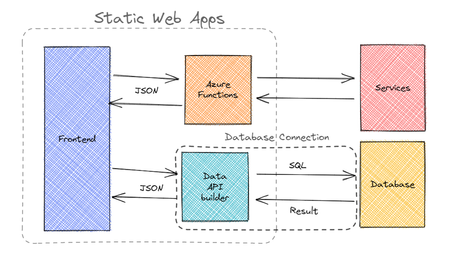
With the announcement of Static Web Apps' database connections feature, when should you use database connections versus building your own backend APIs? What is Data API builder and how does it relate to Static Web Apps' database connections feature? We cover these topics and more in this blog post.11KViews6likes6CommentsAzure Container Apps Jobs in a secure Landing Zone
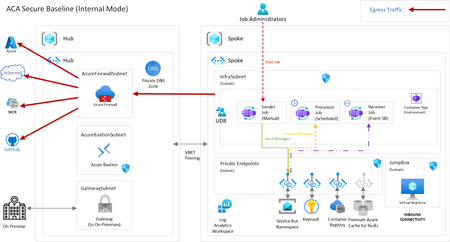
Are you looking for deploying your microservices containerized workloads with short run tasks triggered by events or based on a schedule or by other service with a production grade infrastructure? Then, look no further and dive deep into this article about Azure Container Apps Landing Zone Accelerator that helps to build and deploy containerized workloads faster to production. The new scenario covers about the ACA Jobs feature with a sample application demonstrating all the three different trigger types.7.3KViews5likes0CommentsUnlocking Application Modernisation with GitHub Copilot
AI-driven modernisation is unlocking new opportunities you may not have even considered yet. It's also allowing organisations to re-evaluate previously discarded modernisation attempts that were considered too hard, complex or simply didn't have the skills or time to do. During Microsoft Build 2025, we were introduced to the concept of Agentic AI modernisation and this post from Ikenna Okeke does a great job of summarising the topic - Reimagining App Modernisation for the Era of AI | Microsoft Community Hub. This blog post however, explores the modernisation opportunities that you may not even have thought of yet, the business benefits, how to start preparing your organisation, empowering your teams, and identifying where GitHub Copilot can help. I’ve spent the last 8 months working with customers exploring usage of GitHub Copilot, and want to share what my team members and I have discovered in terms of new opportunities to modernise, transform your applications, bringing some fun back into those migrations! Let’s delve into how GitHub Copilot is helping teams update old systems, move processes to the cloud, and achieve results faster than ever before. Background: The Modernisation Challenge (Then vs Now) Modernising legacy software has always been hard. In the past, teams faced steep challenges: brittle codebases full of technical debt, outdated languages (think decades-old COBOL or VB6), sparse documentation, and original developers long gone. Integrating old systems with modern cloud services often requiring specialised skills that were in short supply – for example, check out this fantastic post from Arvi LiVigni (@arilivigni ) which talks about migrating from COBOL “the number of developers who can read and write COBOL isn’t what it used to be,” making those systems much harder to update". Common pain points included compatibility issues, data migrations, high costs, security vulnerabilities, and the constant risk that any change could break critical business functions. It’s no wonder many modernisation projects stalled or were “put off” due to their complexity and risk. So, what’s different now (circa 2025) compared to two years ago? In a word: Intelligent AI assistance. Tools like GitHub Copilot have emerged as AI pair programmers that dramatically lower the barriers to modernisation. Arvi’s post talks about how only a couple of years ago, developers had to comb through documentation and Stack Overflow for clues when deciphering old code or upgrading frameworks. Today, GitHub Copilot can act like an expert co-developer inside your IDE, ready to explain mysterious code, suggest updates, and even rewrite legacy code in modern languages. This means less time fighting old code and more time implementing improvements. As Arvi says “nine times out of 10 it gives me the right answer… That speed – and not having to break out of my flow – is really what’s so impactful.” In short, AI coding assistants have evolved from novel experiments to indispensable tools, reimagining how we approach software updates and cloud adoption. I’d also add from my own experience – the models we were using 12 months ago have already been superseded by far superior models with ability to ingest larger context and tackle even further complexity. It's easier to experiment, and fail, bringing more robust outcomes – with such speed to create those proof of concepts, experimentation and failing faster, this has also unlocked the ability to test out multiple hypothesis’ and get you to the most confident outcome in a much shorter space of time. Modernisation is easier now because AI reduces the heavy lifting. Instead of reading the 10,000-line legacy program alone, a developer can ask Copilot to explain what the code does or even propose a refactored version. Rather than manually researching how to replace an outdated library, they can get instant recommendations for modern equivalents. These advancements mean that tasks which once took weeks or months can now be done in days or hours – with more confidence and less drudgery - more fun! The following sections will dive into specific opportunities unlocked by GitHub Copilot across the modernisation journey which you may not even have thought of. Modernisation Opportunities Unlocked by Copilot Modernising an application isn’t just about updating code – it involves bringing everyone and everything up to speed with cloud-era practices. Below are several scenarios and how GitHub Copilot adds value, with the specific benefits highlighted: 1. AI-Assisted Legacy Code Refactoring and Upgrades Instant Code Comprehension: GitHub Copilot can explain complex legacy code in plain English, helping developers quickly understand decades-old logic without scouring scarce documentation. For example, you can highlight a cryptic COBOL or C++ function and ask Copilot to describe what it does – an invaluable first step before making any changes. This saves hours and reduces errors when starting a modernisation effort. Automated Refactoring Suggestions: The AI suggests modern replacements for outdated patterns and APIs, and can even translate code between languages. For instance, Copilot can help convert a COBOL program into JavaScript or C# by recognising equivalent constructs. It also uses transformation tools (like OpenRewrite for Java/.NET) to systematically apply code updates – e.g. replacing all legacy HTTP calls with a modern library in one sweep. Developers remain in control, but GitHub Copilot handles the tedious bulk edits. Bulk Code Upgrades with AI: GitHub Copilot’s App Modernisation capabilities can analyse an entire codebase and generate a detailed upgrade plan, then execute many of the code changes automatically. It can upgrade framework versions (say from .NET Framework 4.x to .NET 6, or Java 8 to Java 17) by applying known fix patterns and even fixing compilation errors after the upgrade. Teams can finally tackle those hundreds of thousand-line enterprise applications – a task that could take multiple years with GitHub Copilot handling the repetitive changes. Technical Debt Reduction: By cleaning up old code and enforcing modern best practices, GitHub Copilot helps chip away at years of technical debt. The modernised codebase is more maintainable and stable, which lowers the long-term risk hanging over critical business systems. Notably, the tool can even scan for known security vulnerabilities during refactoring as it updates your code. In short, each legacy component refreshed with GitHub Copilot comes out safer and easier to work on, instead of remaining a brittle black box. 2. Accelerating Cloud Migration and Azure Modernisation Guided Azure Migration Planning: GitHub Copilot can assess a legacy application’s cloud readiness and recommend target Azure services for each component. For instance, it might suggest migrating an on-premises database to Azure SQL, moving file storage to Azure Blob Storage, and converting background jobs to Azure Functions. This provides a clear blueprint to confidently move an app from servers to Azure PaaS. One-Click Cloud Transformations: GitHub Copilot comes with predefined migration tasksthat automate the code changes required for cloud adoption. With one click, you can have the AI apply dozens of modifications across your codebase. For example: File storage: Replace local file read/writes with Azure Blob Storage SDK calls. Email/Comms: Swap out SMTP email code for Azure Communication Services or SendGrid. Identity: Migrate authentication from Windows AD to Azure AD (Entra ID) libraries. Configuration: Remove hard-coded configurations and use Azure App Configuration or Key Vault for secrets. GitHub Copilot performs these transformations consistently, following best practices (like using connection strings from Azure settings). After applying the changes, it even fixes any compile errors automatically, so you’re not left with broken builds. What used to require reading countless Azure migration guides is now handled in minutes. Automated Validation & Deployment: Modernisation doesn’t stop at code changes. GitHub Copilot can also generate unit tests to validate that the application still behaves correctly after the migration. It helps ensure that your modernised, cloud-ready app passes all its checks before going live. When you’re ready to deploy, GitHub Copilot can produce the necessary Infrastructure-as-Code templates (e.g. Azure Resource Manager Bicep files or Terraform configs) and even set up CI/CD pipeline scripts for you. In other words, the AI can configure the Azure environment and deployment process end-to-end. This dramatically reduces manual effort and error, getting your app to the cloud faster and with greater confidence. Integrations: GitHub Copilot also helps tackle larger migration scenarios that were previously considered too complex. For example, many enterprises want to retire expensive proprietary integration platforms like MuleSoft or Apigee and use Azure-native services instead, but rewriting hundreds of integration workflows was daunting. Now, GitHub Copilot can assist in translating those workflows: for instance, converting an Apigee API proxy into an Azure API Management policy, or a MuleSoft integration into an Azure Logic App. Multi-Cloud Migrations: if you plan to consolidate from other clouds into Azure, GitHub Copilot can suggest equivalent Azure services and SDK calls to replace AWS or GCP-specific code. These AI-assisted conversions significantly cut down the time needed to reimplement functionality on Azure. The business impact can be substantial. By lowering the effort of such migrations, GitHub Copilot makes it feasible to pursue opportunities that deliver big cost savings and simplification. 3. Boosting Developer Productivity and Quality Instant Unit Tests (TDD Made Easy): Writing tests for old code can be tedious, but GitHub Copilot can generate unit test cases on the fly. Developers can highlight an existing function and ask Copilot to create tests; it will produce meaningful test methods covering typical and edge scenarios. This makes it practical to apply test-driven development practices even to legacy systems – you can quickly build a safety net of tests before refactoring. By catching bugs early through these AI-generated tests, teams gain confidence to modernise code without breaking things. It essentially injects quality into the process from the start, which is crucial for successful modernisation. DevOps Automation: GitHub Copilot helps modernise your build and deployment process as well. It can draft CI/CD pipeline configurations, Dockerfiles, Kubernetes manifests, and other DevOps scripts by leveraging its knowledge of common patterns. For example, when setting up a GitHub Actions workflow to deploy your app, GitHub Copilot will autocomplete significant parts (like build steps, test runs, deployment jobs) based on the project structure. This not only saves time but also ensures best practices (proper caching, dependency installation, etc.) are followed by default. Microsoft even provides an extension where you can describe your Azure infrastructure needs in plain language and have GitHub Copilot generate the corresponding templates and pipeline YAML. By automating these pieces, teams can move to cloud-based, automated deployments much faster. Behaviour-Driven Development Support: Teams practicing BDD write human-readable scenarios (e.g. using Gherkin syntax) describing application behaviour. GitHub Copilot’s AI is adept at interpreting such descriptions and suggesting step definition code or test implementations to match. For instance, given a scenario “When a user with no items checks out, then an error message is shown,” GitHub Copilot can draft the code for that condition or the test steps required. This helps bridge the gap between non-technical specifications and actual code. It makes BDD more efficient and accessible, because even if team members aren’t strong coders, the AI can translate their intent into working code that developers can refine. Quality and Consistency: By using AI to handle boilerplate and repetitive tasks, developers can focus more on high-value improvements. GitHub Copilot’s suggestions are based on a vast corpus of code, which often means it surfaces well-structured, idiomatic patterns. Starting from these suggestions, developers are less likely to introduce errors or reinvent the wheel, which leads to more consistent code quality across the project. The AI also often reminds you of edge cases (for example, suggesting input validation or error handling code that might be missed), contributing to a more robust application. In practice, many teams find that adopting GitHub Copilot results in fewer bugs and quicker code reviews, as the code is cleaner on the first pass. It’s like having an extra set of eyes on every pull request, ensuring standards are met. Business Benefits of AI-Powered Modernisation Bringing together the technical advantages above, what’s the payoff for the business and stakeholders? Modernising with GitHub Copilot can yield multiple tangible and intangible benefits: Accelerated Time-to-Market: Modernisation projects that might have taken a year can potentially be completed in a few months, or an upgrade that took weeks can be done in days. This speed means you can deliver new features to customers sooner and respond faster to market changes. It also reduces downtime or disruption since migrations happen more swiftly. Cost Savings: By automating repetitive work and reducing the effort required from highly paid senior engineers, GitHub Copilot can trim development costs. Faster project completion also means lower overall project cost. Additionally, running modernised apps on cloud infrastructure (with updated code) often lowers operational costs due to more efficient resource usage and easier maintenance. There’s also an opportunity cost benefit: developers freed up by Copilot can work on other value-adding projects in parallel. Improved Quality & Reliability: GitHub Copilot’s contributions to testing, bug-fixing, and even security (like patching known vulnerabilities during upgrades) result in more robust applications. Modernised systems have fewer outages and security incidents than shaky legacy ones. Stakeholders will appreciate that with GitHub Copilot, modernisation doesn’t mean “trading one set of bugs for another” – instead, you can increase quality as you modernise (GitHub’s research noted higher code quality when using Copilot, as developers are less likely to introduce errors or skip tests). Business Agility: A modernised application (especially one refactored for cloud) is typically more scalable and adaptable. New integrations or features can be added much faster once the platform is up-to-date. GitHub Copilot helps clear the modernisation hurdle, after which the business can innovate on a solid, flexible foundation (for example, once a monolith is broken into microservices or moved to Azure PaaS, you can iterate on it much faster in the future). AI-assisted modernisation thus unlocks future opportunities (like easier expansion, integrations, AI features, etc.) that were impractical on the legacy stack. Employee Satisfaction and Innovation: Developer happiness is a subtle but important benefit. When tedious work is handled by AI, developers can spend more time on creative tasks – designing new features, improving user experience, exploring new technologies. This can foster a culture of innovation. Moreover, being seen as a company that leverages modern tools (like AI Copilot) helps attract and retain top tech talent. Teams that successfully modernise critical systems with Copilot will gain confidence to tackle other ambitious projects, creating a positive feedback loop of improvement. To sum up, GitHub Copilot acts as a force-multiplier for application modernisation. It enables organisations to do more with less: convert legacy “boat anchors” into modern, cloud-enabled assets rapidly, while improving quality and developer morale. This aligns IT goals with business goals – faster delivery, greater efficiency, and readiness for the future. Call to Action: Embrace the Future of Modernisation GitHub Copilot has proven to be a catalyst for transforming how we approach legacy systems and cloud adoption. If you’re excited about the possibilities, here are next steps and what to watch for: Start Experimenting: If you haven’t already, try GitHub Copilot on a sample of your code. Use Copilot or Copilot Chat to explain a piece of old code or generate a unit test. Seeing it in action on your own project can build confidence and spark ideas for where to apply it. Identify a Pilot Project: Look at your application portfolio for a candidate that’s ripe for modernisation – maybe a small legacy service that could be moved to Azure, or a module that needs a refactor. Use GitHub Copilot to assess and estimate the effort. Often, you’ll find tasks once deemed “too hard” might now be feasible. Early successes will help win support for larger initiatives. Stay Tuned for Our Upcoming Blog Series: This post is just the beginning. In forthcoming posts, we’ll dive deeper into: Setting Up Your Organisation for Copilot Adoption: Practical tips on preparing your enterprise environment – from licensing and security considerations to training programs. We’ll discuss best practices (like running internal awareness campaigns, defining success metrics, and creating Copilot champions in your teams) to ensure a smooth rollout. Empowering Your Colleagues: How to foster a culture that embraces AI assistance. This includes enabling continuous learning, sharing prompt techniques and knowledge bases, and addressing any scepticism. We’ll cover strategies to support developers in using Copilot effectively, so that everyone from new hires to veteran engineers can amplify their productivity. Identifying High-Impact Modernisation Areas: Guidance on spotting where GitHub Copilot can add the most value. We’ll look at different domains – code, cloud, tests, data – and how to evaluate opportunities (for example, using telemetry or feedback to find repetitive tasks suited for AI, or legacy components with high ROI if modernised). Engage and Share: As you start leveraging Copilot for modernisation, share your experiences and results. Success stories (even small wins like “GitHub Copilot helped reduce our code review times” or “we migrated a component to Azure in 1 sprint”) can build momentum within your organisation and the broader community. We invite you to discuss and ask questions in the comments or in our tech community forums. Take a look at the new App Modernisation Guidance—a comprehensive, step-by-step playbook designed to help organisations: Understand what to modernise and why Migrate and rebuild apps with AI-first design Continuously optimise with built-in governance and observability Modernisation is a journey, and AI is the new compass and Copilot to guide the way. By embracing tools like GitHub Copilot, you position your organisation to break through modernisation barriers that once seemed insurmountable. The result is not just updated software, but a more agile, cloud-ready business and a happier, more productive development team. Now is the time to take that step. Empower your team with Copilot, and unlock the full potential of your applications and your developers. Stay tuned for more insights in our next posts, and let’s modernise what’s possible together!2.3KViews4likes1Comment