mobile
525 Topics
Resolving erroneous network errors with personal vault
I appreciate there are many(!) general OneDrive vault issues floating around but I wondered does anyone have a solution to a very specific oddity which has rendered OneDrive useless to me - and hence is preventing me purchasing it for use with my small business. Multiple Windows 11 PCs (all up to date, clean etc etc) - OneDrive working correctly, access personal vault and authenticate, all good can see files and access them. One PC hard-line ethernet, the other via WiFi OneDrive website - all working correctly including vault. Samsung Galaxy S10FE Android phone (all up to date, patched, clean etc etc). OneDrive app (v7.32.1) is working fine except for the vault... after authentication (PIN or Biometric I've tried both), the vault appears empty. Upon refreshing, it throws a nonsense "not connected to wifi/mobile data" error. Things to note... all devices are signed into the same MS account, I've tried different WiFi, just mobile data vs WiFi, I've uninstalled, rolled back to factory, cleared cache, reset app, logged-out and logged-back in again. Nothing root'ed or custom on the 'phone, just plain android with Samsung setup. I've confirmed definitely connected - as evidenced by other files upload and download fine, speedtest app shows steady 500/70 on the wifi. Also tried the same version of the app on a cheapie Motorola android phone, exactly the same issue. Can anyone help here - anyone else seen this? I need to make a decision as to whether to subscribe for my SB but currently it's useless - the vault is primarily what we need. Thanks in advance.828Views0likes3Comments
Microsoft Authenticator Passkeys for Entra ID on unmanaged devices
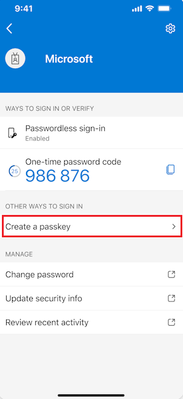
Hello, has anyone successfully registered passkeys on an unmanaged phone in an organisation with device compliance policies? Use case is to provide a phishing-resistant MFA option via Authenticator app for logging into apps on their desktop. Users already have authenticator app on their phone and do number matching MFA. https://learn.microsoft.com/en-us/entra/identity/authentication/how-to-register-passkey-authenticator?tabs=iOS When I select "Create a passkey" - I need to log into my account. However I'm blocked from successful authentication because I have conditional access policies to require compliant devices. As my mobile phone is not enrolled into Intune, I never get to the step where the passkey is created and registered. Based on the constraints - it seems like passkeys cannot be used for unmanaged/BYOD devices for organisations that have device compliance policies. It can only be used for users who have enrolled their mobile phone. Looking to see if anyone has tips or different experience using passkeys on unmanaged mobile phones to log into Entra?334Views0likes1Comment- 52Views0likes1Comment
Helping to enable secure, connected work: Surface with built-in 5G on the Verizon network
Surface for Business devices with built-in 5G, powered by Verizon, deliver secure, reliable connectivity and AI-optimized performance to enable seamless productivity anywhere without dependence on Wi-Fi.421Views0likes0Comments
Word on iPhone
In the past, I’ve managed to edit some documents on my iPhone in Microsoft Word. But now Microsoft is slapping me in the face with grammatical suggestions that obscure my document. I don’t want any grammatical suggestions, but I can’t figure out how to make them stop. Can anybody suggest how I can do that? Am I in the right place to ask this question? Is there another place for the iPhone app?139Views0likes3CommentsSharepoint List Lookup question
Hi I have a Sharepoint list which uses columnn "sfg" as a look up, it then returns "sfglifecycle" for instance. I want to add a calculated column that references uses the figure that's been returned in "sfgLifecycle" and times it by ten, is this possible? if so, how do i go about doing it?167Views0likes2CommentsTAP Question
Hi All I hope you are well. Anyway, I'm looking for some clarification over Temporary Access Passes (TAP) as our testing seems to reveal some different results from those listed in the MS documentation. Here's the scenario's. My understanding: Require MFA policy deployed via Conditional Access New user F3 user starts Issue TAP to user where they can then setup MFA themselves via My Security Info etc Testing results: Require MFA policy deployed via Conditional Access New user F3 user starts User can setup MFA themselves via MS Auth app on a mobile device or via My Security Info in a browser MS TAP Info page: "The most common use for a TAP is for a user to register authentication details during the first sign-in or device setup, without the need to complete extra security prompts." Ref: Configure a Temporary Access Pass in Microsoft Entra ID to register passwordless authentication methods - Microsoft Entra ID | Microsoft Learn Have I missed understood something here and if a new user can indeed still setup MFA is there any real need for a TAP for first time user? Info appreciated. SK168Views0likes1Comment
Sharepoint app links
Hi all Im hoping someone will be able to help me with the Sharepoint app and when it opens links from within the app. I am running the latest version of the Sharepoint app on Android and have created a Sharepoint site on my companies Sharepoint. The site is to be used as a homepage / launch page for my department. I’ve got links to documents that are within my companies Sharepoint site but also links to websites. The links work fine, going to the websites that the Sharepoint launch page is linked to, but they always open within a web browser within the Sharepoint app. This is fine until anyone leaves the Sharepoint app - maybe to look at a photo or access another app. When you return to the Sharepoint app, the web browser that the link opened in has closed and the Sharepoint site is back to the homepage. Can anyone offer any help or advice?100Views0likes1Comment
Search function on Onedrive for iOS not working
I have noticed that the search function on Onedrive for IPhone has stopped working and wondered if anyone else has had the same problem. I contacted MS support directly from within the app and received a reply which acknowledges that it is a real problem that they are working on but who knows when it will be resolved.1.1KViews6likes13Comments