missing
8 Topics
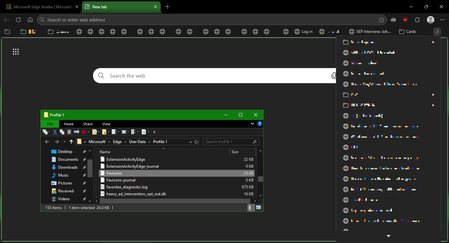
Favicons for bookmarks broken since Edge v149 update
I've recently had Edge update to the v149.0.4022.52 stable-channel releases, and ALL my bookmarks now have no favicons. When I visit any webpage, Edge successfully loads the favicon for the tab of that website. But when I visit a bookmark, the favicon doesn't get updated after it has loaded for the site. And new bookmarks I add also don't show a favicon. If I go into my Edge profile-folder (which can found via edge://profile-internals/ , clicking the heading, then looking next to "Profile Path"), then it is still creating the "Favicon" and "Favicons-journal" files, but I assume isn't populating them with anything? I've tried deleting both files, restarting my PC, but even after Edge recreates them, no bookmarks are gaining any favicons. Is anyone else getting this issue...? OS: Windows 10 Home 22H2 x64 (OS Build: 19045.7291 : May 2026 ESU)Solved4.2KViews4likes23Comments
Site Pages option missing when adding Quick links
When adding links to the quick links web part, you used to be able to select Site...Site Pages. This option is now missing making it really difficult to add multiple links to pages. It has gone on both production and separate Dev tenants. Anyone else affected?3.6KViews1like7Comments
Keyboard issues in Windows Server Insider preview
I have noticed that, in the latest three builds, the keyboard on the Windows Server Insider has issues, characters like ”-” and ”6” do not appear, when the physical keyboard is used, but they appear when the virtual keyboard (at the install process, or the touch keyboard after the OS is installed).954Views1like0Comments
Attach icon missing in Chat
Hi! I started making my thesis last month and my supervisor suggested me to communicate trough Microsoft Teams but I have a problem with attaching files. He added me to a team, which I can see in the "teams" tab, where everything seems to work fine, but in the "chat" tab, where I speak only with him, it seems that I have kind of a "lite" version of the app because I miss the attach button and the software doesn't let me drag and drop. More awkward is that he can send me files and everywhere I look for help it says "simply click the attach button and choose upload from One drive or from your computer bla bla bla...". The same happens in Windows, linux, and the web version, so I infere that it should be something regarding my account. Does anyone has an idea if is it there some configuration or something that I'm missing? PS: I don't know if it's related to it, but maybe this extra info helps. In the Chat it's also missing the "Meet now" button, which I don't need, but it's also missing. Finally, when I click the "Add cloud storage" button in the "files" tab, it only shows the possibility to add an "Egnyte" account but not a one drive account. I don't need those functionalities, but I would really need your help to find the way of uploading files in the Chat.Solved122KViews1like13Comments