mip
18 TopicsMicrosoft Purview Referential Architecture Diagrams
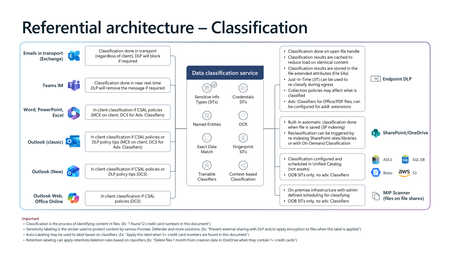
Microsoft Purview architecture diagrams provide a reference view of how classification, sensitivity labelling, Data Loss Prevention (DLP), Insider Risk Management, and Microsoft 365 Copilot protections work together across Microsoft 365 workloads. They illustrate how organisations can consistently identify, label, and protect sensitive data across endpoints, email, collaboration services, browsers, and AI‑assisted workflows—without prescribing a single deployment model. Classification generates sensitivity signals, labels express organizational protection intent, and DLP enforces that intent in real time across devices, apps, and services. Together, these patterns show how Copilot inherits existing security controls so AI‑generated content remains governed within the same compliance boundaries as organizational data.20KViews23likes9CommentsSearching documents with "Sensitivity" Label-ID
Well we have made the field "InformationProtectionLabelId" as Managed Property. So as a App or a User if you want a list of files having a specific label you can simply search using the label's GUID. Like below: Use like below in SharePoint search box InformationProtectionLabelId: 2702e115-d7fc-4912-b15b-a9b7662b1476 To use search API do below: https://<your domain>/_api/search/query?Querytext=%27InformationProtectionLabelId=<guid of the label> That's how you use the search API to search for ALL contents with a specific label11KViews1like7CommentsSecure external attachments with Purview encryption
If you are using Microsoft Purview to secure email attachments, it’s important to understand how Conditional Access (CA) policies and Guest account settings influence the experience for external recipients. Scenario 1: Guest Accounts Enabled ✅ Smooth Experience Each recipient is provisioned with a guest account, allowing them to access the file seamlessly. 📝 Note This can result in a significant increase in guest users, potentially in hundreds or thousands, which may create additional administrative workload and management challenges. Scenario 2: No Guest Accounts 🚫 Limited Access External users can only view attachments via the web interface. Attempts to download then open the files in Office apps typically fail due to repeated credential prompts. 🔍 Why? Conditional Access policies may block access to Microsoft Rights Management Services because it is included under All resources. This typically occurs when access controls such as Multi-Factor Authentication (MFA) or device compliance are enforced, as these require users or guests to authenticate. To have a better experience without enabling guest accounts, consider adjusting your CA policy with one of the below approaches: Recommended Approach Exclude Microsoft Rights Management Services from CA policies targeting All resources. Alternative Approach Exclude Guest or External Users → Other external users from CA policies targeting All users. Things to consider These access blocks won’t appear in sign-in logs— as this type of external users leave no trace. Manual CA policy review is essential. Using What if feature with the following conditions can help to identify which policies need to be modified. These approaches only apply to email attachments. For SharePoint Online hosted files, guest accounts remain the only viable option. Always consult your Identity/Security team before making changes to ensure no unintended impact on other workloads. References For detailed guidance on how guest accounts interact with encrypted documents, refer to Microsoft’s official documentation: 🔗 Microsoft Entra configuration for content encrypted by Microsoft Purview Information Protection | Microsoft Learn3.6KViews5likes3CommentsImpact of Deleting old Label in Compliance Portal
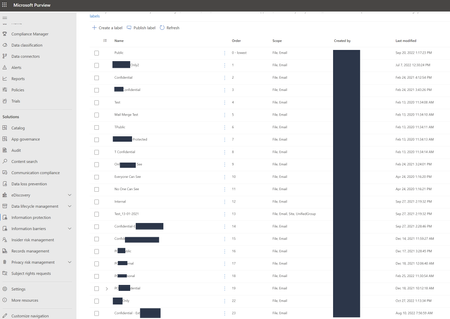
Hi All, I wanted a help to understanding the impact of deleting old label/labels which are not using as of now. However, those labels might be used in previously and because of that I need to understand is there any impact of Data loss. as of now we have too many labels in our environment and purpose is reducing the number of labels. appreciate the help. Thanks, DilanSolved3.1KViews0likes2Comments
Trouble in Opening MIP Files (Azure information Protected Files)
The latest Microsoft Edge stable version 109 for Windows and Mac has issues opening MIP files. We receive a message stating "Something went Wrong" When we downgraded Edge to the Version 108 we are able to open the MIP files in Windows and Mac Is anyone else having the same issue?Solved2.6KViews0likes5CommentsFrom Oversharing to Enforcement: A Practical Guide to AI Data Security with Microsoft Purview
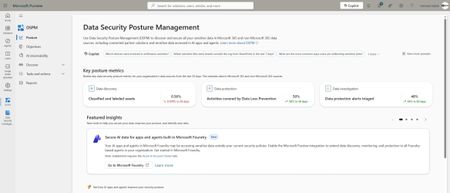
Why AI Changed the Data Security Problem AI does not create entirely new categories of risk—it supercharges existing ones. Traditional data leakage stems from ordinary behavior: sharing a document too broadly, sending an email to the wrong person, copying regulated data to an uncontrolled device. Generative AI amplifies all of these because of the power and speed with which it can proactively surface content that may be obsolete, over-permissioned, or ungoverned. DSPM exists to help with exactly this challenge: it continuously scans your environment to identify sensitive data, assess risk, and recommend actions to reduce exposure. Oversharing at Scale Before AI, an overshared SharePoint file might sit unnoticed. Now, Copilot can summarize it in response to a casual prompt, distributing its contents far beyond the original audience. Prompt Leakage Users can inadvertently expose sensitive information—financial account numbers, health records, project code names—simply by typing them into a Copilot prompt. Because AI interactions feel conversational, users tend to drop their guard. Shadow AI Beyond sanctioned tools, employees experiment with unapproved AI services. Autonomous Agents Autonomous agents expand the data security threat surface by acting independently on sensitive information across systems and boundaries. Their ability to access and share data without direct user interaction increases the risk of oversharing, exfiltration, and unauthorized access, while also introducing complex behavior patterns that are harder to monitor, govern, and control using traditional security models. What Microsoft Purview Now Brings Together Data Security Posture Management (DSPM) DSPM consolidates insights from Data Loss Prevention (DLP), Insider Risk Management, Information Protection, and Data Security Investigations into a single view for monitoring data risks, policy coverage, and posture trends. Now also in Public Preview, DSPM extends coverage to third-party SaaS and IaaS platforms such as Google Cloud Platform, Snowflake, and Databricks, and integrates with partner solutions including Cyera, BigID, and OneTrust for comprehensive risk insights. A central innovation in this version is data security objectives—prominent, selectable cards that each represent a specific security goal. Selecting an objective guides administrators through an end-to-end workflow that groups together the most relevant Purview solutions—information protection, DLP, Insider Risk Management, and eDiscovery—so teams can focus on achieving a specific data security outcome rather than navigating separate solutions. Each Outcome card displays key metrics such as the percentage of data covered by policies, the number of risky sharing incidents, and improvements over time. Within each outcome, DSPM surfaces suggested prioritized actions—applying sensitivity labels, configuring DLP policies, or investigating alerts—all tailored to the organization's data. Administrators can take action directly from the workflow, including remediating oversharing, configuring one-click policies, or launching investigations into suspicious activity. DLP Integration for AI Interactions DLP is one of the core solutions integrated into DSPM's unified approach. The Activity Explorer's AI activities tab captures events where DLP rules were matched during AI interactions—including prompts, responses, and browsing to generative AI sites. DSPM can automate remediation steps such as removing public sharing links or applying data loss prevention policies to help prevent incidents before they happen. AI Observability and Agent Governance Dedicated dashboards and metrics monitor risks associated with AI apps and agents. AI observability enables tracking of agent-specific activities—oversharing, exfiltration, and unusual access patterns—across both Microsoft and third-party environments. Enhanced reporting provides advanced filtering and customizable views, supporting granular analysis of sensitive data usage, DLP activity, and posture trends. Audit logs and activity explorer features help track interactions with AI apps and agents, supporting compliance investigations and incident response. AI-Powered Security Operations DSPM not only secures and governs AI apps and agents but also uses Microsoft Security Copilot and AI agents to help secure and govern data. AI analyzes access patterns, sharing behaviors, and policy gaps to surface actionable risks and can detect unusual activity such as excessive sharing or suspicious downloads. Under administrator guidance, AI agents can take direct action on detected risks—removing public sharing links, applying DLP policies, or revoking permissions. These actions are always audited. To streamline investigations, AI-driven triage agents review alerts from DLP and Insider Risk Management solutions, filtering out noise and highlighting the most critical threats. Three Practical Starting Points For many organizations adopting generative AI, the biggest hurdle isn't recognizing new risks—it's figuring out where to begin. A "boil the ocean" approach can stall progress, while tackling a few targeted areas delivers quicker wins. The best early moves are those that reduce exposure quickly, improve visibility, and build a foundation for stronger governance over time. Starting Point 1: Enable prompt-level protection for Microsoft 365 Copilot An effective first step is to put guardrails on the prompts users enter into AI. Microsoft Purview DLP allows administrators to restrict Microsoft 365 Copilot and Copilot Chat from processing prompts that contain sensitive information. In practice, users are often more comfortable pasting data into a chat prompt than attaching it to an email, which means a well-meaning employee could inadvertently feed a confidential file or personal data into Copilot. Enabling prompt-level DLP creates an immediate safety net: if a user's prompt includes, say, a credit card number or a customer's national ID, Copilot will detect it and refuse to process or share that content. DSPM provides suggested prioritized actions—including configuring DLP policies—that can be activated directly from the workflow, and recommended policies can start in simulation mode. Simulation mode lets you see what would have been blocked or flagged, without actually interrupting users, so you can fine-tune the policy and prepare your helpdesk for any questions. Once you're comfortable with the results, switching to enforcement mode will actively block disallowed prompts and log those events for review. By activating this one control, you've significantly reduced the most immediate oversharing risk—the "oops, I pasted the wrong data" scenario—within hours of starting your AI governance program. Tradeoff: Simulation mode provides safety but delays enforcement. For organizations with imminent regulatory exposure, consider shortening the simulation window and monitoring alert volumes closely. Starting Point 2: Gain visibility into shadow AI usage before broad enforcement The second step is to illuminate what's happening in the shadows. Before rushing into blocking every unsanctioned AI tool, it's crucial to understand how and where AI is being used across the organization. In most enterprises, there's an official layer of AI usage and an often larger, unofficial layer—employees experimenting with free online AI chatbots, writing assistants, or code generators. DSPM provides this visibility. The Discover > Apps and agents dashboard shows AI apps used across the organization, including the top 20 most recently used agents, with details about sensitive data they accessed and how they are protected by Purview policies. The AI observability page provides a broader inventory of all AI apps and agents with activity in the last 30 days, including how many are high risk and the total with sensitive interactions. The Activity Explorer's AI activities tab shows when users browsed to generative AI sites, the prompts and responses involved, whether sensitive information was present, and whether DLP rules were matched. Armed with this insight, you can make informed decisions. If you discover that the majority of "AI consumption" comes from just two external apps, you might focus your immediate controls on those two. Conversely, if the data shows most unsanctioned usage is low-risk, you might decide to monitor rather than block it. The key is visibility first, enforcement second—letting real data guide where to tighten controls versus where to offer secure alternatives. Tradeoff: Visibility without timely follow-through can create a false sense of security. Set a defined window (e.g., 30 days) after which findings must translate into at least one concrete policy action. Starting Point 3: Operationalize DSPM objectives for Copilot A stronger third starting point is to use DSPM as your operational guide, not just a dashboard of charts. DPSM introduces data security objectives—each one a focused end-to-end workflow for a specific outcome. Rather than configuring individual features in isolation, you select an objective and let Purview navigate you through achieving that outcome with the relevant tools. For generative AI, the key objective to leverage early is "Prevent data exposure in Microsoft 365 Copilot and Microsoft Copilot interactions". By selecting this objective in the Purview portal, you're effectively telling Purview, "help me implement whatever is needed to make Copilot safe with our data." The DSPM interface then groups together the critical pieces: it may prompt you to enable a DLP policy, suggest applying or refining sensitivity labels on content, or surface an Insider Risk Management policy template for detecting AI-related risky behavior. It also surfaces metrics so you can track progress—for example, the percentage of data covered by policies, or the number of risky sharing incidents that have been remediated. Using DSPM objectives keeps your team aligned on a clear goal from day one. It shifts the conversation from "what knobs do we turn on?" to "how do we achieve this outcome?" You follow a guided plan curated by the platform's intelligence rather than navigating five different admin pages and hoping it adds up to protection. Tradeoff: Objectives streamline the path but can obscure the underlying complexity. Teams should periodically step outside the guided workflow to review the full policy landscape and ensure no coverage gaps exist between objectives. From Visibility to Remediation: Turning Insights into Action Automated Remediation at Scale DSPM can automate remediation steps such as removing public sharing links or applying data loss prevention policies to prevent incidents before they happen. Under administrator guidance, AI agents within DSPM can take direct action on detected risks—removing sharing links, applying DLP policies, or revoking permissions—and these actions are always audited. This moves the operating model from manual, one-at-a-time fixes to systematic, policy-driven remediation. Closing the Loop: From Risk to Standing Policy DSPM's data security objectives surface suggested prioritized actions such as applying sensitivity labels, configuring DLP policies, or investigating alerts, all tailored to the organization's data. Reporting and analytics are organized by outcome, making it easier to identify and report improvements, compliance, and risk reduction. This turns recurring findings into standing preventive controls. Instead of re-running assessments and manually fixing the same patterns, administrators create durable policies that enforce the desired state going forward. Alert-Driven Investigation and Tuning Audit logs and activity explorer features help track interactions with AI apps and agents, supporting compliance investigations and incident response. Integrated investigation and forensics tools support rapid incident response and root cause analysis for data security events. Impact prediction visuals and progress tracking for remediation steps are surfaced throughout DSPM, enabling administrators to quantify the effect of their actions and adjust course. The closed-loop process is: Discover (DSPM scans and risk assessments) → Remediate (automated actions and bulk fixes) → Prevent (create or tighten DLP and auto-labeling policies) → Monitor (alert review, investigation, and policy tuning). What "Good" Looks Like in a Regulated or Risk-Aware Organization A mature AI governance posture is defined by measurable outcomes and sustainable operating rhythms—not feature count: Clear, communicated AI usage policies. Users know what is and is not acceptable in AI interactions because the tools reinforce the rules. DLP policy tips delivered at the moment of a violation are a primary training mechanism—they remind users in context why their prompt was blocked and what to do instead. Measured enablement over blanket bans. Leading organizations allow Copilot with appropriate controls and restrict only truly unacceptable scenarios. Policies deployed initially in simulation mode provide data to calibrate enforcement thresholds before blocking. This avoids productivity backlash while preserving security posture. High data hygiene and classification rates. Purview's AI protections depend heavily on sensitivity labels. If everything is unlabeled or "General," label-based controls have nothing to act on. Mature organizations invest in auto-labeling and mandatory labeling to close this gap before deploying AI at scale. DSPM's data security objectives include suggested actions such as applying sensitivity labels, directly tying classification to governance outcomes. Quantifiable risk reduction. Security leadership can produce metrics from Purview that show trend lines: DSPM Outcome cards display the percentage of data covered by policies, the number of risky sharing incidents, and improvements over time. These figures feed directly into compliance reporting and audit evidence. Key metrics are tracked over time, supporting continuous improvement of the organization's data security posture. Cross-functional governance. AI governance is not a solo IT Security effort. Stakeholders from security, compliance, legal, and business units review AI usage patterns, discuss policy tuning, and evaluate new Purview capabilities as they release. Role-based access controls within DSPM provide granular access to features and AI content for delegated administration and compliance, enabling this cross-functional model without overexposing sensitive data to every participant. Tradeoff: Strict enforcement can frustrate power users and slow AI adoption. Organizations should explicitly define escalation paths—if a legitimate use case is blocked by DLP, there must be a fast process to review and adjust, rather than a permanent "no." A Phased Adoption Model Phase Focus Key Activities Phase 1 — Quick Wins (weeks) Visibility and baseline safeguards Enable prompt-level DLP for Copilot in simulation mode. Run first DSPM data risk assessment for oversharing. Enable shadow AI discovery via DSPM's Apps and agents dashboard and AI observability page. Start from the DSPM objective "Prevent data exposure in Microsoft 365 Copilot and Microsoft Copilot interactions." Phase 2 — Broad Enforcement (months) Acting on findings Switch DLP policies from simulation to enforcement. Use automated remediation actions (removing sharing links, applying DLP policies, revoking permissions). Expand sensitive information type definitions and add custom types. Rollout user communications explaining new controls and escalation paths. Phase 3 — Mature Governance (ongoing) Continuous improvement and AI-powered operations Leverage AI-driven triage agents to filter alert noise and highlight critical threats. Conduct periodic DSPM posture reviews using Outcome card metrics. Tune policies based on impact prediction visuals and progress tracking. Extend protections to new AI apps and agents as they are adopted—DSPM's AI observability tracks agent-specific activities across Microsoft and third-party environments. Formalize cross-functional AI governance cadence. *Phase 1 should take weeks, not months—the objective is to establish a baseline before risk accumulates. *Phase 2 is where enforcement generates measurable risk reduction. *Phase 3 is ongoing: as Microsoft continues extending Purview to additional AI apps and agent types, the governance framework must evolve in tandem. The DSPM preview's integration with third-party SaaS and IaaS platforms (Google Cloud Platform, Snowflake, Databricks) and partner solutions (Cyera, BigID, OneTrust) means the governance perimeter can expand alongside the organization's AI footprint. Conclusion AI adoption and data protection are not opposing forces. Microsoft Purview now provides the visibility, policy controls, and remediation workflows to move from discovering AI risk to actively governing Copilot, third-party AI apps, and agents at scale. DSPM surfaces oversharing and AI usage patterns through unified dashboards, data risk assessments, and AI observability. DLP blocks sensitive data in prompts and restricts AI access to labeled content. Insider Risk Management detects adversarial AI behavior. AI-driven triage and remediation agents close the gap between identifying a problem and fixing it—with every automated action audited. The path forward starts with practical actions: enable prompt-level DLP, illuminate shadow AI usage, and operationalize DSPM's "Prevent data exposure in Microsoft 365 Copilot and Microsoft Copilot interactions" objective. From there, enforce what you find, measure the results using DSPM's outcome-based metrics, and progressively mature your governance posture. Organizations that operationalize this loop will be in a strong position: able to say, "We use AI to work smarter—and we have the safeguards in place to do it safely."2.6KViews5likes2CommentsPurview Webinars
REGISTER FOR ALL WEBINARS HERE Upcoming Microsoft Purview Webinars JULY 15 (8:00 AM) Microsoft Purview | How to Improve Copilot Responses Using Microsoft Purview Data Lifecycle Management Join our non-technical webinar and hear the unique, real life case study of how a large global energy company successfully implemented Microsoft automated retention and deletion across the entire M365 landscape. You will learn how the company used Microsoft Purview Data Lifecyle Management to achieve a step up in information governance and retention management across a complex matrix organization. Paving the way for the safe introduction of Gen AI tools such as Microsoft Copilot. 2025 Past Recordings JUNE 10 Unlock the Power of Data Security Investigations with Microsoft Purview MAY 8 Data Security - Insider Threats: Are They Real? MAY 7 Data Security - What's New in DLP? MAY 6 What's New in MIP? APR 22 eDiscovery New User Experience and Retirement of Classic MAR 19 Unlocking the Power of Microsoft Purview for ChatGPT Enterprise MAR 18 Inheriting Sensitivity Labels from Shared Files to Teams Meetings MAR 12 Microsoft Purview AMA - Data Security, Compliance, and Governance JAN 8 Microsoft Purview AMA | Blog Post 📺 Subscribe to our Microsoft Security Community YouTube channel for ALL Microsoft Security webinar recordings, and more!2.3KViews2likes0CommentsLive Security and Compliance Ask Me Anything (AMA) with Microsoft Product Experts
Tuesday, June 1, 2021, 11:00 AM – 11:45 AM CDT Live Security and Compliance Ask Me Anything (AMA) with Microsoft Product Experts Register Now Microsoft Security and Compliance thought leaders Matthew Littleton (Microsoft Global Advanced Compliance Specialist, and Retired Navy Captain) and Matt Soseman (Microsoft Senior Security Architect) will offer unique insights and a depth of knowledge around the Microsoft Security product suite during this 45 minute open forum Q&A. These leaders will bring nearly 25 years at Microsoft to bear while answering questions pertaining to product capabilities and updates, feature availability, and applications for federal cybersecurity mandates such as the Cybersecurity Maturity Model Certification (CMMC) and DFARS 7012. Questions may cover the following and much more: Data Loss Prevention Microsoft Intune Azure Active Directory and Conditional Access Microsoft Cloud App Security Microsoft 365 GCC & GCC High In this Ask Me Anything (AMA) style session, Matt and Matt will address audience members and their respective scenarios deploying in the Microsoft Government Cloud to better prepare teams looking to protect corporate and US Government Data. The goal of this session is to address contractors questions in light of the recent Cloud Security and Compliance Series event where both Matt and Matt have addressed topics such as “CMMC Compliance in the Microsoft Sovereign Cloud” and “Meeting CMMC Level 3 with Microsoft Intune / Meeting CMMC with Microsoft Information Protection (MIP)”. Register for live event here.2.1KViews1like1Comment
Not able to Move the file from one site collection to another due to Sensitivity label
Hello Members, I have developed a console application in C# to move the document from one site collection to another. The code fails with message “Exception from HRESULT: 0x87FA0010” and ServerErrorTypeName as “System.UnauthorizedAccessException”. I tried to resolve the issue and came to know that this is happening because of sensitivity label assigned to SharePoint online site from where the code is trying to read the document that needs to be moved. The site collection have sensitivity label "C2" attached to it. When I move the sensitivity label to "C1", the code was able the move the document to another site collection. The reason seems to because of the fact that the code is not passing "Trusted Device" information while it is trying to move the document. Due to this SharePoint is considering the request is coming from a non-trusted device and not allowing the request to read the document. I need to know how can I pass the "Trusted Device" information from my C# code. Please help! Reagrds, Ratnesh1.7KViews0likes2Comments