microsoft to do
38 Topics
Template and automation for To-do and Planner tasks
I really want to take advantage of Microsoft 365 To-do and Planner for my workflow, after months of using these two apps I found them have a lot of potential but fell short of being practical due to the poor-sighted UX design, lack of automation support, and weak integration with other 365 apps, Outlook in particular. Lack of template support (To-do, Planner): This is a crucial flaw of both To-do and Planner. For repetitive work flow, I want the ability to have a template of tasks and subtasks. Currently I'm making template by creating tasks or plans, name them "[Template]", and manually clone them. This is tacky as my "Template" tasks and plans kept populated under suggestions for things to do. Lack of automation (To-do, Planner): I want the ability to easily generate a particular template of task or plan from an Outlook email. This would speed up my work flow tremendously. Currently the best Microsoft offer in term of automation is to create a task with the email name and a link to that email. No subtasks nor planner integration whatsoever. Lack of bulk actions (To-do, Planner): This is specifically frustrating for Planner, I have to manually assign each task under a plan to myself, there is no option to assign tasks in bulk. Microsoft offers integration between To-do and Planner where Planner tasks can show up in my To-do list but only if it's assigned to me, what good does this integration do if the amount of manual work overtake the convenience? No archive option for Planner: Once a plan is completed, there is no option to archive it, user have to delete the plan or have it remains on UI forever, even the delete button is well-hidden. The lack of archive option means I cannot go back to previously completed plans and see the date each tasks is completed. Last but not least, it felt like these two apps don't get any attention from Microsoft. They rarely get updates, it's quite unsettling to use theses feeling like it's being abandoned by the company.13KViews10likes3Comments
Teilen von Listen Microsoft To Do nicht mehr möglich
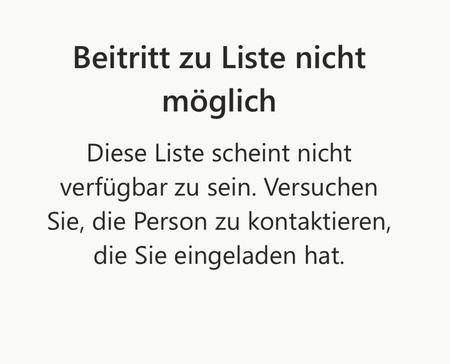
Hi everyone, I've been using Microsoft To Do for years and have always been able to share lists with my family. Now, when I send my wife or son an invitation link, they get an error message saying the list isn't available and they can't join. Here's what I've tried so far: I created a new invitation link and confirmed they're signed in with their Microsoft accounts. I tried using the app on their iPad or iPhone, and also on my MacBook. I checked if the list still exists. Despite all this, sharing still doesn't work. Has something changed with To Do sharing? Is there a new requirement or setting I need to enable? The error message attached. Translated: Any help would be greatly appreciated! Thank you in advance. Best regards Martin648Views4likes5Comments
Forced to login every time I refresh page - Microsoft To Do web app
Hi, I use all my Microsoft apps on the web. Currently using Chrome: Version 81.0.4044.129 (Official Build) (64-bit) Every time I refresh the page - which To Do seems to prompt me to do multiple times daily - I have to login back in to my Microsoft account. This doesn't happen with Outlook or Calendar for web. It's SO annoying. Can anyone tell me why this is happening and what I can do to fix it? Thanks! Lindsay5.3KViews2likes6CommentsDisable incessant nagware popups
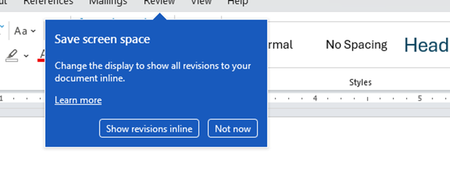
I don't know about everyone else, but I am sick and tired of the nagware pop ups in Word, Excel, PowerPoint, Outlook, etc. Every single product harasses me with pop ups trying to tell me "hey, did you know this feature was here?", "you can do this if you click that", "let me hold your hand through using products you've used for decades even though you don't want daddy Microslop to do that". This is a prime example. I keep getting the same ones again and again and again and everything I've read indicates they should only appear once. But they don't. They keep coming back like a psychotic stalker ex who wants alimony even though you were never married. How do I get this nagware to stop?!371Views1like1Comment
!!!!!!! how to Create a To Do from Microsoft Edge???? Is this really not an option??
I am a wee bit frustrated, there HAS TO BE a way to save a web page in MS Edge into To Do, I have searched high and low and the only thing I can find are third party edge extensions. Anyone have insight or a work around? its driving me CRAZY!!1.1KViews1like2Comments