microsoft teams
1805 Topics
Static Tab and Chat Tab Order Is Not Persisting in Microsoft Teams
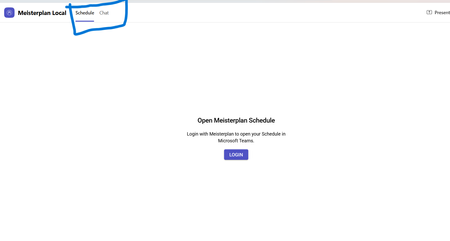
manifest file: "staticTabs": [ { "entityId": "schedule", "name": "Schedule", "contentUrl": "...", "websiteUrl": "...", "scopes": ["personal"] }, { "entityId": "conversations", "scopes": ["personal"] } ] the Schedule tab is intentionally place before conversations: it initially appears correctly, but after navigating away from the app and returning, Teams places Chat/Conversations before Shcedule. I'm using schema version 1.12. The tabs are configured in the specified order in the manifest file, and the expected tab order is displayed correctly when the app is initially opened. However, when I navigate to the Chat section, the tab order changes and does not persist as defined in the manifest file.62Views0likes0Comments
Teams Personal Bot Identity Cache issue
Hi all — looking for guidance on a Teams custom app + bot naming issue. We have a custom Teams app with a bot. The app catalog/admin/dev portal surfaces show the correct app name, and the manifest + Azure Bot configuration appear correctly aligned, but the Teams personal chat surfaces still show the old/wrong bot name. What looks correct: Teams app manifest name.short / name.full have the correct app name Manifest bots[0].botId points to the expected bot ID Azure Bot resource → Configuration → Microsoft App ID matches that bot ID Azure Bot resource → Bot profile display name has the correct name Teams Developer Portal basic information shows the correct name Teams Admin Center shows the correct app short name What is still wrong: Teams left sidebar chat name shows the old/wrong name Chat top header shows the old/wrong name Inline bot sender/name in the conversation shows the old/wrong name The issue reproduces for multiple users It persists after sign out/sign in, uninstall/reinstall, republish, and retesting We may also be seeing a package/version propagation issue: after publishing an updated app package with a newer manifest version, Teams Admin Center still appears to show the previous version. Has anyone seen this before with personal bot apps? Specifically trying to understand: What is the authoritative source for the personal bot chat roster/header/sender display name?302Views0likes1Comment
Unable to submit Teams app update
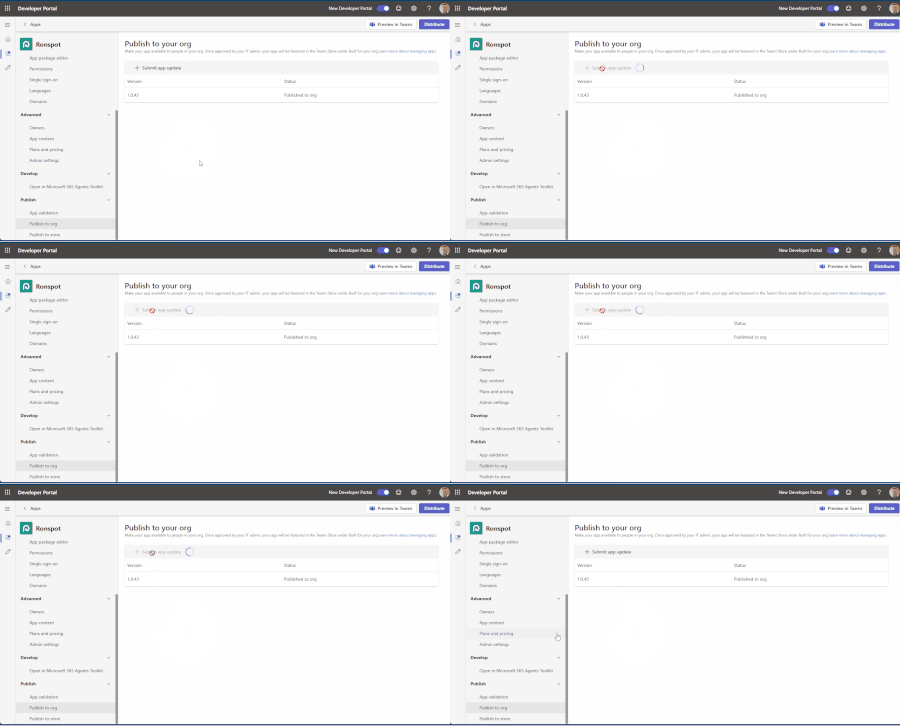
Hello, We have been attempting to submit an update to our Teams app, but we’re experiencing an issue with the submission process. When we click “+ Submit app update,” the loader appears for a few seconds, but then nothing happens. No error message is displayed, and the app update is not submitted. I’ve attached a short video demonstrating the issue. Could you please advise on how we can resolve this? Thank you for your help.241Views0likes1Comment
Teams iOS custom tab not appearing in Safari Web Inspector
Hi, I’m trying to debug an intermittent white screen in a custom Teams tab on iPhone, but I am unable to get "DevTools" to work as described here https://learn.microsoft.com/en-us/microsoftteams/platform/tabs/how-to/developer-tools My setup: Teams iOS 8.14.1 iOS 26.6.1 and iOS 27.0 Beta 6 macOS 26.6.2 Developer Preview enabled My user has been in Microsoft 365 Targeted Release for >24 hours Safari Web Inspector enabled on iPhone Safari pages on the same iPhone are inspectable from my Mac However, with the custom tab open in Teams, Safari → Develop → iPhone shows “No Inspectable Applications.” I’ve already signed out/in, force-quit Teams, cleared app data, re-enabled Developer Preview and tested on two different iPhones/Macs. Is Safari Web Inspector for Teams iOS tabs currently supported, and is there any additional setting required to make the Teams WebView inspectable?Solved318Views0likes2Comments
App Validation failing for no clear reason
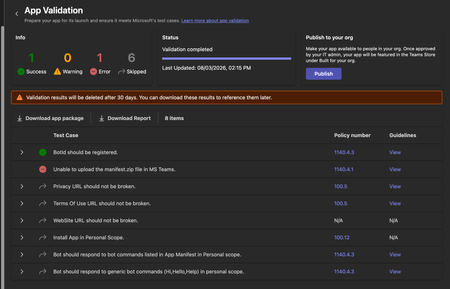
We're trying to get our (very simple) Teams App listed on the app store, but during the App Validation we keep getting the same error: "Unable to upload the manifest.zip file in MS Teams." as seen below: Downloading the report doesn't give any more information, it only lists the only successful validation step ("BotID should be registered") and the error doesn't appear there. I've validated the manifest.json file against the schema, tried reuploading the same manifest to a different org (creating a new app and bot) - validation fails there too. Does anyone have any pointers? Here is my (anonymized) manifest file: { "$schema": "https://developer.microsoft.com/en-us/json-schemas/teams/v1.19/MicrosoftTeams.schema.json", "manifestVersion": "1.19", "version": "1.1.1", "id": "[redacted]", "developer": { "name": "[redacted]", "websiteUrl": "https://www.[redacted].com", "privacyUrl": "[redacted]", "termsOfUseUrl": "[redacted]" }, "icons": { "color": "color.png", "outline": "outline.png" }, "name": { "short": "[redacted]", "full": "[redacted]" }, "description": { "short": "[redacted]", "full": "[redacted]" }, "accentColor": "#4A3AFF", "bots": [ { "botId": "[redacted]", "scopes": ["personal"], "supportsFiles": false, "isNotificationOnly": false, "commandLists": [ { "scopes": ["personal"], "commands": [ { "title": "help", "description": "Show what this bot does and how to connect your account" }, { "title": "connect", "description": "Get a fresh link to (re-)connect your account" } ] } ] } ], "staticTabs": [ { "entityId": "conversations", "scopes": ["personal"] }, { "entityId": "about", "scopes": ["personal"] } ], "permissions": ["identity", "messageTeamMembers"], "validDomains": ["app.[redacted].com", "auth.[redacted].com"] }341Views0likes2Comments
TeamsTab.ReadWriteSelfForTeam: deleting a tab fails with 400 "appId cannot be null or whitespace"
We have a published Teams app that pins a configurable tab into a team channel via Microsoft Graph and removes it again when the user uninstalls our app from that channel. Creating the tab works. Deleting it always fails with a 400 that looks like an unhandled null-argument exception inside the Graph Teams service rather than a permission problem. I reported this in October 2025 as https://github.com/MicrosoftDocs/msteams-docs/issues/13432, but that is a documentation repository and the issue has had no response, so I am reposting here, as we can still reproduce the issue. We're using a delegated token for the operation. The only tab-related scopes are `TeamsTab.Read.All` (read-only) and `TeamsTab.ReadWriteSelfForTeam`. According to the docs (https://learn.microsoft.com/en-us/graph/api/channel-delete-tabs), `TeamsTab.ReadWriteSelfForTeam` is the **least privileged** delegated permission for the delete, so the token should be ok. What works Creating the tab, with the same delegated user token: POST https://graph.microsoft.com/v1.0/teams/«teamId»/channels/«channelId»/tabs Content-Type: application/json { "displayName": "«AppName»", "email address removed for privacy reasons": "https://graph.microsoft.com/v1.0/appCatalogs/teamsApps/«teamsAppId»", "configuration": { "entityId": "«entityId»", "contentUrl": "https://«ourhost»/teams/tabs/channel/«entityId»", "websiteUrl": "https://«ourhost»/app/tickets?channel=«entityId»", "removeUrl": "https://«ourhost»/teams/remove-tab/«entityId»" } } → `201 Created`. The tab appears in the channel and renders correctly. Listing the tabs afterwards also works and returns our tab together with its `id`: GET https://graph.microsoft.com/v1.0/teams/«teamId»/channels/«channelId»/tabs?$expand=teamsApp Works as well and lists our tab. Might be served by the TeamsTab.Read.All permission. What fails DELETE https://graph.microsoft.com/v1.0/teams/«teamId»/channels/«channelId»/tabs/«tabId» → `400 Bad Request` { "error":{ "code":"BadRequest", "message":"appId cannot be null or whitespace. (Parameter 'appId')", "innerError":{ "date":"2026-07-27T13:45:31", "request-id":"f930c847-0b48-4a46-b17e-f0ee10ff8177", "client-request-id":"f930c847-0b48-4a46-b17e-f0ee10ff8177" } } } (leaving in the error details, maybe that helps diagnosing the issue) appID is not even part of the request, it's probably resolved against the TeamsTab.ReadWriteSelfForTeam permission on your side. Let me know if you need any more details.260Views0likes2CommentsCS agent OK in M365 Copilot; Teams chat silent / no Studio session
We are troubleshooting a Copilot Studio agent that works correctly in Microsoft 365 Copilot and in the Copilot Studio test surface, but does not receive inbound activities from Microsoft Teams personal chat. Environment and evidence: - Agent: Copilot Studio agent (custom business assistant) - Copilot Studio agent ID: 88901b10-… (truncated) - Teams/Entra app ID: 7e4a53cc-… (truncated) - Manifest version: 1.0.8 - Channel configuration: Microsoft 365 Copilot + Microsoft Teams - Publish: Succeeded / Channel state: Synchronized - Agent Registry: Available - Authentication: Integrated / Tool credentials: Maker-provided - MCP/custom connector runtime: working (Studio tool test HTTP 200) - Microsoft 365 Copilot routing: working Failure specific to Teams: - Messages in Teams web and desktop appear delivered in the agent personal chat - Agent never replies - Studio monitor has M365 Copilot sessions, but no Teams session for those timestamps - Teams Admin Center Manage apps returns 0 results by name or exact app ID despite Agent Registry Available - Intentionally not republishing / reconnecting OAuth / rewiring connectors because M365 Copilot path proves the same agent+connection works Classification: FAIL — Teams inbound activity is not reaching the Copilot Studio agent. Questions focused on Teams delivery: 1. Why would Teams personal 1:1 messages never create a Studio conversation while M365 Copilot does? 2. Is a missing TAC Manage apps row expected under Unified App Management when Registry shows Available? 3. Known gaps: Agent Registry Available + channel Synchronized, but Teams client chat bound to a non-runtime endpoint? 4. Best diagnostic if Monitor shows 0 Teams sessions after a confirmed client send? Looking for production experience / documented workaround. Redacted evidence available; no tokens/secrets.349Views0likes2Comments
[Adaptive Card] Issue with CodeBlock line numbers and more
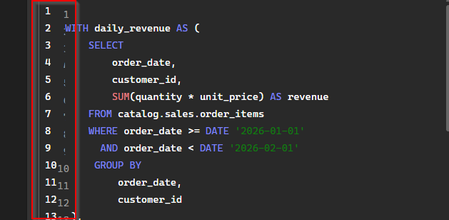
I have a simple adaptive card containing a code block with multiline SQL in it: from botbuilder.core import CardFactory, MessageFactory, TurnContext async def send_sql_card(context: TurnContext): SQL_QUERY = """SELECT order_date, customer_id, SUM(quantity * unit_price) AS revenue FROM catalog.sales.order_items WHERE order_date >= DATE '2026-01-01' AND order_date < DATE '2026-06-01' GROUP BY order_date, customer_id """ activity = MessageFactory.attachment( attachment=CardFactory.adaptive_card( { "type": "AdaptiveCard", "$schema": "http://adaptivecards.io/schemas/adaptive-card.json", "version": "1.6", "msteams": {"width": "full"}, "body": [ { "type": "CodeBlock", "codeSnippet": SQL_QUERY, "language": "sql", }, ], } ) ) await context.send_activity(activity) This worked fine until maybe a few weeks ago. Now, there are two issues: Line numbers appear twice: Not all lines are being shown: It says "Expand (11 lines)", but it only shows 9. This happens on Teams Desktop - it looks fine on the web version.307Views0likes3CommentsMigrating Teams Calling Bot (EchoBot) from VMSS to Windows Containers / ACI?
Hi everyone, I have built a Microsoft Teams Calling Bot using Application-Hosted Media based on the official C# EchoBot sample: https://github.com/microsoftgraph/microsoft-graph-comms-samples/tree/master/Samples/PublicSamples/EchoBot Currently, our signaling logic is fully serverless and runs efficiently on Azure Functions. However, the actual media processing (using the C# Calling SDK which relies on native Windows media binaries) is deployed on VMSS with Windows Server, just like the repository's default deployment guide suggests. Running these Windows VMs continuously is becoming extremely expensive, and we are looking for a cheaper, modern, or "on-demand" alternative to handle the media pipeline. Since raw audio processing strictly requires these native Windows-based Media binaries, I would like to ask the community: 1. Windows Containers (ACI / AKS): Has anyone successfully run this C# EchoBot/Media SDK inside Windows Containers (such as Azure Container Instances or AKS)? If so, how do you handle the public IP and port-binding requirements for the media sockets (since the platform needs direct public connectivity for UDP/TCP traffic)? 2. On-Demand Provisioning: Are there any known architectures or best practices for spinning up the media processor only when a call starts (e.g., triggering an ACI instance via the Azure Function signaling bot) and tearing it down afterwards to keep costs near zero when idle? 3. Alternative Approaches: If you have solved this high-infrastructure cost problem for a real-time raw audio bot in production, what architecture did you end up using? Any documentation, GitHub references, or architectural advice would be highly appreciated! Thanks!279Views0likes2Comments