microsoft teams
17597 TopicsTurn GitHub notifications into code with GitHub Copilot in Microsoft Teams
GitHub can now bring repository updates into a channel, group chat, or private chat. When an update needs action, reply to the notification and @mention GitHub with the task you want GitHub Copilot to carry out. GitHub Copilot uses the issue or pull request linked in the notification and the conversation in the thread to understand the task. It can reproduce a bug, run tests, implement a fix, and prepare a pull request for review. Turn an issue notification into a pull request If the player doesn’t load, open the video in a new window: Open video For a bug report, the workflow starts in the notification thread: A GitHub Issue notification arrives in a Teams channel with a link to the reported bug. You @mention GitHub to investigate the issue and prepare a proposed fix in a pull request. The team reviews the pull request, iterates with GitHub Copilot, tests the proposed changes, and decides whether to merge. Starting from the linked issue and thread lets your team delegate the work to GitHub Copilot without rebuilding the request from scratch. The same workflow can be used to implement a feature, expand test coverage, update documentation, and more. Product and engineering teams at Microsoft are already leveraging the GitHub app in Teams to build products today. Get started Explore the new GitHub app in Microsoft Teams (previously called GitHub Notifications). If you already have GitHub Notifications installed, update the app to the latest version. The legacy GitHub app will be renamed “GitHub (deprecated)” and retired on November 16. Learn more at teams.github.com! Turn the updates your team follows into code your team can review.541Views0likes0Comments
Disable incessant nagware popups
I don't know about everyone else, but I am sick and tired of the nagware pop ups in Word, Excel, PowerPoint, Outlook, etc. Every single product harasses me with pop ups trying to tell me "hey, did you know this feature was here?", "you can do this if you click that", "let me hold your hand through using products you've used for decades even though you don't want daddy Microslop to do that". This is a prime example. I keep getting the same ones again and again and again and everything I've read indicates they should only appear once. But they don't. They keep coming back like a psychotic stalker ex who wants alimony even though you were never married. How do I get this nagware to stop?!409Views1like2CommentsUltimate Polling and Quiz Experience with Polls app: The Replacement for Forms app in Teams meeting
Initially Forms app was launched in Teams - for different experiences based on the sync vs async user scenarios, as it points to polling experience in meetings for quick creation to launch, while it points to survey experience in the context of Teams channel.To provide an intuitive and easy-to-access experience , Polls app was launched - a dedicated app for all your polling and quiz needs in Teams meeting and chat. We are glad to see that hosting an effective and interactive meeting just got easier after the launch of Polls.1.1MViews7likes43Comments
Custom video filters for MS Teams
Hi, I've been experimenting with the Teams Video Filters platform that was announced in public preview in 2023 and have successfully built a proof of concept. Before investing further, I'm trying to understand Microsoft's current direction for this capability. While the APIs and documentation still exist, I haven't found much recent discussion, roadmap information, or examples of new apps being built in this space. Can anyone from Microsoft comment on: Whether Video Filters remains an actively supported extensibility platform Whether new third-party filter apps are still encouraged Whether there are plans for further investment in this area I'm mainly trying to assess whether this is a good long-term bet for a commercial Teams app, or a feature area that has effectively plateaued. Thank you and BR, Sergey.25Views0likes0Comments
Can I use forms inside Teams to automate surveys at intervals?
I’m trying to set up a few recurring surveys for things like monthly pulse checks and occasional employee feedback, ideally without someone from HR having to remember to send them out every time. I know Forms works inside Teams, but I’m not sure how far the automation goes. Can you schedule the same survey to go out every month or quarter, send reminders to non-responders, and keep the results together so you can compare them over time? Has anyone built a decent setup for this?67Views0likes2CommentsMicrosoft Teams transcription language settings
Hi! With a Microsoft 365 Business Premium license and a Copilot license, I can use transcription during a Teams meeting by setting the spoken language to Auto Detect. However, the transcription is sometimes inaccurate. Is there a way to limit the language detection scope? For example, is it possible that I select only English and Chinese, and Auto Detect is restricted to those two languages instead of also attempting to detect languages such as Spanish or French ?169Views0likes2CommentsMicrosoft Teams Notifications Interrupting Video Audio? Here’s How to Fix It
Imagine watching a training video, attending an online course, or listening to a technical presentation. Suddenly, a Microsoft Teams message arrives, and your video audio becomes quieter or stops completely. Sometimes, the sound returns automatically. In other cases, you must pause the video, adjust the volume, or restart playback. link to the post34Views0likes0CommentsCross-Platform Meeting Connect: Great in-room meeting experiences across Teams and Zoom
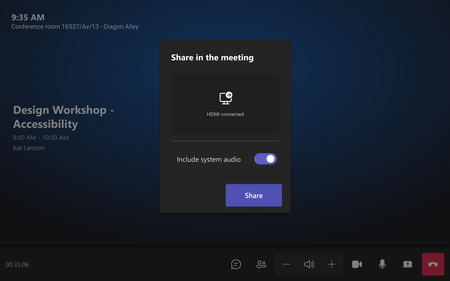
Your team is gathered in a Teams Room for a project review, but the customer’s invitation is for a Zoom meeting. You want to use the room’s audio, video, and displays, share the presentation, and stay connected to the conversation. You shouldn’t have to give up your room’s setup just because the meeting is on another platform. Whether your organization uses Teams or Zoom Meetings today, people need the flexibility to meet with customers, partners, and colleagues on a range of platforms. Direct Guest Join will allow Teams Rooms to join Zoom Meetings and Zoom Rooms to join Teams meetings. Microsoft and Zoom are building on that foundation with Cross-Platform Meeting Connect, to address some of the most requested needs of people joining meetings from a conference room, regardless of the platform they use. The goal is a more complete room experience for the everyday cross-platform meetings that bring organizations together. Planned improvements to sharing, meeting visibility, room controls, and HD video are designed to help people contribute confidently using the room’s capabilities. Share ideas from the room A more seamless room experience also means making it easy to share and view content. With planned HDMI sharing, people will be able to connect a laptop to the room and share content directly into the meeting. The room will also be able to display content shared by other participants, helping everyone follow the same presentation or document. Stay connected to people and the conversation Knowing who is in the meeting helps people collaborate with confidence. A participant roster is designed to show the meeting participant list on room display and update as people join and leave. It will give in-room participants a clearer view of who is in the meeting especially when some attendees are not visible in the current video layout. Enhanced chat visibility will help everyone in the room follow both parts of the meeting conversation by bringing read-only chat into the room layout alongside the meeting video. People will be able to show or hide the chat panel as needed, without having chat appear unexpectedly over video. This experience is read-only: participants will be able to view chat supplied by the meeting platform but not compose or send messages from the room itself. Use familiar room controls People should be able to rely on the controls in front of them. With Cross-Platform Meeting Connect, planned improvements will keep room hardware and touch console controls synced with the hosted meeting, prioritizing mute, unmute, and end-call for the initial delivery. That synchronization is intended to preserve the room's behavior people expect and reduce uncertainty about whether the room is muted or has left the call. Keep people and content in view For rooms with two displays, we are introducing a layout that uses each screen for a different purpose: shared content on one screen and the participant gallery on the other. This would let in-room attendees follow a presentation while keeping remote participants in view. Video improvements support sending and receiving video at up to 1080p for Teams meeting on Zoom Rooms. Actual resolution will depend on the meeting platform’s policies, the room device, and network conditions. The experience is designed to adapt when bandwidth is constrained, or hardware cannot sustain the higher resolution, with meeting reliability remaining a priority. More flexibility, with clear expectations Microsoft and Zoom share a goal of helping people collaborate across platforms while making better use of their meeting rooms. These improvements are designed for both directions, with a focus on the capabilities people need most in everyday room meetings. A guest meeting will still differ from a native meeting, and this work does not extend every enhancement to every platform. As the integration evolves, cross-platform meeting experiences will move forward together. Individual capabilities will depend on support from both the room system and the meeting platform, helping ensure people see controls that work for their meeting experience. What’s next With Cross-Platform Meeting Connect, Teams Rooms will make it easier for people to join, participate, and collaborate in meetings hosted on other platforms, helping organizations get more from their meeting room experience. Stay tuned as we continue working toward more ways to make cross-platform meetings easier and more connected.2.4KViews5likes3CommentsMaking Microsoft Teams more responsive, reliable, and ready for work
By: Ihor Lukyanenko, Harsh Nagaonkar, Vishal Ratna and Suprem Gupta Every day, people rely on Microsoft Teams to connect with colleagues, share ideas, make decisions, and move work forward. Whether they're joining a meeting from a laptop, catching up on conversations from a mobile device, or collaborating across multiple projects throughout the day, they expect Teams to be fast, responsive, and ready when they need it. In our June 2026 update, we shared gains across chat switching, reduced hangs and freezes, and faster people search. Since then, we’ve continued to raise the bar. From hardware-constrained devices to employees working on the go from mobile phones, delivering a consistent, high-quality experience across every platform remains a key focus for the Teams engineering team. In this post, we'll highlight several recent performance investments that are helping make Teams faster, more efficient, and more responsive across desktop and mobile experiences. Teams Efficiency Mode: Delivering a Better Experience on Hardware-Constrained Devices | Windows, MacOS Great collaboration experiences shouldn't depend on having the latest hardware. Many of our customers rely on older devices, entry-level laptops, or systems operating under challenging network constraints. As organizations extend device lifecycles and support increasingly diverse hardware fleets, ensuring a high-quality of experience across all configurations remains an important priority. This is why in June we launched Teams Efficiency Mode, a set of optimizations designed to reduce resource consumption and improve overall responsiveness on hardware-constrained devices. Teams Efficiency Mode gets enabled by default on devices with slower / legacy CPUs and limited amount of RAM (8GB or less). Users on such devices see a corresponding indicator in the Teams title bar. Also, on any device, Efficiency Mode can be turned on and off manually through the dedicated setting. The benefits are visible in everyday workflows. In Efficiency Mode, Teams launches up to 20% faster on hardware-constrained devices, helping users get into conversations, meetings, and tasks more quickly. When in a meeting, Teams automatically adjusts the resolution of user’s camera to preserve the CPU headroom for the audio path. As a result, users on hardware-constrained devices can maintain a high quality of their meeting experience despite the disproportionately higher thermal throttling rates. Encouraged by these early wins, we are actively working on expanding the set of optimizations applied in Efficiency Mode. By making Teams more efficient and resilient on a wider range of hardware, we're helping ensure that users can stay productive, collaborate confidently, and get the most out of Teams regardless of the device they're using. Making Responsiveness Measurable – and Actionable | Android Responsiveness has consistently been one of the biggest sources of dissatisfaction in our Android customers’ feedback. We knew users were experiencing friction, but we lacked a single metric that could measure responsiveness across the many interactions they perform every day. To close that gap, we introduced the App Responsiveness Index (ARI). ARI connects real user actions—such as taps, scrolling, and navigation—with Android frame data. It groups frames into roughly 208 ms “blinks” and measures the perceived smoothness of each interaction and screen. More importantly, it gives teams actionable telemetry at the individual screen level. That visibility made the main causes of poor responsiveness much clearer: Memory issues, responsible for approximately 60–65% of the impact Blocking work on the main thread Heavy layouts We started by addressing memory horizontally across the app. This included fixing memory leaks, reducing database-call explosions, and resolving out-of-memory failures. The results were significant. Our slow-frame metric improved 40% YoY. We also brought the user-perceived ANR rate down to an all-time low of 0.12%. Targeted memory improvements reduced total blocking garbage-collection duration by 23%. Because blocking GC pauses application work, this improvement has a direct effect on how responsive the app feels. We also wanted to make these gains sustainable. For scenarios covered by system tests, we introduced memory regression gates that evaluate changes before they are merged. These gates have already caught several potential regressions at the pull-request stage. In parallel, we built AI-powered pull-request guardrails to identify risky patterns even earlier. These guardrails currently operate at 93% precision, and we are evolving them into an agentic system that can detect, explain, and eventually help prevent responsiveness regressions before they reach production. Image Thumbnails – 17% Faster Loading | Android Every day, people use Microsoft Teams to share screenshots, photos, files, and other visual context that keeps work moving. In media-heavy chats and channels, those images are often experienced first as thumbnails while users scroll through a conversation. When those thumbnails appear late, the conversation can feel less responsive even when the service behind it is healthy. Making media-heavy chats feel smoother For users, the problem was simple: in some Android conversations, thumbnails did not always keep pace with scrolling. A user could reach a message and briefly see an empty placeholder before the image appeared. In other cases, multiple thumbnails appeared together after a delay, creating a bursty experience that made scrolling feel uneven. This was especially visible in chats and channels with a lot of shared media. Images are part of the conversation, so delays in rendering them interrupt the flow of reading, reviewing, and responding. The goal of this work was to make thumbnails appear earlier and more predictably as users move through a conversation. The interesting part was that the backend was not the whole story. Service-side latency could look healthy, and many images were already being served from cache. Still, the user could see delayed thumbnails. That told us we needed to look at the full client-side journey of an image, not just request and response timing. How we did it: mapping the image journey To understand the gap, the team created Image Journey Mapper for Android. This was not a feature by itself; it was a diagnostic subsystem designed to answer one question: where does time go between creating a media block and showing the thumbnail on screen? We first identified the milestones that mattered in the lifecycle of a thumbnail: UI block creation, view attachment, cache lookup, network queueing, download, decode, and render. Then we added instrumentation across those stages and flighted the diagnostic code only to Canary users, which are Microsoft internal users. That allowed us to collect real usage data while keeping the scope controlled. For this investigation, the journey events were written into a separate purpose-built table in the device database. Once enough data was collected from internal users viewing images in Teams, the team analyzed the patterns across many journeys. The important shift was that image rendering was no longer a single opaque interval; it became a stage-by-stage timeline. What we found The Journey Mapper data surfaced three important client-side bottlenecks. They were valuable because each one pointed to a different layer of the image pipeline, and each required a different kind of fix. 1. Some images were being fetched again after cache churn In media-heavy sessions, larger thumbnails and smaller frequently reused assets could compete for cache space. When smaller assets were evicted, the app had to fetch them again even though they were likely to be needed repeatedly. The fix was to make cache behavior more intentional by separating workloads so smaller frequently reused images were less likely to be displaced by larger media. 2. Some requests were waiting in the client network queue A slow thumbnail can look like a network problem from high-level telemetry. The mapped journey showed a more specific pattern: for some images, transfer had not started yet. The request was waiting in the client networking layer. That led us to tune network concurrency for image-heavy workloads so independent thumbnail requests could make better use of available device and network capacity. 3. Loading often started too close to display time The mapper also showed that image blocks could exist before their thumbnails started loading. That meant the app had unused time before the user reached the image. To take advantage of that window, we introduced thumbnail warmup: upcoming media blocks near the viewport can be prepared before they are visible, with cache-aware checks and bounded concurrency. What we changed The fixes followed the diagnosis. We tuned the networking path for concurrent image requests, made cache behavior more predictable for different image sizes and reuse patterns, and added controlled thumbnail warmup so images could be prepared before the user reached them. These changes were designed to improve perceived performance without turning prefetch into unbounded background work. Warmup remains cache-aware, concurrency is limited, and rollout is measured carefully so latency gains are balanced with responsiveness, device resource usage, and reliability. What we have seen so far This work is still in progress. The experience has been validated in internal rings and exposed to our private preview customers for a meaningful period. The team is using the learnings from that exposure to prepare the next broader rollout phase, with general availability as the near-term goal. The current results show that the targeted image-pipeline changes are moving the experience in the right direction, with a measured latency reduction of approximately 17%. More importantly, the visible user impact is clearer in day-to-day use: thumbnails are pre-loaded before the user reaches them, loaders are no longer visible in the optimized path, and users do not have to pause for images to load while scrolling through media-heavy conversations. At the same time, we continue to carefully observe the rollout to ensure that latency gains are balanced with responsiveness, device resource usage, and reliability. Looking Forward As Microsoft Teams continues to evolve with richer collaboration experiences and increasingly intelligent AI-powered capabilities, maintaining a fast and responsive user experience remains a foundational engineering priority. We will continue investing across desktop and mobile platforms to improve responsiveness, reduce resource consumption, accelerate content loading, and ensure Teams performs reliably across the wide range of devices and environments our customers depend on every day.903Views1like0CommentsTeams Meetings Get AI Memories for Copilot
If your tenant has Microsoft 365 Copilot licenses, you’ll soon see meeting archive files generated by AI for Teams meetings. The files are stored in a SharePoint Embedded container, but they’re not intended for user consumption. Instead, AI tools like Copilot and the Facilitator agent will use meeting archive files to generate better responses to questions from meeting participants about what happened during meetings. It’s yet another file type to figure out how to govern. https://office365itpros.com/2026/10/21/ai-meeting-archive-files/73Views0likes0Comments