microsoft teams
31 Topics
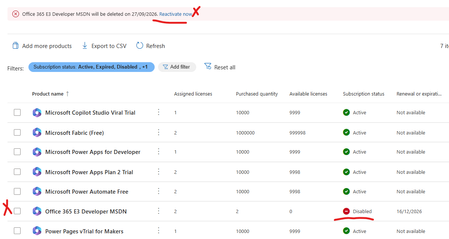
Error office 365 e3 developer license will be deleted on XXXXX. Currently disabled
My Office 365 E3 Developer has been marked for deletion and disabled today. No earlier comms from Micrsoft or any sort of messages.It just locked our my E3 Developer license has there a not supporting it any more. I wanted to try and backup/export my mail box and no luck - the option is greyed out. My SharePoint admin center has been blocked also can't backup any of my files. I'm just helpless.What a shame Microsoft What other plans can i move to and what should i do now since Teams and mail is not working. Can I at least get a a grace period. Any resources or advice would be appreciatedSolved1.3KViews1like17CommentsTeams created in Teams have Group Privacy: HiddenMembers
Since I could not create Class Teams from existing Groups (the option never appears), I tried creating the Teams in Teams first. This works, but now I can’t edit the Groups in the Admin Center because they have a Group Privacy setting that the Admin Center doesn’t seem to understand (HiddenMembers). The drop-down stays on “Loading” forever and it’s not possible to save any changes to the group. I’ve tried editing in Teams admin center too, but it helpfully says: We can't save the team. Please try again. If you continue to have problems, contact {SupportLink}. Is there any way to fix this???5.2KViews1like2Comments
Identifying Inactive Teams
Hello, I am trying to identify inactive Teams, I work for a reasonably sized company so we have hundreds of Teams setup. I have tried running a Usage Report but that only shows Teams that have had activity within the last 7, 28 or 90 days, if a Team has had no activity for over 90 days it does not seem to appear within the report. So far the only way in which I have come up with identifying these inactive Teams is to compare the Usage report with the list of Teams manually which is less than ideal. Are there any alternatives that I am missing? I have read about running some kind of Powershell script but I am not that familiar with using Powershell. Thanks for any suggestions.9KViews1like5Comments