microsoft lists
1748 Topics
JSON formatting to change background color of ENTIRE column of list?
Hi, I'm trying to use JSON formatting to change the color of an entire column of a SharePoint list, and I can't figure it out. Setting the background-color style property appears to only affect the background color of the text. You can still see the default column color in between rows. I want the whole column to be one color. Is there a way to do that?Solved151Views0likes2Comments
Custom Formatter for Read-Only Fields conditional based on other columns
Hello! Does anyone know if it's possible with the fieldsettings, readonly formatting, to make it conditional based on a Person field? It's a multi people field if that makes a difference? I ideally want to make certain fields read only based on who is viewing it (without having to use a Power App customised form!). This is what I want (but I know the syntax is likely all wrong!) but not sure if it's possible to use an IF statement with boolean statements? { "sections": [ {} ], "fieldsettings": [ { "name": "Comments", "readonly": "=if([$People.email] == me, false, true)" } ] }473Views0likes2Comments
MS List Column Width Forced
Hi, I've had a number of MS lists and been able to enter grid view and amend the width of columns and the text doesn't overflow which I want to keep the overall list width smaller; but as of yesterday all my columns are forced to be as wide as the text, meaning the that 1 column can be multiple screens wide for multi-line columns and they can't be resized smaller Is this a bug? Any help appreciated.416Views0likes2Comments
MS List - View a list of columns, including internal column name and column alias
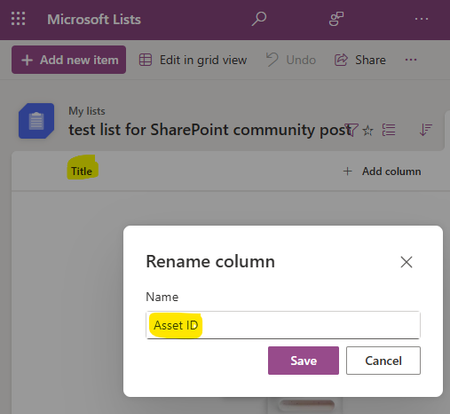
I'm trying to make sense of column names in MS Lists. It seems like columns can have both an internal/system name and an alias. For example, my Title column (internal/system name) is displayed as a custom "Asset ID" column in the Microsoft Lists app. Is there a way to view a list of all column names, and the list would show both the internal/system column name and the column alias? Like this:138Views0likes1CommentImport picklist values for SharePoint List choice field
I have a column in a SharePoint List that uses the choice field type. I'm able to manually enter each choice value by copying/pasting text from an Excel spreadsheet. Is there a way to import a long list of values directly into SharePoint to save time?437Views0likes3Comments
Create reference number in SharePoint lists with each new entry
Migrating an Excel table into SP lists, so I can existing reference numbering system, so with each new entry I need this to increase by one. Let's say the current ref number is R5687 how to I ensure that subsequent entries are allocated a reference number, which is one more last the last296Views0likes3CommentsStore both current employees (AD) and past employees (non-AD) in MS List column?
I have an EMPLOYEE text column in an Excel spreadsheet. I plan to import the spreadsheet as an MS List. The EMPLOYEE spreadsheet column contains both current and past employee names. If I create a new PERSON column in the List to store this data (for clean querying and automation purposes), only the current employees will match up with the Active Directory picklist, not the past employees. If I enter past employees into the PERSON column, the List won't let me save those values since they're invalid. Is there a way to force the past employee names into the PERSON column as broken/unlinked values, such as through a Power Automate flow? Or do I have no choice but to use a TEXT column instead with a custom picklist (manually maintained picklist values)?Solved167Views0likes4CommentsExternal Users Unable to Access Microsoft List Form
We have created a Microsoft List and are using the default Microsoft Lists Form for data entry / intake form. Internal users can access the form URL and submit items successfully. However, external users are unable to access the form link, even though they have been granted Contribute permissions to the SharePoint list. External users can: Access the list Create new items using the + New button Edit items based on their permissions However, they cannot access the dedicated Microsoft Lists Form URL and getting following error. This link is only available to internal users. This link is not available to you. Our requirement is to allow external users to: Open the Microsoft Lists Form URL View the form Submit new items without providing additional access beyond what is required for form submission, and without using Microsoft Forms. Is guest/external user access to the Microsoft Lists Form experience supported? If so, what configuration or permissions are required to enable external users to access and submit items through the form URL?Solved604Views0likes3CommentsRecycle Bin and Site Content Hidden for Site Members and Site Visitors
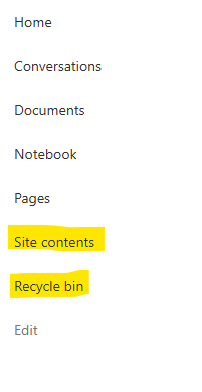
I posted this before but made a mistake with my write up, so I am reposting. I have a requirement that the Recycle bin and Site Contents should be be hidden from the Site Members and Site Visitors. Please how can I achieve this because the Server Infrastructure activation is not working for me. Any workarounds? Please help333Views0likes1Comment