microsoft lists
1748 Topics
JSON formatting to change background color of ENTIRE column of list?
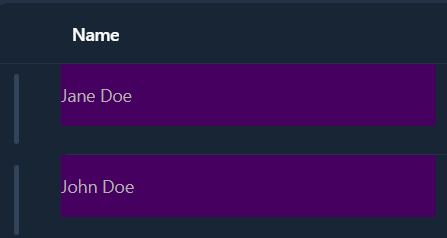
Hi, I'm trying to use JSON formatting to change the color of an entire column of a SharePoint list, and I can't figure it out. Setting the background-color style property appears to only affect the background color of the text. You can still see the default column color in between rows. I want the whole column to be one color. Is there a way to do that?Solved151Views0likes2Comments
ID Calculated Column Not Showing
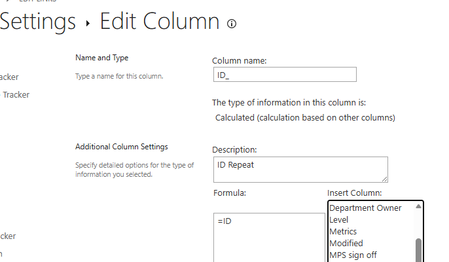
I have created a calculated column to show the ID in an opened List item. This is using =ID in the formula box. However, in the actual List item, the vasty majority are showing ID as 0: There does not seem to be a pattern for this, Does anyone have an explanation for this?380Views1like4CommentsRecycle Bin and Site Content Hidden for Site Members and Site Visitors
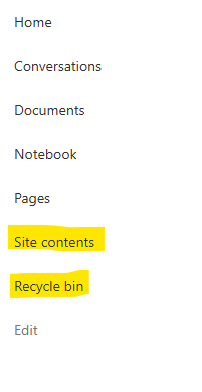
I posted this before but made a mistake with my write up, so I am reposting. I have a requirement that the Recycle bin and Site Contents should be be hidden from the Site Members and Site Visitors. Please how can I achieve this because the Server Infrastructure activation is not working for me. Any workarounds? Please help333Views0likes1CommentUltimate Polling and Quiz Experience with Polls app: The Replacement for Forms app in Teams meeting
Initially Forms app was launched in Teams - for different experiences based on the sync vs async user scenarios, as it points to polling experience in meetings for quick creation to launch, while it points to survey experience in the context of Teams channel.To provide an intuitive and easy-to-access experience , Polls app was launched - a dedicated app for all your polling and quiz needs in Teams meeting and chat. We are glad to see that hosting an effective and interactive meeting just got easier after the launch of Polls.1MViews7likes40CommentsMicrosoft Lists forms: What's New
Microsoft Lists forms help you get the specific details you need from various people and groups, without overexposing your full list and list details. With these improvements, you can create more dynamic, customized, and efficient forms, helping to streamline your workflows and gather more targeted data - and they look beautiful and load and submit quickly. Let's explore these updates in detail – first in a short demo video tour, and then more details below. Watch now: Seamless creation of forms with more customization Quick Creation of List Forms from Lists home, SharePoint, and the Lists app in Teams Creating list forms has never been easier, or more integrated. Now, users can get started with a form without first needing to create a new list. As you create your form from Lists home, SharePoint, or the Lists app in Teams, the underlying list for responses is created automatically behind the scenes. This seamless process saves you time and effort, allowing you to focus on collecting and managing your data. Conditional Branching Make your forms smarter and more dynamic with conditional branching. This feature allows you to show or hide questions based on previous answers, ensuring respondents only see questions relevant to them. This not only improves the user experience but also helps you collect more accurate and targeted data. s the submitter makes their choices. Logo Support Brand your forms with your organization's logo. Adding a logo to your forms not only makes them look more professional, but it also reinforces brand identity. Create more relevant forms with additional field types Note the image above and the corresponding numbers to indicate new supported field types: 1. Location Collect location data with support for location columns on forms. Whether you're planning events, managing inventory, or tracking deliveries, this feature ensures you have accurate location information at your fingertips. 2. Image With image column support, you can now include images in your forms. This is particularly valuable on mobile browsers, where the form can access the device camera for quick image capture and upload. Ideal for audits, visual surveys, product feedback or any form where images can enhance the data collection process. 3. Lookup support Enhance your forms with lookup columns, enabling you to pull in data from other lists. This means that values from a column in another list can be displayed as choices on your form. This feature is particularly useful for creating relationships between different datasets, ensuring your forms are always populated with the most current information. However, please note that currently respondents need at least read access to the underlying source list to see and select the options. 4. Attachments Need to collect files or documents from your respondents? No problem! Our new attachment field support allows users to upload files directly to the form. This is ideal for scenarios like job applications, project submissions, or any situation where additional documentation is required. Enjoy greater control over your forms with additional settings Get Notifications for new form responses Choose to be notified the moment someone submits a response to your form. This feature ensures you stay on top of your data collection and can act promptly on new information, making your workflow more efficient and responsive. By default, this setting is turned off, but you can subscribe to the forms for which you wish to receive notifications. Allow single/multiple responses per user, per form Our new response settings provide you with control over how many times a user can respond to your form. You now have the option to permit either single or multiple responses per user, offering greater flexibility. This feature will be available shortly. Schedule when form submission starts and when it ends Timing is everything! With the new scheduling feature, you can set specific start and end dates for your forms. This is perfect for time-sensitive surveys, event registrations, or any scenario where you need to control when your form is available to respondents. Additional Lists improvements Link unfurling in Microsoft Teams Links to Lists, list items, and Lists forms will display richer details such as title and path when shared in Teams chats and channels. This new feature will enhance collaboration by making it easier for users to recognize specific List link types, in addition to viewing the title and path. n links resolve to a more visual preview. Hide collaborators Based on customer feedback regarding privacy, admins can run the PowerShell command Set-SPOSite -Identity -HidePeopleWhoHaveListsOpen $true to disable this feature on a per-site collection basis, so users cannot see who is working on the list at the same time AND the lists still support co-authoring capabilities, just minimizes the visibility of your co-authors on that sites' lists. Learn more. In the end... We hope you are as excited as we are about these new features rolling out! Try them and see how they can transform your data collection and management processes. Our team is continuously working on new features and improvements to make Microsoft Lists forms even better. Stay tuned for more updates, and don't forget to share your feedback with us. Your input is invaluable in helping us shape the future of Microsoft Lists. Visit the Microsoft Lists resource center: https://aka.ms/MSLists Submit feedback: https://aka.ms/MSLists/Feedback Discover help and 'how to' content: https://aka.ms/MSLists/Help Enjoy, sahilbaid53KViews8likes30Comments
SharePoint List "Lookup" columns not available in Get Items in Flow
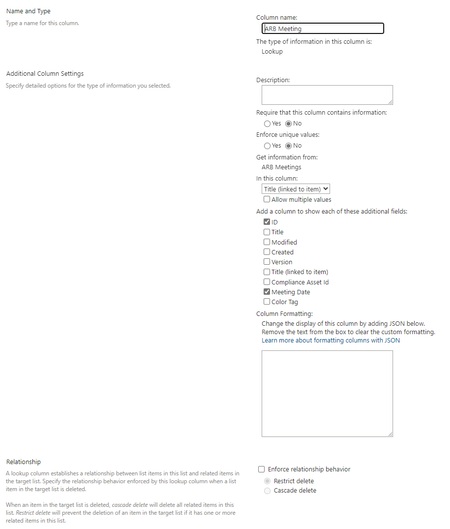
I have seen this discussion before (see https://jgvjg48436.lithium.com/t5/General-Power-Automate/Missing-Columns-from-SharePoint-List-in-Flow/td-p/239360) but suggested solutions have not resolved my issue. So, I am looking for some more guidance or suggestions. I have a SharePoint list with a Look-up column. Using Get Items in a cloud flow this field does not display. Setup SharePoint List called "ARB Meetings" SharePoint List called "Decision Register", this has a lookup column to the ARB Meetings list. Get Item Note, I have tried using Limit columns by View and created a new view including the required lookup column, without success. In the Decision Register SharePoint List, there are some items where the ARB Meetings column is blank, I don't know if this could cause an issue? Co-Pilot Help I have asked Co-Pilot for help, which gave me plently of good options I have tried the following without success: If your lookup column is not showing in the Get items action in Power Automate, here are a few steps you can try to resolve the issue: Check List Views: Ensure that the lookup column is included in the default view of your SharePoint list. Sometimes, columns not included in the view might not appear in Power Automatehttps://jgvjg48436.lithium.com/t5/Building-Flows/Get-items-not-showing-lookup-column/td-p/859264. Refresh the Flow: After adding the lookup column to your list, refresh your Power Automate flow. You might need to close and reopen the flow designer to see the updated columnshttps://jgvjg48436.lithium.com/t5/General-Power-Automate/Missing-Columns-from-SharePoint-List-in-Flow/td-p/239360. Limit Columns by View: In the Get items action, use the Limit columns by view option to select a view that includes the lookup column. This can help ensure that the column is retrievedhttps://jgvjg48436.lithium.com/t5/General-Power-Automate/Missing-Columns-from-SharePoint-List-in-Flow/td-p/239360. Check Column Settings: Verify that the lookup column is properly configured in SharePoint. Ensure it is not hidden or restricted in any wayhttps://jgvjg48436.lithium.com/t5/Building-Flows/Get-items-not-showing-lookup-column/td-p/859264. Pagination Settings: If your list has a large number of items, enable pagination in the Get items action settings. This can help retrieve all items, including those with lookup columnshttps://learn.microsoft.com/en-us/sharepoint/dev/business-apps/power-automate/guidance/working-with-get-items-and-get-files. If these steps don't resolve the issue, you might want to try creating a new flow from scratch to see if the lookup column appears. Sometimes, starting fresh can help Power Automate recognize new or updated columns. Let me know if you need further assistance or if there's anything else I can help with! References [1] https://jgvjg48436.lithium.com/t5/Building-Flows/Get-items-not-showing-lookup-column/td-p/859264 [2] https://jgvjg48436.lithium.com/t5/General-Power-Automate/Missing-Columns-from-SharePoint-List-in-Flow/td-p/239360 [3] https://learn.microsoft.com/en-us/sharepoint/dev/business-apps/power-automate/guidance/working-with-get-items-and-get-files Thank-you, Irene4.5KViews1like3Comments
Custom Formatter for Read-Only Fields conditional based on other columns
Hello! Does anyone know if it's possible with the fieldsettings, readonly formatting, to make it conditional based on a Person field? It's a multi people field if that makes a difference? I ideally want to make certain fields read only based on who is viewing it (without having to use a Power App customised form!). This is what I want (but I know the syntax is likely all wrong!) but not sure if it's possible to use an IF statement with boolean statements? { "sections": [ {} ], "fieldsettings": [ { "name": "Comments", "readonly": "=if([$People.email] == me, false, true)" } ] }473Views0likes2CommentsMS List Column Width Forced
Hi, I've had a number of MS lists and been able to enter grid view and amend the width of columns and the text doesn't overflow which I want to keep the overall list width smaller; but as of yesterday all my columns are forced to be as wide as the text, meaning the that 1 column can be multiple screens wide for multi-line columns and they can't be resized smaller Is this a bug? Any help appreciated.416Views0likes2Comments
Create reference number in SharePoint lists with each new entry
Migrating an Excel table into SP lists, so I can existing reference numbering system, so with each new entry I need this to increase by one. Let's say the current ref number is R5687 how to I ensure that subsequent entries are allocated a reference number, which is one more last the last296Views0likes3Comments