microsoft 365
88 Topics
Microsoft Entra and logging in
Hi there, I signed up for a free trial of M365 with my iCloud email. It showed me what my login would be, i.e. John@<companyname>.onmicrosoft.com I never received an email to my iCloud account with any type of confirmation that the trial was active or my login info. I did not screenshot the login as I thought I would get an email with it. How can I retrieve that information as I obviously cannot login with my iCloud account. Recently I have been getting emails like these to my iCloud. You have a new recommendation for Arlo inc Do not allow users to grant consent to unreliable applications See why this recommendation was generated for your tenant and how to remediate it in the https://entra.microsoft.com/#view/Microsoft_AAD_IAM/RecommendationDetails.ReactView/recommendationId/2bc392f3-b17c-44ce-bb25-b52a2b095d0b_integratedApps/source/email. https://go.microsoft.com/fwlink/?linkid=2260505. But again, I have no idea what my login is. Any help would be greatly appreciated. My trial has been active for a few days now and I am running out of tie with it. Sincerely, John36Views0likes1Comment
I need to speak to a person at Microsoft
Firstly, I don't know if this is the correct place to ask, if not, I apologise, and would be greratful if I could be directed to the correct medium. So..... *** I am writing this on behalf of someone else *** His account has been locked after he had been hacked and infected with a virus, and Microsoft will not unlock it. However, they have decided (today) to take his money for his 365 subscription, that he can't use, and doesn't want. When looking for a way to cancel it, the answer is log-in to his account and cancel it himself. BUT, he can't log in because the account is locked. He has tried looking for a phone number to speak to someone, but cannot find any. He has tried looking for a Live Chat, but, (if it exists) it is only available after he logs in. He just wants to cancel the subscription, and get a refund. Can someone please give me a contact number - preferably in the UK, but any English speaking representitive, in any countrty will do. Thanks,1.8KViews5likes3Comments
M365 Admin Center Global Administrator Lockout
Hello Microsoft Community, I am seeking urgent assistance and guidance regarding a critical Microsoft 365 tenant lockout that has been ongoing for several days without a resolution or proper communication from the support team. Our organization manages Microsoft 365 services for a business with more than 200 active users who depend on Microsoft 365 for their daily operations. Issue Description We have been locked out of our Microsoft 365 tenant's administrator account. This prevents us from properly managing our Microsoft 365 environment and restoring normal access to essential business services. Our business-critical data, including important documents and operational information, is stored in SharePoint. The inability to access and manage these services has significantly disrupted our business operations. Microsoft Support Ticket References We have raised multiple support tickets and followed up repeatedly, but the issue remains unresolved. Tracking ID: 2610050040001149 Tracking ID: 2610090010001066 Tracking ID: 2610050040001222 Despite these support cases and repeated follow-ups, we have not received a satisfactory resolution or a clear recovery timeline. Support Experience So Far Following a discussion with the support team, we were expecting a call to assist with unlocking the administrator account and providing a temporary password through the appropriate recovery process. However, we have not received the expected call or a meaningful update. Our main concerns are: Complete loss of access to the Microsoft 365 tenant administrator account. More than 200 users affected by the ongoing incident. Critical business data and documents stored in SharePoint. Multiple support tickets without a concrete resolution. Lack of clear communication regarding the root cause and recovery timeline. No clear escalation path or confirmation of the next recovery steps. Our Concerns We understand that technical issues can occur, but leaving a business-critical environment inaccessible for an extended period without meaningful updates is extremely concerning. We purchase Microsoft 365 licenses through a partner and expect appropriate technical support and escalation assistance when critical incidents occur. Our organization previously used Google Workspace and recommended migrating to Microsoft 365 because of its enterprise capabilities. This incident has seriously affected user confidence and business continuity. If access cannot be restored promptly, we may have to consider alternative email hosting arrangements to minimize further disruption. Request for Assistance I would appreciate guidance from Microsoft engineers, Microsoft 365 administrators, and community members who have experienced similar situations. What is the appropriate escalation process when all available tenant administrator accounts are inaccessible? How can we expedite tenant ownership verification and administrator account recovery? Is there a dedicated Microsoft team that handles critical tenant lockout incidents affecting business operations? What is the recommended recovery process when the administrator cannot access the Microsoft 365 Admin Center? How can we obtain urgent assistance when multiple support tickets and repeated follow-ups have not resulted in a clear resolution? Can the three referenced support tickets be escalated for urgent review by the appropriate Microsoft support team? We are not looking for workarounds that compromise tenant security. We need Microsoft's official recovery process to restore authorized administrative access safely. Microsoft Support Team: If any Microsoft support representatives are monitoring this community, we would appreciate your guidance on the appropriate escalation channel for this incident. We can provide additional information privately through the appropriate official channels. Thank you for your time and assistance. Any guidance that helps us restore our services and protect business continuity would be greatly appreciated. Best regards, Microsoft 365 Tenant Administrator59Views0likes0Comments
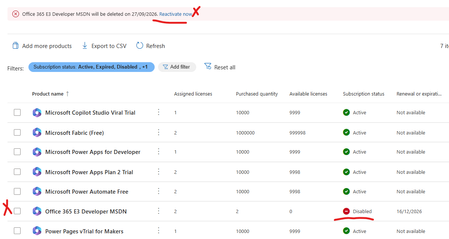
Error office 365 e3 developer license will be deleted on XXXXX. Currently disabled
My Office 365 E3 Developer has been marked for deletion and disabled today. No earlier comms from Micrsoft or any sort of messages.It just locked our my E3 Developer license has there a not supporting it any more. I wanted to try and backup/export my mail box and no luck - the option is greyed out. My SharePoint admin center has been blocked also can't backup any of my files. I'm just helpless.What a shame Microsoft What other plans can i move to and what should i do now since Teams and mail is not working. Can I at least get a a grace period. Any resources or advice would be appreciatedSolved1.3KViews1like17Comments
Changing Microsoft 365 billing frequency from monthly to yearly unexpectedly increased the price
Hello everyone, I would like to raise an issue with Microsoft 365 Business Standard that I find very difficult to understand and even harder to explain to my customer. I manage two Microsoft 365 Business Standard licenses for a customer. The pricing history was as follows: Until May 2026: €23.40/month total for 2 users From June 2026: €21.66/month total for 2 users This means the annual cost at the latest monthly rate was €259.92/year On September 28, 2026, I changed only the billing frequency from monthly to yearly. During this process, I was not shown any clear warning that the actual subscription price would increase. After the change, Microsoft created a new annual subscription with: €145.56 per user/year €291.12/year for 2 users So simply changing from monthly billing to yearly billing increased the annual subscription price from the equivalent of €259.92 to €291.12. This is particularly confusing because the Microsoft website normally presents annual billing as the cheaper option. I contacted Microsoft Support today. According to the support agent: this behavior is the same worldwide the billing change cannot be reverted the agent cannot revert it it cannot be escalated to a supervisor who could revert it there is apparently no email address or written complaint channel where I can formally dispute the change What concerns me most is not only the price increase itself, but the fact that I was apparently moved to a higher price simply by changing the billing frequency, without a clear indication during the process that the subscription price itself would change. I now also have to explain to my customer why their Microsoft 365 costs suddenly increased, even though no additional licenses or services were requested. From my perspective, changing how often a subscription is billed should not silently result in a different commercial price without a very clear confirmation beforehand. Has anyone else experienced this? I would especially like to know: Is this expected Microsoft behavior? Why does changing the billing frequency trigger a new, higher price? Is there any official escalation or written complaint process for Microsoft 365 billing issues? Is there really no way to revert such a billing-frequency change shortly after it was made? I would appreciate clarification from Microsoft, because at the moment this leaves both the reseller/admin and the customer in a very poor position. Regards128Views0likes0Comments
MC1269241 - Can't turn off antropic for agentmode
Hi, I’m trying to figure out how to turn off the new feature where Anthropic is enabled by default for everyone in the EU for agent mode in excel and powerpoint, as described in the Message Center news in the title. It is not possible to press Save when you have unchecked the setting unless you also consent to the terms of use, it is greyed out. Since we want the feature turned off, we do not want to agree to any terms of use. Has anyone found a solution? This seems to be misconfigured.356Views0likes3CommentsMicrosoft SSO SAML Assertion Claims
While getting the assertions back from SAML Assertion Claims, I have configured the user.country & assigned some value in the field. But while getting the claim we are reading the some different value like "IN" ? can I know does the user.country claim supports or not during the claim?401Views0likes4Comments
M365 only admin locked out MFA error 53003
I am learning this the hard way....so here it goes. Currently I am locked out of as the only admin on the tenant with error 53003. I was updating some Microsoft MFA default policy settings in Entra and mistakenly deleted the admin user from the exclusions list, and got locked out. Thankfully I have another tenant, not as big the one locked out. Initiated several support tickets for which everyone calls, and despite of subline mentioning the issue says that they have to assign this ticket to Entra. Then the ticket gets updated and noone has been assigned every since. I have initiated severity A support tickets from Azure portal but no one has called in last 24 hours to help. We area business with Business Premium licenses with over 20 users, and now completely locked out. I have looked almost everywhere online. There is no phone number that takes you to a support agent - PLEASE HELP........730Views0likes3CommentsFile Sharing between licensed account holders
From a starting point of this year, we have been finding that any to most file shares that happened between licensed MS account users are being flagged and quarantined by the anti-malware policy. This should be, we are looking to resolve this issue. Has anyone else experienced this issue and what was your resolve. At the moment we have to monitor the quarantines and manually go in to release the share notifications.530Views0likes4Comments
Where does Teams get its user list from? I can't make sense of which accounts I see vs which I can't
OK, so I have a currently rather unusual situation. I am looking at a 365 Tenant. A number of users have four accounts on the same tenant (let's not even get into why, cleaning things up is part of the reason I got called in). When you start typing their name into teams it comes up with three of them as a suggestion (I only want one) Account 1: has just been used for ActiveDirectory for permissions to the company's Distributed File System (stored in on on premises servers in various locations). This account has to the best of my knowledge never had a license or mailbox associated with it, and so has never been on the global address list, it's also never had the teams app enabled for it. I don't want this one to show, but it does Account 2: A now defunct account which used to have a Business Standard license assigned to it, but has now had the licensed removed. Before the license was removed this account was hidden from the GAL and its teams app disabled. I don't want this one to show, but it does Account 3: An now defunct account which still has a Business Standard license, but with Teams deselected in the Apps. I don't want this one to show... and it doesn't Account 4: An account shared via a multi tenant organization (the users in question have been migrated to a new tenant). So these are members (not guests) but external ones. I want this to show, and it does. Now, accounts 2 and 3 will be deleted soon, whether we can get rid of account 1 depends on whether the necessary access to the DFS can be done using account 4 (which I need to look into next). However for the time being they are all there so I was trying to hide accounts I don't want users trying to message on teams from teams, and I cannot make any sense of which I see which I don't. To sum up. Account that has never been on the Global Address List and never been activated for Teams - Shows Account that used to have a license and was on the GAL, and used in teams - Shows Account that still has a license, but has been removed from GAL and had teams app disabled - Doesn't show Account that has no license and is not on the GAL, but has teams on it's host tenant - Shows After a previous inquiry I set "Scope directory search using an Exchange address book policy" in the teams setup, but I have not set up any specific address book policy as yet. I have tried showing and hiding people from the global address list, and also the "ShowInAddressList" setting in Entra (which seems to only be available through graph?). Nothing seems to make a difference (it doesn't help that Teams takes forever to update its local cache for this stuff, so maybe a change DID make a difference at some point and I missed it). I cannot find any logic as to which of these accounts is showing in the auto suggests and which not, most notably that account 1 shows but account 3 doesn't. So, where is Teams getting its list of contacts from?3.1KViews0likes4Comments