microsoft 365 copilot admin
90 TopicsCopilot Chat vsus. Microsoft 365 Copilot. What's the difference?
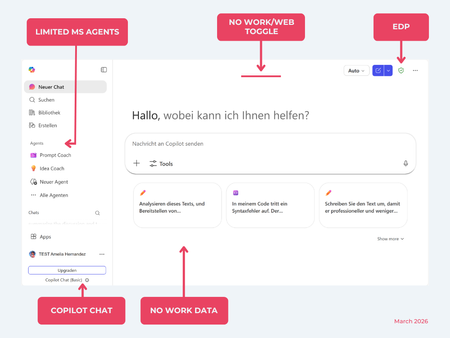
While their names sound similar at first glance, Microsoft 365 Copilot and Microsoft 365 Copilot Chat, they differ in several aspects. And more importantly: one is built on top of the other. What is Copilot Chat (Basic)? First things first. Microsoft 365 Copilot Chat is often simply called Copilot Chat. Copilot Chat (Basic) generates answers based on web content, while Microsoft 365 Copilot (Premium) is also grounded on users' data, like emails, meetings, files, and more. Since early 2025, Microsoft 365 Copilot Chat has been available to all users in organizations, becoming the entry point to AI assistance for many organizations. Copilot Chat (Basic) is the foundational Copilot experience available at no extra cost for everyone with an eligible Microsoft 365 plan, including: Microsoft 365 E3 / E5 Microsoft 365 A3 / A5 Microsoft 365 Business Standard & Business Premium Copilot Chat (Basic) is secured, compliant, and it does not required the full Copilot add-on license. Copilot Chat (Basic) is able to ground responses on: Public web content. Content explicitly shared or work data manually uploaded to the chat by the user. On-screen content or content displayed on-screen in apps like Outlook, Word, Excel, PowerPoint, and OneNote. When it comes to agents, Copilot Chat (Basic) offers these features: You can create your own declarative agents grounded on public web content with Agent Builder. You can use agents built by your org grounded on organizational data with the pay-as-you-go method. There are Microsoft prebuilt agents available like Prompt Coach, however Microsoft premium prebuilt agents like Researcher or Analyst are not included. The screenshot below shows how Copilot Chat looks and highlights its main capabilities. Note the Upgrade button, meaning this is not Microsoft 365 Copilot, but the Copilot Chat (Basic) experience. Note that EDP (Enterprise Data Protection) is available in Copilot Chat (Basic). What is Microsoft 365 Copilot (Premium)? Microsoft 365 Copilot (Premium) is a paid add-on license that builds on top of Copilot Chat and unlocks Copilot's full power. It is available for selected Microsoft 365 plans, including: Microsoft 365 E3 / E5 Microsoft 365 A3 / A5 Microsoft 365 Business Standard & Business Premium With a Microsoft 365 Copilot license, users get everything Copilot Chat (Basic) offers, plus much more: Data grounding: Microsoft 365 Copilot (Premium) includes Copilot Chat grounded on web and/or on user's Microsoft 365 data like emails, meetings, chats, and documents. Office apps: It integrates deeply into Microsoft 365 apps like Outlook, Teams, Word, Excel, and more. The integration includes features like Edit with Copilot allowing Copilot to adjust live your documents or email based on your prompts. Custom agents: It brings the capability to create your own declarative agents grounded in organizational data and/or web data. You can create agent either using Agent Builder or Copilot Studio. MS prebuilt agents: Premium prebuilt agents like Researcher and Analyst are included in Microsoft 365 Copilot (Premium). The screenshot below shows the Copilot chat experience for users who have a Microsoft 365 Copilot license. Note that EDP or Enterprise Data Protection also applies here How can I access Microsoft 365 Copilot Chat? Today, Copilot Chat is accessible via https://m365.cloud.microsoft or https://copilot.cloud.microsoft using your Entra ID (work or school account). One important difference in day-to-day experience: Users with a Microsoft 365 Copilot license typically see Copilot prominently surfaced across Microsoft 365 apps. Users with Copilot Chat only may not see it pinned by default on the Microsoft 365 home page. To improve discoverability, Microsoft 365 Copilot administrators can pin Copilot Chat via the Microsoft 365 admin center, ensuring that users can easily access it without friction. Especially convenient is that if you use the M365 Copilot Chat app on Windows, you can open Copilot using the keyboard shortcut Ctrl + C. What’s the difference? The differences between Copilot Chat and Microsoft 365 Copilot mainly come down to: Licensing Data grounding (web-only vs. personal work data) Integration depth within Microsoft 365 apps I’ve listed the key differences in the comparison below. 👇Solved8.6KViews8likes22Comments
Use Copilot with Microsoft ToDo
It would be great if I could have Microsoft Copilot Pro talk to and be able to query these few responses. 1. What are my important task that I am missing? 2. What task do I need to focus on in the next few days? 3. Look at this project/doc/sharepoint file and add additional task to my ToDo that isn't currently on my list.4.8KViews5likes2Comments
Workflows and App Builder Agents
Hey everyone, I have recently started using the Workflows and App Builder Agents, which are currently in preview through the Frontier programme and I would like to know your opinions on these tools as well. From my side, Workflows: didn't work once for me, most of the time, the flow is correctly generated, and connections are established but the flow fails to save. when it did save (that two times), it couldn't use the Outlook getEmails actions to pull information and errored out we don't have any DLP policies to block its use, so I don't understand why nothing is working here. last, it's no possible to edit the flow, which is not a great experience especially when trying to figure out what went wrong. App Builder: users need the permission to create a fresh sharepoint site for each app, this is a horrible experience for admin, as there could be hundreds new sites as users play around with the agent, why not allow users to pick an already established site, as all it does is create a list to store the information in? it's not possible to edit the app manually, so you're stuck talking to the agent for a long time to make changes that would take seconds in the PowerApps editor. when making changes through the editor, you can ask the agent to change a single thing in the app, then it 'kinda' understand and changes the entire thing either way, adding to the frustration. So all-in-all, both agents are a great concept, but they are still waaaay behind in what they promise.898Views4likes2Comments
What's difference creating Agent from Copilot page vs from Copilot Studio -> Copilot for M365?
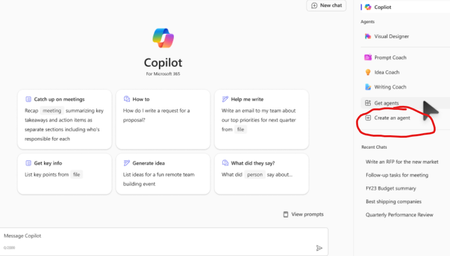
Hello, I am learning about Copilot and was very confused by these two different ways to do it. My understanding is both are "Declarative Agents" which lets the Microsoft 365 Copilot do the most heavy lifting. Method 1. First way is to go to Copilot page and clicking 'Create an Agent' w3 Method 2: Going to Copilot Studio -> Agents -> Copilot for Microsoft 365 -> New Agent (Couldn't find a screenshot) Q1. Anyway, first, I created an Agent using the first Method 1 above, and now I see it on the Copilot page under 'Agents' section. However, when I go to Copilot Studio -> Agents -> Copilot for Microsoft 365, I don't see that Agent there. Is this normal and intended? Q2. Is an Agent created using the Method 1 only available to people who have Copilot license? (as long as they are shared; I see options are only me, anyone in the organization, and specific users in the organization) Q3. Could you please confirm agents created using either way above are both "Declarative Agents"? Sorry for the newbie questions in advance... I took the course MS-4010 and reviewed several posts but still confusing...4.9KViews4likes10Comments
Disable Agent Creation for Select Users
When will we be able to allow declarative agent use but disable creation for some users? We want only selected users to be able to create agents. We currently have not way to restrict this. If users can use agents, then they get the Create and agent option.3.5KViews4likes8CommentsHow to become a Frontier 💪
If the Workflows agent sounds like a mystery to you, or you doubt of the existence of the =Copilot() function in Excel at all, then keep reading becasue this tip may be for you! Features like the =Copilot() function in Excel, the Workflows agent, or the Learning agent are part of the Frontier program. But what's the Frontier program and how to join it, this what this post is all about. What's the Frontier program? The Frontier program can help you get early-taste of Microsoft 365 Copilot features before they go public. If you care about Copilot new features, and want to help new features improve, then the Frontier program is for your. It is great stuff to give feedback and help Copilot product development. 💪 Here's Microsoft official definition of the program: The new Frontier program gives customers early access to experimental Microsoft 365 Copilot innovations in their own environment. Frontier agents are previews designed for evaluation and feedback. Features may change as development continues. How to join Frontier program? Follow the instructions below to turn it on: Web apps Desktop apps And Agent store Step 1: Go to M365 Admin Center Log in as M365 Global Admin Click on Copilot and then Settings Step 2: Search for "Frontier" Search for "Frontier" Click on Copilot Frontier Step 3: Pick your choice Select the "Web apps" tab to enable for your web apps Select "Specific users" to add the security group you want to enable the Copilot Frontier for Want to enable on desktop apps too? Step 4: Select Desktop and mobile apps Select the "Desktop and mobile apps" tab to enable for desktop Follow the link to find out the deployment option that best fit your environment ( In my environment, adding a reg key worked best How do you know what's new in Frontier? Want to find out the latest Frontier innovations? In this page you can find it: Frontier program – Microsoft AdoptionSolved992Views3likes2CommentsToken Limit Exceeded ?
Hi All, Please check out my latest blog on “Token Limit Exceeded” would love to hear your thoughts https://techcommunity.microsoft.com/blog/1c769f9e-c0b0-45a7-af52-fecceca10bb2/token-limit-exceeded-whats-actually-going-on-and-what-to-do-about-it-/4536271167Views2likes2Comments
Microsoft 365 Copilot licensing confusion
In the SharePoint Agent preview (ended in October 2025), Microsoft permitted unlicensed users to access SharePoint agents. I guess the reason for it was to enable organizations to evaluate agent functionality and provide feedback before licensing and billing requirements were applied (?). After the preview period concluded, it now seems that all users are required to have a Microsoft 365 Copilot Add-On license to interact with SharePoint agents. Users with, for example, a Microsoft 365 E3 license can only access the free version of Copilot (Copilot Chat), but do not have interaction privileges with SharePoint agents. A while ago, one of our CSP partners recommended us to buy a capacity pack and set up pay-as-you-go billing. In their opinion, this would replace the need for the Microsoft 365 Copilot Add-On license. However, we do not want to buy these expensive package unless we know for sure that this is the case. Can anyone answer the question: Does using a capacity pack and pay-as-you-go billing override user license requirements? Thank you ❤️Solved1KViews2likes4CommentsWhat the hack is a "Microsoft 365 Copilot Bizchat"?
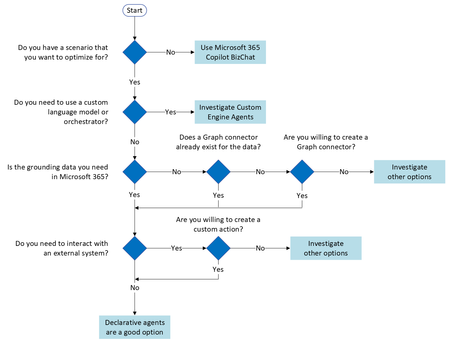
I am taking a training course on learn.microsoft and this word "Microsoft 365 Copilot Bizchat" just came out of nowhere... I went few slides/pages of the training course and even googled it but there is no definition or clarification of it either sigh... What is that4.3KViews2likes4Comments
Microsoft 365 Copilot Mic/Composer functionality for Android
Hi Everyone, We have been trialing Copilot, Claude, ChatGPT in our organization and finally decided to start buying some licenses for users, however we have noticed on android devices like samsung when you open Copilot and sign in it redirects you to the M365 Copilot app, after loading the app on our phones we notice you can no longer click the little mic icon and have conversations with Copilot, this is really frustrating and there seems to be zero information online about this, is this a lack of functionality or am I missing something in our tenant settings that would block the ability to use the mic function in the M365 Copilot app for Android? I can open the free version and have conversations with it but there is no history and its really annoying.854Views2likes4Comments