microsoft 365 apps
36 Topics
Changing Microsoft 365 billing frequency from monthly to yearly unexpectedly increased the price
Hello everyone, I would like to raise an issue with Microsoft 365 Business Standard that I find very difficult to understand and even harder to explain to my customer. I manage two Microsoft 365 Business Standard licenses for a customer. The pricing history was as follows: Until May 2026: €23.40/month total for 2 users From June 2026: €21.66/month total for 2 users This means the annual cost at the latest monthly rate was €259.92/year On September 28, 2026, I changed only the billing frequency from monthly to yearly. During this process, I was not shown any clear warning that the actual subscription price would increase. After the change, Microsoft created a new annual subscription with: €145.56 per user/year €291.12/year for 2 users So simply changing from monthly billing to yearly billing increased the annual subscription price from the equivalent of €259.92 to €291.12. This is particularly confusing because the Microsoft website normally presents annual billing as the cheaper option. I contacted Microsoft Support today. According to the support agent: this behavior is the same worldwide the billing change cannot be reverted the agent cannot revert it it cannot be escalated to a supervisor who could revert it there is apparently no email address or written complaint channel where I can formally dispute the change What concerns me most is not only the price increase itself, but the fact that I was apparently moved to a higher price simply by changing the billing frequency, without a clear indication during the process that the subscription price itself would change. I now also have to explain to my customer why their Microsoft 365 costs suddenly increased, even though no additional licenses or services were requested. From my perspective, changing how often a subscription is billed should not silently result in a different commercial price without a very clear confirmation beforehand. Has anyone else experienced this? I would especially like to know: Is this expected Microsoft behavior? Why does changing the billing frequency trigger a new, higher price? Is there any official escalation or written complaint process for Microsoft 365 billing issues? Is there really no way to revert such a billing-frequency change shortly after it was made? I would appreciate clarification from Microsoft, because at the moment this leaves both the reseller/admin and the customer in a very poor position. Regards177Views0likes0Comments
Entra MFA for seniors using W365 Biz Basic
Entra MFA for seniors using W365 Biz Basic, these folks cannot and will not deal with mobile auth apps or keyfobs. This is a Historical Society. Need MFA bypass or non-technical solution that Senior Citizens with only enough knowlege to work MS Word can handle. There is zero risk of data loss or hackers or the like. We have nothing to lose as all is websearch and simple word docs. MFA without SMS or voice is going to put a lot of non-tech seniors out of their livelihoods. Need a simple non-tech solution. MS is so worried about CYA with regard to security, that they are pushing people out of technology. Do I have to go to Google Docs for a solution? Libre? It's not MS responsibility to remove all possibilities for poor decisions. Give us the tools for wise decisions, but quit binding us up. I need a solution or I'll have to move these folks off M365.347Views0likes1Comment
File Sharing between licensed account holders
From a starting point of this year, we have been finding that any to most file shares that happened between licensed MS account users are being flagged and quarantined by the anti-malware policy. This should be, we are looking to resolve this issue. Has anyone else experienced this issue and what was your resolve. At the moment we have to monitor the quarantines and manually go in to release the share notifications.609Views0likes4Comments
Managing Two MSFT Licenses
Hi, I had an old hotmail.com email address but it doesn't exist anymore per MSFT. I purchased an annual Excel annual license several months ago but I can't find an email about it on my Gmail inbox. I just signed up for MSFT 365. How can I find the Excel license subscription so that it doesn't auto-renew?138Views0likes1CommentUnable to remove Office Store applicaitons in admin center:
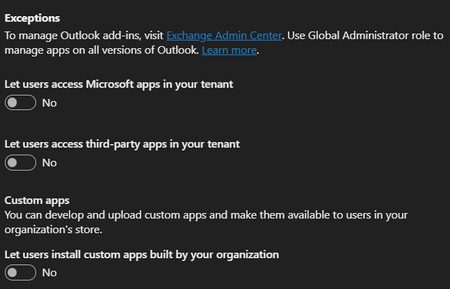
Hi! Yesterday I changed the settings in the screenshot below and it worked. It showed that IT blocked access when clicking on the Add-Ins button in Word and Excel. Today it shows the list off add ins and nothing was changed in the settings. Users can install add ins again: Google shows results of an Org setting in M365 admin panel that doesn't exist anymore. Any help would be appreciated.148Views0likes2Comments
APP Android Excel 365
Hallo und guten Tag, wird möchten mehrere Android Tablets anschaffen um eine auf einem W11 Laptop (mit VBA und Macros) erstellte Excel 365 Anwendung zu nutzen. Hat jemand Erfahrung mit Excel 365 für Android. Insbesondere geht es mir um die herauszubekommen, inwieweit VBA und Macros auf dem Tablet ausführbar sind. Gruß Peter221Views0likes1Comment
Microsoft Feedback Portal account issue
I changed my Microsoft email a year ago, and it updated everywhere other than the Feedback Portal. As a result, I get an error when I try to login, or do anything on the page. Microsoft account support's suggestion was to login to the Feedback Portal which is insane given I'm having issues accessing it. How can I get this issue resolved? I've got three separate support tickets now and they keep asking me to wait 24 hours to get the issue resolved. Can someone from the Feedback Portal team please contact me to resolve this? This is what Microsoft Support have said: "understand your frustration, and yes—this is an account‑related issue because the Feedback Portal is still tied to your old alias, which causes login conflicts and forces you out. Your Microsoft account itself signs in correctly, but the Feedback Portal is pulling outdated identity data that you cannot update on your own. Since you cannot access the Portal to submit feedback, directing you back there is not a workable solution. What you need is for Support to escalate this to the internal Identity/Feedback Platform engineering team so they can manually correct the outdated alias mapping on the backend. In this situation, the Feedback Portal and Tech Community teams are the ones who manage and maintain that specific platform. Because the issue appears on the Feedback Portal side—even though your Microsoft account is working normally—only their dedicated team can make the necessary corrections on their end. That’s why we are guiding you to connect with them through the links provided: https://techcommunity.microsoft.com/ or https://feedbackportal.microsoft.com/feedback. They will be able to review the portal‑specific account data and assist you further. I understand why this is frustrating. Since you’re unable to stay signed in to the Feedback Portal, I completely see why posting there isn’t possible for you. However, I do need to be transparent: I’m not able to escalate this issue directly to the Feedback Portal team, as they don’t provide internal escalation channels for us and only accept requests through their own platform."418Views0likes2Comments
People Skills Not Enabling – Possibly Due to Tenant Being Marked as “EDU”
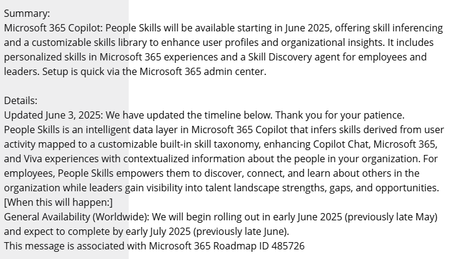
Hi everyone, We’re trying to roll out People Skills across our organisation, but the feature never becomes active in our Microsoft 365 tenant. After a lot of investigation, it looks increasingly likely that the root cause is that our tenant is classified as an Education (EDU) tenant. Which is correct, we are a mixed tenant accurately so for licensed purposes, but Education tenants don't get People Skills. Service plans updated and all initially looked out just no configuration appeared. Anyone else having issues with People Skills? MC1060842 – (Updated) Microsoft 365 Copilot: People Skills will be available starting in May MC1060845 – New Service Plan: People Skills Announcing People Skills general availability and new Skills agent | Microsoft Community Hub137Views0likes0CommentsBooking not available for everyone
Dear Community, We are currently experiencing an issue within our tenant related to the Microsoft Bookings App. While the app is enabled and accessible via browser for users in a specific group, some users are unable to add the app directly to their Teams interface without submitting a request. At this point, we have not been able to identify the root cause of the issue. I might be a policy issues that only we can solve. Has anyone encountered a similar problem or could suggest possible solution? Thank you :)460Views0likes2Comments