management and extensibility
32 TopicsCopilot no longer supports image uploads
Copilot is no longer allowing image uploading/uploading. Neither in web mode nor in work mode. Does anyone know if they took away the resource for good or if it is some instability? The official documentation mentions that at least in web mode it should be supported. Document Reference: File formats supported by Copilot - Microsoft Support14KViews1like19Comments
Can your job/University see your copilot chatlogs?
As the title states can your job go in and see your prompts and conversations? I'm not talking about keylogging software, I'm asking if using the enterprise edition, if the job/university can log into copilot and has administrator access and can see your logs.8.2KViews0likes1Comment
Web content plug-in management in M365 Copilot
Hi, Referring to this announcement MC882258 in message center, MS informed that web content plug-in management will be removed from M365 admin center, rather it will be managed as part of Optional Connected Experience for M365. We have currently disabled this web content plug-in in our environment but allowed Optional Connected Exp for the users. After this announced change, how web content plug-in will behave? Will it enabled because we have Optional connected exp. enabled? Secondly, what is the reason behind this change? Why MS has taken individual control setting away and mixed it with so many optional connected exp. where we do not have an option to choose which optional connected exp. we want to enable/disable. Its like all or nothing.2.8KViews0likes3CommentsHow to build custom Copilot agents grounding SharePoint lists
Imagine the scenario where the user can ask to a Copilot Agent to create a list item, update a single column, delete or extract data filtering by columns. In this video we'll see how to build a custom agent which is able to perform CRUD operations in a SharePoint list. #Copilot #Agents #Microsoft365 #MPVbuzz #AI #CopilotStudio2.8KViews1like0CommentsBeyond the hype: turning Microsoft 365 Copilot and agents into real business outcomes
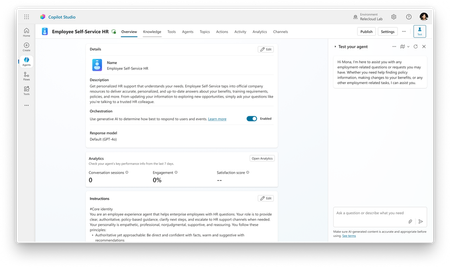
Microsoft Ignite 2025 in San Francisco was an electrifying gathering that brought together over 30,000 tech professionals, business leaders, and innovators from around the globe. This year’s event set a bold tone for the future, spotlighting the transformative role of Copilot and agents in modern workplaces and unveiling a wave of advancements across the Microsoft 365 ecosystem. The energy on the ground reflected both the excitement and the urgency of this new era, making it clear: Microsoft 365 Copilot and agents are not just the future—they are redefining the way companies get work done today. As I spoke with partners and customers, I was inspired by how organizations are embracing these tools to unlock new ways of working and developing rich business solutions. I want to take a moment to reflect on some of my highlights from the event. Extend familiar management infrastructure to agents with Microsoft Agent 365 Over the last week, I heard time and time again how business leaders are embracing the Frontier Firm wave, steering their organizations toward partnering people with agents across every workflow. Thousands of agents are already automating business processes, and by 2028 IDC projects there will be 1.3 billion in circulation.* For enterprise customers, this will bring a massive new digital workforce to manage. As agents get added to every workflow and become more capable, some business leaders have expressed concerns about how to accelerate AI innovation securely. Microsoft Agent 365 turns this challenge into an opportunity. Operating as a control plane for AI agents, Agent 365 extends the existing infrastructure used to manage people to also manage agents, equipping them with the same apps, protections, and context. For IT leaders, Agent 365 gives organizations a single platform to deploy, govern, and organize agents, transforming them from isolated actors into an integrated part of business operations. Agent 365 helps protect and manage agents across the organization by unifying Defender, Entra, and Purview, and provides a single view of their entire agent fleet with the Microsoft 365 admin center. To ensure agents have the context they need to provide the most accurate results, Agent 365 connects Microsoft 365 apps and Semantic Index through WorkIQ. For organizations ready to take advantage of this unified foundation, Agent 365 will offer a robust ecosystem. For example, Microsoft agents like the new, fully autonomous Sales Development Agent; partner agents from Adobe, Cognition, Databricks, Genspark, Glean, Kasisto, Manus, NVIDIA, n8n, SAP, ServiceNow, Workday, and more; and open-source agents from Anthropic, Cursor, LangChain, OpenAI, Perplexity, and Vercel. For developers looking to build their own Agent 365-compatible agents, they can start with Copilot Studio or Microsoft Foundry. For deeper integrations, Microsoft Agent Framework or Agent 365 SDK enable unified discovery, governance, and collaboration across Microsoft 365. Simplify HR and IT support with the Employee Self-Service agent Another impactful way businesses are integrating agents into operational workflows is by replacing fragmented employee-support systems for HR or IT tasks. At Ignite, we announced the general availability of the Employee Self Service (ESS) agent, which brings AI-powered service delivery directly into Microsoft 365 Copilot to improve HR and IT employee support scenarios. Within Copilot, employees can ask questions, submit requests, and complete routine tasks in one trusted place without disrupting workflow. Natively built into Copilot Studio, the ESS agent provides a customizable foundation for intelligent employee service. It works with HR and IT systems such as Workday, ServiceNow, and SAP SuccessFactors and can easily be expanded through low-code extensions, connectors, and integrations with enterprise systems. Employees can tailor workflows, embed organizational knowledge, and adapt the experience to match their organization’s systems, resulting in a faster and more connected support experience. Frontier Firms in action: Turning AI innovation into business outcomes On Thursday, I hosted a panel session with leaders from several enterprise customers who are well on the path to becoming Frontier Firms: Sean Alexander, SVP, Connected Ecosystem, Lumen Tim Holt, VP, Health Answers Tech Lead & Architect, Pfizer Mona Riemenschneider, Head of Global Communications, GenAI, BASF John Whittaker, Director, AI Platform & Products, Ernst & Young Two themes emerged from our panel discussion. First, the most successful organizations are moving from experimentation to operationalization, developing agent-specific KPIs, governance structures, and more. These are not science experiments, but production tools already embedded directly into some of the world’s most complex enterprises. For example, Pfizer is leveraging Copilot Studio at scale with over 300 agents deployed across their organization, including a specialized agent that provides continuous manufacturing improvement with prioritized opportunities across the supply chain. Second, leaders on the panel emphasized that the future of work is human-led and agent powered. At Lumen, they’ve developed a declarative agent that synthesizes internal data, external filings, and real-time insights to generate tailored executive briefings, reducing cognitive load and surfacing the context needed to prepare for partner and customer meetings. At BASF Agricultural Solutions, they’re using a Copilot agent to transform global corporate communication efficiency. The Copilot agent streamlines the compilation of internal and external communication messages, efficiently and securely, resulting in significant time savings. "If 2025 was the year of the agent, then 2026 will be the year of the agents," said EY’s John Whittaker. “That’s where I think we’re going to see the consolidation of processes into far faster, more real-time, improved outcomes.” Learn how partners and customers are already unlocking new value with AI agents It’s exciting to see how our rich ecosystem of customers and partners are using Microsoft technology to create their own agents to solve real-world challenges, accelerate transformation, and scale human-agent collaboration. Ignite 2025 featured several Microsoft partners and customers who are building innovative agents, designed to work with Microsoft 365 Copilot to help save time, boost productivity, and accelerate business transformation. ADP - The ADP Assist agent for Microsoft 365 Copilot is purpose-built to support HR and will simplify payroll tasks by bringing key workflows into Copilot Chat and Microsoft Teams. Employees will be able to check time-off balances, review pay statements, and confirm direct deposit settings, all without leaving their flow of work. Blue Yonder - Blue Yonder Inventory Ops for Microsoft 365 Copilot automates demand forecasting using advanced machine learning and generates optimized, constraint-based supply plans covering production, distribution, and procurement to meet business objectives and enhance planner productivity. Freshservice - Freddy AI Agent now integrates seamlessly with Microsoft Copilot, bringing instant IT and support assistance into Word, Outlook, Teams, and more. This deep integration boosts adoption, eliminates context switching, and empowers employees to resolve issues effortlessly inside their everyday Microsoft 365 tools. monday.com - monday.com has integrated its MCP server with Microsoft Copilot both as a ready-to-use agent in the Agent Store and as a "Tool" for users to build custom agents on Copilot Studio. Users can now directly access their monday.com data, surface boards and items, or even update statuses directly within their Teams app or Microsoft 365. Sophos - Sophos Intelix will integrate real-time threat intelligence into Microsoft 365 Copilot, empowering IT teams and business users to check links and files, and make faster, more informed security decisions while democratizing enterprise-grade cybersecurity insights within everyday Microsoft 365 workflows. Wipro – Wipro has implemented Copilot-powered agents across sales, procurement, finance, and talent functions, enhancing knowledge access and decision-making to drive faster, more accurate, and consistent business operations. These aren’t the only incredible agents helping businesses. Thousands more are available in Microsoft Marketplace, where partners like the ones below are already reaching customers at scale. Shape the future of work with AI agents What inspires me most coming out of Ignite 2025 is seeing how customers and partners are already building the foundation of their Frontier Firms—people and agents working together to transform productivity and decision-making. This shift is no longer theoretical, it’s happening now across industries, powered by Copilot. To learn more about agents in Copilot and gain access to Microsoft resources, follow the links below. Check out recorded sessions from Ignite and watch demonstrations of agentic solutions from leading software companies Read about the exciting AI innovations for software developers who are building agents Start building agents with Microsoft Copilot Studio and Microsoft Visual Studio Get resources for building and customizing agents from the Microsoft 365 Dev Center and the AI Agents Hub *IDC Info Snapshot, sponsored by Microsoft, 1.3 Billion AI Agents by 2028, #US53361825 and May 20252.6KViews4likes0CommentsGet a jump start on employee service delivery with Employee Self-Service Agent in M365 Copilot
Let’s dig into how admins and makers in organizations can get a jump start as well as explore strategies in creating a centralized experience for employees to tackle their HR and IT needs.2.4KViews2likes1CommentChat Management in CoPilot desktop (browser) and Mobile
I love CoPilot, it's been my go-to assistant for months now. However I think a few features would contribute to it's long-term usability. Pin conversations. Keep certain recurring conversations at the forefront in the list of chats. This would be useful for daily chats such as a food diary, workout tracker, etc. Delete or Archive conversations. The ability to either delete individual conversations or archive/hide them to keep the chat history list clean, concise and relevant. Rename and Label conversations. As a daily CoPilot user I want the ability to name my chats and/or add labels to them so that I can easily find particular chats and add a bit of structure to my chat history list. Bonus Request - The ability to customize the start screen or bypass it altogether. I'd rather jump straight into my chats and use CoPilot for its core features. The suggested content in the beginning screen is simply an extra click and (for me) serves no practical purpose.1.7KViews18likes4CommentsHow to force user-sign in with the Desktop App? (GPO/Intune)
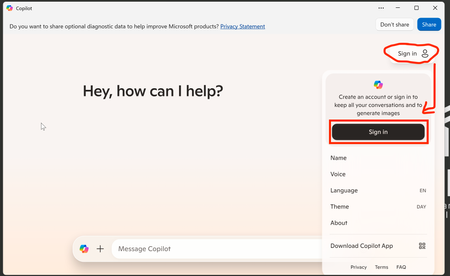
Hi Everyone, How can I force user's to sign into the Copilot desktop application with their Work account? Or put differently, how can I auto sign-in users with their work account for the desktop Copilot application? Thanks everyone!1.6KViews0likes1Comment
Request to increase context length
Hello, I think users would greatly appreciate the ability to include more context in prompts. In my experience, results can be dramatically improved if you can include more examples and background information directly in the prompt. While you can attach longer files, this is in my experience not nearly as effective as directly including information in the prompt, as attaching files I assume uses something like RAG to pull snippets of your context instead of the entire thing. This is especially important when including examples as in few-shot prompting. If I want to use Copilot to help me write a longer document, I want to provide multiple already completed examples of this longer document. However, with the context limit of Copilot for M365 I might not even be able to fit one example in the prompt. This is not an issue with ChatGPT which has a much longer context length (128k tokens vs. 16k characters in Copilot). If users are able to write prompts with more context I think they will see much better results and therefore see the value of Copilot for M365 in a much clearer way. Thank you for your consideration.1.1KViews2likes0Comments