mailbox
155 TopicsSearch-UnifiedAuditlogs For Mailbox - Problems
Introduction Like many, I have been faced with an audit search problem on mailboxes. I finally found a solution by searching deeply into the web. In this post I will provide you with Microsoft's documentation, I have tested everything, and it finally works. I also have comments to Microsoft, directly to the product group (with a case Microsoft) but also by the technet article feedback feature. Technical Content We assume that you have all necessary permissions and role to run audit logs search. For Regular mailboxes: if you have no results via GUI, It is possible that in the time interval there is no result. It may happen that the audit is blocked on the mailbox despite the fact that the feature is active. You may use the command http://Search-UnifiedAuditLog documenation]https://learn.microsoft.com/fr-fr/powershell/module/exchange/search-unifiedauditlog?view=exchange-ps with the following parameters: UsersIds : email address Operations : event to be search (https://learn.microsoft.com/en-us/purview/audit-log-activities#exchange-mailbox-activities) Search-UnifiedAuditLog -UserIds <MailboxIdentity> -Operations MoveToDeletedItems, SoftDelete, HardDelete -StartDate "01/01/2025" -EndDate "15/01/2025" Unfortunately, no results appear with powershell. https://learn.microsoft.com/en-us/purview/audit-troubleshooting-scenarios#search-for-mailbox-activities-performed-by-users-with-non-e5-licenses, you can find the documentation that describe the symptom and how to resolve it. Even when [mailbox auditing on by default](https://learn.microsoft.com/en-us/purview/audit-mailboxes) is turned on for your organization, you might notice that mailbox audit events for some users aren't found in audit log searches by using the Microsoft Purview portal or the compliance portal, the **Search-UnifiedAuditLog** cmdlet, or the Office 365 Management Activity API. The reason for this is that mailbox audit events is returned only for users with E5 licenses when you use one of the previous methods to search the unified audit log. You must run the following command within Exchange Online : Set-Mailbox -Identity <MailboxIdentity> -AuditEnabled $false And then : Set-Mailbox -Identity <MailboxIdentity> -AuditEnabled $true Now you can search within the GUI or with powershell and you will have some results. For Shared Mailboxes: To search audit logs for a SharedMailbox, you must use the following command, with the parameter *FreeText.* Search-UnifiedAuditLog -StartDate "08/01/2025" -EndDate "11/01/2025" -FreeText (Get-Mailbox -identity <MailboxIdentity>).ExchangeGuid -Operations MoveToDeletedItems` https://learn.microsoft.com/en-us/purview/audit-troubleshooting-scenarios#search-for-mailbox-activities-performed-in-a-specific-mailbox-including-shared-mailboxes you can find the article that describes the FreeText parameters, and also decscribes that GUI is not working for SharedMailboxes. Also, using the **User** dropdown list in the audit log search tool or the **Search-UnifiedAuditLog -UserIds** won't return results for activities performed in a shared mailbox. If there are no results and you are sure that there should be, then the same manipulation as described above will have to be done. Disable and then reactivate the audit on the mailbox: Set-Mailbox -Identity <SharedMailboxIdentity> -AuditEnabled:$false Set-Mailbox -Identity <SharedMailboxIdentity> -AuditEnabled:$true Run again the Search-UnifiedAuditLog command. Now you will find results. Conclusion I assume that the "Users" text box in the interface corresponds to the parameter "UserIds" in the cmdlet. And there is no match for the "FreeText" parameter. You can find other articles in my GitHub about Purview https://github.com/trisdev75/MicrosoftPurview2.7KViews0likes0Comments
"Share to Teams from Outlook" possible with mailbox on prem?
The situation in our company is that we're using an Exchange Hybrid setup with the mailboxes on prem. We are using one of the latest Outlook desktop clients (so that should be sufficient). The function is working for me on the outlook web client on my dev tenant just fine, but I don't see the outlook addin for our production tenant with the mailboxes on prem. Is that something that's not working? I don't see anything regarding that circumstances in the docs. Thanks in the advance.1.6KViews0likes1Comment
Shared mailbox permissions in hybrid environment
Hello. I manage a hybrid Exchange environment with 2 x Exchange 2016 servers (CU19) on-premise. I ran the HCW some time ago, and had to do lots of things manually that it couldn't do (such as create connectors), but for the most part it seems to work well. I have created some shared mailboxes on-premise and granted access to some users. They appeared in Outlook and all was well. I have now migrated these mailboxes to Exchange Online and while existing users can still access them new users can't. I've delegated permission through the usual way but they can never see the mailbox. Also, I've revoked access for some users but they can still access them. What am I missing, what's not working or not setup right to cause this to happen? Any tips and suggestions welcome. Thanks, Dave3.1KViews0likes1Comment
Creating users without mailbox
Hi all, I want to create users without creating a mailbox and instead using an existing mail address. It is possible by guest users. But my users should be real users but from different domains. All of them have already their mailbox. Is this possible? Or can I activate a forwarder rule to their real mailbox by creating the user?Solved27KViews0likes5CommentsGraph API access to Exchange Server 2019 hybrid setup (on prem mailbox)
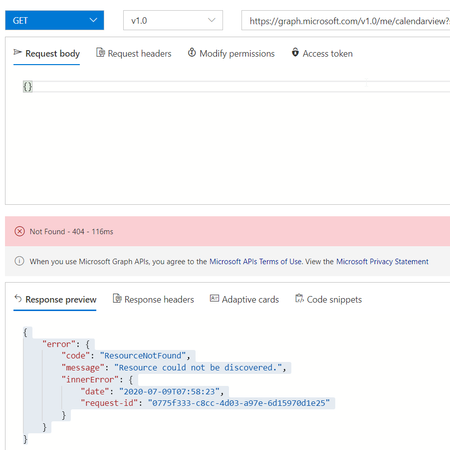
I read within the Microsoft docs (https://docs.microsoft.com/en-us/graph/hybrid-rest-support) that it should be possible to access basic resources like calendar or mail via the Graph API. Behind the scenes, when Microsoft Graph identifies that a REST API call is attempting to access an on-premises mailbox in a hybrid deployment, it proxies the REST request to an on-premises REST endpoint which then processes the request. This discovery makes accessing the REST API possible. We are using a hybrid setup with Exchange Server 2019 and on Prem mailboxes, but unfortunately I'm not able to access any data from there via Graph API.4.7KViews1like1CommentRestore Teams private chat history to new mailbox
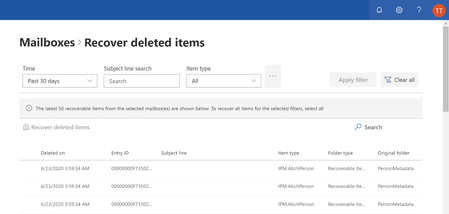
Hi, I'm having an problem with restoring Teams chat history to new user accounts and and their mailbox. I disabled Azure AD sync for a few users and deleted their account in the cloud tenant from the recyclebin and enabled the sync again to solve an issue with calendar syncing with on-premise mailboxes. Unfortunately their Teams chat history also vanished from their Teams account and now I'm searching for a way to restore their history. I can see the deleted mailboxes and should be able to restore the whole mailbox to a temporary account but I have no idea if the missing data is in there or how I can move the Teams chat history to the new mailbox. Can anyone give me hint or solution? Thanks and Regards5.9KViews0likes4Comments