mac, auto correct
1 TopicAutoSave disabled when opening SharePoint-synced files from Finder after macOS Tahoe 26.6 update
Files stored in SharePoint Online and synchronized locally through OneDrive are opened as local documents when launched from Finder. Office applications display "Saved to my Mac" and AutoSave is turned off by default. However, opening the exact same files through Word/Excel > Open > Sites, or via SharePoint "Open in Desktop App", correctly identifies them as cloud documents. In that scenario, AutoSave is enabled and collaboration/version history features work as expected. Troubleshooting already performed: OneDrive reset and re-linked SharePoint library re-synced Signed out and back into both Office and OneDrive Removed Microsoft credentials from macOS Keychain and re-authenticated Recreated local OneDrive sync relationships Verified OneDrive File Provider extensions are enabled Verified Office applications and OneDrive are fully up to date Tested with newly created files and existing files Tested "Always Keep on This Device" with no change in behavior The issue appears to be specific to the Finder-to-Office launch path after upgrading to macOS Tahoe 26.6. Before upgrading to macOS Tahoe 26.6, opening the same SharePoint-synchronized files directly from Finder correctly preserved cloud document identity and AutoSave was enabled as expected. I discussed this issue in detail with Apple Support, but they quickly dismissed it, saying that the problem is not on Apple's side and that I should contact Microsoft instead.4.2KViews13likes39Comments
OneDrive files opened from Finder not recognized as cloud files on Mac
Office for Mac: OneDrive files opened from Finder no longer recognized as cloud files – AutoSave disabled Hi everyone, I am experiencing a persistent issue with Microsoft 365 for Mac and OneDrive that started suddenly around August 10, 2026. The same setup and workflow had worked without problems for more than two years before that. Problem My Office files are stored in OneDrive and synchronized to my Mac via the standard macOS File Provider. When I open an Excel or Word file by double-clicking it in Finder, the Office application opens the file, but it apparently does not recognize it correctly as a OneDrive/cloud file. For example: AutoSave is disabled real-time co-authoring does not work as expected when I try to enable AutoSave manually, Office behaves as if the file were local and asks me to upload/save it to OneDrive – even though the file is already stored and synchronized in OneDrive However, if I open the exact same file from within Excel or Word via the OneDrive/Online Locations option, everything works correctly: AutoSave is enabled immediately co-authoring works changes made by another user appear in real time This behavior is reproducible with multiple files and affects both Excel and Word, so it does not appear to be an issue with one particular workbook or application. Environment MacBook Air M2 current macOS version current Microsoft 365 version current OneDrive version OneDrive Personal files synchronized through the standard macOS File Provider I have also tested opening files directly from: ~/Library/CloudStorage/OneDrive/... The result is the same: when opened from Finder, Office does not appear to recognize the file correctly as a cloud file and AutoSave remains disabled. Troubleshooting already performed I have already: completely reset and reconfigured OneDrive allowed OneDrive to fully resynchronize verified the files and folders in OneDrive on the web confirmed that OneDrive reports everything as synchronized restarted Finder and macOS removed and recreated Finder shortcuts/favorites tested without Finder favorites or aliases tested directly from ~/Library/CloudStorage/OneDrive updated macOS updated all Microsoft 365 applications updated OneDrive None of these steps changed the behavior. Key diagnostic result The following comparison is consistently reproducible: Finder → OneDrive file → double-click → Excel/Word → AutoSave OFF → file appears not to be recognized as an active OneDrive cloud document → co-authoring does not work correctly Excel/Word → Open → OneDrive/Online Locations → same file → AutoSave ON immediately → cloud functionality works → co-authoring works correctly This suggests that OneDrive synchronization itself is functioning correctly. The issue seems specifically related to the handoff between macOS Finder / Apple File Provider / OneDrive and Microsoft 365 for Mac when a OneDrive file is opened from Finder. Important detail This is not a workflow that has never worked on macOS. For more than two years, we routinely opened our synchronized OneDrive Word and Excel files directly from Finder. Office recognized them as cloud files, AutoSave was available, and collaborative editing worked normally. The behavior changed suddenly around August 10, 2026, without us intentionally changing the OneDrive folder structure or our workflow. Question Has anyone else encountered this recently? In particular: Is this a known regression in Microsoft 365 for Mac, OneDrive for Mac, or their integration with Apple's File Provider? Why would Office recognize a file as a OneDrive cloud document when opened through the application's Online Locations, but not when the exact same synchronized file is opened from Finder? Is there a way to reset or repair the Microsoft 365/OneDrive cloud-file recognition or File Provider integration without resetting the entire OneDrive again? Are there any relevant logs, caches or diagnostics that could show why Office considers a Finder-opened OneDrive file to be local? Opening every document through the Office application's Online Locations is a possible workaround, but it is not a practical long-term solution when working with a larger shared folder structure in Finder. I have already contacted both Apple Support and Microsoft Support. Apple referred me to Microsoft, and Microsoft Support subsequently recommended that I raise the issue here in the Tech Community. Any insight from Microsoft staff, MVPs or others familiar with Microsoft 365 for Mac, OneDrive and the macOS File Provider would be greatly appreciated.1.4KViews7likes9Comments
Word corruption
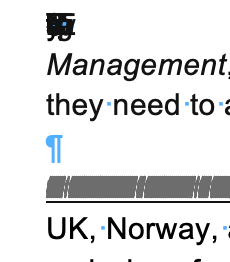
I am using Microsoft 365 on Mac running Tahoe 26.3.1. I downloaded a Google document from a client as a .docx Word document. This is something I do often. My client is also using a Mac. The Word document has corruptions in it, full lines of text are appearing as lines (like a barcode) and there seem to be letters and symbols stacked up on top of each other. Screenshots attached. I have tried saving as a .doc Word document but the corruptions are still there. If I select all of the text and change the font, the corruptions are still there. I copied the text into Text Edit and converted to plain text. The corruptions disappear in Text Edit but so does any text that was there, sentences are incomplete. If I copy and paste this plain text into a new Word document, the corruptions reappear. If I import the Plain Text into InDesign, the corruptions reappear. If I copy and paste the plain text into InDesign, the corruptions reappear. This strikes me as very odd because as far as I know Plain Text should remove any corruptions. My client says that they see no corruptions in the Word doc or in the Plain Text doc that they created. But when they send these docs in email, the corruptions are still there. I spent 4 hours with Microsoft Support yesterday trying to figure out the problem and when they couldn't figure it out, they just closed and left the chat.... I would love to let my client know what they can do to fix this on their end so that we can move forward with the project. Any suggestions are appreciated!135Views0likes4CommentsI built a free, open-source M365 security assessment tool - looking for feedback
I work as an IT consultant, and a good chunk of my time is spent assessing Microsoft 365 environments for small and mid-sized businesses. Every engagement started the same way: connect to five different PowerShell modules, run dozens of commands across Entra ID, Exchange Online, Defender, SharePoint, and Teams, manually compare each setting against CIS benchmarks, then spend hours assembling everything into a report the client could actually read. The tools that automate this either cost thousands per year, require standing up Azure infrastructure just to run, or only cover one service area. I wanted something simpler: one command that connects, assesses, and produces a client-ready deliverable. So I built it. What M365 Assess does https://github.com/Daren9m/M365-Assess is a PowerShell-based security assessment tool that runs against a Microsoft 365 tenant and produces a comprehensive set of reports. Here is what you get from a single run: 57 automated security checks aligned to the CIS Microsoft 365 Foundations Benchmark v6.0.1, covering Entra ID, Exchange Online, Defender for Office 365, SharePoint Online, and Teams 12 compliance frameworks mapped simultaneously -- every finding is cross-referenced against NIST 800-53, NIST CSF 2.0, ISO 27001:2022, SOC 2, HIPAA, PCI DSS v4.0.1, CMMC 2.0, CISA SCuBA, and DISA STIG (plus CIS profiles for E3 L1/L2 and E5 L1/L2) 20+ CSV exports covering users, mailboxes, MFA status, admin roles, conditional access policies, mail flow rules, device compliance, and more A self-contained HTML report with an executive summary, severity badges, sortable tables, and a compliance overview dashboard -- no external dependencies, fully base64-encoded, just open it in any browser or email it directly The entire assessment is read-only. It never modifies tenant settings. Only Get-* cmdlets are used. A few things I'm proud of Real-time progress in the console. As the assessment runs, you see each check complete with live status indicators and timing. No staring at a blank terminal wondering if it hung. The HTML report is a single file. Logos, backgrounds, fonts -- everything is embedded. You can email the report as an attachment and it renders perfectly. It supports dark mode (auto-detects system preference), and all tables are sortable by clicking column headers. Compliance framework mapping. This was the feature that took the most work. The compliance overview shows coverage percentages across all 12 frameworks, with drill-down to individual controls. Each finding links back to its CIS control ID and maps to every applicable framework control. Pass/Fail detail tables. Each security check shows the CIS control reference, what was checked, what the expected value is, what the actual value is, and a clear Pass/Fail/Warning status. Findings include remediation descriptions to help prioritize fixes. Quick start If you want to try it out, it takes about 5 minutes to get running: # Install prerequisites (if you don't have them already) Install-Module Microsoft.Graph, ExchangeOnlineManagement -Scope CurrentUser Clone and run git clone https://github.com/Daren9m/M365-Assess.git cd M365-Assess .\Invoke-M365Assessment.ps1 The interactive wizard walks you through selecting assessment sections, entering your tenant ID, and choosing an authentication method (interactive browser login, certificate-based, or pre-existing connections). Results land in a timestamped folder with all CSVs and the HTML report. Requires PowerShell 7.x and runs on Windows (macOS and Linux are experimental -- I would love help testing those platforms). Cloud support M365 Assess works with: Commercial (global) tenants GCC, GCC High, and DoD environments If you work in government cloud, the tool handles the different endpoint URIs automatically. What is next This is actively maintained and I have a roadmap of improvements: More automated checks -- 140 CIS v6.0.1 controls are tracked in the registry, with 57 automated today. Expanding coverage is the top priority. Remediation commands -- PowerShell snippets and portal steps for each finding, so you can fix issues directly from the report. XLSX compliance matrix -- A spreadsheet export for audit teams who need to work in Excel. Standalone report regeneration -- Re-run the report from existing CSV data without re-assessing the tenant. I would love your feedback I have been building this for my own consulting work, but I think it could be useful to the broader community. If you try it, I would genuinely appreciate hearing: What checks should I prioritize next? Which security controls matter most in your environment? What compliance frameworks are most requested by your clients or auditors? How does the report land with non-technical stakeholders? Is the executive summary useful, or does it need work? macOS/Linux users -- does it run? What breaks? I have tested it on macOS, but not extensively. Bug reports, feature requests, and contributions are all welcome on GitHub. Repository: https://github.com/Daren9m/M365-Assess License: MIT (free for commercial and personal use) Runtime: PowerShell 7.x Thanks for reading. Happy to answer any questions in the comments.5.7KViews2likes4Comments