lookup
31 Topics
Defaulting a lookup value on a page via URL
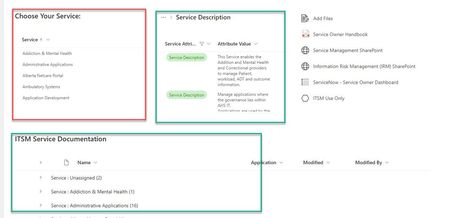
I have created a pretty standard page with a lookup list that users can choose the main value and the other lists adjust to show values associated with that choice. Users want to be able to default their choice. There is no list of users aligned with these choices and it is not feasible to create/maintain such a list. Is there a way I can provide users with a URL that automatically defaults a choice to a specific value. For example, if I want to set the default value and displayed items to be Risk Management, I just give them a Risk Management URL that defaults the choice. I don't care if they change their choice after. Screen shots below showing how it works. I don't want to create 80 pages, one for each choice cause you can't share widgets across pages. Updating 80 versions of the links section would be painful. Plus 80 different pages, one for each choice is very maintenance heavy.710Views0likes1Comment
Sharepoint library - Lookup stopped working just on one column
I have a library with lookup columns pointing to specific lists (providers, companies, products etc.). In particular, I have two columns, "Company" and "Invoicee" pointing to the same list "companies". Everything worked perfectly for months, but suddenly since yesterday the lookup for the "Invoicee" columns stopped working. When I start typing, it seems that it starts looking for a match but it keeps looping forever. The other column "Company" that points to the same lookup list does not present the same problem and is still working properly. I thought it could be a temporary issue but today the problem is still there. Any idea on how to fix this?2.4KViews1like3Comments
Lookup column pulling number shows 6 zeros after decimal point
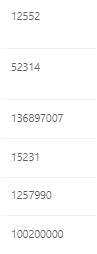
Hi all. I'm hoping someone can help me figure this out - I built a few lists in SharePoint, and the last 2 lists pull an ID number from the first list. On the second list, the number displays with 6 zeros after a decimal point. The colum is set as a number, with 0 decimal places, no thousands separator. On the third list, the number shows as expected. What the heck is goin on here? Thanks, Jen756Views0likes0Comments
Sharepoitn List, Columns, Datasource
Hi Is it possible for a Sharepoint list column to lookup values from an excel sheet stored in O365? I can see it is easy to do this in a PowerApps form to a new field, but not in a list lookup column? (Cannot add datasource in the lookup column to the excel file) If I do this in the PowerApps form, then it seems that this field cannot be shown in the list view, so cannot filter on it in list view? thanks Rich658Views0likes0CommentsUser Names Appearing Incorrectly
Was seeking some assistance on names appearing incorrectly on our SharePoint Online 2013 list. The field is a 'person' lookup, and names have started appearing with 2 commas between the first and last name (as attached) The name is appearing on the list as FirstName,, LastName Other lists using the same field type show the name with only 1 comma.1KViews0likes0Comments
Show Lookup Column of a Lookup Column in List
Hi, I was wondering how to show a Lookup column of a Lookup column. I have three tables (A, B, C): Table A has a Lookup Column (ElementB) pointing to Table B. Table B has a Lookup Column (ElementC) pointing to Table C. I would like to be able to show the "ElementC" column in Table A in order to see this information, so that the columns of Table A would be something like: Title ElementB (which is a Lookup to Table B and works) ElementC (which is contained in Table B as a Lookup column and does not appear as option) Is this possible? Thank you very much in advance for your help.889Views0likes0Comments
Hidden Names are Displaying
We have hidden certain people from displaying in our Global Address book. Problem is that these hidden accounts show up in SharePoint lists that have people/group lookup columns. Is there a way to keep an account from showing up in SharePoint as well?1.4KViews0likes2Comments
Document Lookup Column Link
Hi, all, In SharePoint Online I have a doc library (Reference Docs) and a list (Projects). The goal is for users to choose a doc from a lookup drop-down in Projects, which, when clicked, will directly open the chosen document stored in Reference Docs. So, in Reference Docs I created a workflow that sets the value of the Title field with the Name field. In Projects I created a lookup column referencing the Title field in Reference Docs All works fine, except the link opens the document properties, not the document itself. This should be simple, but I just can figure out what is incorrect. Any help will be appreciated.16KViews0likes13CommentsGetting changes to Lookups to trigger a crawl
We're using a Lookup column to link to master data. When the master data is updated, the changes are applied to the content via the Lookup. While this works well for the browsing and filtering within the list view, the update to Lookup pull-through data does not appear to trigger a crawl. We use these properties for search purposes (refiners) and need them to be updated. Is there a way to trigger the crawl when an item is updated in the Lookup list for the libraries that use it?1.2KViews0likes2CommentsCan we use VLookup to fill in fields from Scattered Data ?
Hi, I wanted to know that is it possible to use VLookup to fill in data in a certain row by matching it from different rows rather than just from a single row. In the attached image, I want to fill in the cells next to "Yellow" i.e. (H4) & "Pink" i.e. (H7) by using the same formula I used to in H2 cell which is "=VLOOKUP(G2:G7,A2:E12,2,0) ". NOTE - That I have selected the table array from "A2:E12" which covers the values of D11, E11 & D12, E12 in which the "Yellow" and "Pink" information is given. I do realise that the source has become different now, but is there a way in which I can fill in H4 & H7 through ANY FORMULA (if Vlookup can't be used) where I don't have to restructure the data in the sheet. Thank You in advance.3.4KViews0likes5Comments