limits
137 Topics
Onedrive sooo annoying but great a same time
I have an some what unwanted computer issue here with Microsoft Onedrive! I have Office 365 and use Onedrive however, it has deleted over 5,500 pictures (yes I have backups and yes I deleted them off OneDrive HOWEVER these pictures were on my computer first so why does Onedrive delete the files even one my PC is the question - is there some setting to prevent this). However, this is so annoying, especially with documents, and IF you stop syncing a folder, OneDrive will delete that folder from your PC - why, especially since the folder was originally on my computer first. So it "seems" Onedrive does things without our consent people tell me BUT I say there must be a setting - anyone know where it is?157Views0likes1Comment
Corrupted VT+ transaction files
We are a small accounting company using VT+ Transaction on a local drive synchronized with OneDrive for backup and file storage. A few days ago when we tried to open the application, we suddenly started receiving the following error messages: Run Time Error 0 and Run Time Error 440, and the program does not start. According to VT+ support the program files are corrupted and the data can only be restored up to the year 2022, as the more recent backups are also affected. Somehow the system is overriding our backups, which makes the latest ones unusable. Any advice what could cause that and how to resolve the issue. Thanks243Views0likes1Comment
Face scan recognition limits?
I was a big fan of adding name tags in photos before, and was eager to have it back. Problem is, I have quite a large number of photos, and onedrive just stopped scanning, being very far from finishing the job. I mean, considering for example the pictures my spouse appears in, one drive started recognizing her in the most ancient photos quite nicely, but stopped somewhere in 2006, and than added just a dozen from the most recent pictures. Yes, I keep taking photos of her meanwhile. Unfortunately it didn't accept help from me, like hey look here, this is a face, and is the face of this person. Any idea if this is just temporary?664Views0likes1Comment
Can OneDrive mobile sync a specific local folder on Android or iOS?
Hi, I would like to understand what is officially supported regarding folder synchronization in the OneDrive mobile app on Android and iOS. Specifically: - Is it possible to select a specific local folder on a mobile device and configure OneDrive mobile to automatically sync that folder? - Or does the OneDrive mobile app only support manual uploads and limited automatic features such as camera roll backup? I am looking for an official clarification on the supported behavior of OneDrive on mobile devices. Thank you.829Views0likes1CommentOneDrive says tnot enough cloud space and asks me to free up space, but there are enough space.
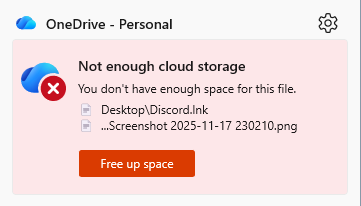
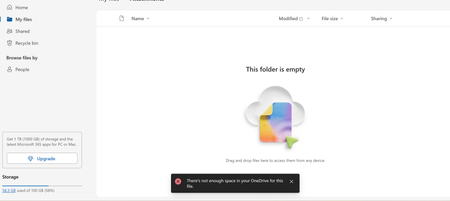
Once I click on the "Free up Space" option, it just shows that I have enough space. I opened a ticket since 11/6 and heard nothing since.Same thing from my phone. The ticket was assigned to an agent on 11/7. No one responded. It has been 11 days since I asked for tech support. The problem persisted more than two weeks. Not even sure how I could get ahold of a human. Is my only option to cancel OneDrive and switch to NAS?377Views1like3CommentsMove files from Account A to Account B 165 GB data
I’ve been using Microsoft Office 365 Family for several years, sharing it with my family members. We have 6 accounts, each with 1 TB of storage. One of my accounts has now reached 985 GB, so I need to transfer files from Account A (my account) to Account B (my wife’s account). These files mainly consist of photos and videos — over 200,000 files in total. I tried transferring a 6 GB wedding shoot (.ISO format), but it took more than an hour. Re-downloading and uploading all the data isn’t feasible as my internet connectivity is limited to 100 mbps only. I’m looking for the best and most efficient way to move these files directly between OneDrive accounts.471Views0likes2CommentsAdd option to change priority of file sync in the OneDrive app
There is no way to prioritise the download or upload of individual files in OneDrive. This is in contrast to Dropbox which has robust prioritisation features. Where this becomes an issue is if you want to download some files as a priority to allow you to continue work. This lacking feature is especially noticeable if you want to download/upload large files, but need smaller files to download/upload to continue working. It's features like this, and the lack of being able to cancel a download of an individual file that makes OneDrive feel half baked, dare I say, amature.385Views1like2Comments