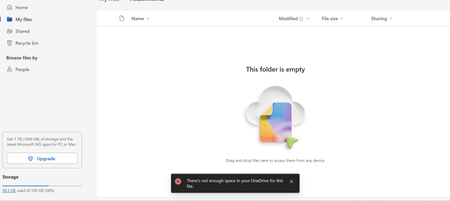
limits
145 Topics
New family storage limits from 6 TB to only 2 TB
I’m a little freaked out what I’m going to do with my entire family’s storage. Right now each of my kids and wife use nearly 1 TB for a total of nearly 5 TB. Since they are reducing this to a new “shared 2 TB” rather than 1 TB each, I am stuck either paying more money or finding a new solution. I am paid up into 2028. It seems terrible that I have paid for this and it is being taken away.1.1KViews4likes12Comments
can't restore deleted files because storage/bin is full with said files.
Hi everyone, I'm using a university OneDrive account with a 50 GB storage limit; I was trying to empty my OneDrive onto an external hard drive to free up space. While doing this, I accidentally deleted some important files (around 60 GB in total). They're now in the OneDrive Recycle Bin, and I need to restore them because they're the only copies I have left. The problem is that OneDrive won't let me restore them because my storage is full. It says I'm using 120 GB out of 50 GB, so I'm 70 GB over the limit. However, the numbers don't seem to add up: My OneDrive folder's Properties on my PC show around 3 GB. The online Storage Metrics page shows only around 6.3 GB in my Documents folder, with very little space used by other visible folders. Even if I deleted the remaining visible files, it wouldn't be enough to bring my usage below the 50 GB limit. So I'm stuck in a loop: I need to restore the files to download them to my external drive, but OneDrive won't let me restore them because it's over quota. I can't find a way to download them directly from the Recycle Bin either. I've contacted my university's IT support, but so far they've only suggested deleting more files, which doesn't solve the problem. I've asked whether they could restore the files as an administrator or temporarily increase my quota, but the IT guy said they cant do either of those things...149Views0likes4Comments
Onedrive sooo annoying but great a same time
I have an some what unwanted computer issue here with Microsoft Onedrive! I have Office 365 and use Onedrive however, it has deleted over 5,500 pictures (yes I have backups and yes I deleted them off OneDrive HOWEVER these pictures were on my computer first so why does Onedrive delete the files even one my PC is the question - is there some setting to prevent this). However, this is so annoying, especially with documents, and IF you stop syncing a folder, OneDrive will delete that folder from your PC - why, especially since the folder was originally on my computer first. So it "seems" Onedrive does things without our consent people tell me BUT I say there must be a setting - anyone know where it is?468Views0likes1CommentAdd option to cancel download of individual files in the OneDrive App
Once a download starts in OneDrive on desktop, there is no way to stop it. This is a huge issue for anyone dealing with working files that link to multiple files. Files should be able to be cancelled on an individual basis. An example of when this lacking feature becomes a problem is if you open a Premiere Pro project that links to multiple videos, these videos will start downloading. If you then close the Premiere Pro project, the files linked within the project will still download. These may be many gigabytes worth of files. Other reasons why you might want to cancel a download: You may no longer need the file to be downloaded You may realise that your internet connection is too slow for the download but still need to download smaller files to continue working395Views0likes1Comment
3 file limit error in Personal Vault in spite of 1TB family subscription
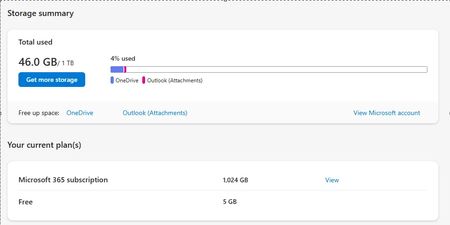
I am having issues with my Personal Vault on One Drive. Its giving me error that I have hit 3 files limit in the Personal Vault on One Drive. In order to use more than 3 files , I have to upgrade to a 1TB plan. I am already a part of the Family Subscription and have 1 TB of space. I have just used 46GB of 1TB. Support is barely able to help me. Best they could do was tell me to logout and login. I have uninstalled and reinstalled my One Drive, and after setting up the Personal Vault, I am seeing the same issue. On 1TB , I can save as many files on Vault but I cant do for some reason now. It was working fine for last so many years but just today it broke after I edited and saved a file. Family subscription with 1TB allows unlimited files on Personal vault but basic plan allows only 3 files. Please help if anyone has a solution.3.4KViews1like3Comments
Corrupted VT+ transaction files
We are a small accounting company using VT+ Transaction on a local drive synchronized with OneDrive for backup and file storage. A few days ago when we tried to open the application, we suddenly started receiving the following error messages: Run Time Error 0 and Run Time Error 440, and the program does not start. According to VT+ support the program files are corrupted and the data can only be restored up to the year 2022, as the more recent backups are also affected. Somehow the system is overriding our backups, which makes the latest ones unusable. Any advice what could cause that and how to resolve the issue. Thanks465Views0likes1Comment