integrations and third-party tools
31 Topics
Fix all annoying Copilot bugs
I’m experiencing an issue with Microsoft Edge on Android. Starting today (September 22, 2026), whenever I try to visit copilot.microsoft.com, Edge automatically redirects me to the Google Play Store to install the Copilot app. I prefer using Copilot in the browser and do not want to install the app. And even when i try to install the copilot app it does not let me do anything and thinks I need a license or subscription to access it like copilot is litterly supposed to be free and also even when i try to get rid of the app redirection it for some dumb reason it redirects me to from copilot.microsoft.com to copilot.com and they put in restrictions like after a lot of chats you must wait for a specific time period and a couple months ago you guys removed the ability to use copilot without registration like come on that is so dumb I want Microsoft Copilot to be fixed revert how copilot was before how is this consumer friendly113Views0likes1Comment
Which Accessible Source Can Reliably Return Current Date, Time, Timezone and UTC Offset?
Question for Microsoft 365 Copilot experts I am trying to implement a reliable "Current Time Validation" control inside a Microsoft 365 Copilot workflow. The requirement is to obtain a machine-readable and repeatable timestamp containing: - Current date - Current time - Time zone identifier - UTC offset For example: 2026-09-16T18:09:00+08:00 Timezone: Asia/Shanghai UTC Offset: +08:00 My goal is not a human-readable world clock page, but a source that Microsoft 365 Copilot can actually access and consume reliably during execution. Business context: The timestamp is used as a mandatory validation gate before generating operational reports. If the timestamp is wrong, downstream conclusions may become invalid because greetings, operating-hours logic, OOO/PTO analysis, and action ownership are all time-dependent. Problems encountered so far I have already tested several approaches and found multiple reliability issues: 1. Conversation context is not a reliable clock source. Copilot may retain or reuse a timestamp from the beginning of a conversation rather than reflecting the actual current time. 2. External "current time" web pages are problematic. Some sites appear to return cached/indexed content when accessed through Copilot, producing timestamps that are clearly inconsistent with real-world elapsed time. 3. Human-readable sources are insufficient. I need a source that returns structured data which can be validated programmatically. 4. Timezone information alone is not enough. The solution must provide: - current date - current time - timezone identifier - UTC offset 5. The source must be repeatable. Two consecutive queries should return updated timestamps reflecting actual elapsed time. Questions 1. Among the data sources that Microsoft 365 Copilot can realistically access today, which source can provide: - date - time - timezone - UTC offset in a machine-readable format? 2. Is there any Microsoft-native source (Microsoft Graph, Outlook, Exchange Online, mailbox settings, tenant settings, calendar services, etc.) that exposes this information directly? 3. Which source would be considered the most reliable and repeatable for workflow-validation purposes? 4. Has anyone implemented a trusted "current time authority" pattern for Microsoft 365 Copilot or Copilot Studio agents? 5. Does Microsoft 365 Copilot have access to a real-time clock source that is guaranteed to be refreshed at query time rather than returning indexed or cached timestamp information? The objective is to establish a trusted and auditable timestamp before generating business reports, task summaries, or workflow decisions. Thanks in advance.31Views0likes0Comments
Access to Office App Context and Setting CEA as Default in Microsoft 365 Copilot
Hello everyone, I’m exploring Custom Engine Agents (CEA) in Microsoft 365 Copilot and have two questions regarding their integration with Microsoft 365 applications. Can a Custom Engine Agent access the current Office application context? When a CEA is added to Microsoft 365 Copilot, is there a supported way for the CEA to access the content of the Microsoft 365 application where Copilot is currently being used? For example: Word: Can the CEA read and/or modify the document currently open in Word? Outlook: Can the CEA access the current email/thread and perform write operations such as drafting or modifying content? PowerPoint: Can the CEA access and modify the presentation currently open? Other Microsoft 365 applications: Are similar capabilities available in other applications where Microsoft 365 Copilot is supported? Essentially, I’m trying to understand whether a Custom Engine Agent can leverage the same application context and read/write capabilities that the native Microsoft 365 Copilot has within these applications. If this is supported, what APIs, SDKs, or integration patterns should be used? Can a Custom Engine Agent be configured as the default mode? Is there a supported way to: Disable or bypass the default Microsoft 365 Copilot experience/mode, and Configure a Custom Engine Agent as the default agent/mode that users interact with when they open Copilot? For example, if an organization has a custom agent that should handle the majority of Copilot interactions, can that agent be configured as the default instead of the standard Microsoft 365 Copilot? I’d appreciate any clarification on the current capabilities, limitations, and recommended architecture for these scenarios. Thanks72Views0likes0CommentsAccess to Office App Context and Setting CEA as Default in Microsoft 365 Copilot
<p>Hello everyone,</p> <p> I’m exploring <strong>Custom Engine Agents (CEA) in Microsoft 365 Copilot</strong> and have two questions regarding their integration with Microsoft 365 applications. </p> <p><strong>1. Can a Custom Engine Agent access the current Office application context?</strong></p> <p> When a CEA is added to Microsoft 365 Copilot, is there a supported way for the CEA to access the content of the Office application where Copilot is currently being used? </p> <p>For example:</p> <ul> <li><strong>Word:</strong> Can the CEA read and/or modify the document currently open in Word?</li> <li><strong>Outlook:</strong> Can the CEA access the current email/thread and perform write operations such as drafting or modifying content?</li> <li><strong>PowerPoint:</strong> Can the CEA access and modify the presentation currently open?</li> <li>Similarly, can it access the context of other Microsoft 365 applications where Copilot is available?</li> </ul> <p> Essentially, I’m trying to understand whether a <strong>Custom Engine Agent can leverage the same application context and read/write capabilities that the native Microsoft 365 Copilot has within these applications</strong>. </p> <p> If this is supported, what APIs, SDKs, or integration patterns should be used? </p> <p><strong>2. Can a Custom Engine Agent be configured as the default mode?</strong></p> <p> Is there a supported way to: </p> <ul> <li>Disable or bypass the default Microsoft 365 Copilot experience/mode, and</li> <li>Configure a <strong>Custom Engine Agent as the default agent/mode</strong> that users interact with when they open Copilot?</li> </ul> <p> For example, if an organization has a custom agent that should handle the majority of Copilot interactions, can that agent be configured as the default instead of the standard Microsoft 365 Copilot? </p> <p> I’d appreciate any clarification on the current capabilities, limitations, or recommended architecture for these scenarios. If there is any official documentation covering these capabilities, please share it as well. </p> <p>Thanks!</p>68Views0likes0CommentsAccess to Office App Context and Setting CEA as Default in Microsoft 365 Copilot
Hello everyone, I’m exploring **Custom Engine Agents (CEA) in Microsoft 365 Copilot** and have two questions regarding their integration with Microsoft 365 applications. ### 1. Can a Custom Engine Agent access the current Office application context? When a CEA is added to Microsoft 365 Copilot, is there a supported way for the CEA to access the content of the Office 365 application where Copilot is currently being used? For example: - **Word:** Can the CEA read and/or modify the document currently open in Word? - **Outlook:** Can the CEA access the current email/thread and perform write operations such as drafting or modifying content? - **PowerPoint:** Can the CEA access and modify the presentation currently open? - Similarly, other Microsoft 365 applications where Copilot is available. Essentially, I’m trying to understand whether a **Custom Engine Agent can leverage the same application context and read/write capabilities that the native Microsoft 365 Copilot has within these applications**. If this is supported, what APIs, SDKs, or integration patterns should be used? ### 2. Can a Custom Engine Agent be configured as the default mode? Is there a supported way to: - Disable or bypass the default Microsoft 365 Copilot experience/mode, and - Configure a **Custom Engine Agent as the default agent/mode** that users interact with when they open Copilot? For example, if an organization has a custom agent that should handle the majority of Copilot interactions, can that agent be configured as the default instead of the standard Microsoft 365 Copilot? I’d appreciate any clarification on the current capabilities, limitations, or recommended architecture for these scenarios. Thanks63Views0likes0Comments
Request to increase context length
Hello, I think users would greatly appreciate the ability to include more context in prompts. In my experience, results can be dramatically improved if you can include more examples and background information directly in the prompt. While you can attach longer files, this is in my experience not nearly as effective as directly including information in the prompt, as attaching files I assume uses something like RAG to pull snippets of your context instead of the entire thing. This is especially important when including examples as in few-shot prompting. If I want to use Copilot to help me write a longer document, I want to provide multiple already completed examples of this longer document. However, with the context limit of Copilot for M365 I might not even be able to fit one example in the prompt. This is not an issue with ChatGPT which has a much longer context length (128k tokens vs. 16k characters in Copilot). If users are able to write prompts with more context I think they will see much better results and therefore see the value of Copilot for M365 in a much clearer way. Thank you for your consideration.1.1KViews2likes0CommentsWriting good descriptions for Microsoft Graph custom connectors
Good morning everyone, I've setup several Microsoft Graph custom connectors as described here: https://learn.microsoft.com/en-us/microsoft-365-copilot/extensibility/overview-graph-connector They're able to index and everything. The problem I'm running into is how to write good descriptions of the connector in the search and intelligence center so that copilot knows how to use them. Does anyone have any guidance on writing good descriptions for the connectors to enhance the relevant results users get?136Views1like0Comments
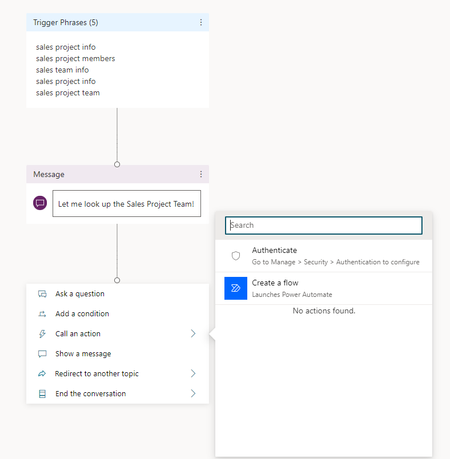
Link is broken to create a flow - Copilot in Teams
When I try to create a flow in Copilot Studio for Teams, I get an information "Looks like that link is broken" The error occurs when I access a "Topic", click on "Add an action" and then on "Create a flow" I'm using Microsoft Copilot Studio version 1.2.8 in Microsoft Teams version 24335.208.3315.1951. And this problem is occurring in any chatbot agent created.1.1KViews0likes4Comments