integrations and third-party tools
33 Topics
Agent not visible in M365 Copilot
I created an agent in M365, including its name, description, instructions, and required actions. The agent is properly tested in Copilot Studio and published, but it is not visible in the M365 Copilot agent list. Interestingly, one agent is visible while the other is not, and I am unable to determine the issue.14KViews0likes9Comments
Web content plug-in management in M365 Copilot
Hi, Referring to this announcement MC882258 in message center, MS informed that web content plug-in management will be removed from M365 admin center, rather it will be managed as part of Optional Connected Experience for M365. We have currently disabled this web content plug-in in our environment but allowed Optional Connected Exp for the users. After this announced change, how web content plug-in will behave? Will it enabled because we have Optional connected exp. enabled? Secondly, what is the reason behind this change? Why MS has taken individual control setting away and mixed it with so many optional connected exp. where we do not have an option to choose which optional connected exp. we want to enable/disable. Its like all or nothing.2.8KViews0likes3CommentsHow to build custom Copilot agents grounding SharePoint lists
Imagine the scenario where the user can ask to a Copilot Agent to create a list item, update a single column, delete or extract data filtering by columns. In this video we'll see how to build a custom agent which is able to perform CRUD operations in a SharePoint list. #Copilot #Agents #Microsoft365 #MPVbuzz #AI #CopilotStudio2.8KViews1like0Comments
Schedule a meeting using copilot in outlook
We need to explore how to build a Copilot for scheduling meetings. This Copilot should automatically suggest meeting times, check availability across company calendars, and manage invites. Our users already have Copilot licenses. Since we’re not experts in Copilot, we need to clarify if this functionality is available in Copilot for Outlook in the US. If it is, how can we use and customize these features? If not, what would be the approach to build something similar using the Copilot interface in Outlook?1.3KViews0likes2Comments
Request to increase context length
Hello, I think users would greatly appreciate the ability to include more context in prompts. In my experience, results can be dramatically improved if you can include more examples and background information directly in the prompt. While you can attach longer files, this is in my experience not nearly as effective as directly including information in the prompt, as attaching files I assume uses something like RAG to pull snippets of your context instead of the entire thing. This is especially important when including examples as in few-shot prompting. If I want to use Copilot to help me write a longer document, I want to provide multiple already completed examples of this longer document. However, with the context limit of Copilot for M365 I might not even be able to fit one example in the prompt. This is not an issue with ChatGPT which has a much longer context length (128k tokens vs. 16k characters in Copilot). If users are able to write prompts with more context I think they will see much better results and therefore see the value of Copilot for M365 in a much clearer way. Thank you for your consideration.1.1KViews2likes0CommentsLink is broken to create a flow - Copilot in Teams
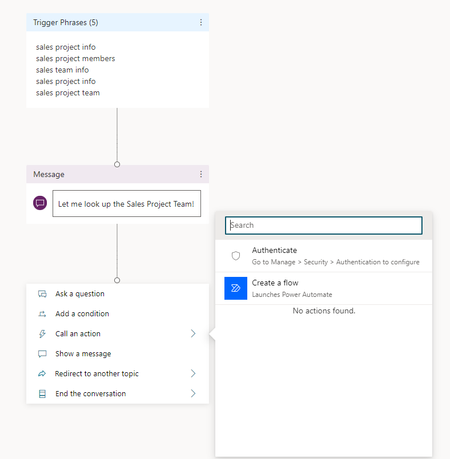
When I try to create a flow in Copilot Studio for Teams, I get an information "Looks like that link is broken" The error occurs when I access a "Topic", click on "Add an action" and then on "Create a flow" I'm using Microsoft Copilot Studio version 1.2.8 in Microsoft Teams version 24335.208.3315.1951. And this problem is occurring in any chatbot agent created.1.1KViews0likes4CommentsCopilot for Microsoft 365 action/plugin not appearing in Admin center.
I'm encountering an issue with the Copilot action/plugin not appearing in the admin center. Here’s what I’ve done so far: Navigated to Copilot Studio. Selected Copilot for Microsoft 365. Added a Conversational Action and created a custom topic. Published it in the Publish tab. Despite this, the plugin action has not shown up in the admin center or in Microsoft 365 Copilot even after more than 24 hours. Can anyone help me figure out what might be going wrong? Additionally, is there a way to integrate the custom Copilot I created in Copilot Studio into Microsoft 365 Copilot? Thank you for any insights!880Views1like1Comment
Copilot Agent with Graph API
I am building a Copilotagent and trying to integrate MicrosoftGraphAPI. However, I am encountering an "Authorization" error while interacting with the agent. For now, I am simply calling the "/me" endpoint to retrieve the logged-in user's information. Here are the steps I followed for app registration: 1. Registered the app in Azure AD. 2. Generated the client ID and secret. 3. Under API permissions, granted admin consent for the User.Read scope. The part where I am getting confused is when I followed the documentation, it mentions registering an app on "dev.teams.microsoft.com" to get the ID. However, I am only getting the ID in Azure AD. This is my first time working on something like this, so I am a bit unsure. :( Attaching the reference docs links here as well. 1. Authentication schemes for API plugins for Microsoft 365 Copilot https://lnkd.in/dzjufNsC API plugins for Microsoft 365 Copilot https://lnkd.in/dpWMvNp6 Could anyone help me resolve this or share their experience with this integration. that would be really helpful 😊749Views1like0CommentsUnlock AI Innovation: October 9th, 9:00 AM PT – Live AMA on GPT-4o-Realtime API & Copilot Voice
Unlock new capabilities with the GPT-4o-realtime API with Audio, now on Azure! This model is set to transform your AI applications, offering natural multilingual conversations, faster interactions, and more streamlined workflows. What to Expect: Deep Dive into the Tech: Get insights into how the model integrates with Copilot Voice and learn about real-world use cases that can enhance your applications. Connect with Experts: Our Microsoft product experts will be on hand to answer your toughest questions and share best practices. Use Cases & Implementation: Discover how to maximize the potential of GPT-4o Audio for customer interactions, workflows, and more. Ready to revolutionize your AI applications? RSVP here to secure your spot!574Views1like0Comments