information protection
51 Topics
Issue Using Built in Trainable Classifiers in Auto Labelling Policies - Purview
Over the last few days, I have run into issue while configuring Auto labelling policies in Purview specifically when using built in classifiers for eg: Budget, Agreements These classifiers are parr of ready to use. They have been working well for us until recently but now saving an auto labelling rule that includes any of Trainable classifiers getting client side error: 'Could not find rule pack associated with sensitive information type' this is unexpected because: same classifiers eg: Budget worked perfectly just few weeks ago. No changes have made to roll, permissions on our side. Still not sure why showing issue now. Kindly request you, help me with root cause of the cause. Please feel free to post it comments if someone faced same issue in using trainable classifiers in auto labelling policies. Thanks in advance. Regards, BanuMurali645Views2likes5Comments
Can´t Sign confidential documents
Hello, I have a problem. I want to send confidential contracts to customers for signing with Adobe DocuSign. This contracts have a label "confidential" from purview and are encrypted. But now the customer cant sign the contract with DocuSign because of the encryption. Is there a way that they can sign the document? We must encrypt the documents because compliance reasons and ISMS. Thank you.496Views2likes5CommentsApply Sensitivity label on SharePoint or Teams site to block offeline sync
Hi All, I was wondering is there any way if we apply a label toa SharePoint or Teams site (backed by SharePoint), we can enforce restrictions such as "Don't allow offline sync". Thanks in advance, DilanSolved284Views2likes2CommentsMicrosoft Purview Best Practices
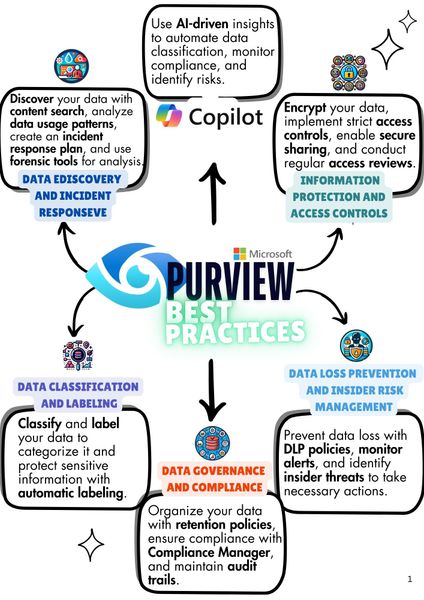
Microsoft Purview is a solution that helps organizations manage data and compliance. It also uses AI to classify data, monitor compliance, and identify risks. Key features include data discovery, classification, governence, retention, compliance management, encryption, and access controls. Purview ensures data security, prevents insider threats, and helps implement data loss prevention policies to meet compliance requirements. Hello everyone - This is just a short introduction, I am Dogan Colak. I have been working as an M365 Consultant for about 5 years, holding certifications such as MCT, SC-100, SC-200, SC-300, and MS-102, with a focus on Security & Compliance. This year, I am excited to share what I have learned with the Microsoft Technology Community. In the coming days, I will be publishing videos and articles based on the training agenda I have created. I will also share these articles on LinkedIn, so feel free to follow me there. I am always open to feedback and suggestions. See you soon!1.4KViews2likes1Comment
I just want to secure AI. DLP vs Info Protection vs DSPM vs Governance vs...
I'm with an MSP, and I've avoided Purview like the plague, because it seems to be suffering from the same 'made by marketing teams' 'strategy' the 365 documentation is. However, it's my understanding Purview policies are needed for Data control of Copilot. Here's my issue: all of these different 'solutions' sound like the exact same thing, but are pitched as if they are something different. i'm going to post a couple of descriptions for these 'solutions' to illustrate this. 'discover, label, and protect sensitive and business-critical info' 'make sure your organization can identify, monitor, and protect sensitive info across the expanding Microsoft 365 landscape' 'discover and secure all your sensitive data across Microsoft 365 and non-365 data sources' 'Discover, label, and protect sensitive and business-critical info across your multicloud data estate.' I genuinely do not have time to figure out what each of these 'solutions' are, then figure out their policies, then their giant library of settings (below)... It's not even clear to me what's active NOW, considering we never licensed Purview - but somehow have been roped into it. It SEEMS like these are all variations of marketing terms, which all point to 3-4 actual technical implementations in obscure ways. Can someone advise on the ACTUAL technical policies we want to target and enable? Or just give some clarity? I've never felt so overwhelmed or disconnected from Microsoft's environment. We just want to secure our tenant's AI usage.823Views1like9Comments
Auto-labelling does not support content marking
We’ve hit a limitation with service-side auto-labeling in Purview: when a sensitivity label is applied by an auto-labeling policy, any configured visual markings (headers, footers, watermarks) are not written into the document. A further complication is that there is a requirement which includes a custom script that applies sensitivity labels at the folder level and relies on the service-side engine to cascade those labels down to the folder's contents. This means automation isn't just a 'nice to have' for scale — it is a core dependency of our labeling architecture. The inability to also apply visual markings through this same automated path creates a direct gap in our compliance posture and the MS solution. For environments where visible classification is mandated by regulation, this effectively means we can’t rely on service-side auto-labeling alone, which is a big constraint. I’d really appreciate: Any confirmed best practices/workarounds others are using, and Input from the product team on whether server-side visual markings tied to auto-labeling are being considered / and what to consider meeting this requirement as an alternativeSolved422Views1like1CommentEncryption disappears in Outlook - Sensitivity Label not working
Hello everyone, we implemented Sensitivity Labels at our client and have iconsistent and unexpected behavior, we cannot explain. Maybe some of you can help or have ideas on whats going on: Scenario / Use Case A customer is using Sensitivity Labels to encrypt emails in Exchange Online. Label configuration: The sensitivity label applies encryption The label is scoped (published) to a Microsoft 365 group User A and User B are members of this Microsoft 365 group and therefore can apply the label User are licensed with M365 Business Premium The label is published and available to User A and User B (member of above M365 group) User C is an external recipient and not included in the label’s publishing scope Observed Behaviors Scenario 1 – Encryption Lost When Forwarded Externally User A (internal) sends an email to User B (internal) using a sensitivity label that applies encryption. User B receives the email correctly: The lock icon in Outlook is displayed, the message is encrypted as expected User B forwards the email to User C (external) User C receives the forwarded email unencrypted: No lock icon is shown, User C can read the entire conversation history, including content that was previously encrypted Scenario 2 – Encryption Disappears Within an Internal Email Conversation In addition to the external forwarding scenario, we are also observing the following behavior within an internal email thread: User A sends an encrypted email to User B using the sensitivity label. User B replies to User A: The reply remains encrypted User A replies again within the same conversation Suddenly, the encryption disappears: The lock icon is no longer shown The message and the full conversation history is no longer protected This happens without any user action to remove or change the sensitivity label. Key Observation Both scenarios occur intermittently: Sometimes encryption behaves as expected Sometimes encryption disappears “out of nowhere” The behavior is not reliably reproducible, which makes troubleshooting very difficult. Any help is appreciated!352Views1like2CommentsTest DLP Policy: On-Prem
We have DLP policies based on SIT and it is working well for various locations such as Sharepoint, Exchange and Endpoint devices. But the DLP policy for On-Prem Nas shares is not matching when used with Microsoft Information Protection Scanner. DLP Rule: Conditions Content contains any of these sensitive info types: Credit Card Number U.S. Bank Account Number U.S. Driver's License Number U.S. Individual Taxpayer Identification Number (ITIN) U.S. Social Security Number (SSN) The policy is visible to the Scanner and it is being logged as being executed MSIP.Lib MSIP.Scanner (30548) Executing policy: Data Discovery On-Prem, policyId: 85........................ and the MIP reports are listing files with these SITs The results Information Type Name - Credit Card Number U.S. Social Security Number (SSN) U.S. Bank Account Number Action - Classified Dlp Mode -- Test Dlp Status -- Skipped Dlp Comment -- No match There is no other information in logs. Why is the DLP policy not matching and how can I test the policy ? thanks210Views1like2CommentsHow Can We Extend Data Protection Beyond Microsoft 365?
Hey everyone, I am running into a bit of a roadblock. I am trying to find a way to ensure consistent data classification and protection across our diverse IT landscape. While Microsoft Protection Policies are greeat for Microsoft Solutions, I'm struggling to extend that coverage to systems like SAP and our HR solution. Has anyone else faced a similar challenge? I'd love to hear any tips or solutions ou've come up with.Solved485Views1like4Comments