gpo
73 TopicsHelp! I’m stuck at “Applying Computer Settings” …
First published on TECHNET on Oct 14, 2008 Perhaps one of the most frustrating issues to troubleshoot is a system that sits at the “Applying Computer Settings …” screen for what seems like forever before (eventually) getting to the point that you can log in.100KViews0likes0Comments
Microsoft Teams cache in a non-persistent environment
Hi all, My name is Koen and I am working with Microsoft Teams in a Dutch government organization. We like to offer our staff the ability to work from home, especially during the COVID-19 crisis. We already have enrolled Microsoft Teams in our desktop (it came out of nowhere and we are replacing the default web-downloader with the MSI file) For the record: We are using a non-persistent environment with VMWare Horizon Client and thin clients in the office, and mostly the web client when users are working from home. All of our users are having a profile where we store the temp files like caches and stuff. Also %AppData% is located in that profile. This data is presistent and will be availible on every boot, when they authenticate. But, we are looking for a way to change the Microsoft Teams cache location. We have limited disk space on the 'profile' disk. The problem is, that Microsoft Teams uses the folder %AppData%\Microsoft\Teams\Service Worker\CacheStorage as location of some caching files. The size of the folder is at least 200MB, and some other users are having a folder with at least 500MB cache. We have 200+ users, so when I calculate this ( 200(users)x200(MB) : 40.000MB/40GB for only the smallest caches. And the profile disk is only 100GB (for example) This is why we want to replace (or totally disable) the cache. I already looked in the newest Administrative Templates (for Office 365, 2016 and 2019) and the desktop-config.json - but I can't find the right way to do this. Does anyone know how to solve this issue?92KViews0likes5CommentsUnderstanding of custom policies / oma-uri / registry
Hi, i would like to understand the whole topic belonging custom policies / OMA-URI / registry a little deeper. I hope that some of you guys would like to join the disscussion to gain some new knowledge together. The first goals should be: Configuring some basic "onboard" registry values Implementation of some Group Policy Objects through Intune Config Let me outline one or two examples: I would like to create / edit a registry value at a specific path. (e.g. HKCU\Software\sample\subfolder) I would like to take an existing GPO and move this one completely to Intune management (e.g. User Configuration \ Preferences \ Folder Options -> hide known file extensions:false) My thoughts on this: This should be possible, right? 😄 I already used "admx ingesting" before e.g. for use with Google Chrome ADMX / Google Update ADMX, which worked fine after understanding it. 😉 Is it possible to use all the other gpo related settings within intune, when they' aren't present in the "administrative templates profile", yet? If yes, how? Any participation in discussion is highly appreciated. Regards PatrickSolved49KViews0likes5Comments
Getting an error when trying a Group Policy Update
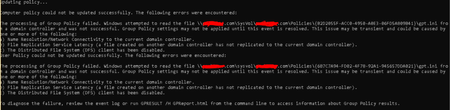
Hi everyone, I'm getting the following error when I'm trying a Group Policy update ( gpupdate /force) in a newly domain joined Windows 10 computer -- This doesn't happen with all the Windows 10 PCs of the domain. Only like 2-3 computers so far. -- The Windows build in the affected PC is 21H2. Can Ping and reach the domain controller. The SYSVOL folder can be reached when browsed via Explorer. I have tried -- ipconfig /flushdns , reboot, trying the gpupdate -- Removing the computer account from the AD, rejoining the PC to the domain and running a gpupdate Can anyone please help me with this ? Thank in advance! Any help is really appreciated. Let me know if you need more details.34KViews0likes1CommentManaging the "Launching Applications and Unsafe Files" Setting
First published on TECHNET on Nov 27, 2007 We are often asked about the centralized management of Internet Explorer configuration options for which there are no Group Policy settings included with the default IE GPO templates.19KViews0likes0Comments"Never save password websites" group policy needed
We just deployed Edge to 1000+ devices in our organization but have discovered unwanted save password suggestions from the Password Manager. When users access an internal webpage that uses some kind of integrated windows authentication/SSO/NTLM/Kerberos etc. meaning the user is not prompted for a username and password - the password manager still suggests to save the username and password! There could be many other scenarios in an enterprise where you do not wish passwords on certain internal (or external) websites to be saved, but allow it for others. It looks like Edge automatically populates a list of websites or URL's where passwords are "never saved" and when a website is on that list Edge doesn't prompt if the user want to save the password. It would be very useful for an enterprise to have a Group Policy where we could prepopulate this list with websites we do not want the browser to save passwords for. The browser should of course still fill websites on this list that the user clicks "Never" to save, but so that the list could consist of both websites populated from the group policy and websites added by the user.16KViews4likes8Comments
Exclude specific file extention from OneDrive sync
Hi all, we are going to move the Know Folders to OneDrive For Business via GPO. We would like to exclude some kind of files (such as .pst or .mov) but we can't find any policy to do that. There is some administrative template we need to add? There is some other way (via reg key, for ex) to do the same thing? Thank youSolved15KViews0likes2Comments
Windows 10 1903 Group Policy Issues after OSD
Hi, We've recently started deploying Windows 10 1903 (First Win 10 version too...) with SCCM 1902 with MDT and group policy appears to apply, according to the logs but then we find certain settings not actually applied, even though a gpresult shows them as being applied. Checking the various reg keys etc. for our policy settings on a client, I have seen that all of our GPO settings get applied and then some but not all get mysteriously removed, for example the Interactive Logon message gets applied but then removed, as in the registry value is removed. Running a gpupdate /force after this has happened, appears to fix the issue. However using the SMSTSPostAction variable to run a script or command to update Group Policy, doesn't work either, the script/command runs (As per log files) but the above does still occur until we run a gpupdate /force (A ordinary gpupdate does nothing, so most of the time reboots etc. do nothing). We have no Group Policy related Group Policy settings (As in the ones that control whether CSEs process during slow links etc. and whether they process even though there are no changes) and we cannot find any other reason for this not to work correctly. I think until we find a fix, using the RunOnce reg key/value maybe the workaround... Would someone at Microsoft be able to confirm whether this is a confirmed issue at Microsoft and whether there is a fix for it please? Or if there is a fix incoming as potentially some of our security related GPOs are not being correctly applied. Many thanks, Luke9.2KViews0likes15Comments