formulas and functions
25446 TopicsWelcome to the Excel Community
The Excel Community is a place we've built for all of you. You can learn more about how to do something with Excel, discuss your work, and connect with experts that build and use the product. With over half a billion Excel customers, we want to engage with you in fundamentally different ways and the community is a starting point for that. Our community helps answer your product questions with responses from other knowledgeable community members. We love hearing feedback and feature requests from you which helps us build the best version of Excel ever. If you have found an outage or a bug please post at our Answers forum. We look forward to getting to know you! Sangeeta Mudnal & Olaf Hubel on behalf of the Excel Team69KViews30likes109CommentsAnnouncing LAMBDA: Turn Excel formulas into custom functions
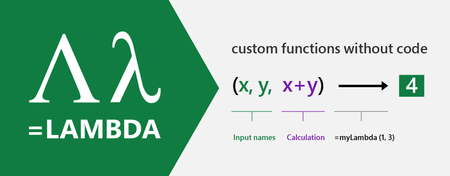
Today we are releasing to our Beta customers a new capability that will revolutionize how you build formulas in Excel. Excel formulas are the world’s most widely used programming language, yet one of the more basic principles in programming has been missing, and that is the ability to use the formula language to define your own re-usable functions.468KViews29likes227Comments
Autocomplete not working for data validation
At work we have a shared excel sheet (we open it on the web) and we use it to store data. We had it set up with data validation list's and when we typed into the boxes, it would autocomplete one of the options. Now, you have to click the down box then start typing because autocomplete has stopped working. Autocomplete is still checked in options, and everything is still the same setting that it was previously as far as anyone can tell. Please help!56KViews23likes73Commentscreate a kind of Gantt beam from a Working time sheet
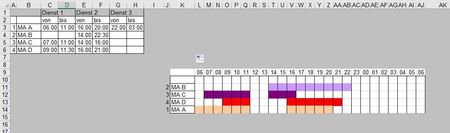
Hello people need help too, Would like to create a kind of Gantt beam in this worksheet. Would like to enter the working hours (von=from, bis=to) in sheet "January", in three Duties ( Dienst1, Dienst2, Bereitschaft ) and in MA1 to 9 (colleagues) as well as the TeamChief, in the end it should be in the specified beam in sheet "IND1" should appear. The bar / timeline should appear (“IND1”) in the default color and row of the colleague I insert the working time in sheet “Januar”. Only the entered working hours should appear with color in sheet “IND1”, everything else without color in the row. In the end, the VBA code should be so that I simply copy it into the next sheet every month. A very nice person wrote me this VBA code (which I am also very grateful for) to accomplish my project. However, due to my VBA ignorance, I overexcited his good mood. I tried all the days to make it on my own, but without success. That’s why I contact the community. Any help in any kind is welcome and would like to thank you in advance for taking the time to read my request. If it could come to a solution, I would not only be happy, but also to do a somersault ... and that at my age :-))1.4KViews19likes2CommentsPLEASE VOTE!!! for Additional function for formatting cells. Adjust cell size to text length
Your vote counts!!! Adjust cell size to text length Additional function for formatting cells. https://excel.uservoice.com/forums/304921-excel-for-windows-desktop-application/suggestions/41191999-additional-function-for-formatting-cells Additional function for formatting cells. Adjust cell size to text length. At the moment there is in the menu of cell format, alignment, among other things the possibility to adjust the text size on the cell. In addition to this function, it would be very helpful if there was a box to click on where the cell would be adapted to the font size. If you like the idea, please click on the link and vote!1.1KViews18likes3Commentsentering the working time, automatically marked with color in the timeline.
When entering the working time in a time entry, this time should be automatically marked with color in the timeline. Is this possible? if yes... how? TEST Sheet Ps. My knowledge in Excel is not the best, but my knowledge in VBA is almost non-existent 😞 Any help is welcome Thx in Advance NikolinoSolved7.4KViews18likes35CommentsVBA - Show data selection in pop-up menu
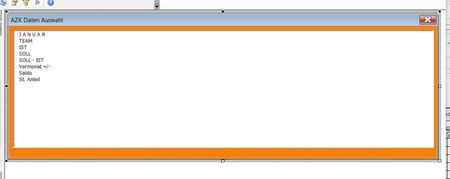
Hi Guys, have a "little" problem where I need a little help. I have a user form with a list field where I take data from a table from another worksheet. My problem is that it only shows the labeling area and not the data. VBA Code in Scheet1 Option Explicit Private Sub Worksheet_BeforeRightClick(ByVal Target As Excel.Range, Cancel As Boolean) Me.Unprotect ("1234") If Not Intersect(Target, Range("G5:EZ6")) Is Nothing Then Cancel = True ASK_Auswahl.Show End If Me.Protect ("1234") End Sub User Form in sheet 1 Sheet2 - table where the data is taken from Properties window in lists Box1 How can I get all data from Sheet2 to be displayed in the user form? Thx in Advance 🙂 NikolinoSolved5.4KViews16likes3Commentsincorrect formulation
Hello everyone, need a little food for thought ... or better...need your help 🙂 Examble (Cell L14) : =ODER(UND(L$9>=$C$3;L$9<=$D$3);UND(L$9>=$E$3;L$9<=$F$3); UND(L$9>=$G$3;L$9<=$H$3)) With this formula I can create a timeline as long as the working time is longer. If the working hours from 8:00 p.m. to 11:00 p.m. then everything is ok, shows how it should display. If the working hours are from 10pm to 3am then it shows empty, how can I correct this error in my formula? Nikolino I know I don't know anything (Socrates)Solved4.9KViews16likes16CommentsTimeline - Back to the Future
So far I have made a worksheet where I built up my timeline. In the installation of the formulas which I have only managed with the help of so many here. In the process of realization, some prolemes have emerged where I need your help with. Problem 1) The middle service = service (G&H) deducts half an hour in the timeline. Example MA2 & MA2. MA1 should also be green at 6:00 p.m. and MA2 should be orange-brown at 8:00 p.m. Problem 2) If no time is entered in the service cells, the timeline looks like MA3 & MA4 & MA5. Problem 3) How can I set the list (columns A to L) so that all MA & GL are the same sequence as in the timeline. Any help is welcome, thx in advance Nikolino I know I don't know anything (Socrates) *Trost gibt der Himmel, von dem Menschen erwartet man Beistand und Hilfe ( Juda Löb Baruch).Solved1.2KViews15likes2Comments
Conditional formatting for entire row based on data in one cell
I need all cells in a row to highlight a certain color if the data in one cell contains a specific word. What I specifically want is for an entire row to turn grey if the status cell contains the word "SHIPPED." I know how to make that specific cell highlight the color I want, but not the entire row of the sheet. Thank you for your help!Solved3.8MViews11likes134Comments