formulas and functions
25444 TopicsHalloween 2026 Scheduling Challenge 🎃
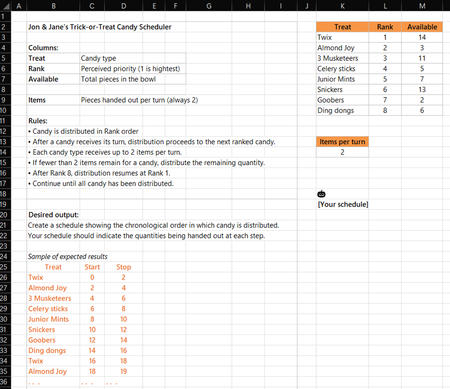
Happy Halloween! You'll find the rules in the screen capture below and in the attached workbook. Creative solutions are encouraged. Feel free to use any functions available in the Beta channel. I won't post my solution immediately so submissions aren't influenced. Enjoy!266Views1like14Comments
Calculate partial month salary
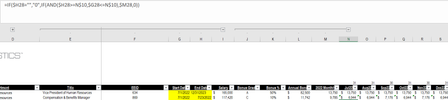
I am trying to figure out the best formula that will calculate either a) a full month of salary or b) a partial month salary if the start or end date indicate an employee was not there for the full month. For example, in the screenshot below, the employee on the second line should only get 23/31 days of salary in July 22 (dates on the top row are EOMONTH) and no salary after July 22.7.7KViews0likes12Comments
Excel 4.0 macros are not working properly after last update Oct 2026
One of the functions I use in the name manager Eval1=LAMBDA(x,IF(TODAY(),EVALUATE(x),)) has stopped providing results. It only returns #NAME? as result. I have been using it for years without a problem and the last update (Oct 2026) I believe was the source of this issue. I have already checked the settings in the Trust Centre and are fine.19Views0likes0Comments
Excel Nested Arrays: Find the Nesting Depth of Uniform and Ragged Arrays ARRDEPTH() & ISRAGGED()
Hey everyone! I’ve been diving deep into Excel’s new nested arrays features lately, and I absolutely love the flexibility they bring to data structuring. However, managing them can get a bit tricky, so I figured I’d build some specialized tools to handle them seamlessly. Public Interfaces & Arguments =ISRAGGED(array) Argument Description Default Behavior array Target nested structure to validate. Required =ARRDEPTH(array, [is_ragged]) Argument Description Default Behavior array Target nested structure to measure. Required [is_ragged] TRUE: Scans all branches for the deepest path. FALSE: Speed test on the first path only. FALSE (Omitted) TL;DR (What makes it tick): Function Name Type What It Does ARRDEPTH Public UI Returns nesting depth. Supports deep checking or fast linear testing. ISRAGGED Public UI Structural validator. Returns TRUE if array branches have uneven nesting. ANALYZE_NESTING Hidden Core Engine Multi-process recursive parser that tracks tree structure geometries. LINEARDEPTH Hidden Utility High-speed depth checker that evaluates the first element path exclusively. You can get both functions from my GitHub Gist: https://gist.github.com/Medohh2120/9cdf939036942c9672c57ccd6de696d3458Views1like9Comments
Excel “Trace Dependents” stops working in XLSX files generated by ChatGPT
Excel “Trace Dependents” stops working in XLSX files generated by ChatGPT – Cause and tested solution Problem When opening Microsoft Excel workbooks (.xlsx) generated by ChatGPT, the Trace Dependents feature may stop working, reporting that a cell has no dependents even when other cells explicitly reference it. The Trace Precedents feature may continue to function normally. In our testing, the problem was particularly difficult to diagnose because: It occurred repeatedly with Excel workbooks generated by ChatGPT. Opening an affected workbook caused Trace Dependents to stop working even in other workbooks that had previously worked correctly. The malfunction persisted after closing the affected workbook. Recalculating formulas, rebuilding the calculation chain and reconstructing the workbook did not consistently resolve the issue. Root cause identified The affected XLSX files generated by ChatGPT contained the following setting in xl/workbook.xml: forceFullCalc="1" This setting enables forced full calculation, bypassing Excel's normal dependency-based calculation mechanism. Tested solution Close Excel completely, including any remaining EXCEL.EXE processes. Open the affected XLSX file as a ZIP archive. Locate xl/workbook.xml. Find the <calcPr> element. Change forceFullCalc="1" to forceFullCalc="0", or remove the attribute. Save the corrected XLSX file. Restart Excel in a clean session. Open only the corrected workbook and test Formulas → Trace Dependents. Experimental confirmation We verified that: An original ChatGPT-generated workbook containing forceFullCalc="1" triggered the malfunction. The problem affected the entire Excel session and persisted after closing the original workbook. A corrected version containing forceFullCalc="0" worked when opened in a clean Excel session. The same issue was reproduced through multiple tests, including Excel Safe Mode. Recommendation for ChatGPT and XLSX-generation developers ChatGPT's spreadsheet-generation workflows should explicitly prevent the unnecessary activation of forceFullCalc=True. Before delivering generated XLSX files, the system should inspect xl/workbook.xml and ensure that persistent forced full calculation is disabled unless specifically required. This check is particularly important because the problem may affect not only the generated workbook but also other Excel workbooks opened in the same session. Scope and limitation This issue was repeatedly observed in workbooks generated through ChatGPT in our testing. The results do not establish that all ChatGPT-generated Excel files are affected, nor that this setting is responsible for every Trace Dependents malfunction. Nevertheless, the relationship between forceFullCalc="1" and the observed behavior was confirmed experimentally in the tested environment. Conclusion A ChatGPT-generated XLSX workbook with forceFullCalc="1" can trigger a persistent malfunction of Excel's Trace Dependents feature. Disabling this setting and restarting Excel restored the functionality in our tests.139Views0likes1Comment
Conditional formatting
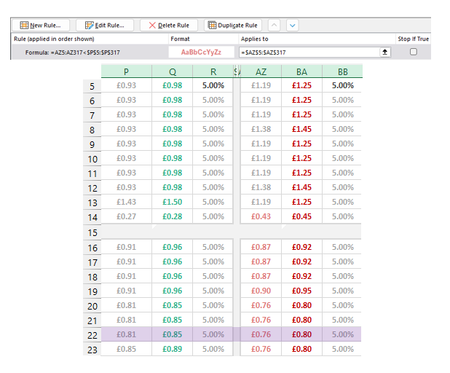
I'm making a rule to Highlight cells in Column AZ when the value is lower than Adjacent cells in Column P. For the most part it works except for two cells in AZ (1 shown as an example) that are higher than P but are being picked up by the conditional formatting. The two cells I'm focusing on here are P14 (£0.27) and AZ14 (£0.43). £0.43 should not be being highlighted pink as it isn't lower than £0.27. This has to be something obvious but I have looked at it too long. Please help if you can :)Solved128Views0likes3CommentsQuestion about categorizing transactions from bank statement in EXCEL
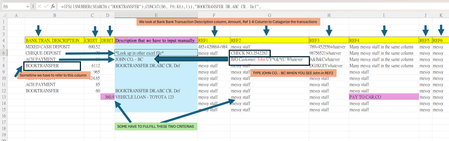
I have a problem of categorizing every transaction in the bank statement for bookkeeping purposes. As shown below, I have to input the Description for every item, and every item has to refer to different columns. For example, if we see "CHECK NO" in REf 2, we have to input "*Look up in other excel file*". If "John" appears in REF2, we have to input "JOHN CO. -BC". If "BOOKTRANSFER" appears in "BANK TRAN. DESCRIPTION", we have to input "BOOKTRANSFER DR. ABC CR. Def". If 360.9(DEBIT) and PAY TO CAR. CO(REF4) appears at the same time, than "VEHICLE LOAN - TOYOTA 123" (I still cannot figure out how to write this rule). There are hundreds of these rules. I wrote a function, like =IFS(ISNUMBER(SEARCH(("BOOKTRANSFER"),CONCAT(B6,F6:K6),1)),"BOOKTRANSFER DR.ABC CR. Def", ISNUMBER(SEARCH(("John"),CONCAT(B6,F6:K6),1)),"JOHN CO. - BC", ISNUMBER(SEARCH(("CHECK NO"),CONCAT(B6,F6:K6),1)),"*Look up in other excel file*"), and drag it down in cell E, to facilitate my job. However, I cannot enter every single rules into a cell, and it would be very long and complicated. It is also difficult to modify. I just wonder whether I can do it with a table or not, like this: so I can input hundreds of rules. But I still cannot figure out how to do it with a table. Please advise if there is a smarter way to do the job. Thank you. (P.S. Reply in Chinese and English are welcomed)Solved5.7KViews0likes16Comments
Formatting depending upon results form a vstack
I have a dynamic VSTACK being displayed. I want to format an adjacent cell in each line of the VSTACK with a boarder that appears or disappears according to changing number of rows in the VSTACK. I would appreciate any help in achieving this.240Views0likes5Comments
Vlookup to multiple columns
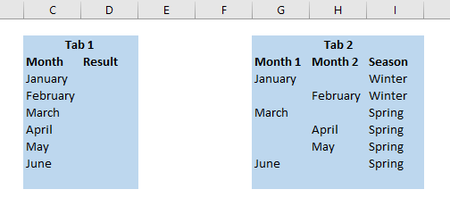
Hello! I was wondering if there was a formula to do a vlookup referencing 2 different columns? In the below example I have 2 tabs of data; on tab 1 I want to do a vlookup based off of column C however on Tab 2 the "month" can be found in either column G or H. Is there a formula that says vlookup column c and look to column G and H and return the result of I? Thank you!56KViews0likes5Comments