exchange
298 Topics
MS Outlook 2024 LTSC automatically gets closed and later not getting open
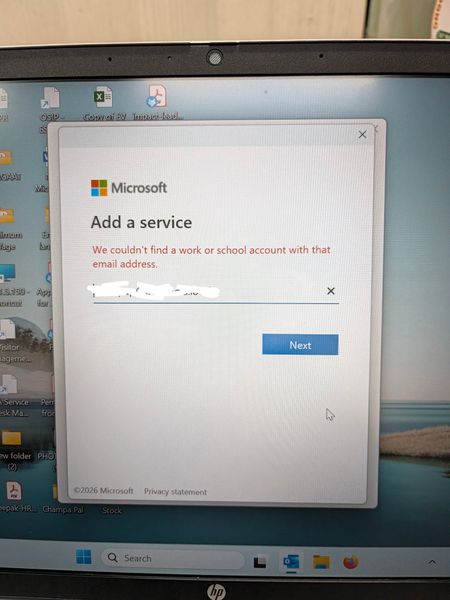
In Outlook 2024 LTSC, the application suddenly stops and closed automatically. Later troubleshooting, it is observed that it doesn't even open in safe mode. Tried to create a new profile where it is not able to search the user from exchange and automatically redirect to Microsoft 365 login page whereas our mail server works in exchange mode. Even after reinstalling the MS office 2024, it is not able to search the user and redirects to Microsoft 365 login page. What is the issue and resolution.248Views0likes2Comments
New Outlook - PST file cannot reopen and PST search not working
Hi, Issue 1 – One PST file cannot be reopened I have two PST files, PST A and PST B. PST A can currently be opened and browsed normally in New Outlook. PST B was previously opened in New Outlook and I was able to browse the folders and emails. However, after I closed/removed PST B from New Outlook, I am now unable to open/add the same PST file again. The PST file can still be opened using Classic Outlook. If the PST format is unsupported or too old for New Outlook, why was New Outlook able to open and browse it previously before I closed it? Could this be related to the PST format (ANSI vs Unicode), PST corruption, or a limitation/bug in New Outlook? Issue 2 – Unable to search emails stored in PST For PST A, I can open the PST and manually browse and read the emails in New Outlook. However, when I use Search, emails stored inside the PST do not appear in the search results. This is referring to searching for the email/message itself, not searching for attachments. The same PST can be searched using Classic Outlook. My understanding is that New Outlook now supports searching emails stored in PST files. Is PST search fully supported, or are there still limitations compared with Classic Outlook? I would appreciate any advice on how to troubleshoot both issues, especially whether there is a way to verify PST compatibility with New Outlook.234Views0likes1Comment
Intermittent “We can’t retrieve the calendar events right now” error in Outlook team calendars
We are receiving an increasing number of reports from users who are unable to view colleagues’ calendars in Outlook. The following error is displayed: “We can’t retrieve the calendar events right now. Wait a few minutes and try again.” The issue appears to be intermittent and inconsistent across Outlook clients: Some calendars work in Outlook on the web but not in New Outlook or Classic Outlook. Other calendars fail in OWA as well. A calendar may work temporarily and then fail again after restarting Outlook or switching between New and Classic Outlook. Some users first experienced the issue yesterday, while others have experienced it for more than a week. One affected user is a manager with nine direct reports. Outlook automatically displays these users under “Team: [Manager name]”. However, the number of visible team members changes after restarting Outlook or switching clients. For example, the group may contain all nine members at one point and only three at another. The Manager attribute and reporting structure have been verified in Active Directory/Entra ID and are correct for all team members. Our Service Desk has already tested the following without resolving the issue: -Outlook on the web, New Outlook and Classic Outlook -Removing and adding the affected calendars again -Adding calendars manually using the users’ primary SMTP addresses -Resetting the Outlook navigation pane -Resetting Outlook views -Creating a new Outlook profile -Verifying the users’ Manager attributes and reporting structure Because the issue also occurs intermittently in OWA and the membership of the automatically generated Manager’s Team Calendar changes, this does not appear to be limited to the local Outlook profile. Has anyone else experienced this recently? Could this be a known Exchange Online issue involving the automatically generated Manager’s Team Calendar, shared-calendar synchronization or mailbox-side calendar navigation data? Are there any additional diagnostics or supported methods for rebuilding the Manager’s Team Calendar configuration in Exchange Online?1KViews4likes3Comments
can't verify my outlook account while logging in on IOS mail app
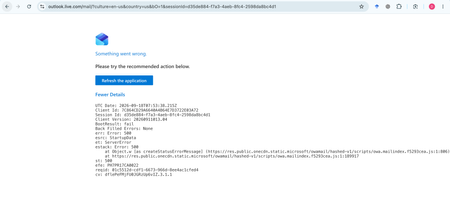
My Outlook.com mailbox cannot be opened on Outlook Web, macOS Mail, or iPhone Mail. Other accounts work normally. Outlook Web shows: HTTP 500, BootResult: fail, esrc: StartupData, et: ServerError. Please check the mailbox provisioning/backend status for my account.302Views0likes1CommentNew Outlook Office.js Html body insert fails with error 9011 HtmlSanitizationFailure
I am building an Outlook web add-in for New Outlook on Windows. Calling mailbox.item.body.setSelectedDataAsync, prependAsync, or setAsync with CoercionType.Html fails with HtmlSanitizationFailure code 9011 on an empty HTML compose body, even for minimal Learn-style bold markup. CoercionType.Text works on the same client. Is 9011 a known New Outlook issue? Where is this error documented? What is the supported way to insert formatted HTML from an add-in?193Views0likes1Comment
Thousands of Sent Items moved to Deleted Items, no rules, no retention
Hello everyone, I'm investigating a very unusual Exchange Online mailbox issue and would appreciate any insights from anyone who has seen something similar. Environment Exchange Online (Microsoft 365) Mailbox: User mailbox Outlook for Mac Outlook for iOS Outlook Web (OWA) Incident Summary On August 13, 2026, approximately 4,997 messages were moved from: The activity occurred over roughly a 3-hour period. Mailbox audit logs show thousands of: Operation: MoveToDeletedItems events. Hourly breakdown: 01:00 - 2,046 events 02:00 - 1,540 events 03:00 - 1,408 events Audit Findings All sampled audit events show: LogonType = 0 (Owner) UserId = affected mailbox owner Result = Succeeded I sampled 5,000 records and all of them were: LogonType = 0 No events were recorded as: LogonType = 1 (Admin) LogonType = 2 (Delegate) Source and Destination Folders Examples from mailbox audit records: Folder : \Sent Items Destination : \Deleted Items Operation : MoveToDeletedItems Message Trace Findings Extended Message Trace was performed on one of the affected emails. The trace confirmed: CopiedToSentItems=True DeleteAfterSubmit=False which indicates: The email was successfully sent. The email was copied to Sent Items. Exchange did not delete the message during transport. So the message existed in Sent Items and was later moved to Deleted Items by a mailbox operation. Rules Investigation Checked: Get-InboxRule -Mailbox <mailbox> -IncludeHidden Findings: No Inbox Rules targeting Sent Items. No hidden Inbox Rules targeting Sent Items. Only two legitimate rules that delete messages from specific Jira/Confluence senders. Delegation Investigation Mailbox permissions reviewed. Known permissions exist, but mailbox audit logs show: 5000/5000 sampled events = LogonType 0 Therefore: No evidence of delegate activity. No evidence of administrative activity. Retention / Compliance Investigation Checked: Get-Mailbox Get-RetentionPolicy Get-RetentionPolicyTag Get-RetentionCompliancePolicy Get-RetentionComplianceRule Findings: No Sent Items retention tag. No retention policy targeting Sent Items. No Purview retention/compliance policy appears to explain this behavior. Activity pattern does not resemble normal retention processing. Add-ins Investigation Mailbox add-ins: Polls Share to Teams Send to OneNote Action Items Bing Maps My Templates Unsubscribe No third-party mailbox-management or archiving add-ins found. Client Information Seen During Investigation Examples observed in mailbox audit logs: Client=OutlookService;MacOutlook/16.112 a { text-decoration: none; color: #464feb; } tr th, tr td { border: 1px solid #e6e6e6; } tr th { background-color: #f5f5f5; } What Has Been Ruled Out ✅ Admin activity ✅ Delegate activity ✅ Inbox Rules ✅ Hidden Inbox Rules ✅ Outlook add-ins ✅ MRM retention policies ✅ Sent Items retention tags ✅ Purview compliance retention policies ✅ Exchange transport deleting the messages Question Has anyone encountered a similar case where: Thousands of messages were moved from Sent Items to Deleted Items Operation = MoveToDeletedItems LogonType = 0 (Owner) No rules No retention policy No delegate activity particularly involving: Outlook for iOS Outlook for Mac Client=OutlookService Any similar experiences, findings, or recommendations would be greatly appreciated. As we need to know the root cause for this issue. Thanks348Views0likes2CommentsUser can't see some emails after loading PST
Recently I helped a user migrate from an IMAP mail to Outlook. I downloaded the PST file from the old IMAP account and loaded the file into his new account, all in Classic Outlook as this user refuses to use the new Outlook. However, during the load of old mail he would stop receiving any new mail. To fix this I created a new profile and that did allow new mail to arrive, however, the mail from the backup didn’t show. I then loaded the backup into the new Outlook and it only loaded mail up to 2022. After this, we loaded the PST into Outlook Classic on a different device as to not disrupt workflow, but that also didn’t solve the issue. I loaded the PST file into a testing account, and it did load all the files, from 2020 to the date the file was created.314Views0likes2Comments
Outlook.de DKIM and DMARC records broken
Outbound mail from outlook.de carries a DKIM-Signature with d=OUTLOOK.DE; s=selector1, but the corresponding DNS TXT record at selector1._domainkey.outlook.de does not exist. This causes receiving servers to report dkim=permerror (no key for signature). To reproduce: Send a mail from any @outlook.de account Check the DKIM-Signature header — it references selector1 Run: dig TXT selector1._domainkey.outlook.de — no record returned The domain outlook.de also has no DMARC record published (dmarc=none). Some header information: Received: by 2002:a05:6a11:e41c:b0:73b:6833:703f with SMTP id em28csp1732536pxc; Tue, 21 Jul 2026 07:23:10 -0700 (PDT) [...] ARC-Authentication-Results: i=2; mx.google.com; dkim=permerror (no key for signature) header.i=@OUTLOOK.DE header.s=selector1 header.b=mWWTJtqO; arc=pass (i=1); spf=pass (google.com: domain of email address removed for privacy reasons designates 2a01:111:f403:d20f::3 as permitted sender) [...] I leave out DNS this time as the discussion was marked as spam, but you can easily check it yourself: dig TXT selector1._domainkey.outlook.de and dig TXT _dmarc.outlook.de return no entries as all. So obviously the DNS records are not published. This leads to bad email reputation - so emails are either in SPAM folders or get rejected completely. Can someone from MS look into this and fix it. This is at least the case since June 2026 - see also https://borncity.com/blog/2026/07/02/patzt-microsoft-bei-dkim-fuer-outlook-de/ (which is in German unfortunately) - but that is the exact issue.274Views0likes5Comments腾龙公司游戏官网
现场负责人威性【 u a a 2 2 0 0】 🐧 【 3 9 8 1 1 1 5 1 0 1】 1、注恻流程详细了解微信: 【a a 9 9 9 5 521 1 1 】 开设腾龙公司的账户通常涉及以下几个步骤, 2、填写申请表格,您可以在腾龙公司的官方网站-点——浏览器——上下载并填写申请表格,或直接在腾龙公司的营业现场部填写。 3、提交开户所需文件:完成申请后准备所需的文件,这通常通过身份证明文件以及地址证明文件、银行账户信息等。这些文件需要提交给腾龙公司,可以选择在营业部现场提交或通过邮寄方法提交。 4、开设账户,提交必要的文件后,您需要按照腾龙公司的指示进行开户流程,这可能包括提供手机号码、验证短信、设置密码等步骤。 5、账户验证,完成所有必要的信息并同意相关协议后您的账户即可开通。 6、请注意,具体的开户流程可能因公司和地区的不同而有所不同,因此建议直接访问腾龙公司的官方网站获取最准确的信息109Views0likes0CommentsShared Calendars No Longer Visible
For years, I've shared Outlook calendars between my Outlook accounts and with my husband's, without any issues. However, since mid-June the shared calendars have disappeared for no apparent reason. The sharing permissions are still in place, but the calendars are no longer visible or available to add on Android, in the Outlook desktop app, or on Outlook on the web. I've spent hours Googling and tried all the usual troubleshooting steps, but nothing has worked! As a workaround, I now have to invite all @outlook.com accounts to calendar events just so everyone can see them and avoid double bookings. Has anyone come across this before and found a fix that isn't one of the standard "how-to" suggestions? Note: these are personal paid Microsoft accounts.1.7KViews0likes3Comments