entra admin center
27 Topics
Microsoft SSO SAML Assertion Claims
While getting the assertions back from SAML Assertion Claims, I have configured the user.country & assigned some value in the field. But while getting the claim we are reading the some different value like "IN" ? can I know does the user.country claim supports or not during the claim?258Views0likes4Comments
MS support "unable to reach you loop" for locating only GA account.
For 5 day in a row I've received this response to my support case "I am writing this email in reference to case ID 2609070010000261. I was unable to reach you at your contact phone number provided. Please let me know the best time frame and phone number to call you back by replying to this email. " I do not have any missed calls on my phone, I have provided an alternative number, I have stated what I'm looking for in the email response, I have tried calling the number in the email but get to a " provide an update online " and hung up prompt. I have a tenant Ive paid for. I'm trying to attach a domain that is my mostly unique last name to it that I forgot I had on another tenant ( that wasn't paid for yet and has my first name last name) and I dont know the GA username on the tenant, I've tried every iteration I can think of for a username. I'd just love for a password reset email be sent from that tenant and I think I would get the email, reset it, release the domain, and move on. however I dont see that tenant's onmicrosoft url in any of my emails either if that's a possible secondary issue. If anyone has suggestions for getting into the tenant or getting something more than " unable to reach you" I'd greatly appreciate it!129Views0likes1Comment
M365 only admin locked out MFA error 53003
I am learning this the hard way....so here it goes. Currently I am locked out of as the only admin on the tenant with error 53003. I was updating some Microsoft MFA default policy settings in Entra and mistakenly deleted the admin user from the exclusions list, and got locked out. Thankfully I have another tenant, not as big the one locked out. Initiated several support tickets for which everyone calls, and despite of subline mentioning the issue says that they have to assign this ticket to Entra. Then the ticket gets updated and noone has been assigned every since. I have initiated severity A support tickets from Azure portal but no one has called in last 24 hours to help. We area business with Business Premium licenses with over 20 users, and now completely locked out. I have looked almost everywhere online. There is no phone number that takes you to a support agent - PLEASE HELP........625Views0likes3Comments
Looking for Microsoft 365 best practices for a large dynamic company group
Looking for Microsoft 365 best practices for a large dynamic company group I'm a Microsoft 365 admin trying to figure out the best architecture for a company-wide group (100+ users) and I'm wondering if there's a better approach than what I'm currently doing. What I need I want a single company group that can: Automatically include users through dynamic membership Share SharePoint sites, files, OneDrive content, Teams resources, etc. Allow sending company-wide emails Allow sending required Outlook meeting invitations (not optional) Have moderation/approval for announcements, meeting invites, or posts Allow certain trusted users to bypass approval while everyone else requires approval Scale as employees are hired/terminated automatically Current setup Dynamic Distribution List Used for company-wide emails and Outlook meeting invites. Membership is dynamic using an Exchange recipient filter based on US users. Private Microsoft 365 Group Used for SharePoint, file sharing, and collaboration. Membership is dynamic through an Entra ID Dynamic Membership Rule. I had to use PowerShell to configure some permissions because the portal didn't support everything I needed. Problems I'm running into I now have two separate groups that should always contain the same people. The Dynamic Distribution List works well for email/meetings but doesn't provide SharePoint, Teams, or file collaboration. The Microsoft 365 Group provides collaboration but doesn't seem to support everything I need for company-wide communication. I haven't found a clean way to have approvers/moderators, while allowing a few designated people to post or send meeting invites without requiring approval. I also haven't found a good way to make Outlook meeting requests "required" from the sender side other than relying on attendees not changing their RSVP. My questions Is there a better Microsoft 365 architecture for this? Should I be using a Dynamic Distribution List, a Microsoft 365 Group, a Mail-enabled Security Group, Teams, Viva Engage, or something else? Is there a supported way to have dynamic membership + SharePoint + company email + moderated announcements/meeting invites all in one solution? How do large organizations typically handle company-wide communications while keeping membership automatic? Is maintaining two dynamic groups (one for collaboration and one for email) simply the recommended approach? I'd love to hear how other Microsoft 365 admins have solved this in production. Thanks!330Views0likes3Comments
Unable to access our Microsoft Entra admin center
We cannot create a support request from the admin center because we cannot sign in Dear Microsoft Support Team, We are unable to access our Microsoft Entra admin center because even our administrator account, email address removed for privacy reasons, is being prompted for MFA, and we do not currently have access to the Microsoft Authenticator method required to complete the sign-in. As a result, we cannot access Entra ID / Microsoft 365 admin settings to reset MFA methods, issue a Temporary Access Pass, or re-register authentication methods for the affected users. Tenant/domain: itieurope.com Affected admin account: email address removed for privacy reasons Issue: MFA is required to sign in, but the Authenticator method is unavailable Impact: We are locked out of the tenant administration portal and cannot manage users or authentication methods We request assistance with one of the following recovery actions: Reset MFA methods for the administrator account email address removed for privacy reasons; or Enable re-registration of MFA for this account; or Provide a Temporary Access Pass or another Microsoft-approved recovery method so that we can regain administrative access to the tenant. We had force majeure, the only authenticator was on the phone, which was destroyed due to an unforeseen situation. (crashed) We are ready to verify domain ownership, provide billing information, tenant details, proof of identity, or any other information required to confirm that we are the legitimate owners/administrators of this Microsoft 365 tenant. Please escalate this as an urgent tenant lockout / admin access recovery issue. Kind regards, itieurope.com email address removed for privacy reasons219Views0likes1CommentMFA alerts for when a alternative phone number is added
Hi, i need to be able to find a way when someones adds a alternative phone number to MFA it sends an alert via email that would go into a shared mailbox but haven't been able to find a way to get the MFA alerts for alternative phone numbers. can someone help please?658Views2likes1Comment
Usable Video Format for Microsoft Support?
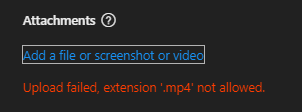
I swear the ineptitude of Microsoft support knows no bounds. You give us the option to upload a video, but the format for which the WINDOWS OS's SNIPPET TOOL USES AS WELL AS CIipChamp that is referenced as a program to edit with FROM THE SNIPPING TOOL (which this forum WOULDN'T even allow me to have as a word here...) uses MP4 BUT MP4 IS NOT ALLOWED... I mean seriously who is in charge of this madness!? They should be ejected into the sun for this sort of stupidity, and then the tool tip gives you 0 information as well as the error. So freaking annoying and stupid.478Views1like1CommentLanguage defaults audit for everything M365
We are struggling to find where and how the wrong language is being used for various parts of the M365 platform. We have Swedish set as default, but still English is used for a number of places which often are only realized as a consequence by a user. For example, in Viva Engage language is set to Swedish, and for the SharePoint as well. But: When a new user logs on VE is in English While the SharePoint web part is in Swedish, the link text have for some time ended with "- Home" (English) instead of as it was when we started 2+ years ago " - Startsida" (Swedish) Then when creating a VE group Event (Teams-meeting) default language is also English Tracking down what and where is making the wrong language being used is hard. I would be very grateful if pointed to a resource that give an as complete as possible overview of everything in M365 that we need to look over for making sure that the correct language is default everywhere it should be.477Views0likes4CommentsAdding Outlook add-ins and permissions
Wonderoig if someone can answer a question for me. I'll use the process in this link as context https://help.draftable.com/hc/en-us/articles/46382047949977-Configuring-Redline-in-Email-Outlook-with-Draftable In short when adding an Outlook Addin and selecting a group to assign the add-in too and the accepting the permission requests does this: Apply the permissions to ONLY those nominated users' mailboxes; or Applies the permissions to ALL mailboxes and applies "security" by limiting the users who can see the add-in I assume it does one of the two. Any ideas?368Views0likes2CommentsMTO and access to on premises file system
Let me preface this by saying I'm still fairly new to 365 Admin (it's been a steep learning curve) and haven't even got my feet wet with on premises stuff as yet. Also, I think some of the admin decisions made previously by others may have been based on just repeating what was found to work the first time rather than necessarily a deep understanding of the best solution. The situation when I arrived on the scene was this (actually it was a bit more complex and messy than this, but this simplified description covers the salient points at this stage) One tenant, with two domains, call them old-domain and new-domain. Two types of user, who I will refer to operations and corporate. An on premises Active Directory system running a file server. Well to be more precise on three premises with mirroring of data and a DFS, but from the user perspective when you're one of the office locations and connect to the network the same folders are available to you. Everyone was using Azure Joined Company Laptops to do this, so their laptop logins were also their network logins. Outside of the offices people connected to the DFS using a VPN (with three gateways in different countries). Operations Users had one account, @old-domain, this was licensed for 365 and had a mailbox associated with it. It was also synched to their on premises AD account Corporate Users had two accounts, one @old-domain with no license, synched to an on premises AD account. The second was new-domain with a 365 license and mailbox. If you're scratching your head wondering why two accounts rather than assigning the new-domain email address to the same account, I can't give you a definitive answer as I've never been given one, but for whatever reason when new domains were brought into play on corporate name changes the admins gave them new mailboxes rather than simply aliasing email addresses to the same mailbox (some people had three accounts as a result). What I did note was that when a new Corporate user was added the admins gave them both of the above accounts, I was told that the unlicensed old-domain one was required for the access to the DFS. Now for reasons not worth getting into here, a decision was made to move the Corporate users to a new tenant, along with new-domain and then to link the two tenants in a multi-tenant organization. It was also decided to leverage BYOD for Corporate users, so their devices will only be Azure registered. This has been done, there was some pain thanks to the reluctance of Microsoft applications to switch to the new account locations rather than redirecting back to the old tenant, but that's been sorted. So right now Corporate users still have two accounts, but on two tenants. On the Old Tenant they have their @old-domain account, no license, no mailbox, synched to the on premises AD (as before) On the New Tenant they have their new-domain account. This is where they actually do their work, and is the only account anyone should be communicating with internally or externally. Access to the DFS is being done using the VPN with the on premises credentials associated with the old-domain account. In terms of functionality, this works perfectly well, people across the two tenants appear in each other's address lists, they can chat and share information etc. Everybody also has access to the folders they should have access to on the DFS. However there are two issues. The first, and most detrimental in terms of just getting work done is that users in one of the overseas offices have found their access to the DFS has slowed considerably, despite being in physically the same location as the data. I believe the problem is that although the data is on-premises, the VPN gateway is not, therefore data does a round trip from the server, through that gateway IP address at the ISP and back to the user. Since they are in a remote location with poor internet this slows things considerably. So the first question is, how do we take that loop out of the equation so that when they are in the office they connect more directly to the servers on site? Ideally without having to revert to needing an Azure AD joined device. The second issue is that those remaining old-domain accounts (the ones for the Corporate users who are now working on the new tenant) on the old tenant are messy, in two ways 1) From an admin perspective, because every one of those corporate users still has two accounts, their local one that is synched to On Premises AD, and the the external account shared from the new tenant as part of the MTO 2) From a user's perspective. For reasons that I cannot fathom (but this is coming direct from Microsoft after many attempts on my part to find a way) it seems that while you can control which licensed accounts appear on Teams search by controlling whether they are in the GAL and setting the appropriate switch in Teams Admin, all the unlicensed users appear whether you like it or not. The net result is that when someone on the old tenant starts typing in a name of someone in Corporate, they get two suggestions coming up. So the second question is, are those accounts actually necessary?401Views0likes1Comment