WHY is microsoft support so useless???
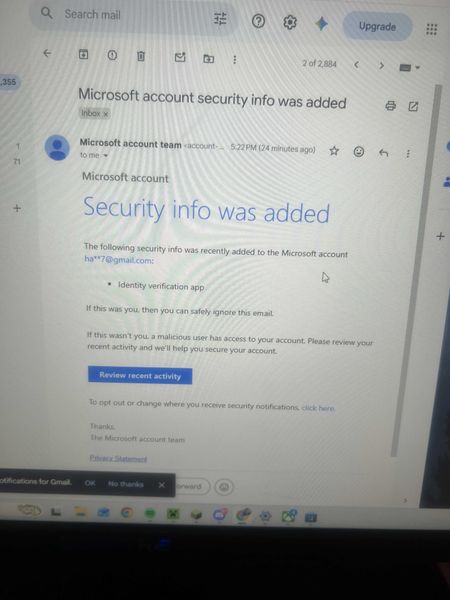
I give up at this point. How is it possible for one of the biggest companies in the world to have the worst and most useless support system ever. I'm just trying to get my account back after it got hacked so I can play minecraft. So how is in after sending a paragraph of information about the account and screenshots of receipts and email I received of someone changes the email of the account, it's still not enough information??? The selfhelp system is somehow the worst one I've ever seen and the AI chatbot doesn't even work.146Views0likes0Comments
Can't sign in to microsoft account
I'm locked out of my microsoft account simply because I don't have access to the Authenticator App. I recently performed a factory reset on my phone with the Authenticator App on and now I can't sign in to my account. I have tried the self help forums and I got a response email saying: "It looks like you just used the Microsoft account recovery form (account.live.com) to request a password reset for e**************email address removed for privacy reasons. Because you've turned on two-step verification for your account, we ignore these requests but wanted to let you know. If you're having trouble signing in, go to (account.live.com/ResetPassword) and reset your password using security info such as your phone, alternate email address, or authenticator app." It won't let me use my phone number when I select it as a sign in option. I have tried the recovery forms to no avail.245Views0likes1Comment
Hacked please help
My Microsoft account was hacked today. The attacker changed my sign-in alias to a random Outlook address, removed my phone number, added their own Authenticator app, and changed the recovery email. My original email now says the Microsoft account doesn’t exist. I have the Microsoft security emails proving the changes. I also have other forms of proof. If there is any moderator or anyone who can help me recover my account I had some important stuff on there I would like to get back. It wasn't this email but another one I made this so I can ask for help. When I tried to recover the email they changed it as provided in the screenshots down below. I tried to call support and fill out recovery stuff but since they changed the email for the account there is not much I can do.497Views0likes2Comments
Subject: Need help reaching support for a compromised account where the email was changed
Greetings! My gamertag is sakhigaming2. My account was compromised a few months ago, and the hacker changed my login email completely. Because of this, the standard recovery system says my gamertag does not exist. I am currently locked out of my home Xbox console. I have my physical console Serial Numbers and hardware data for both of my household Xboxes to prove I am the original owner.Since the automated recovery forms do not recognize my old email anymore, I need a way to contact a live support agent who can escalate this to the account investigation team to track down my profile's backend ID. If anyone knows the correct path to get a live chat or callback for an alias-changed account, please let me know. Thank you, and have a great day!367Views0likes2Comments
Assign an email adress on an option in MS Form
Hi. New here. I just started using MS Form and Workflow to automate requesting study for new projects. I made a form where you will type in project name, location, system to use, etc. Two of the options in this form are the names of the Salesman and the Draftsman that will do the project that the salesman will assign to. My problem is that upon completion of the form, workflow has the flow of: when a new respose is submitted -> Get response -> Create a task in planner -> Send an email. For the create task, I want the draftsman that will be picked in the form will be the one assigned in the planner including the salesman who filled up the form. Next is sending a custom email, with dynamic content highlighting the response on the form and sending that email to the draftsman that the salesman picked in the MS Form. Is it possible to have this kind of flow? If yes, please shed some light on how I can accomplish this. Thanks bunch.1.6KViews0likes6Commentssend from alias enabled for individual users instead of org wide
Hello, There currently exists an org wide setting to enable users to send from their aliases. This allows any user to send from their aliases or .onmicrosoft.com domain. I would like to request a feature to have this ability on the mailbox level instead of org wide. I only want to enable this feature for a small subset of users instead of org wide and currently cannot do this. https://learn.microsoft.com/en-us/powershell/module/exchange/set-organizationconfig?view=exchange-ps#-sendfromaliasenabled1KViews0likes2Comments
Issue with Email Not Recognized as Clickable Link in Microsoft Forms
I am currently creating a form for my research work. When I enter my email address in the subtitle field after the title, it is not being recognized as a clickable link. I have noticed that other email addresses from my institute are correctly recognized as clickable links, but mine is not. I have ensured that the email is correctly formatted and manually typed it to avoid any hidden formatting issues. I have also tried clearing any formatting, using different browsers, and even recreating the form, but the issue persists. Other email addresses from the same domain are recognized without any problems. I am using the same email address for creating the form as well. I would greatly appreciate your assistance in resolving this issue as it is crucial for my research work. Thank you for your time and support. I look forward to your prompt response.Solved1.3KViews0likes5Comments
Error "the operation cannot be performed because the object has been deleted
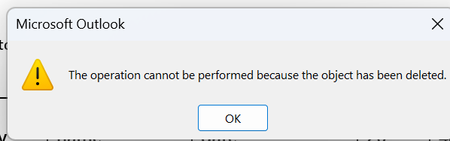
Microsoft office home & Business 2021 and Microsoft office LTSC stand 2021 happening intermittent error. after finishing typing a reply email and clicking the reply button, an error prompt appears. The user needs to close the email, reopen it, and retype the message. i have did window update, update office, repair office, disable add-in, re-install office, create new outlook profile. Anyone can help?1.1KViews0likes3Comments
Microsoft Graph API using for external user
We have been working with the Microsoft Graph API to fetch the mail list of an external user using the following endpoint: https://graph.microsoft.com/v1.0/me/messages. However, we are encountering an issue with the response returned by the API. The response is as follows: stdClass Object ( [@odata.context] => https://graph.microsoft.com/v1.0/$metadata#users('4e75df4a-021c-457d-a7b4-8bcabaae1cbb')/messages [value] => Array ( ) ) As you can see, the response does not include any list of mails. The value array is empty. Could you please provide guidance on why this might be happening?428Views0likes1Comment
Update / Fix of the e-mail rules for Outlook 365 & Browser
Hello there, I hope I'm in the right place for this. Today I was reminded of this "bane" called Outlook Mail Rules where I want to put the exact e-mail address, however the filter still is unable to apply some very basic exclusion conditions / filters you would assume should be a thing by now. Each time I set a rule with a from or to that contains a group mail with multiple members like From: "Secretary @ company.com" To:"IT @ company.com" it filters anything from anyone is those groups. A neutral Example: Members of Secretary @ company.com Sam @ company.com Ryan @ company.com Members of IT @ company.com Frank @ company.com Danielle @ company.com Susan @ company.com Conditions: From: "Secretary @ company.com" To: "IT @ company.com" Subject contains: "Bills to pay", "Bills to verify" Actions: Move to folder: "Bills from Secretary" Our automated system sends a mail containing the subject "Bills to pay" as "Secretary @ company.com" to "IT @ company.com". This should be filtered Later Sam sends a mail containing the subject "Bills to pay" to "IT @ company.com". This should NOT be filtered as it's not send from "Secretary @ company.com" and send to "IT @ company.com". Do you see my issue? I don't want to filter mails send by members or exclude them from the conditions but instead it just takes any member from the group mail. It would be great to set it to exactly from that mail instead of anyone from the group. This is one example but we have other systems sending mails and sometimes people use the same subjects to discuss things but that either makes me miss those mails since they are moved to folders and have those mail set to mark as read while I have no idea they even came in. It a regular occurrence and it's getting to a point where it's unacceptable. Is there any way to set this in the conditions of the mail rules or is this a missing feature? I set my rules in outlook.office.com since they always apply and not only when Outlook at work is running. EDIT: Had to change the fake e-mail addresses since there is now @ company.com mailserver afaik and this is for an neutral example.866Views0likes3Comments