downloads
24 Topics
Edge browser crashes after file download / open
Hello, I am using Edge browser Version 142.0.3595.80 (Official build) (64-bit), on Linux. When downloading a file , and trying to open the downloaded file from wihin browser, it causes edge browser instances to close. I have been using other browsers to get around the problem. Is this a known problem, and are there a solution to this problem? Thanks, Jay625Views1like8Comments
Noise (sorry) after downloading a file
After the latest upgrade to Edge, all downloaded files, and I have them every day, come with an annoying audio effect I would like to turn off. As this appears to be specific to Edge, and I can't find anything to change in settings, I'm guessing I'd have to go into Developer Tools to find the solution. Am I right there?57Views0likes0Comments
OneDrive Direct Download Link
Hi all, My Problem and Question This question pertains to OneDrive for personal use. Microsoft recently made a change to the link format from the embed feature and made my direct download links obsolete. I would retrieve these links from the embed feature in OneDrive and the links looked like what's shown below. The link would directly serve the file to whomever accessed it without them ever having to interact with OneDrive. With the changes Microsoft recently made to OneDrive, is there a new way of getting links that have this functionality? Old link format (no longer works): https://onedrive.live.com/download?resid=XXXXXXXXXXX&authkey=XXXXXXXXXXX My Own Digging I've scoured several forums unable to find any solutions. I have found a temporary solution; however, the links generated via this method only have temporary authentication, so they expire after a day. Perhaps it could be a real solution if I could figure out how to get a permanent auth token for a personal OneDrive file. I'm retrieving the link from the GET request when clicking the download button on a file from a publicly shared link. Link format: https://my.microsoftpersonalcontent.com/personal/{resid}/_layouts/15/download.aspx?UniqueId=XXXXXXXXXXXXX&Translate=false&tempauth=XXXXXXXXXXXXXXXX&ApiVersion=2.0 Thank you to anyone that has input!14KViews1like6CommentsBITS Downloading App updates from unknown endpoint
Hi, Our IDS started freaking out today because a large number of our endpoints started initiating BITS downloads to an unknown endpoint. My initial reaction was ransomware, but after further investigation it appears that these BITS downloads are updates for Windows Store Apps. I am making this post to confirm that these endpoints are actually indeed official Microsoft endpoints. The BITS requests I had seen were all for the Limelight Networks CDN (llnwd[.]net), which I have heard hosts content for a lot of MSPs, one of which being Microsoft. Checking the logs, it appears that our workstations have never made BITS requests to this CDN. All previous BITS updates were carried out using official microsoft.com endpoints. The following are some examples of the domains seen in the BITS requests: ic-c39e4900-0f7065-msftstoretlu19.s.loris.llnwd[.]net ic-c39e4900-0d5ab5-msftstore19.s.loris.llnwd[.]net ic-c39e4900-08b3f9-msftstore19.s.loris.llnwd[.]net ic-c39e4900-0700f8-msftstore19.s.loris.llnwd[.]net Although all my investigations point to these being official Microsoft endpoints, I am worried that a CDN is being used because a malicious actor could easily mangle the URLs to make them look like official Microsoft ones. Is this the correct place to confirm that the above sub-domains are official Microsoft, and if not where should I ask this question instead? Thanks4.2KViews2likes4Comments
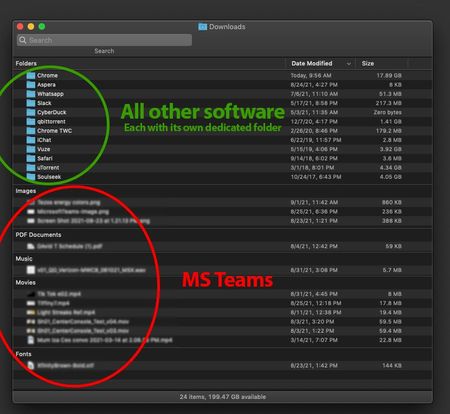
Why no option to customize download folder, like most other pro software?
Does anyone know the reason why Teams doesn't have any options to set a custom location for its downloads? Every other software I use lets me customize it. This means I don't just have a single catch-all folder for every single download (what a mess), but instead I have folders dedicated to each software. This makes for less clutter, both in the OS and in the Mind. Why doesn't Teams have any options to customize this?2KViews0likes3Comments
Download zipped files only.
After I upload large zipped files, our clients can open them up and see what's inside but they can't download the individual files. It does not give them the option. Only option they have is to download the entire zipped folder. Some of these are several Gigs so they are having issues. They used to be able to open and download smaller files withing the zipped folders but now they can't. Has OneDrive changes this capability recently? Thanks.1.1KViews0likes0Comments[Downloads UI] Legacy UI is used when a download comes from a pop-up window
What is the issue? Edge now uses a modern-UI for handling downloads: an icon on the toolbar, just after the end of the Address Bar, which shows a vertical-list of downloads. However, when a download starts from a pop-up window, such as from the Microsoft Update Catalog site, the old-UI is used instead, which feels a bit inconsistent! Expected outcome That only the modern-UI will be used. Proposed solutions My preferred-solution would be to add a setting into Edge where the user can ask for pop-ups to load into a new tabs, instead of separate windows -- Internet Explorer 11 had such a setting. This would then mean pop-up content gets treated like any-other tab, and so would use the modern-UI. Alternatively, when a download starts from a pop-up window, the parent-window should come to the foreground, and the download then begin in that window. Before posting here, have you submitted feedback via the "Send Feedback" feature in Edge? Yes Browser and Operating System Edge 90.0.818.62 (Official build) (64-bit) Windows 10 Home (64-bit) Version 20H2 (Build 19042.985; May 2021 update-level)1KViews0likes0CommentsMS Teams Linux - Downloaded files are simply named "download"
Hi, I submitted a feedback through the app but I might have better visibility here. When downloading files, most of them are simply named "download (1)", "download (2)" etc. They also loose their extension, so I can't open them if I do not rename them back. This happens 2 times out of 3, maybe 3 out of 4. I simply right click on a file and select "download". Does anyone have the same problem? Also, a save-as option would be nice. Thank you,1.5KViews0likes0Commentsedge policies to control the appearance settings of history and downloads
Are there plans to create edge policies for controlling the appearance of history and downloads on the menu of edge like show cast / home button etc? are there any other way to control its appearance not though admx in endpoint manager for now?2.3KViews0likes7Comments