device management
1749 TopicsWindows 11 Search Function Suddenly Stops Working
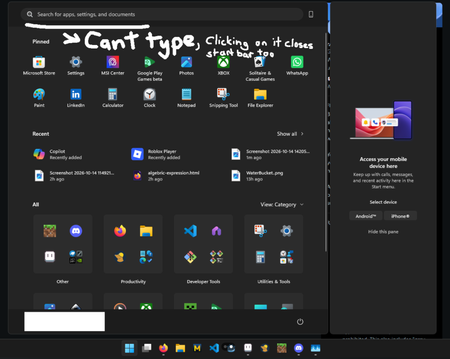
This morning, after turning on my computer, it was unusually sluggish. During the reboot process, the system froze, so I held down the power button to force a shutdown. After restarting, the system responded normally, but I noticed that most of Windows' native search functions were malfunctioning: the search box disappeared, was unresponsive, or wouldn't accept text. At first, I suspected that I had accidentally deleted a component using RevoUninstaller two months ago, but the system had been rebooting normally until then. Additionally, some system applications are running abnormally and take a very long time to open. I've already tried running the troubleshooter and selecting the Reset this PC (keep my files) option, but neither resolved the issue. Specs: CPU: AMD Ryzen 9 9900X RAM: 32GB Graphics Card: NVIDIA RTX 5080 (16GB), AMD Radeon Graphics Storage: 209GB used / 1.82TB total OS: 64-bit Windows 11, Product ID: 00342-22935-85203-AAOEM50Views0likes1Comment
Possible to install windows 11 without microsoft account?
Hello tech community members, I'm new to Windows and want to install Windows 11 on a PC given by my dad, but I don't have a Microsoft account and I'm not planning to create one. I've heard that it's possible to bypass the Microsoft account requirement during the installation process, but I'm not sure how to do it. Could anyone provide a step-by-step guide or any tips on how to install Windows 11 without Microsoft account? Any help would be greatly appreciated! [Latest update] Please don't send private message any more as I don't have time replying one by one. If you had the same question, please follow this step-by-step-guide with screenshots to get it done. I already successfully installed Windows 11 on my PC without Microsoft account. You can also contact the support to send you the custom ISO to skip the Microsoft account requirement.1MViews15likes59Comments
Full-screen video freezing issue
한국어와 영어로 글을 남깁니다. 이 글을 남기기 이전에 기술 지원을 24시간 대기 중이라는 분에게서 받았습니다. 그 분은 가장 해결 확률이 높고 가장 해결이 완벽에 가까운 방식을 제안했습니다. 그건 코덱을 업데이트하거나 코덱을 설치하라는 것이었습니다. 전 이 방법이 해결방법에 가깝다고 느낍니다. 제가 드리려는 말은 우연히 이 문제를 해결했다고 생각하기에 그 해결 방법을 공유하는 것입니다. 윈도우 제품에는 사소한 버그가 있고 서로 다른 프로그램이 충돌하는 경우가 있을 수 있으며 특정 프로그램이 버그를 만들 때도 있기 때문입니다. 전 전체화면으로 영상을 시청할 때에 멈추는 증상이 해결이 안 되었어요. 신기한 건 다른 회사의 그래픽 카드를 사용할 때엔 이런 문제가 발생하지 않는다는 점이었습니다. 인텔 ARC 그래픽 카드는 이런 문제가 없어요. AMD의 라데온 그래픽 카드를 사용할 때에 다 좋은데 이 문제 때문에 좀 불편했습니다. 지금도 인텔 CPU와 인텔 GPU를 쓰면 문제가 없고, 인텔 CPU와 AMD GPU 혹은 AMD CPU와 AMD GPU를 쓰면 전체화면 영상이 멈춥니다. 모니터는 상관이 없던 것 같아요. 그래서 결론은 코덱을 찾아볼 수도 있는데 어떤 코덱이 필요한지 제가 정확하게 모르거든요. 우연하게 찾은 해결책은 윈도우 설정에 작업 표시줄 옵션이 있습니다. 거기서 작업 표시줄 단추 합치기 및 레이블 숨기기 / 작업 표시줄 단추 합치기 및 다른 작업 표시줄의 레이블 숨기기 / 더 작은 앱 아이콘 표시 옵션을 조절하는 것이었습니다. 항상-작업 표시줄이 꽉 찼을 때-안 함 중에 문제가 해결되는 옵션을 고르세요. 전 작업 표시줄이 꽉 찼을 때를 3개 모두 설정해 두니 전체화면 영상이 더 이상 멈추지 않아요. 라데온 그래픽카드 드라이버 문제일 수도 있고 이 라데온 프로그램이 윈도우와 우연하게 충돌이 일어나는 것일 수도 있을 것 같아요. 전 전문가가 아니라 우연히 옵션 조정으로 방법을 찾았다는 점만 말하고 싶습니다. 그러므로 이 문제는 해결이 될 수도 사용자에 따라서 해결이 되지 않을 수도 있습니다. 제가 지내던 커뮤니티에선 라데온 그래픽카드 드라이버 프로그램이 이전부터 전문적이지 않다는 이야기가 돌았는데 전 그 때 그 말을 믿지 않았지만 지금은 그 말에 신빙성이 있다는 생각도 듭니다. 엔비디아 지포스에서도 동일한 증상이나 멈춤 현상이 있는 것 같기는 합니다. 윈도우의 호환성 문제일 수도 있겠지요. 잘은 모르겠지만요. 도움이 되시길 바랍니다. I am posting this in both Korean and English. Before writing this, I received assistance from a technical support representative who was available around the clock. They suggested a solution that was highly likely to work and offered the most complete fix: updating or installing the necessary codecs. I believe this is the right approach. I am sharing this because I managed to resolve the issue—albeit somewhat by chance—and want to pass on the solution. Windows products can have minor bugs, conflicts between different programs can occur, and specific programs can sometimes trigger these issues. I wasn't able to resolve the issue where the video would freeze during full-screen playback. Interestingly, this problem didn't occur when using graphics cards from other manufacturers; Intel Arc graphics cards, for instance, don't have this issue. While AMD Radeon graphics cards are otherwise excellent, this specific problem was a bit of a hassle. Even now, I experience no issues when using an Intel CPU with an Intel GPU, but the video freezes in full-screen mode if I pair an Intel CPU with an AMD GPU or use an AMD CPU with an AMD GPU. The monitor didn't seem to be a factor. I suppose I could look into codecs, but I'm not exactly sure which ones are needed. I stumbled upon a solution within the Windows taskbar settings. The fix involved adjusting options such as "Combine taskbar buttons and hide labels," "Combine taskbar buttons and hide labels on other taskbars," and "Use small taskbar buttons." You should experiment with the available settings—"Always," "When taskbar is full," or "Never"—to find the one that resolves the issue. For me, setting all three options to "When taskbar is full" stopped the full-screen videos from freezing. This could be an issue with the Radeon graphics card driver, or perhaps a random conflict between the Radeon software and Windows. I am not an expert; I simply wanted to share a method I discovered by chance while tweaking settings. Consequently, this solution might work for some users but not for others. In the online community I frequent, there had long been talk that Radeon graphics card driver software wasn't exactly professional-grade; I didn't believe it at the time, but now I’m starting to think there might be some truth to it. That said, it seems like similar symptoms or freezing issues occur with Nvidia GeForce cards as well. It could be a Windows compatibility issue, though I’m not entirely sure. I hope this helps.108Views0likes2Comments
win re wim file
I have NOT played with any system files on my Windows 11 PC but have found that under "create a restore point", there is a line that says "WinRETools (Missing)". It has been there for years in an uncorrupted status and I don't understand why it is now missing. it appears I need a file called Winre.wim and that it can be extracted from a Windows 11 ISO file. I have downloaded 2 ISO files, one in "English (United States)" and one in "English (Great Britain)". There was also an option for "English (International)". BUT none of these match the region shown by my Control Panel which says my PC is English (Australia). Web searches say this language mismatch is a problem and I've posted a separate query to the Community regarding this. Nevertheless I have proceeded to follow the various instructions on the web / Microsoft website about: download a zip extraction software. find install.win within the ISO file, and open it/extract/find the file winre.wim. BUT this is where I'm stuck - no matter how many times I've tried, there is NO winre.wim file within the ISO file. It appears that if my PC crashes and I need to recover/rebuild from the ISO file, and I won't be able to because the winre.wim file is missing from my computer's C drive, under Windows\System 32\Recovery. Help!!47Views0likes1Commentwin re wim file
When this file is missing from C-Windows-System Recovery, what are the exact steps for setting it up again please? I have found various suggestions on the web, but they seem to be incomplete as one are working. I'd appreciate a detailed and complete step by step instruction.23Views0likes0Comments
The Surface Phone 2.0: The way to revive the past in a way everyone profits.
The tech industry is currently facing a massive user-experience crisis, particularly in mobile and tablet computing. As a student regularly using iPadOS for schoolwork, I experience this firsthand. Apple's 'walled garden' has become an unnecessary complication: transferring a simple file requires uploading it to an unreliable third-party cloud storage service and downloading it on the target device. Multitasking is deeply flawed—windows crush, stretch, and break UI layouts, while the system frequently lags and crashes. This artificial lock-in forces user dependency through restriction, rather than delivering genuine utility. Microsoft has a historic opportunity to counter this by introducing an 'open-loop' ecosystem that respects the user’s intelligence. A system where users stay not because they are trapped by a hardware lock, but because they simply don't want to leave. Microsoft's core strength has always been treating the user as an administrator of their own device—embracing a 'if you break it, you can easily reinstall it and learn from your mistakes' philosophy. This concept is proven by long-term device stability: my 2015 Lumia 430 Dual SIM, despite being packed to capacity with photos, music, and videos, still runs smoothly and navigates flawlessly. This is a testament to the unmatched core optimization Microsoft is capable of. The market does not need another restricted tablet or a repetitive Android skin. We need the revival of the Universal Windows Platform (UWP) and 'One Windows' philosophy under a new hardware standard: The Microsoft Surface Phone 2.0. Here is a structured business and technical blueprint for how Microsoft can commercialize its past innovations and deliver a truly seamless ecosystem: 1. Unified Interface Architecture (Versatility over Restrictions) Instead of forcing a single mobile layout, the device should adapt dynamically to the user's workload, bridging past achievements with current innovations: • Tile Mode: A modernized revival of the legendary Live Tiles interface for quick, glanceable mobile data. • Desktop Mode: A complete desktop environment with unconstrained floating windows, fully exploiting the capabilities of Windows on ARM. • Console Layout (XBOX Mode): Out-of-the-box integration of the newly introduced XBOX Mode (Compact Home Experience). When paired with a controller or running Xbox Cloud Gaming, the phone instantly transforms into a fully-fledged portable gaming console. 2. Commercializing Past 'Failures' and Abandoned Innovations Microsoft has spent billions developing revolutionary technologies that were abandoned prematurely due to market timing, rather than technical failure. The Surface Phone 2.0 should consolidate and ship these features directly to consumers: • The Revival of Continuum: This remains Microsoft's most powerful concept. Plugging the phone into a monitor should instantly launch a full desktop Windows 11 environment. The modern processing power of ARM chips makes this transition flawless today. • Reclaiming Abandoned Shells: The modular interface designs from Windows 10X, the user experience of Project Andromeda, and the spatial computing foundations of Windows Mixed Reality should be reintegrated. If a user wears an XR headset, the phone should seamlessly project UWP apps into a 3D environment. 3. Cross-Platform Infrastructure Integration The Surface Phone 2.0 must serve as the universal anchor for a frictionless, continuous workflow under a single Microsoft Account: • Windows in the Car: A native dashboard interface to directly challenge Apple CarPlay and Android Auto, linking Bing Maps, Outlook calendars, and media seamlessly. • Frictionless Cloud & Local Continuity: True cross-device synchronization. If a user is modifying a Word or PowerPoint document on their PC and needs to leave, a native 'Continue working from...' notification should instantly appear on the Surface Phone, opening the exact file at the precise position it was left. • Hardware Tiering: Maintaining a stable, highly-optimized mid-range hardware line alongside flagship devices. The Windows ecosystem has historically proven that superb software optimization beats a raw hardware spec race. 4. Solving the 'App Gap' with Multi-Layered Architecture To prevent the ecosystem stagnation that affected Windows 10 Mobile, the device must support a versatile environment: • Native ARM64 UWP & Win32 applications for full-scale desktop performance. • A Built-in Android APK Subsystem (a revived, optimized iteration of virtualization) as a fallback mechanism, ensuring users have immediate access to mainstream applications while developers transition to native tools. 5. Next-Generation System-Wide AI Utilizing modern hardware-level Neural Processing Units (NPUs), a deeply integrated Copilot must replace old voice assistants. A reliable, context-aware, system-wide 'Hey, Copilot' assistant that works locally to manage scheduling, cross-device file tracking, and automation would instantly differentiate this device from competitors. Conclusion By unifying XBOX Mode, enterprise continuity through Continuum, and an open infrastructure that trusts the user, Microsoft can deliver a device that scales from a phone to a desktop, a car dashboard, and a console. The hardware and cloud infrastructure are finally ready. It is time to execute. (compressed and turned into human text by AI)44Views0likes0Comments
Win 11 Pro - Unable to log in with MS 365 Business Basic account
Good day, I have a couple of new build Win11Pro 26H2 units that have been setup with a local admin account. When I go to SETTINGS, ACCOUNTS, OTHER USERS, ADD ACOUNT it comes up with a message stating "Looks like this isn't a Microsoft account." I know that this is a valid account as this is my MS365 Admin Center account. Is there something that I am missing on how to add an account? I had read that it had to be WinPro, so upgraded from Home to Pro. Thanks for any support that you can provide. Bill Wilson58Views0likes1CommentWindows 11 Task Manager Startup Impact Display Issue
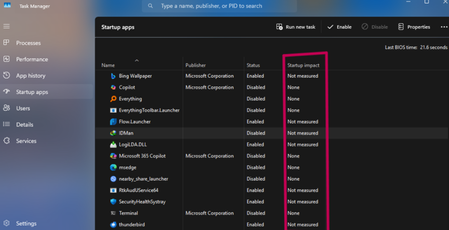
In the "Startup" tab of Task Manager, some applications show their "Startup Impact" column as blank or "Not measured," instead of the usual Low, Medium, or High ratings. Need to understand whether this status is due to the system deliberately omitting measurements, a malfunction in the measurement mechanism, or restrictions from user permissions/settings. Also seeking methods to fix the display or obtain accurate impact assessments.1.1KViews0likes5Comments
Intel Extension 2.0.10200.8 keeps reappearing after successful installation
Windows Update repeatedly offers Intel – Extension – 2.0.10200.8, even though update history shows it was successfully installed. After restarting, the same update returns and requires another restart. This causes repeated mandatory restarts under our organisation’s update policy and affects device compliance. How can we safely clear this update from the queue and stop it reappearing without disabling other Windows updates?37Views0likes0Comments