csp
235 TopicsGet ready for Azure CSP promotions: A new growth and profitability lever for partners
Microsoft is introducing Azure consumption promotions for Cloud Solution Provider (CSP) partners, offering time-bound discounts on select Azure products for eligible customer segments. Readiness materials—including the readiness guide, FAQ, Partner Center walkthrough, and billing and reconciliation guide—are available now. Offers are subject to eligibility, terms, and conditions. To be ready to activate promotions when they are available on November 2: Review the promotions readiness guide and FAQ in the resource collection. Access the sandbox and Microsoft Learn documentation to begin API adoption for the Azure promotional capability. Confirm your billing and reconciliation processes can read the new promotion identifier and discount source fields. Questions? Review the FAQ80Views0likes0Comments
CSP Indirect Reseller error on enrollment
I intend to enroll as a CSP Indirect Reseller. My partner ID has been active and valid for some time. I did additional checks on my end to ensure all basis were covered: Company verification: approved Domain grantor.co.mz: verified in our tenant MFA: enabled on the admin account Roles: Global Administrator (Entra) and Account admin (Partner Center) Retried in a clean InPrivate browser session I logged a ticket and sent additional information (TrackingID#2610210050002089). I get an error when finalizing the enrollment process as seen below: Please help for I do not know how to proceed and I am going on to the second week without a reply on this. I Shared the screen recording and HAR file. Cheers
Microsoft Partner Center Verification - 27 days without resolution or actionable feedback
Subject: Microsoft Partner Center Verification – 27 Days Without Resolution or Actionable Feedback Hello Microsoft Partner Support / Partner Compliance Team, I am posting here in the hope that someone from Microsoft who has access to the relevant verification results can assist me with an ongoing issue with my Microsoft Partner Center verification. I have now been trying to resolve this issue for 27 days. Despite contacting Microsoft support multiple times and opening several support tickets, I still haven't received a clear explanation of what needs to be updated, changed, or corrected to complete my organization's verification. My indirect reseller status is also still showing as Pending, and I am unable to get a clear answer about what is preventing the process from moving forward. The generic email response I have repeatedly received states: "We've reviewed your appeal for verification. Based on the information you have provided to date, we have determined that your organization does not currently meet the requirements to pass verification. We have closed your application." Unfortunately, this response does not identify which verification check has failed or explain what information needs to be corrected. My application appears to be stuck at the Contact Information and Identity Verification stages. Furthermore, the Fix Now / Resolve Now option is not appearing, meaning I have no way to address or resubmit the information through Partner Center. I am becoming increasingly frustrated because, despite my repeated efforts to resolve this matter through the official support channels, I feel that I am simply receiving generic responses rather than having my case reviewed by someone who can actually investigate the issue and help me resolve it. I am requesting the following: A manual review of my Partner Center verification application by someone who has access to the actual verification results. Specific clarification of which verification checks have failed and what information needs to be corrected. Assistance in resolving the issue so I can complete verification and progress my indirect reseller application. Reopening or resetting my application if necessary, so I can correct any outstanding issues. I have made every effort to complete the process correctly and have repeatedly contacted support in good faith. However, without specific feedback or access to someone who can review the underlying verification results, I am unable to move forward. I would genuinely appreciate it if a real person from Microsoft Partner Support, Partner Compliance, or the relevant verification team could contact me directly and provide clear, actionable guidance. For reference, my details are: Organization: Verasura UKI Ltd Microsoft Partner ID: 7163240 Support Ticket Number: 2610270050005027 Indirect Reseller Status: Pending I can provide any additional documentation or information required to assist with the review. Thank you for your time and assistance. I sincerely hope someone can help bring this matter to a resolution.Partner Blog | From Copilot adoption to agent-powered growth
A successful Copilot trial opens the door to a much bigger customer conversation and a bigger role for partners. Once users experience the value of AI in their daily work, partners can guide customers to extend that value across teams, workflows, and business processes while maintaining the security, governance, and cost controls needed to scale. In my recent post, From AI curiosity to Copilot adoption in 30 Days, I introduced how Cloud Solution Provider (CSP) partners can use a guided, 25-user trial to bring Microsoft 365 Copilot Business to small and medium-sized business (SMB) customers. That initial experience creates momentum, but sustaining it requires a structured approach to adoption, governance, and expansion. The opportunity is growing with the new Copilot, which brings Home, Code, and Autopilot together in one connected experience. Combined with a commercial model that supports subscriptions and usage-based billing, these advances create new ways for customers to move from AI assistance to delegated work and agent-powered business processes. For partners, this expands opportunities across the customer lifecycle, from guiding adoption and securing environments to developing agents, managing AI consumption, and delivering ongoing services. The key is connecting these capabilities into a repeatable practice that evolves alongside customer needs. Build on the momentum of Copilot in 30 The first 30 days give customers a practical foundation for working with AI. Through Copilot in 30, users explore how Microsoft 365 Copilot Business can improve everyday productivity across Outlook, Teams, Word, Excel, and PowerPoint before progressing to agents and more advanced scenarios. The Copilot Success Planner gives partners a structured way to guide this experience. It creates personalized learning plans for the 25 trial users, along with a roadmap for the customer sponsor. The guided journey builds skills progressively. If the sponsor enables Copilot Cowork, Weeks 3 and 4 add Cowork prompts that introduce the possibilities of delegated work. At the end of the trial, partners can use the sponsor's Day 30 value readout to identify where Copilot delivered results, which users and teams are ready to expand, and where additional capabilities could create business value. That conversation now has a broader destination. With the new Copilot, customers can move through connected experiences: Home brings Chat, Copilot Cowork, and Office together, so users can ask questions, create content, and delegate more complex work. Code extends AI-powered solution development, so users can turn natural-language ideas into apps, dashboards, automations, and workflows. Autopilot introduces a persistent, proactive personal agent designed to keep work moving within organizational permissions. Home and Code are rolling out through the Frontier program, and Autopilot is in private preview. They expand what customers can explore as their AI maturity grows, building on the foundation of everyday Copilot adoption. For partners, the next step is to turn early success into a longer-term customer roadmap. The Microsoft 365 Copilot + Agents SMB Guided Experience (download kit) provides a ready-to-deliver, 90-minute engagement to reinforce value, explore new scenarios, and guide the transition toward broader adoption. Continue reading here208Views0likes0Comments
CSP Indirect Reseller enrollment deactivated + can't open a support ticket
Hello, My partner account (company LIS-INFO, France) has a legal verification status of Authorized as of today, on both the Partner and Reseller profiles. However, when I try to enroll in the Cloud Solution Provider – Indirect Reseller program (via aka.ms/accounts/varEnrollment or via "Other programs" in Account Settings), I consistently get the message: "This program registration has been deactivated for your account." I also notice that the "Customers" workspace shows "Access not granted" under Account Settings > My access, which is consistent with the CSP enrollment being deactivated. I believe this may be related to an earlier partnership application that failed before my current application was approved. I have been unable to submit a support ticket through the normal Partner Center channel — the "Contact support" flow gets stuck on an infinite loading spinner, across multiple attempts over several weeks (different browsers, different sessions). This is why I'm posting here instead. This is currently blocking me from establishing a distributor relationship with my indirect provider (ALSO), who has confirmed they cannot resolve this on their end since the block is on my Partner Center account, not on the distributor relationship itself. I'd be happy to share my Partner/MPN IDs privately with anyone from Microsoft who can help look into this. Thank you for your help.Earn the badge built for Frontier AI leaders
The next wave of AI transformation needs more than ambition. Customers need partners with the skills and proven capabilities to deliver real outcomes. The Frontier Transformation Engineer badge recognizes partners building the capabilities to design, implement, and deliver Microsoft Frontier AI solutions. Earn the badge to demonstrate validated skills, strengthen customer confidence, and differentiate your practice in a rapidly evolving AI market. With the Frontier Transformation Engineer journey, your team can: Validate Frontier AI engineering capabilities. Strengthen credibility in customer conversations. Build readiness for AI transformation engagements. Bring greater credibility to customer conversations. Differentiate your practice with demonstrated expertise. Qualify for a flagship Frontier Partner specialization recognition. The journey combines certifications, hands-on training, and project readiness to help your team build the capabilities needed to lead Frontier AI transformation. Don’t just prepare for the future of AI. Build the expertise to deliver it. Earn the Frontier Transformation Engineer badge1.8KViews1like3CommentsCSP August 2026 Monthly Partner Update
This month's updates covered important changes to agreements, security requirements, pricing capabilities, growth programs, and promotional offers that enable partners to increase customer adoption and make the most of upcoming CSP opportunities. Please use the survey link to share your feedback on these updates Survey Link. Visit the Launch Enablement Guide for additional readiness resources, guidance, and partner actions. This Month's Topic: Promotion Capabilities Consumption-based and per-user New Azure promotion capabilities will enable percentage-based discounts across eligible consumption scenarios, including pay-as-you-go, reserved instances, and pre-purchase plans, with discovery and redemption experiences available for sandbox testing. Upcoming per-user promotion enhancements will support more precise customer targeting by seat count and introduce greater flexibility for qualifying customers in new-to-offer scenarios. Watch the video for more details. If the player doesn’t load, open the video in a new window: Open video Important Links Visit the Azure promotions learn documentation Refer the https://aka.ms/Azure-Promos-FAQ Need More Information? Visit the Launch Enablement Guide for additional readiness resources, guidance, and partner actions.experiences with “MS incentives new experience”
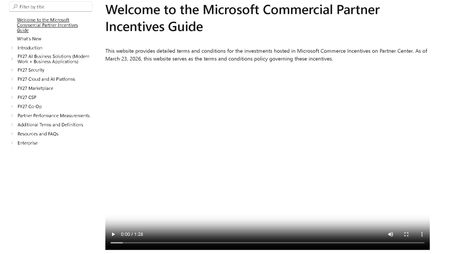
Dear Microsoft, dear fellow partners, Please find below first experiences with the new "incentives experience" where the annual incentives guide was replaced with a website. This fine product can be found at: https://incentiveguide.partner.microsoft.com/en-US/ Site only shows a video, no matter which link you click. We want text, not video. I want the CSP M365 incentives info, not that video overlay again. 2. Site refers to a ‘product addendum’ but no such is found in the guide itself (it is in the MCI collection on OpsReadiness luckily - https://assetsprod.microsoft.com/mpn/en-us/microsoft-commerce-incentive-product-addendum.xlsx ) 3. The MCI collection (https://partner.microsoft.com/en-US/asset/collection/microsoft-commerce-incentive-resources#/) links to various files/links. The link to the FY27 coop guide is broken ☹ (https://incentiveguide.partner.microsoft.com/en-US/fy27-co-op/how-to-use-the-co-op-guidebook) p- luckily the definitions of what cannot be found are present (at https://incentiveguide.partner.microsoft.com/en-US/additional-terms-and-definitions/glossary-cooperative-marketing-funds) 4. There are no rates mentioned in the website/download of the guide. For CSP you would need to view the MSFY27 documentation in collection mentioned earlier we eagerly await an updated & improved version of this site!experiences with “MS incentives new experience”
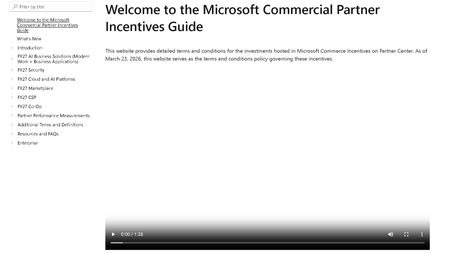
Dear Microsoft, dear fellow partners, Please find below first experiences with the new "incentives experience" where the annual incentives guide was replaced with a website. This fine product can be found at: https://incentiveguide.partner.microsoft.com/en-US/ Site only shows a video, no matter which link you click. We want text, not video. I want the CSP M365 incentives info, not that video overlay again. 2. Site refers to a ‘product addendum’ but no such is found in the guide itself (it is in the MCI collection on OpsReadiness luckily - https://assetsprod.microsoft.com/mpn/en-us/microsoft-commerce-incentive-product-addendum.xlsx ) 3. The MCI collection (https://partner.microsoft.com/en-US/asset/collection/microsoft-commerce-incentive-resources#/) links to various files/links. The link to the FY27 coop guide is broken ☹ (https://incentiveguide.partner.microsoft.com/en-US/fy27-co-op/how-to-use-the-co-op-guidebook) p- luckily the definitions of what cannot be found are present (at https://incentiveguide.partner.microsoft.com/en-US/additional-terms-and-definitions/glossary-cooperative-marketing-funds) 4. There are no rates mentioned in the website/download of the guide. For CSP you would need to view the MSFY27 documentation in collection mentioned earlier we eagerly await an updated & improved version of this site!