copilot
42 Topics
Copilot for Outlook error - The thread is too long so we couldn't consider all of the conversation
Hello Community, While replying to a mail chain which has many mail in the mail thread, Draft with Copilot shows error as "The thread is too long so we couldn't consider all of the conversation history. Make sure to check the draft." I couldn't find any known issues as such with Copilot for Outlook or any fix to it. Please let me know if you have faced such issue and the solution / workaround which helped you. Thank you1.4KViews0likes3Comments
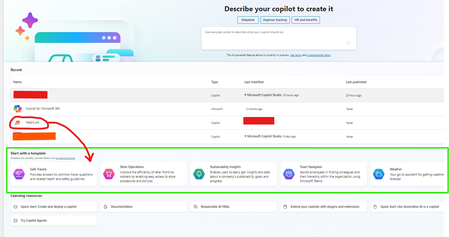
how to make custom created copilot to appear in the list of "Start with a new template"?
Hello Everyone, Thank you so much in advance for your response and help. I have created custom copilot in Copilot studio. And I want to make it appear in the list of other below mentioned templates in the section of "Start with a new templates" beside safe travels, store operations, weather etc. is there any way to make it appear there with other templates? Thank you. please reply to this thread if anyone knows! I really appreciate it.. #copilot #template306Views0likes0CommentsCopilot Prompt Limit Difference Between Licenses
Hello, Based on a user's M365/O365 license, are prompt character limits changed for Copilot for M365 prompts? For example, a user assigned a Business Basic license has a 2,000-character limit for prompts, and a user assigned an Office 365 E3 license has a 4,000 character-limit for prompts. Why is this the case? Does licensing change anything with prompt limits? Thank you4.8KViews0likes2CommentsHow To Reference Files Using Copilot In Word By Copy Pasting The URL
First off, I have no idea why what I'm about to type is not published in the existing Copilot in Word training materials produced by Microsoft. Nevertheless, if you are trying to use the pre-fetched files or trying to type in file names and they aren't showing up....here is how to get around all of that. Also, it does require some pre-work in step number 1 - but this is a one time deal. Search for clipboard settings in your Windows settings Tap the windows button on your keyboard and type clipboard...select "clipboard settings" Turn on "Clipboard History" to "On" if it isn't on already Navigate to the location of the file you want to reference (OneDrive/SharePoint) Open the details pane for the file and scroll down to the bottom to the "Path" section and click the icon. This copies the absolute URL (just the straight up path - no garbage included) to the file Repeat as necessary until you have up to 3 file paths copied Go to your Copilot prompt and type what you want to happen with the files you are about to reference from your clipboard (summarize, rewrite, create new file based on.....) Within that same prompt, hold down the windows button and press "V" This will bring up your clipboard history (if you followed the 1st step above correctly) Now you can paste in the URLs of the files you want to reference You will know the files were found/accepted after you hit the space bar as the URL will resolve into a hyperlink with the title of the file 3 files is currently the max you can reference in one prompt Yes this is a bit manual - however I see no other way to reference a file if it doesn't show up in the prefetch window or when you start typing the name of the file. Update! After you go through the steps above, when you come back later....typing out the file name seems to work. I guess there is some caching going on. Good luck and please let us know if this works for you!6.5KViews3likes2CommentsMicrosoft Copilot for Microsoft 365 GCC GA Update
Exciting news for Federal Civilian and SLG customers! Microsoft Copilot for Microsoft 365 GCC is set for General Availability on October 15, 2024 (pending US Government authorization). Key features coming in October: AI-powered tools in Word, Excel, Outlook, and Teams Graph-grounded chat for quick data access Intelligent meeting recaps March 2025 will bring even more capabilities like real-time meeting summaries and task automation. Security & Compliance: Fully aligned with Microsoft 365 GCC standards. 📢 Read the full blog for more details!1.7KViews0likes1Comment
Copilot, Sharepoint Online, and LLM Training Data
When one creates a Copilot for a SPO site, what data becomes part of the model's training? Are prompts used by msft in training the model? Is any part of the site data or AI's reponses used in training the model? This is a critical issue for any organization with protected data, like law firms, health care delivery orgs, etc.1.4KViews1like1Comment
Toggles for GPT-4 and GPT-4 Turbo in Copilot Pro completely disappeared. Been missing for days.
Current Copilot Pro subscriber and a few days ago my toggles for which GPT-4 to select disappeared. I've checked in Edge, Edge Dev, Edge Canary, and Chrome to make sure it's not my browser being stupid and it's gone everywhere. Even checked in the iOS mobile app and not there either. Not sure if there's some sort of A/B testing going around or it's an Insider thing or what, but I can't find any information suggesting that so not really sure what's going on. Is an updated GPT-4o being rolled out to Copilot Pro currently or something that does away with the toggles? Or is my shiz just borked? Am I the only one with this issue? Any help or input is appreciated, thank you!2.4KViews1like3CommentsHow to limit the CoPilot scope in the tenant resources.
Good morning, I looked around for similar topics without success, so please redirect me to any active thread if one exists. We are in the process of implementing M365 CoPilot for a limited number of users as part of an adoption phase. As for the users, we will progressively extend CoPilot's visibility (see segregation) of the user tenant resources once validated by our team.To be clear, for example, CoPilot works across all of Graph, but initially, we would exclude SharePoint and focus only on Exchange.How can we achieve this? Is it possible? Thanks, Fabrizio1.9KViews1like5CommentsSWOT analysis and SWOT diagram with Copilot
Word can process corresponding prompts well. However, when it comes to displaying a diagram from the SWOT analysis, Word does not seem to be able to do this. Windows Copilot can create the corresponding basics (table with four columns), which can then be transferred to Excel. However, Excel itself then refuses to create a diagram. Unfortunately, the additional specification in Excel or Word that the SmartArt graphic “Cycle Matrix” should be used as a template for the diagram does not help either. I know that you can create very good SWOTs with non-Microsoft products. But that is not the question. What is the correct procedure for Copilot to create a SWOT diagram? Thank you very much for your support. Best regards Andreas3.8KViews1like2CommentsHow To Map Context Key Now That WIN-C Is Disabled
So, I got used to calling Co-Pilot from my Surface Laptop Studio 2 with my remapped Context Key via PowerToys. After a recent update, this no longer works and through research, it said that WIN-C has been depreciated. How can I re-map it to my ContextKey now?1.9KViews0likes2Comments