copilot
3 Topics
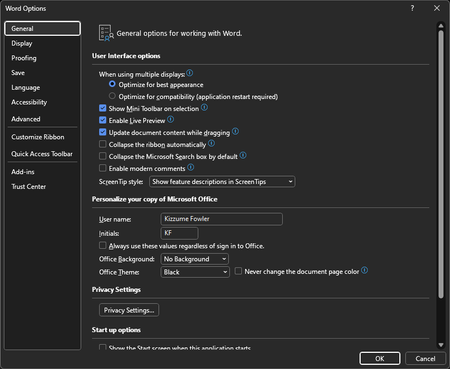
How do I turn off copilot if it's not in the options?
This provided screenshot is what I get with Word Options. There are no copilot settings in Word Options in my copy of Office, I cannot find any way of turning it off, and yet copilot has gotten so much worse by giving me three suggestions (at the top of the window, suggesting what kind of content I should make) every time I open a new document. Copilot just keeps getting more intrusive, and I want to shut it off. The more it's shoved in my face, the less I want to use it. I don't know why you're making it so intrusive, I've never heard of anyone actually LIKING this stuff. Why would someone want suggestions as to what kind of document to make? It's far worse than Clippy could even dream of. I haven't tried uninstalling and reinstalling Office yet, but I don't want to have to go through and change a bunch of options again (that I always forget, there are so many options that I have to change to make it usable, like turning off the awful Backstage when saving) unless it's truly necessary to fix this problem. If it gets updated regularly (like the update that gives three Copilot suggestions every time I open a new document), I don't see why reinstalling it would fix the problem. But maybe reinstalling is the answer--if it IS the answer, I just want confirmation that it has actually worked for other people, and not just a generic answer that hasn't been confirmed.1.3KViews0likes2Comments
Word Copilot attachments fail with NoTokenObtained
Word Copilot cannot read local or cloud attachments with my Microsoft account. Cloud file attachment opens OneDrive Picker but fails with NoTokenObtained, timeout, or “Sorry, something went wrong.” Local files are accepted but reported as empty/corrupted. The same files work correctly in Microsoft 365 Copilot Chat with the same account. The issue reproduces on different computers, different networks, new Edge profile, new Windows user, and Word for the web without Office desktop installed. Word Copilot can read the active document, so only the attachment pipeline appears broken. Correlation IDs: 49a92ea2-7068-2001-bf16-3cf7d0c388fd and b39b30a2-b012-f000-cf51-72bd844c5dea. Please escalate to Word Copilot / OneDrive File Picker / Microsoft 365 Copilot engineering.299Views0likes1Comment