configuration
2254 Topics
Family Safety: child PC registered but not connected (Event ID 454, 0x86000002)
Hello, I am reporting a persistent Microsoft Family Safety device-association issue on a newly configured Windows 11 Home PC. Microsoft Support case reference: 7109577064 Microsoft Support has confirmed that the standard consumer-support troubleshooting path has been exhausted and specifically advised me to post the full technical scenario in Microsoft Tech Community. Environment Windows 11 Home 25H2 OS Build: 26200.9550 Update: KB5124010 Newly configured PC Child uses a Microsoft consumer account based on an external email domain: OP.pl No email addresses or personal account identifiers are included in this public post. Problem The PC is correctly registered under the child’s Microsoft account and is continuously visible at: account.microsoft.com/devices However, Microsoft Family Safety still shows: No connected Windows device So the Microsoft Account device registration works, but the Family Safety device association does not. Configuration already verified Child account is a Standard User, not Administrator. Child is correctly added to the Microsoft Family group. Parent account is the Family Organizer. Parental consent is correctly granted. Windows activity reporting is enabled. Windows Settings → Accounts → Family shows that the child can sign in. FamilySafetyRefreshTask exists and completes successfully with result 0x0. Manual execution of: schtasks /run /tn "\Microsoft\Windows\Shell\FamilySafetyRefreshTask" returns SUCCESS. WpcMonSvc is running. wlidsvc is running. AppIDSvc is running. dsregcmd /status reports: WamDefaultSet : YES WamDefaultAuthority : consumers and the Microsoft consumer account is correctly detected. Troubleshooting already completed Child Windows profile was switched temporarily to a local account and then reconnected to the same Microsoft account. Child Windows profile was later completely removed from the PC and recreated from scratch. Microsoft Family Safety for Windows was installed. Microsoft.Windows.CloudExperienceHost was reset with PowerShell. DNS cache was flushed. PC was tested using a different Internet connection / mobile hotspot. Windows was fully updated to 25H2 build 26200.9550. Child was completely removed from the Microsoft Family group. Parental consent was revoked. Child was invited again to the Family group. Parental consent was granted again. The recreated family relationship synchronized immediately between the Family Safety web interface and the mobile app. FamilySafetyRefreshTask was run again after recreating the family relationship. The issue persists. Additional symptom Under: Settings → Accounts → Connected devices the child profile behaves inconsistently. The PC appeared there once after recreating the Windows profile, but after restarting Windows the local Connected devices list became empty again. However, the PC remains continuously visible under the child account at account.microsoft.com/devices, which indicates that the cloud device registration itself is persistent. Event Viewer findings In: Microsoft-Windows-DeviceManagement-Enterprise-Diagnostics-Provider/Admin historical events from 27 September 2026 show: Event ID: 454 Enrollment Type: FamilySafety CSP: AppLocker Path: ./Vendor/MSFT/AppLocker/FamilySafety/FamilySafetyGroup Error: 0x86000002 After recreating the Microsoft Family relationship, granting parental consent again, and manually running FamilySafetyRefreshTask, no new FamilySafety-related events are generated in this log. What is confirmed to work Microsoft account authentication Windows user profile Microsoft Family group membership Parental consent Windows device registration under the child’s Microsoft account Family Safety activity reporting configuration Synchronization between Family Safety on the web and the mobile app The remaining failure appears to be specifically: child Microsoft account → Microsoft Family group → registered Windows device → Family Safety device association Microsoft Support could not escalate the case further through the consumer-support channel and instructed me to post the issue here. Microsoft Support case reference: 7109577064 I would appreciate input from Microsoft engineers, moderators, or anyone who has encountered this exact issue, especially in relation to: Event ID 454 error 0x86000002 AppLocker/FamilySafety/FamilySafetyGroup device visible in account.microsoft.com/devices but missing from Microsoft Family Safety I can provide additional Event Viewer logs, screenshots, dsregcmd /status output, or other diagnostic information if required.23Views0likes1CommentWhy does my laptop sleep anyway despite my screen and sleep settings being set to never?
I have a ThinkPad X1 Carbon (6th Gen) running Windows 11 Pro. I've set my "Plugged in" options to turn screen off after 5 minutes and never sleep, and "On battery" to turn screen off after 3 minutes and never sleep. But it ignores both—it always sleeps right around those times regardless of whether it's plugged in or not. I've searched online and tried a bunch of fixes, but nothing stuck. Not sure if it's a Windows thing or something specific to this laptop. Any help would be appreciated. Happy to provide more info if needed.24Views0likes1Comment
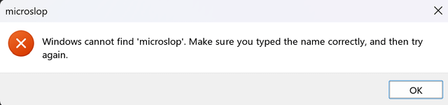
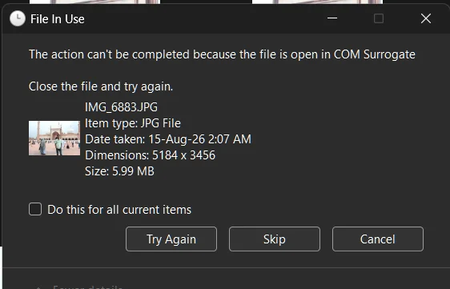
Why does "COM Surrogate" block me from deleting files on Windows 11?
Why does a "COM Surrogate" prompt pop up every now and then when I try to delete certain files on my Windows 11 laptop, telling me the file is in use and can't be deleted? It only happens with some files, and sometimes after a restart I can delete them without any issue, then the next time the same thing happens again. My laptop is a Lenovo LOQ 15ARP9 with a Ryzen 7 7435HS and RTX 4060. Is this something serious, or just a normal Windows behavior that gets in the way? And is there a way to stop COM Surrogate from locking the files so I can delete them without rebooting every time?22Views0likes1CommentWindows 11 25H2 Build 9457 lockscreen not changing picture
Hello to all, so, we have three laptops that have Windows 11 25H2 Build 9457, two of these have Enterprise whilst the third one has the Pro version installed, one of the Enterprise laptops is my work laptop, the other one I use for testing image installations etc and is freshly installed with this build. The Pro version is my personal laptop and has also been freshly installed. Ever since having the latest build installed on all three of these laptops, the lockscreen picture does not work, all three remain on the default blue bloom one. I have tried changing from spotlight to picture, restart, then switch to spotlight again with no success. I have deleted the contents of the Assets folder located under this folder MicrosoftWindowsContentDeliveryManagercw5n1h2txyewy , and also the settings folder, rebooted and had no success. I also tried the powershell script that registers the content delivery manager and had no success either I ran a dism check health and all three have no corruption detected, the same after running an sfc scannow. All this on three of these laptops. Then i decided to log on to the local Admin account of my work laptop and after a couple of minutes i locked the screen and the lockscreen picture changed I said to myself so it is working now, i signed out logged in with my domain account and the lockscreen defaulted back to the blue bloom picture. The same happened with the test laptop, i use a test domain user account for this, when i change to a local account the lockscreen picture changes, when i go back to a domain account it defaults to the blue picture. Also happens with my personal laptop where i use a microsoft account to log in. I am literally out of ideas what is causing this because using a local account makes the lockscreen spotlight work, when using a domain or Microsoft account it seems to break it. Thank you for any help.49Views0likes0CommentsWin11 Taskbar search box remains highlighted after pressing Escape
After clicking the search box on the taskbar and pressing the Esc key to close the search panel, the search box remains highlighted or displays a blue border, as if it were still active. Clicking elsewhere on the desktop or taskbar removes the highlight. This issue occurs intermittently and is more noticeable when using a high-contrast theme or custom accent colors.39Views0likes0Comments
Why does Windows 11 say "No Internet, secured" even though my Wi-Fi is working fine?
Why does my custom power plan on Windows 11 keep resetting itself back to Balanced after every restart, even though I created it, selected it, and confirmed it was active? It stays on my plan until I shut down or reboot, then it's back to Balanced without any warning. I've already tried duplicating the plan, renaming it, and using the command line to set it as active, but nothing sticks. Is this a known issue with how Windows 11 handles power plans now, or is something in the registry or a group policy overriding my choice? And is there a way to lock in a custom plan so it survives reboots without having to switch it back every time?28Views0likes0CommentsOver 380GB of temp files I can't find or delete
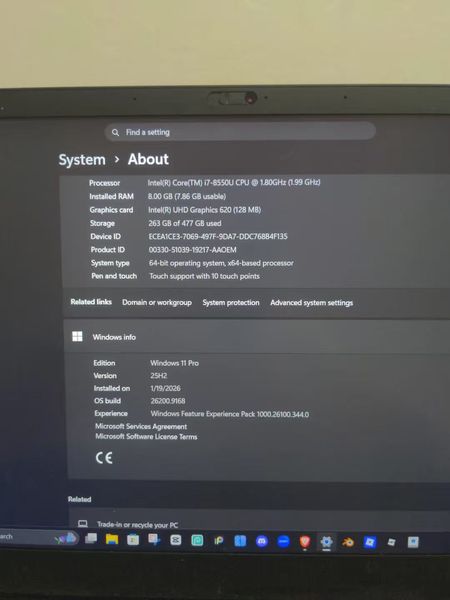
I'm on Windows 11 and noticed my storage is showing over 380GB of temp files—but I can't actually find them or delete them. I've tried the usual stuff like running %temp%, disk cleanup, and even manually clearing folders, but nothing changes the number. I do have some large games installed, but I can't imagine they're generating that many temp files. OS build is 26200.8875. Anyone know where these files might actually be hiding or how to clear them out for good?57Views0likes1CommentThe KB5124010 File History backup issue persists (Unresolved issue from KB5101684)
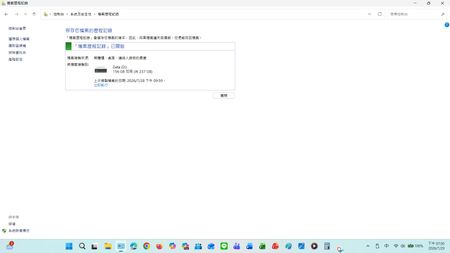
Current version: Laptop: Windows 11 25H2 OS Build 26200.8973 Desktop: Windows 10 22H2 OS Build 19045.7725 After installing KB5124010, the previous KB5124008 issue was resolved, and the scheduled backup function returned to normal. However, the serious file history synchronization error initially introduced after installing KB5101684/KB5120249 on July 28th still persists. Steps and Observations: After modifying and successfully saving files on drive D, manually triggering a backup via Control Panel > System and Security > File History > Execute Now : Timestamp mismatch: The date and time of the last copy failed to update to the latest save time. The current temporary solution is: For newly added files such as Word documents, File Properties > Previous Versions shows: No previous versions are available, or the content of older files does not display the latest timestamp version of updated/newly added files.In the console, go to All Console Items > File History > Select Drive. When you select drive D, the last copied file date will be updated. However, for newly added files (such as Word files), "File Properties" > "Previous Versions" displays: No previous version is available, or the contents of the old file do not show the latest timestamp version of the updated/newly added file. Expected Behavior: Initially, the KB5124010 update was intended to address issues with KB5124008 and KB5101684. Actual Behavior: However, unexpectedly, it only fixed the following issue: This update resolves an issue where file history might fail to back up or restore files to an external drive or network location. Affected devices might incorrectly display a "Reconnect Drive" message even if a compatible backup drive is connected and functioning correctly. Feedback Hub report: https://aka.ms/AA13n22w I'm telling the truth; the file history was normal before updating KB5124010 and KB5101684. I don't see export Application log events for FileHistory.exe or KERNELBASE.dll in the Event Viewer. Has anyone else reproduced this behavior on Windows 10/11? I would also greatly appreciate it if the Windows team could investigate and fix this issue. This is a post I made where people commented that they had encountered similar issues, and there were also test results from others. : KB5101684/KB5120249 caused File History errors, but Microsoft has not acknowledged them. | Microsoft Community Hub Welcome to comment if KB5101684 or KB5120249 caused the same File History issue. | Microsoft Community Hub I want to ask Microsoft, why are there abnormal in the file history logs after these two updates? | Microsoft Community Hub Win 10/11 file history is malfunctioning after an update why hasn't Microsoft fixed this issue yet? | Microsoft Community Hub https://learn.microsoft.com/en-nz/answers/questions/5972265/windows-11-file-history-not-updating-correctly-aft https://learn.microsoft.com/en-nz/answers/questions/5978256/win-11-25h2kb5101684-os-builds-26200-8973-and-2610 https://www.w2eb.com/kb5124010-file-history-initial-backup-incomplete/ https://www.nichepcgamer.com/archives/post-132469.html My question is shown in the screenshot below: After modifying and successfully saving files on drive D, manually triggering a backup via Control Panel > System and Security > File History > Execute Now : Timestamp mismatch: The date and time of the last copy failed to update to the latest save time. For newly added files such as Word documents, File Properties > Previous Versions shows: No previous versions are available, or the content of older files does not display the latest timestamp version of updated/newly added files.98Views0likes0Comments
Can't move Windows 11 Pro key to new machine
I'm in the middle of building a new PC and am unable to move my Windows 11 Pro license to it. I have verified with cmd that it is Retail channel and license, IIRC it was purchased as Windows 10 Pro and upgraded. On the system activation page it says "Windows is activated with a digital license linked to your Microsoft account." This is a retail license I purchased several years ago. I retrieved the key from the old machine using Regedit. If I try to enter this into the Activation settings page on the new PC with "Change Product Key" it says "We can't activate Windows on this device because you don't have a valid digital license or product key. If you think you do have a valid license or key, select Troubleshoot below. (0x803fa067)" Hitting the troubleshoot button on the system activation page says "We weren't able to activate Windows on this device." Selecting "I changed hardware on this device recently" on the new PC says "We can't find any devices linked to your Microsoft account that can be used for reactivating the device you're using right now. Make sure you're signed in with the same Microsoft account you linked to the Windows 10 digital license on this device or try again later." Clicking "See other devices linked to your Microsoft account" bring up the Reactivate Windows page with the message "We can't reactivate Windows from these devices." I have verified that both machines are linked into the same account and show up in my devices list. I removed the old PC from devices hoping that would help, but it has made no difference. It took a little bit but I was ale to get the PC to show up on my account again, though with less details then had been there previously (it may still be updating.) I have followed the link to the "Get Help" app, but when I sign in it says "Sorry, but we're having trouble signing you in." "AADSTS500200: User account 'MYACCOUNTHERE' is a personal Microsoft account. Personal Microsoft accounts are not supported for this application unless explicitly invited to an organization." I tried calling Microsoft support numbers fort the US, and after a great deal of time and effort eventually got past the AI which kept sending me to the directions I had already followed whenever I use the word "activation." I eventually figured out how to get someone on the line and after explaining my problem I was then put on hold for them to transfer me for help, after ~30 minutes the hold music stopped and it went silent. Waited another 10 minutes and nothing so hung up and called again. Could not get them to forward my call to a person again and now whenever I call one of their support numbers it says "Hello, thanks for calling Microsoft, for assistance with Windows Support please visit us online at help.microsoft.com. Thanks for calling Microsoft, have a good day." and hangs up on me. I'm absolutely livid at this as it seems they've flagged my number to ignore it now and I'm left with no way to contact Microsoft support to get my issue resolved.28Views0likes0Comments