configuration
2249 Topics
Windows 11 File History recopies unchanged files whenever its Control Panel page is opened
I am reporting a repeatable File History problem on a fully updated Windows 11 computer. File History is configured to back up my libraries every hour to a separate physical internal HDD that Windows accepted as the File History destination. To eliminate the possibility of an old or damaged backup configuration, I reformatted the destination drive and configured File History again from the beginning. Steps and observations: The initial File History backup completed successfully and consumed approximately 38 GB. I did not modify the protected source files after the initial backup. I closed and reopened Control Panel > System and Security > File History merely to check the backup status. Immediately after the File History page loaded, it changed to “Saving copies of your files.” The destination drive then consumed approximately another 38 GB, creating new physical versions of files that had not been modified. Pressing Stop ends the active backup cycle. However, after closing and reopening the File History Control Panel page, another backup cycle starts again. This behavior is repeatable whenever the File History page is reopened. A scheduled hourly backup also added approximately 14 GB, despite there being no corresponding amount of intentionally changed source data. I understand that File History is supposed to preserve multiple versions of files that have actually changed. The problem is that it is physically recopying unchanged files and rapidly consuming the entire backup drive. Expected behavior: Opening the File History Control Panel page should only display its current status or scan for changes. Only new or modified files should be copied during the next backup cycle. Actual behavior: Opening the File History page itself triggers a backup cycle that writes another large physical copy of unchanged data. Has anyone else reproduced this behavior on Windows 11? I would also appreciate it if the Windows team could investigate whether opening the legacy File History Control Panel applet is incorrectly forcing a complete or partial re-indexing and recopying of unchanged files. Feedback Hub report: https://aka.ms/AA13n2f385Views1like8CommentsWin11 Taskbar search box remains highlighted after pressing Escape
After clicking the search box on the taskbar and pressing the Esc key to close the search panel, the search box remains highlighted or displays a blue border, as if it were still active. Clicking elsewhere on the desktop or taskbar removes the highlight. This issue occurs intermittently and is more noticeable when using a high-contrast theme or custom accent colors.12Views0likes0Comments
The KB5124010 File History backup issue persists (Unresolved issue from KB5101684)
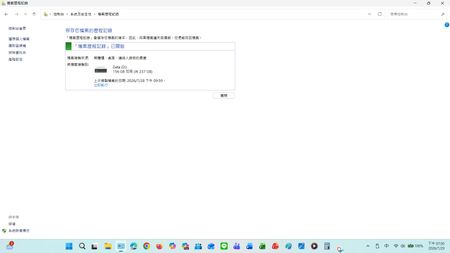
Current version: Laptop: Windows 11 25H2 OS Build 26200.8973 Desktop: Windows 10 22H2 OS Build 19045.7725 After installing KB5124010, the previous KB5124008 issue was resolved, and the scheduled backup function returned to normal. However, the serious file history synchronization error initially introduced after installing KB5101684/KB5120249 on July 28th still persists. Steps and Observations: After modifying and successfully saving files on drive D, manually triggering a backup via Control Panel > System and Security > File History > Execute Now : Timestamp mismatch: The date and time of the last copy failed to update to the latest save time. The current temporary solution is: For newly added files such as Word documents, File Properties > Previous Versions shows: No previous versions are available, or the content of older files does not display the latest timestamp version of updated/newly added files.In the console, go to All Console Items > File History > Select Drive. When you select drive D, the last copied file date will be updated. However, for newly added files (such as Word files), "File Properties" > "Previous Versions" displays: No previous version is available, or the contents of the old file do not show the latest timestamp version of the updated/newly added file. Expected Behavior: Initially, the KB5124010 update was intended to address issues with KB5124008 and KB5101684. Actual Behavior: However, unexpectedly, it only fixed the following issue: This update resolves an issue where file history might fail to back up or restore files to an external drive or network location. Affected devices might incorrectly display a "Reconnect Drive" message even if a compatible backup drive is connected and functioning correctly. Feedback Hub report: https://aka.ms/AA13n22w I'm telling the truth; the file history was normal before updating KB5124010 and KB5101684. I don't see export Application log events for FileHistory.exe or KERNELBASE.dll in the Event Viewer. Has anyone else reproduced this behavior on Windows 10/11? I would also greatly appreciate it if the Windows team could investigate and fix this issue. This is a post I made where people commented that they had encountered similar issues, and there were also test results from others. : KB5101684/KB5120249 caused File History errors, but Microsoft has not acknowledged them. | Microsoft Community Hub Welcome to comment if KB5101684 or KB5120249 caused the same File History issue. | Microsoft Community Hub I want to ask Microsoft, why are there abnormal in the file history logs after these two updates? | Microsoft Community Hub Win 10/11 file history is malfunctioning after an update why hasn't Microsoft fixed this issue yet? | Microsoft Community Hub https://learn.microsoft.com/en-nz/answers/questions/5972265/windows-11-file-history-not-updating-correctly-aft https://learn.microsoft.com/en-nz/answers/questions/5978256/win-11-25h2kb5101684-os-builds-26200-8973-and-2610 https://www.w2eb.com/kb5124010-file-history-initial-backup-incomplete/ https://www.nichepcgamer.com/archives/post-132469.html My question is shown in the screenshot below: After modifying and successfully saving files on drive D, manually triggering a backup via Control Panel > System and Security > File History > Execute Now : Timestamp mismatch: The date and time of the last copy failed to update to the latest save time. For newly added files such as Word documents, File Properties > Previous Versions shows: No previous versions are available, or the content of older files does not display the latest timestamp version of updated/newly added files.62Views0likes0CommentsOver 380GB of temp files I can't find or delete
I'm on Windows 11 and noticed my storage is showing over 380GB of temp files—but I can't actually find them or delete them. I've tried the usual stuff like running %temp%, disk cleanup, and even manually clearing folders, but nothing changes the number. I do have some large games installed, but I can't imagine they're generating that many temp files. OS build is 26200.8875. Anyone know where these files might actually be hiding or how to clear them out for good?27Views0likes1CommentWhy does Windows 11 say "No Internet, secured" even though my Wi-Fi is working fine?
Why does my custom power plan on Windows 11 keep resetting itself back to Balanced after every restart, even though I created it, selected it, and confirmed it was active? It stays on my plan until I shut down or reboot, then it's back to Balanced without any warning. I've already tried duplicating the plan, renaming it, and using the command line to set it as active, but nothing sticks. Is this a known issue with how Windows 11 handles power plans now, or is something in the registry or a group policy overriding my choice? And is there a way to lock in a custom plan so it survives reboots without having to switch it back every time?14Views0likes0Comments
Color profile and eye strain
I’m experiencing a color/display issue on Windows 11 with an NVIDIA GeForce RTX 5070 I was having eye strain while using my pc and i found a solution, I was opening my pc and get into the display section and it was applying a color profile and then I was putting it to sleep mode and once i open it again color profile wasn't working, so i was never getting into display section again because once i do, it was applying to a color profile that hurts my eyes. But lately after windows update or nivida driver update, that solution for me started not working. Is there anything i can do to continue using like the way i do before? or is there any color profile was applying after i put to sleep mode. I was feeling comfort on my eyes while i was doing this. If you can help me i would be so happy.112Views0likes2Comments
Can't move Windows 11 Pro key to new machine
I'm in the middle of building a new PC and am unable to move my Windows 11 Pro license to it. I have verified with cmd that it is Retail channel and license, IIRC it was purchased as Windows 10 Pro and upgraded. On the system activation page it says "Windows is activated with a digital license linked to your Microsoft account." This is a retail license I purchased several years ago. I retrieved the key from the old machine using Regedit. If I try to enter this into the Activation settings page on the new PC with "Change Product Key" it says "We can't activate Windows on this device because you don't have a valid digital license or product key. If you think you do have a valid license or key, select Troubleshoot below. (0x803fa067)" Hitting the troubleshoot button on the system activation page says "We weren't able to activate Windows on this device." Selecting "I changed hardware on this device recently" on the new PC says "We can't find any devices linked to your Microsoft account that can be used for reactivating the device you're using right now. Make sure you're signed in with the same Microsoft account you linked to the Windows 10 digital license on this device or try again later." Clicking "See other devices linked to your Microsoft account" bring up the Reactivate Windows page with the message "We can't reactivate Windows from these devices." I have verified that both machines are linked into the same account and show up in my devices list. I removed the old PC from devices hoping that would help, but it has made no difference. It took a little bit but I was ale to get the PC to show up on my account again, though with less details then had been there previously (it may still be updating.) I have followed the link to the "Get Help" app, but when I sign in it says "Sorry, but we're having trouble signing you in." "AADSTS500200: User account 'MYACCOUNTHERE' is a personal Microsoft account. Personal Microsoft accounts are not supported for this application unless explicitly invited to an organization." I tried calling Microsoft support numbers fort the US, and after a great deal of time and effort eventually got past the AI which kept sending me to the directions I had already followed whenever I use the word "activation." I eventually figured out how to get someone on the line and after explaining my problem I was then put on hold for them to transfer me for help, after ~30 minutes the hold music stopped and it went silent. Waited another 10 minutes and nothing so hung up and called again. Could not get them to forward my call to a person again and now whenever I call one of their support numbers it says "Hello, thanks for calling Microsoft, for assistance with Windows Support please visit us online at help.microsoft.com. Thanks for calling Microsoft, have a good day." and hangs up on me. I'm absolutely livid at this as it seems they've flagged my number to ignore it now and I'm left with no way to contact Microsoft support to get my issue resolved.14Views0likes0Comments
Win11 file explorer keeps resetting to the top at random moments
Win version : Win11 23H2 Ever since i upgraded from win10 to win11, i have had this extremely annoying problem where win explorer will suddenly reset to the top of the folder. E.G. If i scroll halfway down, win explorer will suddenly reset to the top of the folder, as if i had scrolled all the way up. It does not manually scroll up by itself...its not like my mouse is broken and causing it to scroll up. It just instantly jumps all the way to the top. Its like something has reset the folder view. Importantly, this folder view reset happens even when i am not using win explorer, so it happens in the background, at random intervals. I cannot reproduce this consistently. It seems to mainly happen shortly after i resume from hibernation, and at random intervals throughout the day. It has nothing to do with icons and thumbnails as far as i can tell. The folder view reset happens in ALL explorer windows that i have open, at the same time, even if the folder is a bunch of files set to "details" view mode. When it triggers, no errors or anything are logged in event viewer->windows logs->system or application. There are no error popups or anything, the folder view just resets to the top silently in the background, even when i am not using explorer. I have tried a ton of things to fix it : Uninstalled OneDrive and purged the registry and policies of everything OneDrive related that i could find. I saw some posts saying that OneDrive was responsible because win explorer keeps trying to connect to OneDrive, but this has not fixed it for me. I am not using any network drives, cloud drives, or anything of that nature. Set explorer to "launch folder windows in a seperate process" Set "FolderType" to "NotSpecified" in Computer\HKEY_CURRENT_USER\Software\Microsoft\Windows\Shell\Bags\AllFolders\Shell. This was meant to disable the feature where windows tries to automatically set the folder type Cleared the thumbnails cache Cleared the folder view cache in HKEY_CURRENT_USER\Software\Classes\Local Settings\Software\Microsoft\Windows\Shell\BagMRU and HKEY_CURRENT_USER\Software\Classes\Local Settings\Software\Microsoft\Windows\Shell\Bags Disabled "allow files in this folder to have contents indexed" in properties Set NoSimpleNetIDList, NoRemoteChangeNotify and NoSimpleNetIDList to 1 in HKEY_CURRENT_USER\Software\Microsoft\Windows\CurrentVersion\Policies\Explorer. I think this has prevented the folder view reset from occuring on logon, but it has not prevented it from occuring at random intervals throughout the day. Disabled "show recently used files", "show frequently used folders" and "show files from office.com" in view options Disabled everything under Options -> View -> Navigation Pane except for "Show this PC" Made sure i am not running any kind of network drive, cloud sync, etc, software or services. Unchecked "Automatically pick an accent color from my background option" in display personalization. Made sure slideshow was disabled for the windows screensaver Set explorer to default to "This PC" instead of "Home" Used ShellExView to see if i had any network or cloud sync stuff affecting the shell...nothing that i could see. Ran sfc /scannow and DISM, then rebooted Enabled group policies for user config -> admin templates -> windows components -> file explorer, "no computers near me in network locations", "remove map network drive and disconnect network drive", "turn off caching of thumbnail pictures", "turn off the caching of thumbnails in hidden thumbs.db files" and "turn off windows key hotkeys" Set NoActiveDesktopChanges in HKEY_CURRENT_USER\Software\Microsoft\Windows\CurrentVersion\Policies\Explorer E Made sure focus assist was off Set NoNetCrawling, NoRemoteRecursiveEvents, NoRemoteRecursiveEventsEx, NoResolveTrack and NoPinnedSiteSync in HKEY_CURRENT_USER\Software\Microsoft\Windows\CurrentVersion\Policies\Explorer Checked there was nothing process related in power options (this is a PC, there is no battery) Checked for any optional updates that might fix this (there were none) Set file explorer to "show icons only, never thumbnails" Disabled refresh cache for onesettings in task scheduler Reset all folder view options to defaults and then restarting Those are the only the ones i can remember off hand. I also tried using process monitor to see if anything might be causing it...but it eventually closed by itself after running for a few hours, presumably because it was logging too much stuff. And since the folder view reset happens randomly, i cannot check the log at a certain time anyway, because i have no idea what time to check the log at. I found an old post talking about what seems to be a similar issue : Windows 11 File Explorer jumps to top when scrolling - Microsoft Q&A, except that it jumps to the top when i am not using explorer. It never jumps to the top when i am actively using explorer. None of the solutions posted in the thread worked for me. Does anyone have any idea what could be causing this? Its very obviously something related to win11 because it was not present in win10, but i cant narrow it down and windows wont tell me what is causing it. It just seems to be some kind of folder/UI refresh that keeps triggering but i cant tell what is triggering it, when it triggers or how to turn it off.EndFragment I tried using an alternative to file explorer, called the "Files" app, and i can confirm the "folder jumps to the top" bug does not happen there...so whatever is causing it, only affects win11's file explorer. I was able to find someone else who confirmed that this folder view reset bug happens for them as well on win11, but he did not know why it was happening either. His best guess was that the changes that win11 made to file explorer have introduced this bug. Does anyone have any ideas on what is causing this, or any ways to trouble shoot this? Clearly, win11 introduced something that is causing the folder view to reset to the top constantly, but windows does not tell me what it is or why it is doing it...there is nothing in event viewer that i can see. It just silently resets file explorer's folders in the background.1.2KViews1like4Comments
Windows Explorer Constantly Crashes
Hi. I switched to Windows 11 a couple months ago, and only today I started noticing a really annoying issue with Windows Explorer. Basically everytime I turn on the PC I can use it fine for 5-10 minutes but then I start noticing that it gets unresponsive. For example, I have Chrome open, and Microsoft Word, and out of nowhere I can't scroll in Chrome or switch to Word, it's like it completely freezes but I can still move my mouse. The actual explorer is frozen, so I can't open the task manager from there either. Only thing that works for fixing this is pressing Ctrl+Alt+Del to bring up the task manager through there, once I do that I can go back to using my computer normally but after some time it crashes again. I was reading some forums about this issue and it was recommended to end the "explorer.exe" task in the Details tab, and then starting it again, which I did, and restarted my computer after. Now its worse, when I turn on the PC and go into my desktop it's frozen from the start, so to start using the computer I need to access the task manager through Ctrl+Alt+Del. My computer specs are: Nvidia RTX4070ti 64gb ram AMD Ryzen 9 5950X 2 nvme SSDs and 1 HDD I have the latest drivers from Nvidia Studio Driver installed (6 16.92). I installed it more than a week ago, I wonder if this could be causing the issue. But please, anyone with this problem that can help me solve it? Thanks5Views0likes0CommentsPC 1 sees PC 2's shared drives, but PC 2 can't see PC 1's
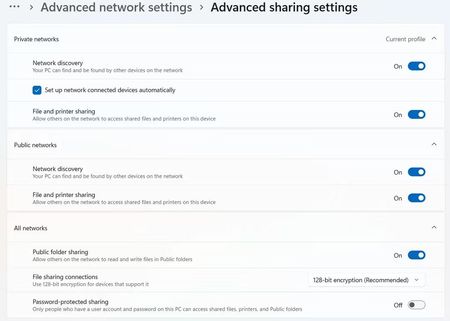
This is driving me nuts. Two Windows 11 PCs on the same network—one Ethernet, one Wi-Fi. PC 1 can access PC 2's shared folders just fine, but PC 2 can't see anything from PC 1 at all. Both have the same sharing settings enabled. Already tried unsharing and resharing drives, toggling Network Discovery, restarting both PCs, even restarted the router. Still the same issue. The only thing that changed was enabling Wake on LAN on PC 1. That works perfectly—PC 2 can wake PC 1—but once it's awake, the shares still don't show up. Anyone seen this before? Could Wake on LAN be messing with network discovery?82Views0likes2Comments