community
3284 TopicsPlease clarify the numbering system in Microsoft exams
I am trying to make sense of exam numbers in Microsoft Certification poster. https://arch-center.azureedge.net/Credentials/Certification-Poster_en-us.pdf. For example I notice most azure exam numbers start with 1xx. That gives me the impression that 1xx could be related to Infrastructure. But I am not sure if that is the correct understanding. For example all fundamental exams are numbered 9xx. So are exams numbered differently in role based certifications? What is the numbering pattern and practice in role based certifications? Again one might assume that all architect exams may have the same number pattern but they don’t. Some patterns emerge when it comes to Windows certification - 8xx. Collaboration and communication - 7xx except MB 700. So it appears even under role based certifications the numbering pattern may be different depending on the technology or platform or product. I have not found any authoritative material on the internet form anyone in Microsoft or an MVP on this topic. Some clarification on this topic will help to put at rest years of curiosity and confusion in the community. Thank you.19Views0likes1Comment
Windows 11 24H2/25H2 System Freeze After January 2026 Updates – Lenovo ThinkPad G2
Dear Microsoft Support Team, We would like to raise a high-priority technical support case regarding a stability issue observed after installing the January 2026 cumulative updates on our Windows 11 devices. Environment Details: Device Model: Lenovo ThinkPad G2 (multiple units) OS Versions: Windows 11 24H2 and 25H2 Update Installed: January 2026 Patch Tuesday cumulative update (KB number can be provided) Deployment Method: WSUS / Intune / Windows Update (specify accordingly) BIOS Version: (Installed Latest available from Lenovo) Issue Description: After installing the January 2026 cumulative updates, devices intermittently experience a complete system freeze. The system becomes fully unresponsive: Mouse and keyboard input stop responding No BSOD is displayed Task Manager cannot be opened System recovery is only possible via hard reboot (power button) Frequency: The issue occurs randomly, both during active use and idle state. Multiple users across our environment are impacted. Troubleshooting Performed: Reinstalled OEM-certified Lenovo display drivers Disabled Fast Startup Ran SFC and DISM health checks (no integrity violations) Updated BIOS to latest version Setting power idle mode, then work normally Request: - Please confirm whether this is a known global issue under investigation. - Advise if any hotfix, Known Issue Rollback (KIR), or registry-based mitigation is available. - Provide guidance on additional diagnostic logging required at kernel or driver level. - Confirm whether crash dump analysis is recommended for this scenario. We are prepared to provide additional diagnostic logs, memory dumps, or reproduction steps upon request. Kindly treat this as a priority case due to multi-user impact in a production environment. Thank you for your support. #Windows11, #Windows 11 24H2, Windows Update, Cumulative Update, System Freeze, Lenovo ThinkPad, Display Driver, Enterprise956Views7likes13CommentsFiltering tasks based on custom columns in Microsoft Planner?
In Microsoft Planner, I can add a custom column, and it appears in the table view. However, I do not see an option to filter tasks based on the new column. Is this a supported feature, or is there any workaround to enable filtering on custom fields?Solved165Views3likes2Comments
Optimizing Web Applications
Hi Community, I’m working on a web app that allows users to check their SASSA grant status. As we know, there can often be delays in SASSA payments, and we're focused on building an app that ensures a seamless experience even during those times. We're prioritizing high performance and security to handle large amounts of traffic, especially during peak periods when these payment delays are more common. I’d love to hear from others with experience in building similar public service portals: What strategies can you recommend for scaling web apps to handle high traffic volumes efficiently? How can we ensure data security and protect sensitive user information, especially when dealing with government services? Looking forward to your insights! For more information on improving your SASSA payment experience and web app performance, click here .25Views0likes0CommentsCan not use URL https://support.microsoft.com ?
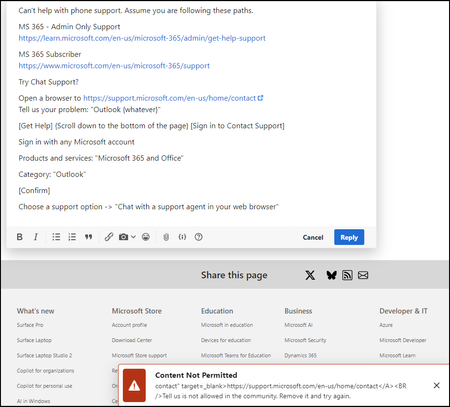
Replying to the question Outlook support - human | Microsoft Community Hub Trying to link to https://support.microsoft.com/en-us/home/contact Get a "Content Not Permitted" Same if I try and use that URL here: What am I doing wrong?Solved72Views0likes2Comments
Login not possible
Since the beginning of the year, I have had the problem that I cannot log into my email account via Outlook. I have contacted Microsoft support several times, and they have repeatedly told me to contact Outlook support directly, but I am unable to do so. I have already cleared my cache several times and tried using other browsers. I have also tried incognito modes, as well as using my cell phone. Whenever I try to log in, I get the following error message: That's why I hope that someone here can help me somehow. UTC Date: 2026-02-22T02:15:19.184Z Client Id: 7A828C91B2DA4E399FF041930501246B Session Id: 4ec12d8b-3707-444b-9f57-50efe72ef5cf Client Version: 20260213001.06 BootResult: fail Back Filled Errors: None err: System.Runtime.Serialization.SerializationException esrc: StartupData et: ServerError estack: Newtonsoft.Json.JsonSerializationException st: 500 ehk: X-OWA-Error efe: AS4P190CA0013 ewsver: 15.20.9632.15 emsg: ErrorUnexpectedFailure34Views0likes1Comment
Proposal for Reviving Windows Mobile in 2026
Dear Microsoft Windows Team, I am writing as a passionate supporter of the Windows Mobile experience, especially the fluidity and innovation seen in Windows 10 Mobile. I believe there is a strong opportunity to revive Windows Mobile in 2026 with a compact, affordable, and well-equipped device that can serve middle-class users globally. The concept I envision includes: - A compact form factor (6 to 6.2 inches) for comfortable one-handed use. - Floating apps and lock-screen widgets that feel alive and interactive. - Seamless integration with Windows PCs, Xbox, and Surface devices. - Android app compatibility to eliminate ecosystem limitations. - AI-powered features like Copilot for productivity and assistance. - Economic pricing to ensure accessibility for middle-class users. The enthusiasm for such a device remains strong, and I truly hope Microsoft considers this vision. It would not only honor the legacy of Windows Mobile but also redefine mobile computing for the future. Thank you for your time and consideration. Sincerely, Dillip22Views0likes0Comments
Radio buttons aren't functioning for a mandatory question in job application with Job ID - 200027012
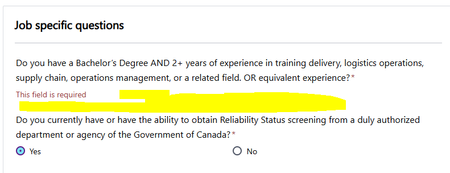
Hi All, Yes and No radio buttons are missing for a mandatory question in one of the job application on Microsoft careers, without which application cannot be submitted, details as below Job ID - 200027012 Role - Inventory and Asset Technical Trainer Can anyone please look into this. I've raised the same concern yesterday night about 12hrs back, but it got disappeared, if possible can anyone let me know where to find my previous raised concerns.45Views0likes2Comments
help me with this frustraating issue
A week or less than a week, that's all it takes for my windows 11 on my laptop to just collapse and tell me windows system files corrupt.. this is the second time i've fresh installed windows 11 all over again. it's activataed windows 11 pro btw.. symptoms before syystem fail : 1- freezing and really slow. 2- black screen even after multiple restarts. 3- takes me to the windows blue screen that has various tools like usb install or dvd troubleshoot or countinue or more options like cmd or whatever. 4- not being able to boot into system without a black screen(first time it didn't even let me bot in to windows.) what do i do? and is it better if i go with windows 10 at this point and end all the windowss 11 nonsense?? please tell me, i need instant response because this is really annoying me.. laptop specs btw : intel core i5 8365U 1.60GHZ gpu intel uhd 620 graphics 4gb share ram 8 gigs ddr4 2133 MT/s ssd m.2 256 gigs36Views0likes1CommentSearch Service refuses to run
Ever since installing W11 64 in Novemeber my search function refuses to run. I have tried a half dozen fixes from DISM, to re-specifying Security settings to an re-install via ISO (keeping programs). My search settings still say my organization controls some settings even though I have tried to clean them off (no longer working) Outlook is useless to me without search capabilities. Do i need to wipe the drive and reinstall W11 and my programs. I am at mu exhaustive limits. Any help out there. Tony30Views0likes2Comments