community
3277 Topics
Search Service refuses to run
Ever since installing W11 64 in Novemeber my search function refuses to run. I have tried a half dozen fixes from DISM, to re-specifying Security settings to an re-install via ISO (keeping programs). My search settings still say my organization controls some settings even though I have tried to clean them off (no longer working) Outlook is useless to me without search capabilities. Do i need to wipe the drive and reinstall W11 and my programs. I am at mu exhaustive limits. Any help out there. Tony21Views0likes1Comment
User Folder displaying wrong name and icon
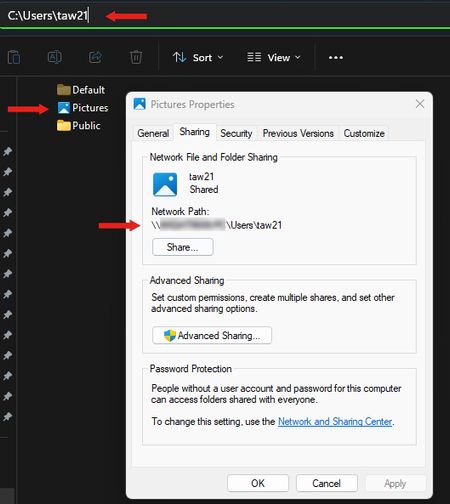
I recently noticed that my personal user file is displaying the name "Pictures" and has the Pictures icon. However, when I click on the folder, everything is correct within the folder and the address bar shows the correct folder name. I've attempted to attach an image here; I had to paste several images together to create the attached image, so I know that the address bar would not actually be visible at this point, but if I click on the Pictures folder then the address bar it becomes visible. Thanks, Tom12Views0likes0Comments
Bluetooth Headset Microphone Constantly Disconnects
Hello, I have noticed this issue not only with myself, but several colleagues of mine using any bluetooth headset and its built-in microphone. When initially connecting bluetooth headsets to our Windows devices (Apple, Shokz, etc.) they work as intended. However, the microphone seems to disconnect and no longer be recognized by Windows randomly throughout the day and/or right before answering calls (through MS Teams). Audio continues working as intended. The only solution I have found is restarting the device. You can imagine this becomes extremely annoying and causes us to lose time working. I have tried several other solutions. Uninstalling the drivers through device manager just creates an endless loading screen loop and never completely uninstalls any drivers while the headset is paired. Removing the device in Windows Bluetooth settings also ends up getting stuck and doesn't allow you to un-pair or re-connect to the headset. Restarting Bluetooth services does not fix the issue either. Does anyone have a similar issue or a fix for this? It has only started happening recently, maybe within the past couple weeks.107Views0likes2CommentsWhere / How to find "Ask a question"
CAN ANYONE TELL ME how to reliably and repeatably find the Link to "Ask a question" or "Start a Discussion"! Yes, I am Starting a Discussion now ONLY because I accidentally stumbled upon a Start a discussion link. I am often wondering around in the various Community Hubs, Discussions, Screens, etc. trying to find that link - and don't laugh because I am serious, but sometimes for 30 minutes or more and sometimes finally giving up. I love the Community and the support here, but WHY is it so hard to "Ask a Question" I will post the question somewhere else when I finish here - if I can once again find the link to ask a question. And sorry to be such a pain over this and although a long-term Community participant, but this has been a lingering problem for me, going back years and years. ron in shawnee80Views2likes4Comments
Windows 11 ARM VM disconnects network share
I'm running Windows 11 ARM in VM on Mac, and am using Window Defender to scan over SMB folders.......Some folders large 40+gig in size, so scanng a fewb at a time, but maes no different.. it still hangs. During a can sometimes it looses connection and despite having IP address still i cannot reconnect... until i restart, which means i have to restart scan all over.. I've tried resetting network adapter using netsh int ip reset and netsh winsock reset both hang. Windows 11 arm is up-to-date with Updates,,,,,, The adapter i'm using on Mac is this one: https://www.amazon.com/UGREEN-Ethernet-Thunderbolt-Converter-Chromebook/dp/B082K62S48?crid=1W1RAIDHVHIFN&dib=eyJ2IjoiMSJ9.Z1hVGIdeIcKfZtt-mU1MaR0AMBVh4wYfj8eOItSdm4-YixNCTTr32VUNTB3sepW1pmbX-vfj300tos5rlB0802FJlf0hixLulk9MAdLF8rooZf63dpV10Hf8J5JPoL-F8RYShzDED0K0gdD2jp9nuFwsbi1xW1bHyRjcQSvObVuqeNQ19DfWY3JGBhbIPoyLuFQc61NcG0MAc16Jowq8yPUINVCedVfhRd5jOoGJdG8.jei67wmsVFeoEgNK0F3v7t2TWiMjRE2XtopL9IpRmks&dib_tag=se&keywords=ugreen%2Bthunderbolt%2Bto%2Bethernet&qid=1770521767&sprefix=ugreen%2Bthunderbolt%2Bto%2Beherne%2Caps%2C342&sr=8-1&th=1 When looking at Properties of driver Looking at the usb : ax88179_178a.sys in (/System32/drivers), there is NO signature .... but its not in use so should be ok.. Instead the adapter is connected to VM by Ethernet "Bridged (AX88179)" Is this issue just because it can't handle excessive sized? or what ?45Views0likes4CommentsWindows 11 24H2/25H2 System Freeze After January 2026 Updates – Lenovo ThinkPad G2
Dear Microsoft Support Team, We would like to raise a high-priority technical support case regarding a stability issue observed after installing the January 2026 cumulative updates on our Windows 11 devices. Environment Details: Device Model: Lenovo ThinkPad G2 (multiple units) OS Versions: Windows 11 24H2 and 25H2 Update Installed: January 2026 Patch Tuesday cumulative update (KB number can be provided) Deployment Method: WSUS / Intune / Windows Update (specify accordingly) BIOS Version: (Installed Latest available from Lenovo) Issue Description: After installing the January 2026 cumulative updates, devices intermittently experience a complete system freeze. The system becomes fully unresponsive: Mouse and keyboard input stop responding No BSOD is displayed Task Manager cannot be opened System recovery is only possible via hard reboot (power button) Frequency: The issue occurs randomly, both during active use and idle state. Multiple users across our environment are impacted. Troubleshooting Performed: Reinstalled OEM-certified Lenovo display drivers Disabled Fast Startup Ran SFC and DISM health checks (no integrity violations) Updated BIOS to latest version Setting power idle mode, then work normally Request: - Please confirm whether this is a known global issue under investigation. - Advise if any hotfix, Known Issue Rollback (KIR), or registry-based mitigation is available. - Provide guidance on additional diagnostic logging required at kernel or driver level. - Confirm whether crash dump analysis is recommended for this scenario. We are prepared to provide additional diagnostic logs, memory dumps, or reproduction steps upon request. Kindly treat this as a priority case due to multi-user impact in a production environment. Thank you for your support. #Windows11, #Windows 11 24H2, Windows Update, Cumulative Update, System Freeze, Lenovo ThinkPad, Display Driver, Enterprise754Views5likes8Comments
help me with this frustraating issue
A week or less than a week, that's all it takes for my windows 11 on my laptop to just collapse and tell me windows system files corrupt.. this is the second time i've fresh installed windows 11 all over again. it's activataed windows 11 pro btw.. symptoms before syystem fail : 1- freezing and really slow. 2- black screen even after multiple restarts. 3- takes me to the windows blue screen that has various tools like usb install or dvd troubleshoot or countinue or more options like cmd or whatever. 4- not being able to boot into system without a black screen(first time it didn't even let me bot in to windows.) what do i do? and is it better if i go with windows 10 at this point and end all the windowss 11 nonsense?? please tell me, i need instant response because this is really annoying me.. laptop specs btw : intel core i5 8365U 1.60GHZ gpu intel uhd 620 graphics 4gb share ram 8 gigs ddr4 2133 MT/s ssd m.2 256 gigs5Views0likes0Comments
Massive sitemwide stutter and frame drops
Hi everyone. for the past 6 month since i build the system i have been experiencing issues with it, like VGA debug showing every few boots or kernel power 41 error, however the most recent one being FPS drops and system stutter even while idle out of nowhere witch have always been there but worsened with the latest 5070 drivers, that's why i downloaded latencymon. Unfortunately i have no idea how to make sense out of the summary it gave me so I'm posting it here. if anyone is willing to help out I'm be very happy! I have gone trough numerous troubleshooting steps including full windows reinstall and installing only the latest drivers for everything, i have also tryed replacing the psu with a 1000W one but the issue remains. Here are the results and my pc specs: GPU-MSI SHADOW 2x RTX 5070 CPU-I7 14700k RAM-Corsair vengeance 32gb ddr5 MOBO: Asus TUF z790 BTF WiFi 7 SSD-P310 1tb PSU-MSI MAG 850w CONCLUSION _________________________________________________________________________________________________________ Your system appears to be having trouble handling real-time audio and other tasks. You are likely to experience buffer underruns appearing as drop outs, clicks or pops. One or more DPC routines that belong to a driver running in your system appear to be executing for too long. One problem may be related to power management, disable CPU throttling settings in Control Panel and BIOS setup. Check for BIOS updates. LatencyMon has been analyzing your system for 0:16:21 (h:mm:ss) on all processors. _________________________________________________________________________________________________________ SYSTEM INFORMATION _________________________________________________________________________________________________________ Computer name: MIDAS OS version: Windows 11, 10.0, version 2009, build: 26200 (x64) Hardware: System Product Name, ASUS BIOS: 1825 CPU: GenuineIntel Intel(R) Core(TM) i7-14700K Logical processors: 28 Processor groups: 1 Processor group size: 28 RAM: 32451 MB total _________________________________________________________________________________________________________ CPU SPEED _________________________________________________________________________________________________________ Reported CPU speed (WMI): 340 MHz Reported CPU speed (registry): 3418 MHz Note: reported execution times may be calculated based on a fixed reported CPU speed. Disable variable speed settings like Intel Speed Step and AMD Cool N Quiet in the BIOS setup for more accurate results. _________________________________________________________________________________________________________ MEASURED INTERRUPT TO USER PROCESS LATENCIES _________________________________________________________________________________________________________ The interrupt to process latency reflects the measured interval that a usermode process needed to respond to a hardware request from the moment the interrupt service routine started execution. This includes the scheduling and execution of a DPC routine, the signaling of an event and the waking up of a usermode thread from an idle wait state in response to that event. Highest measured interrupt to process latency (µs): 3702.0 Average measured interrupt to process latency (µs): 12.211401 Highest measured interrupt to DPC latency (µs): 328.50 Average measured interrupt to DPC latency (µs): 4.000333 _________________________________________________________________________________________________________ REPORTED ISRs _________________________________________________________________________________________________________ Interrupt service routines are routines installed by the OS and device drivers that execute in response to a hardware interrupt signal. Highest ISR routine execution time (µs): 200.797250 Driver with highest ISR routine execution time: HDAudBus.sys - High Definition Audio Bus Driver, Microsoft Corporation Highest reported total ISR routine time (%): 0.001732 Driver with highest ISR total time: HDAudBus.sys - High Definition Audio Bus Driver, Microsoft Corporation Total time spent in ISRs (%) 0.002366 ISR count (execution time <250 µs): 192231 ISR count (execution time 250-500 µs): 0 ISR count (execution time 500-1000 µs): 0 ISR count (execution time 1000-2000 µs): 0 ISR count (execution time 2000-4000 µs): 0 ISR count (execution time >=4000 µs): 0 _________________________________________________________________________________________________________ REPORTED DPCs _________________________________________________________________________________________________________ DPC routines are part of the interrupt servicing dispatch mechanism and disable the possibility for a process to utilize the CPU while it is interrupted until the DPC has finished execution. Highest DPC routine execution time (µs): 1290.669690 Driver with highest DPC routine execution time: nvlddmkm.sys - NVIDIA Windows Kernel Mode Driver, Version 591.86 , NVIDIA Corporation Highest reported total DPC routine time (%): 0.030604 Driver with highest DPC total execution time: nvlddmkm.sys - NVIDIA Windows Kernel Mode Driver, Version 591.86 , NVIDIA Corporation Total time spent in DPCs (%) 0.070060 DPC count (execution time <250 µs): 1727247 DPC count (execution time 250-500 µs): 0 DPC count (execution time 500-10000 µs): 66 DPC count (execution time 1000-2000 µs): 6 DPC count (execution time 2000-4000 µs): 0 DPC count (execution time >=4000 µs): 0 _________________________________________________________________________________________________________ REPORTED HARD PAGEFAULTS _________________________________________________________________________________________________________ Hard pagefaults are events that get triggered by making use of virtual memory that is not resident in RAM but backed by a memory mapped file on disk. The process of resolving the hard pagefault requires reading in the memory from disk while the process is interrupted and blocked from execution. NOTE: some processes were hit by hard pagefaults. If these were programs producing audio, they are likely to interrupt the audio stream resulting in dropouts, clicks and pops. Check the Processes tab to see which programs were hit. Process with highest pagefault count: eldenring.exe Total number of hard pagefaults 34765 Hard pagefault count of hardest hit process: 14809 Number of processes hit: 65 _________________________________________________________________________________________________________ PER CPU DATA _________________________________________________________________________________________________________ CPU 0 Interrupt cycle time (s): 45.913793 CPU 0 ISR highest execution time (µs): 52.300176 CPU 0 ISR total execution time (s): 0.007069 CPU 0 ISR count: 5498 CPU 0 DPC highest execution time (µs): 1290.669690 CPU 0 DPC total execution time (s): 10.347802 CPU 0 DPC count: 1028241 _________________________________________________________________________________________________________ CPU 1 Interrupt cycle time (s): 13.326854 CPU 1 ISR highest execution time (µs): 186.204506 CPU 1 ISR total execution time (s): 0.125169 CPU 1 ISR count: 36542 CPU 1 DPC highest execution time (µs): 236.494441 CPU 1 DPC total execution time (s): 1.010642 CPU 1 DPC count: 46504 _________________________________________________________________________________________________________ CPU 2 Interrupt cycle time (s): 27.494746 CPU 2 ISR highest execution time (µs): 200.797250 CPU 2 ISR total execution time (s): 0.423721 CPU 2 ISR count: 121362 CPU 2 DPC highest execution time (µs): 1024.498245 CPU 2 DPC total execution time (s): 3.399354 CPU 2 DPC count: 134735 _________________________________________________________________________________________________________ CPU 3 Interrupt cycle time (s): 12.385180 CPU 3 ISR highest execution time (µs): 7.334991 CPU 3 ISR total execution time (s): 0.000312 CPU 3 ISR count: 147 CPU 3 DPC highest execution time (µs): 235.896138 CPU 3 DPC total execution time (s): 0.812093 CPU 3 DPC count: 77894 _________________________________________________________________________________________________________ CPU 4 Interrupt cycle time (s): 14.076719 CPU 4 ISR highest execution time (µs): 7.179637 CPU 4 ISR total execution time (s): 0.000326 CPU 4 ISR count: 182 CPU 4 DPC highest execution time (µs): 275.688707 CPU 4 DPC total execution time (s): 0.817639 CPU 4 DPC count: 106086 _________________________________________________________________________________________________________ CPU 5 Interrupt cycle time (s): 9.223182 CPU 5 ISR highest execution time (µs): 15.224693 CPU 5 ISR total execution time (s): 0.000062 CPU 5 ISR count: 22 CPU 5 DPC highest execution time (µs): 163.519602 CPU 5 DPC total execution time (s): 0.006149 CPU 5 DPC count: 843 _________________________________________________________________________________________________________ CPU 6 Interrupt cycle time (s): 13.519949 CPU 6 ISR highest execution time (µs): 165.284377 CPU 6 ISR total execution time (s): 0.063246 CPU 6 ISR count: 18339 CPU 6 DPC highest execution time (µs): 267.27560 CPU 6 DPC total execution time (s): 0.526176 CPU 6 DPC count: 24241 _________________________________________________________________________________________________________ CPU 7 Interrupt cycle time (s): 11.000898 CPU 7 ISR highest execution time (µs): 0.0 CPU 7 ISR total execution time (s): 0.0 CPU 7 ISR count: 0 CPU 7 DPC highest execution time (µs): 209.227326 CPU 7 DPC total execution time (s): 0.152301 CPU 7 DPC count: 27080 _________________________________________________________________________________________________________ CPU 8 Interrupt cycle time (s): 18.244239 CPU 8 ISR highest execution time (µs): 8.740784 CPU 8 ISR total execution time (s): 0.000292 CPU 8 ISR count: 215 CPU 8 DPC highest execution time (µs): 1076.138092 CPU 8 DPC total execution time (s): 0.719669 CPU 8 DPC count: 89534 _________________________________________________________________________________________________________ CPU 9 Interrupt cycle time (s): 11.026076 CPU 9 ISR highest execution time (µs): 21.746343 CPU 9 ISR total execution time (s): 0.002246 CPU 9 ISR count: 809 CPU 9 DPC highest execution time (µs): 209.717379 CPU 9 DPC total execution time (s): 0.044324 CPU 9 DPC count: 6433 _________________________________________________________________________________________________________ CPU 10 Interrupt cycle time (s): 13.730056 CPU 10 ISR highest execution time (µs): 173.793446 CPU 10 ISR total execution time (s): 0.026458 CPU 10 ISR count: 8635 CPU 10 DPC highest execution time (µs): 1017.483324 CPU 10 DPC total execution time (s): 0.266994 CPU 10 DPC count: 21242 _________________________________________________________________________________________________________ CPU 11 Interrupt cycle time (s): 10.702580 CPU 11 ISR highest execution time (µs): 4.461966 CPU 11 ISR total execution time (s): 0.000032 CPU 11 ISR count: 22 CPU 11 DPC highest execution time (µs): 1015.787010 CPU 11 DPC total execution time (s): 0.103409 CPU 11 DPC count: 13647 _________________________________________________________________________________________________________ CPU 12 Interrupt cycle time (s): 12.093453 CPU 12 ISR highest execution time (µs): 8.064365 CPU 12 ISR total execution time (s): 0.000091 CPU 12 ISR count: 36 CPU 12 DPC highest execution time (µs): 213.140433 CPU 12 DPC total execution time (s): 0.262527 CPU 12 DPC count: 27394 _________________________________________________________________________________________________________ CPU 13 Interrupt cycle time (s): 8.633920 CPU 13 ISR highest execution time (µs): 0.0 CPU 13 ISR total execution time (s): 0.0 CPU 13 ISR count: 0 CPU 13 DPC highest execution time (µs): 187.397601 CPU 13 DPC total execution time (s): 0.003542 CPU 13 DPC count: 491 _________________________________________________________________________________________________________ CPU 14 Interrupt cycle time (s): 11.681545 CPU 14 ISR highest execution time (µs): 21.947630 CPU 14 ISR total execution time (s): 0.000938 CPU 14 ISR count: 298 CPU 14 DPC highest execution time (µs): 199.131656 CPU 14 DPC total execution time (s): 0.056436 CPU 14 DPC count: 4987 _________________________________________________________________________________________________________ CPU 15 Interrupt cycle time (s): 9.115822 CPU 15 ISR highest execution time (µs): 0.0 CPU 15 ISR total execution time (s): 0.0 CPU 15 ISR count: 0 CPU 15 DPC highest execution time (µs): 1043.584552 CPU 15 DPC total execution time (s): 0.024784 CPU 15 DPC count: 7324 _________________________________________________________________________________________________________ CPU 16 Interrupt cycle time (s): 2.823546 CPU 16 ISR highest execution time (µs): 0.0 CPU 16 ISR total execution time (s): 0.0 CPU 16 ISR count: 0 CPU 16 DPC highest execution time (µs): 170.598888 CPU 16 DPC total execution time (s): 0.064023 CPU 16 DPC count: 10437 _________________________________________________________________________________________________________ CPU 17 Interrupt cycle time (s): 2.705166 CPU 17 ISR highest execution time (µs): 0.0 CPU 17 ISR total execution time (s): 0.0 CPU 17 ISR count: 0 CPU 17 DPC highest execution time (µs): 201.528379 CPU 17 DPC total execution time (s): 0.030929 CPU 17 DPC count: 2923 _________________________________________________________________________________________________________ CPU 18 Interrupt cycle time (s): 2.350827 CPU 18 ISR highest execution time (µs): 0.0 CPU 18 ISR total execution time (s): 0.0 CPU 18 ISR count: 0 CPU 18 DPC highest execution time (µs): 165.492686 CPU 18 DPC total execution time (s): 0.045182 CPU 18 DPC count: 3898 _________________________________________________________________________________________________________ CPU 19 Interrupt cycle time (s): 2.651509 CPU 19 ISR highest execution time (µs): 0.0 CPU 19 ISR total execution time (s): 0.0 CPU 19 ISR count: 0 CPU 19 DPC highest execution time (µs): 215.245758 CPU 19 DPC total execution time (s): 0.049992 CPU 19 DPC count: 4038 _________________________________________________________________________________________________________ CPU 20 Interrupt cycle time (s): 3.500996 CPU 20 ISR highest execution time (µs): 0.0 CPU 20 ISR total execution time (s): 0.0 CPU 20 ISR count: 0 CPU 20 DPC highest execution time (µs): 221.664131 CPU 20 DPC total execution time (s): 0.098140 CPU 20 DPC count: 17522 _________________________________________________________________________________________________________ CPU 21 Interrupt cycle time (s): 2.286206 CPU 21 ISR highest execution time (µs): 0.0 CPU 21 ISR total execution time (s): 0.0 CPU 21 ISR count: 0 CPU 21 DPC highest execution time (µs): 854.607665 CPU 21 DPC total execution time (s): 0.049182 CPU 21 DPC count: 4212 _________________________________________________________________________________________________________ CPU 22 Interrupt cycle time (s): 2.080044 CPU 22 ISR highest execution time (µs): 0.0 CPU 22 ISR total execution time (s): 0.0 CPU 22 ISR count: 0 CPU 22 DPC highest execution time (µs): 187.657987 CPU 22 DPC total execution time (s): 0.067957 CPU 22 DPC count: 9595 _________________________________________________________________________________________________________ CPU 23 Interrupt cycle time (s): 2.016118 CPU 23 ISR highest execution time (µs): 0.0 CPU 23 ISR total execution time (s): 0.0 CPU 23 ISR count: 0 CPU 23 DPC highest execution time (µs): 123.084552 CPU 23 DPC total execution time (s): 0.043985 CPU 23 DPC count: 8428 _________________________________________________________________________________________________________ CPU 24 Interrupt cycle time (s): 3.266492 CPU 24 ISR highest execution time (µs): 0.0 CPU 24 ISR total execution time (s): 0.0 CPU 24 ISR count: 0 CPU 24 DPC highest execution time (µs): 219.302809 CPU 24 DPC total execution time (s): 0.144488 CPU 24 DPC count: 28909 _________________________________________________________________________________________________________ CPU 25 Interrupt cycle time (s): 1.945996 CPU 25 ISR highest execution time (µs): 26.020772 CPU 25 ISR total execution time (s): 0.000484 CPU 25 ISR count: 124 CPU 25 DPC highest execution time (µs): 203.696021 CPU 25 DPC total execution time (s): 0.053714 CPU 25 DPC count: 11114 _________________________________________________________________________________________________________ CPU 26 Interrupt cycle time (s): 1.913675 CPU 26 ISR highest execution time (µs): 0.0 CPU 26 ISR total execution time (s): 0.0 CPU 26 ISR count: 0 CPU 26 DPC highest execution time (µs): 149.815974 CPU 26 DPC total execution time (s): 0.026669 CPU 26 DPC count: 6143 _________________________________________________________________________________________________________ CPU 27 Interrupt cycle time (s): 1.898587 CPU 27 ISR highest execution time (µs): 0.0 CPU 27 ISR total execution time (s): 0.0 CPU 27 ISR count: 0 CPU 27 DPC highest execution time (µs): 852.944119 CPU 27 DPC total execution time (s): 0.031474 CPU 27 DPC count: 3424 _________________________________________________________________________________________________________36Views0likes0Comments
How to unlink cells in Format Control
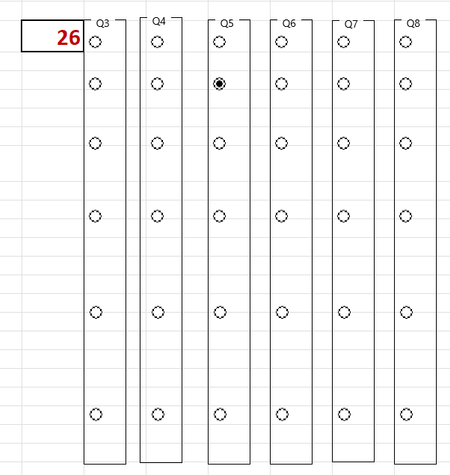
I am developing a survey in excel (because the questions are complicated and long and do not format well in e.g. MS Forms) and using option buttons to choose responses. Each question has 6 potential responses. In developer I have inserted a group box, into which I placed 6 option buttons. After formatting the buttons so that they snap to the excel grid I then linked them to a cell to make calculating responses easier. On-line advice then suggested that I could copy and paste these to each new question. However, by doing this, I am only able to choose 1 option as they are ALL linked to the same cell. How do I unlink each group box of 6 option buttons so that I can link each group individually to a different cell for each question? Or - do I have to create a group box and option boxes from scratch for each question set? I have removed the questions for simplicity of view (note that there are 6 in Q1 and Q2 not visible) and highlighted the linked cell from Q1. As you can see - for Q5 this has given an answer of 26 (the 26th option button) rather than 2 (the 2nd button in Q5)Solved157Views0likes6Comments