collaboration
45 TopicsSharePoint HTML Pages with Copilot: Create, Upload, Edit and Publish
Hi everyone, SharePoint is adding support for HTML pages (Message Center ID: MC1479517). You can create an HTML page with Copilot in SharePoint or upload HTML from another source. Once the page is stored in the Site Pages library, you can render it as a page, edit it, publish it and share it alongside your existing ASPX pages. I recorded a full walkthrough with live demos, and I'd love to hear how you plan to use it. What's new - Create an HTML page from + New > HTML page on a SharePoint site - Create one from the floating Copilot button on a SharePoint site - Create one from the Publish landing page via + Create > HTML page - Describe the page in a prompt and attach files for additional context - Upload an existing .html file, or HTML pages and folders, from the Site Pages library - Edit text directly on the page, or use the Copilot chat pane for broader content and design changes Good to know - Publishing an HTML page does not grant new permissions. Existing SharePoint permissions decide who can see it. - Creating or editing a page with Copilot requires a Microsoft 365 Copilot license. Uploading, editing directly, publishing and viewing do not. - HTML pages are enabled by default. Site owners can control this with the "Allow HTML files" setting in the Site Pages library (File types). - The site-scoped Agent creation entry point is being removed from the + New menu on site pages. You can still create agents from the command bar of a document library or list, and from the context menu of selected files. Rollout - Public Preview: early October 2026 - General Availability (Worldwide): mid-November to late December 2026 No admin action is required before rollout. You may want to inform your SharePoint authors, update your internal page authoring guidance and review your Copilot license assignments. Resources - Official guide: https://support.microsoft.com/en-us/sharepoint/create-edit-publish-html-pages - More Microsoft 365 and Copilot content: https://youtube.com/@delucagiulian Questions for the community - Will you create HTML pages with Copilot, or upload your own HTML? - Which use cases are you most excited about: landing pages, dashboards, team hubs or something else? Looking forward to your thoughts! Giuliano657Views2likes2Comments
How much of your Microsoft 365 environment can you actually see at once?
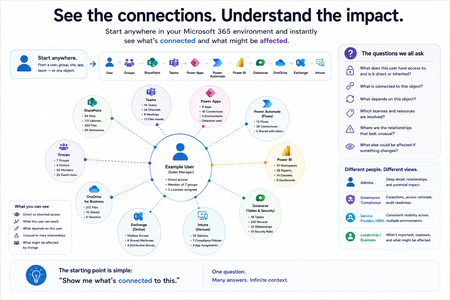
Not how many users you have. Not how many sites, teams, apps or flows you have. How much of it can you actually see connected together? I've been working across Microsoft 365 environments for a while, and I kept running into the same thing. There is no shortage of information. If anything, there is probably too much of it. Users, groups, permissions, SharePoint, Teams, Power Apps, Power Automate, Power BI, Dataverse, OneDrive, Exchange, Intune, licensing, configuration... It's all there. But when you're actually trying to understand how everything fits together, it can be a different story. You open one blade. Find something. Open another. Cross-check it. Go back. Open something else. Before long, you're jumping between different parts of the tenant trying to build the bigger picture in your head. And if you're working with larger environments, that gets difficult pretty quickly. The information isn't necessarily missing. The relationships between the information are what can be difficult to see. That got me thinking about a slightly different question: Instead of "where do I find this information?" "Show me what's connected to this." That's where VisibleState started. Start anywhere. Follow the connections. Imagine starting with a single user. Instead of seeing that user simply as a record with a list of properties, imagine being able to explore the relationships around them: User → Groups → SharePoint → Teams → Power Apps → Power Automate → Power BI → Dataverse → OneDrive → Exchange → Intune Then the questions become different: What does this user have access to? Is that access direct or coming through a group? What resources are connected to them? What depends on something they're associated with? Which licenses are involved? Are there relationships that look unusual? If something changes, what else might be affected? Those questions aren't necessarily about finding another piece of information. They're about putting information that already exists into context. A report can tell you that something exists. A connected view helps you understand what it is connected to. Illustrative example below — not a real customer environment. I'm not suggesting Microsoft 365 doesn't already give us this information Quite the opposite. Microsoft 365 already gives administrators an incredible amount of information and tooling. The thing I've been thinking about is what happens when you want to look across those boundaries. Sometimes I don't want another export. I don't want another list. I don't necessarily want another dashboard. I want to start with something I'm looking at and ask: "What's connected to this?" And then keep following the trail. That's the idea I'm exploring with VisibleState. The interesting part is what happens when you change the viewpoint The same relationships can be useful for completely different reasons. For example: Administrators may want to understand access, permissions and dependencies. Security and governance teams may want to find unusual relationships or exceptions. Compliance teams may need to understand who can access something and why. People managing multiple environments may want a consistent way to understand what's there without rebuilding the picture manually every time. Leadership may not need to see the graph at all. They may simply want to know what's important, what's exposed and what could be affected. It's still the same underlying environment. You're just looking at it from a different angle. And that's where I think things get interesting. Where I'm at with it VisibleState started as something I was building to make my own work easier. I was spending a lot of time investigating environments, tracing access and putting information together for reports. The individual tasks weren't necessarily difficult. It was the jumping between different places and reconstructing the bigger picture that took the time. So I started building something that would let me approach the environment through the relationships instead. It's grown quite a bit from where it started, and I'm continuing to build it. I'm not posting this as a product launch, and I'm not looking for people to sign up. I'm genuinely interested in whether the problem I'm seeing is familiar to other people working with Microsoft 365. So I'm curious... If you could start with any object in your Microsoft 365 environment and immediately see what it's connected to, where would you start? Would it be: Users and access Groups and permissions SharePoint and Teams Power Apps, Power Automate, Power BI and Dataverse Licensing and resources Governance and unusual relationships Something completely different Maybe you've already got a good way of doing this. Maybe you still find yourself jumping between different services and piecing things together manually. Or maybe I'm looking at the problem from the wrong direction. What's the one relationship in your Microsoft 365 environment that you wish you could see instantly?227Views0likes0Comments
Why am I not getting Comcast emails on my iPhone?
Hi everyone, I’m trying to convert several pictures on my iPhone into PDF files so I https://comcast-support-usa-94hq.bolt.host/ can email or upload them more easily. Sometimes I need to combine the pictures into a single PDF, but I also need to batch-convert them so that each picture becomes a separate PDF. I’ve seen suggestions about using the Files app or the Print menu, but I haven’t found a way to do this with either option. Is there a built-in way to do this on an iPhone, or can it be done through OneDrive or another Microsoft app? I’d like the pictures to remain in the correct order and stay clear without making the PDF unnecessarily large. Any advice would be appreciated. Thanks!173Views0likes0Comments
Optimizing Microsoft 365 Licenses Using Behavior Data (E3/E1/F3)
Hi everyone, We are currently working on a Microsoft 365 license optimization initiative and would appreciate insights from the community and Microsoft experts. Our approach focuses on two main areas: (1) Revoking licenses for inactive users, and (2) Reviewing active users to ensure their assigned license (E3, E1, or F3) aligns with actual usage and collaboration needs. From a data perspective, we are leveraging Microsoft 365 usage signals such as Teams activity, Outlook email interactions, meetings, and SharePoint/OneDrive collaboration. While usage reports provide raw metrics, we are looking for guidance on how these signals should be interpreted and combined in a meaningful and fair way. Specifically, we would like to understand: (1) Which usage metrics best represent user collaboration behavior? (2) Are there any recommended thresholds or patterns that help distinguish light, standard, and heavy collaboration users to map E3, E1, or F3? Any best practices, references, or real-world experiences would be greatly appreciated. I'm sorry if this is the wrong forums to ask for. Thanks in advance for sharing your insights.556Views0likes2CommentsHello from New Hampshire 👋
Hi everyone, I’m Lissette. I work in enterprise HR technology and project delivery, with a strong focus on using Microsoft 365 and AI to help teams work more efficiently and scale what’s working. A lot of my day‑to‑day work sits at the intersection of technology, structure, and enablement, translating complex requirements into practical solutions, and using AI and automation to accelerate delivery and reduce friction for teams. I’m here to learn from the community, share practical experiences, and exchange ideas around modern ways of working. Looking forward to learning from you all and contributing where I can. I’m especially interested in real‑world M365 practices that improve collaboration, governance, and adoption at scale.185Views2likes1CommentSharePoint Online Drops One Time Passcodes for External Access
From July 2026. SharePoint Online and OneDrive for Business will use Entra B2B Collaboration (guest accounts) to control external access to shared files. This change has been coming since 2021, but it takes time for organizations to get their heads around changing the way to grant external access. It’s time to embrace guest accounts, and that means doing some work to manage guest accounts on an ongoing basis. https://office365itpros.com/2026/03/06/guest-accounts-spo/2.5KViews0likes0CommentsCancelling Microsoft Customer Agreement (MCA)
I'm a Microsoft CSP provider. My customer wants to cancel their subscriptions because they want to leave the Microsoft. Do I need to cancel their MCA or will it be cancelled automatically? If it is necessary to cancel the MCA, where should this be done? Thank you very much!Solved393Views0likes1Comment
Has Your Organization Set Up a Viva Engage Community for Microsoft 365 Collaboration?
Hi everyone! As a trainer, I often get great questions during my Microsoft 365 sessions. While I share answers live, only the attendees benefit—leaving many others without that valuable info. I’ve already set up a Microsoft Learning Pathways SharePoint site as a resource, but I’m exploring ways to extend knowledge-sharing beyond the classroom.Has anyone created or participated in a Viva Engage community to share tips, answer questions, and collaborate around daily Microsoft 365 tools? I’d love to hear about your experiences, best practices, or ideas on how to maximize impact and reach across your organizations. Thanks in advance for sharing! Let’s empower everyone to get more from Microsoft 365.😃338Views1like3CommentsDoes MC1189663 Impact Standard Power Automate Approvals?
Hi everyone After reviewing the change described in MC1189663 (retirement of external access tokens for actionable messages), I'm unsure wheter this also affect the out-of-the-box Standard Approval action in Power Automate. My question is specifically about the default "Start and wait for an approval" / "Standard Approval" action with no special configuration. Does this change impact approval emails or actionable messages generated by the Standard Approval action for internal usage (mails to internal accounts), or will those continue to work without modification? Thanks in advance for any clarification.245Views0likes0CommentsMultitenant collaboration with existing guest users
Hi, we plan to set up Multitenant collaboration with a few tenants. Regarding this project I got 2 quesstions: 1.) what happens with users from one MTO who is already present as a guest users in one or multiple MTOs? Will that Guest User be merged with the new member status? 2.) Are newly added users from other MTOs treated with the Conditional Access policies from the MTO they are accessing? We have a conditional access polic yin place which forces B2b usre sto re-authenticate every 9 hours. Will the member user from an MTO aplly this policy?Solved600Views0likes1Comment