client
147 Topics
Remote Desktop client connection
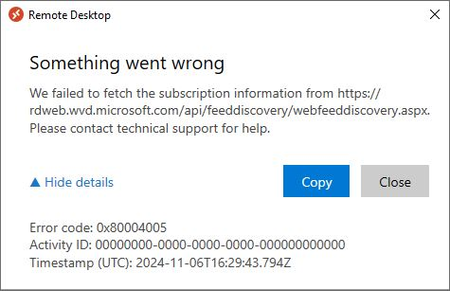
I'm trying to expand access to our AVD pools into our internal network and I'm getting the following error after I hit subscribe. I never get the initial Entra sign in when you click subscribe. The network I want to extend to is fairly secured with very limited access to the internet. I've been trying ever looser rule set to access the necessary services but at this point I'm allowing everything out on port 443 from my test machine without change. I was originally trying to connect to private endpoints through an express rout connection but I've removed the DNS forwarding that was directing the traffic there for now as well. The client update also fails and when I dig into the logs I can see that it has a TLS error "System.Net.WebException: The underlying connection was closed: Could not establish trust relationship for the SSL/TLS secure channel."1.3KViews0likes6CommentsHybrid joined devices - convert to entra Joined
how to convert/migrate +5.000 devices/laptops from Hybrid joined devices to Entra joined Only devices (the users are not in scope) - so this is all about the devices and to get this working within a existing infrastructure. Or can someone confirm there's no conversion path for hybrid joined devices to Entra join only?994Views1like1Comment
Stored Procedure Formatting in SQL 2019
I've stumbled across a very odd formatting issue, when it comes to creating a stored procedure in SQL Server 2019. The exact version we're using is: Microsoft SQL Server 2019 (RTM-CU20) (KB5024276) - 15.0.4312.2 (X64) Apr 1 2023 12:10:46 Copyright (C) 2019 Microsoft Corporation Developer Edition (64-bit) on Windows Server 2019 Standard 10.0 <X64> (Build 17763: ) (Hypervisor) If I create a stored procedure, and then generate the ALTER script for it, all of the carriage returns in the stored procedure disappear. The code in the stored procedure returned from the server is bunched up - it doesn't appear as I wrote it, at all. I have never seen this behaviour before. Could this be an client issue, perhaps? I appear to be using SQL Server Management Studio 15.0.18424.0 Could there be a conflict between my client, and the server version? Thanks.1.4KViews0likes2CommentsMS Teams Desktop APP - Sorry we couldn't connect you.
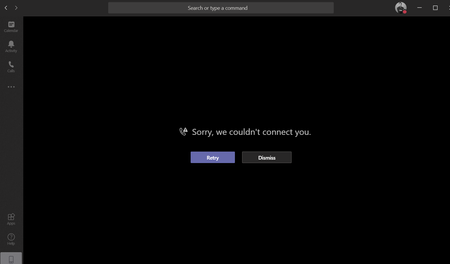
Hello all , I want to roll out MS teams to use company wide since we have included in our office365 bundle . I have created a small user test group before company wide push. My issue is that in some of the users i am facing the issue where the desktop app will not connect to any Audio/Video meeting with the error "Sorry we couldn't connect you". Others it works fine. The users can join all meeting fine via a browser though. I have checked event logs and the only error i see when joining a meeting is the 4227 error TCIP . I have tried reinstall ms teams , restart pc , check drivers nothing. I havealso tried manual install from downlaoded msi and exe still same issue. Can anyone pelase help ?178KViews0likes26CommentsSFB online Client Sign in and Authentication Deep Dive ;Part 1
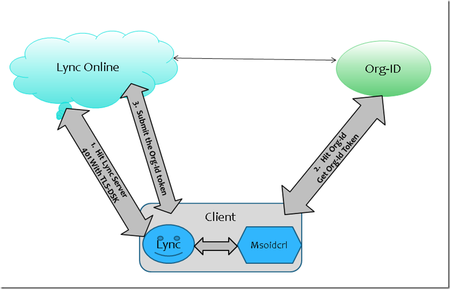
First published on TECHNET on Apr 09, 2018 Scenario: Pure Online (O365) environment, SFB user is homed Online, NO ADFS, MA (Modern Auth) is Disabled in O365NOTE:I have tried my best to ensure the information below is accurate.27KViews8likes2Comments