build
249 TopicsAI innovation takes center stage at Microsoft Ignite
Artificial intelligence is transforming how software companies build, scale, and deliver solutions. At Microsoft Ignite, we announced new tools and programs to help developers accelerate innovation responsibly, from AI-powered workflows and unified tools in Microsoft Foundry to Cohere’s language models on Azure. Plus, the global launch of Microsoft Marketplace brings the industry’s largest catalog of AI apps and agents, enabling partners to reach new customers and unlock growth. Explore the latest announcements and learn how to ship faster, scale confidently, and turn AI innovation into business impact. Read the full article201Views12likes1CommentBecoming a Frontier Firm: Accelerate custom app development with Quick-Start Development Toolkit
The theme of Ignite was undeniable: Frontier firms are transforming business with investments and projects developing AI apps and agents. And these aren’t just businesses using AI - they’re companies developing and monetizing AI apps and agents. The numbers are clear - here are a few compelling stats from a global study commissioned by Microsoft with the International Data Corporation (IDC) about Frontier firms: 67% are monetizing industry-specific AI use cases to boost revenue 58% use custom AI, and in the next two years, that will increase to 77% Those building agentic solutions will grow 3x in the next two years ROI is 3x higher for Frontier firms than slower adopters It’s no longer a question. Companies who get ahead, make and sell AI apps and agentic solutions. But it can be difficult to develop at the speed of AI. To answer the challenge of streamlining and shortening the development cycle, we’ve improved the Quick-Start Development Toolkit to help your team start coding in minutes. Getting simple guidance for custom application development To help your team go from idea to coding in minutes, we've introduced the Quick-Start Development Toolkit. Teams were spending too much time with false starts or hunting for AI app or agent code templates. With expert developer guidance, we created the Quick-Start Development patterns - a package that includes a sample solution reference diagram, custom code templates for your dev team to download and customize, and high-value resources to address common development challenges. We’ve also made it easier to find the right development pattern for your needs. Answer a few questions to see how to develop an AI app We’ve built an interactive wizard that makes it easy for software companies to go from thinking about AI or agentic solutions to solve a problem directly to creating custom code. The process is easy: Go to Quick-Start Development Toolkit Click on “Find the right pattern for your needs” Answer a few simple questions about your priority scenario, environment, and tools Land on a development pattern designed to help your team start coding in minutes With development patterns ranging from flexible AI app or agent development with Microsoft Foundry to multi-agent custom automation to integrating your data with Microsoft Fabric Unified Data Foundation, you’ll find a development pattern to get started on your next AI app or agent. Not the right fit? Keep looking at focused patterns, all created in partnership with Microsoft experts. If your project has a different focus, like migrating or replicating an AWS app to Azure or integrating Microsoft Security to an app, the Quick-Start Development Toolkit has development templates for these, too. Take the confusion out of how to make an app and then publish and monetize it After you're done developing, realize full ROI on your app or agent and help other companies advance their Frontier level by publishing and selling it on Microsoft Marketplace. Within each development pattern, you can get curated guidance from App Advisor to package, publish, and sell your app. Ready to get started with your next AI app project? Visit the Quick-Start Development Toolkit today!404Views11likes0CommentsGain clarity on your Marketplace offer type in minutes with App Advisor
Publishing your app or agent to Microsoft Marketplace is the first critical step to reaching customers, unlocking benefits, and monetizing your solution. But choosing the right marketplace offer type to match your technology and business needs can slow teams down with extensive research or trial and error. That’s why App Advisor includes an interactive offer type selection wizard, designed to help you move forward with clarity and confidence. By answering a short set of targeted questions, you can quickly identify the marketplace offer type that best fits your app or agent technology and business goals, without guesswork or context switching. How the interactive offer type selection wizard helps The wizard simplifies one of the most important publishing decisions by guiding you through a focused set of inputs. In just a few steps, it helps you: Narrow options based on your chosen product stack, Align offer types to how your solution is built and delivered, Match deployment and selling models to the right marketplace configuration. What once required hours of documentation review and comparison can now be completed in minutes, accelerating your publishing momentum. How the interactive offer selection wizard works Getting started is straightforward and fully integrated into App Advisor: Go to the Choose your marketplace offer type, Click the Guide me to my offer type button, Answer a few questions about your app or agent, Receive a recommended offer type, based on your answers, Review pricing and transaction details specific to that offer type, See what types of private offers are applicable to this type of offer. The guidance you see is tailored to your selection, helping you understand not just what to choose, but why it fits your scenario. If you want to explore an alternative path, you can restart the wizard at any time and compare outcomes. With this wizard, clear choices lead to a confident decision. Move from decision to publishing faster The interactive offer selection wizard removes friction from the early stages of marketplace publishing. By helping you choose the right offer type up front, App Advisor enables you to spend less time researching and more time building, publishing, and selling. Ready to make your next marketplace decision with confidence? Get a clear offer type choice in App Advisor today.423Views10likes1CommentBuild an AI app or agent faster to sell on Marketplace with App Advisor
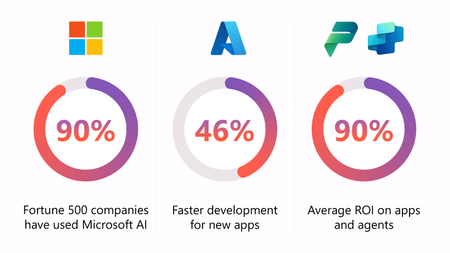
Jump right to the step-by-step curated guidance for building a well-architected app in App Advisor The development of AI apps and agents is moving fast. The data backs it up: The AI platform of choice: 90% of Fortune 500 companies use Microsoft AI, Development lifecycles speed up: Teams see up to 46% faster development with Azure, Companies realize great ROI: AI apps and agents realize an average of 90% ROI. The opportunity is real, but speed alone isn’t enough. To turn momentum into a scalable, sellable solution, software companies need a clear path from idea to architecture to Microsoft Marketplace readiness. How to build an AI app or agent and sell it on Marketplace Microsoft Foundry provides the platform to build AI apps and agents. App Advisor provides the structure, guiding you through the decisions that matter early. So, you can move fast without creating rework later. When paired with focused build and alignment checklists, App Advisor helps you ship faster and prepare your solution for the Marketplace from day one. Here’s how App Advisor, paired with material developed from the popular AI Envisioning sessions, helps you build with speed and Marketplace readiness in mind. App Advisor gives you a clear starting point to build AI apps and agents App Advisor is tailored specifically to remove ambiguity. Instead of guessing where to begin, you’re guided through key build decisions, based on five critical pillars: Security Reliability Cost optimization Operational excellence Performance efficiency These pillars are more than theory. They help you and your team think through pricing models, identity and access, resiliency, scaling, and operational integration early: before code hardens and changes get expensive. By anchoring your build in these principles, you create a foundation that supports both rapid development and future Marketplace requirements. Design well, build fast: Create an Agent MVP in 30 days After your architecture is defined, the next challenge is execution speed. The Create an Agent MVP in 30 Days checklist turns Microsoft Foundry best practices into an actionable build plan. It’s organized around the same well-architected pillars, making it easy to move from design to implementation without losing alignment. This checklist helps you: Embed security controls like encryption, RBAC, and managed identity from day one, Design for reliability with stateless services, health checks, and graceful fallback, Right-size performance and compute so you don’t overbuild the MVP, Control costs early with monitoring, budgets, and automation, Set up DevOps and CI/CD to support fast iteration. The result is a working agent that’s intentionally scoped, production-aware, and easier to evolve into a commercial offering. Built to move fast, ready to be sold at scale Used together, App Advisor, the 30-day to an MVP checklist, and the AI Envisioning sessions give you a repeatable path: Start with architecture clarity, Build an MVP quickly and responsibly, Stay aligned on Marketplace outcomes. You’re not just shipping an AI app or agent. You’re building a solution designed to be deployed, sold, and supported for your target customer. And designing well with solid core principles can help build a solid foundation for your Marketplace success. Ready to build faster with Microsoft Foundry? Explore App Advisor for step-by-step guidance to quickly design well-architected apps. Want to get development templates to start designing in minutes? View the Quick-Start Development Toolkit library for AI apps and agents. See the difference when you build with the proven framework of Microsoft Foundry and selling well-architected apps and agents in Marketplace.581Views8likes0CommentsStart coding in minutes with the Quick-start Development Toolkit
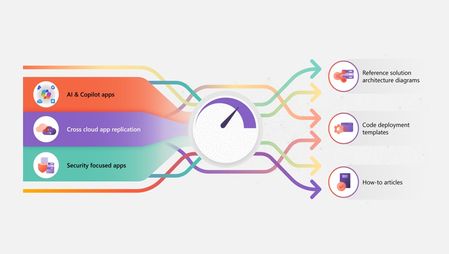
The timeline from an idea for an app to coding is longer than most software development companies would like. Understanding the problem is only the first step in deciding what tools can be used to develop and how to code. And, with a dizzying array of development tools and approaches, time can be lost in consideration before anything is ever built. To help solve this problem, use the Quick-start Development Toolkit — collected actionable resources centered around best practice development patterns — that help software companies get targeted code packages to streamline their app development for AI, Copilot, and agents, AWS to Azure multi-cloud replication, or apps integrating Security. How does it work? As companies brainstorm apps to develop, they often know about the business benefits and purpose, the scenarios where the app would be valuable. What they might not have (without several dev cycles) is the general architecture of that app design and a quick way for their developers to iterate with code, seeing if it’s the right approach. As a result, their time to market may be slower and — when developing apps — this can be costly. With the Quick-start Development Toolkit, we’ve brought together the combined knowledge of experts at Microsoft to provide the foundations of getting developers working with applicable code within minutes: Reference solution architecture: to show how components are used and interact, Click-to-deploy reference code: cloud-ready templates get you coding in minutes, How-to articles: for context to help understand products, patterns, and tips to deploy. These streamlined resources help you and your team get ideas off the drawing board and into a tangible prototype within minutes, saving your team valuable dev cycles. Having access to these should cut time and effort from your dev cycles, helping you stay at the forefront of app development. We look forward to seeing your apps in market! Visit the Quick-start Development Toolkit to boost your code cadence today.307Views8likes0CommentsGet alignment early to build AI apps and agents and sell on Marketplace
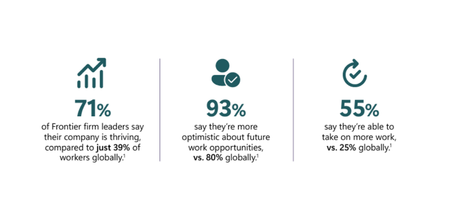
Frontier firms are pulling ahead. The data is clear why. According to Microsoft research of Frontier firms: 71% of leaders say their company is thriving, compared to just 39% of workers globally, 93% are optimistic about future work opportunities, 55% say they’re able to take on more work, versus 25% globally. But the difference isn’t experimentation with AI. It’s execution. Work Trend Index Annual Report, 2025 How getting business and technical alignment with AI development helps Frontier firms are succeeding because they align business intent, technical design, and security expectations before building AI apps and agents. They don’t treat alignment as a workshop or a slide deck. They treat it as a prerequisite to building agents that actually work, scale, and earn trust. Microsoft helps you adopt this same approach through structured guidance in App Advisor, AI envisioning resources, and practical checklists designed to keep teams aligned from design through deployment. Why alignment separates Frontier firms from the rest AI apps and agents increasingly operate inside critical business workflows. That raises the bar. When alignment is missing, teams often ship agents that technically function but fail in production due to security gaps, unclear ownership, or mismatched expectations around outcomes. Teams that align early are better positioned to: Move faster through build by eliminating ambiguity, Build agents that reliably perform the job they’re designed to do, Embed security, governance, and trust by design, not as an afterthought, Reduce redesign cycles caused by unclear requirements or late-stage constraints. This is where guidance-first approach from Microsoft plays a critical role. How App Advisor helps teams align before they build App Advisor is intentionally designed to help teams put an alignment framework together at the start. To move faster later. App Advisor gives you: Tools to help your business get an AI Center of Excellence, Systems, like Azure Essentials and Cloud Adoption Framework, Checklists for every step of the way, so that teams stay informed, Toolkits and services that build in answers to friction that your team can leverage. These shared starting points helps ensure what teams build reflects real business needs and can be deployed responsibly. Using AI envisioning sessions to align outcomes The Microsoft AI envisioning sessions complement App Advisor by helping teams translate strategy into execution. The Business–Technical Alignment Checklist for Microsoft Foundry helps teams stay synchronized as they build. It ensures architecture, cost, security, and delivery choices support a clear business outcome—not just technical success. This checklist reinforces practices like: Defining shared success metrics and KPIs, Setting joint budget guardrails and cost visibility, Establishing cross-functional cadence and governance, Planning for integration testing and real-world workflows, Using a shared project workspace as a single source of truth. This alignment reduces late-stage friction when you’re preparing to publish, co-sell, or scale. This translates into offers that are easier to describe on Marketplace, more likely to attract customers, and better for those customers to deploy. Moving from aligned design to confident build to sales growth After alignment is established, teams can move into build with momentum. App Advisor showcases development toolkits, SDKs, templates, and reference architectures that reflect the decisions already made during design. That continuity matters. It keeps teams focused on execution instead of re-litigating fundamentals mid-build. Alignment isn’t a meeting. It’s a system. Microsoft provides the structure to support it. Start aligning today to sell more tomorrow Get resources to help your teams align and keep in step in App Advisor.187Views7likes0CommentsDiscover why to build AI apps and agents with Microsoft and sell through Marketplace
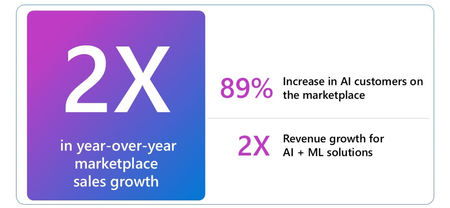
Customer demand for AI is accelerating fast. And your company's AI app or agent should be there to meet it. In this fiscal year, Microsoft has already seen 2x growth in customers purchasing AI products through Microsoft Marketplace, while also being the largest catalog of AI apps and agents in the industry. Building AI apps and agents isn’t just about model performance or speed to market. It’s about meeting your customers’ needs when they have them. For software companies, success depends on whether your AI solution is secure, compliant, responsibly designed, and ready to scale in real-world work environments. That’s why App Advisor starts by showing the many reasons why building with Microsoft is the right foundation for AI apps and agents. Why building AI apps and agents with Microsoft is different Microsoft, named an AI Leader by Gartner, brings together AI innovation, Responsible AI, and enterprise-grade security into a single, integrated platform. This matters when you’re quickly building AI-powered experiences and agents that your customers can trust. When you build with Microsoft, you’re building on an AI-native platform designed for production use: Industry-leading AI and agentic capabilities supporting Gen AI, RAG, ML, predictive analytics, and multi-modal agent workflows, Integrated developer tools to help teams ship faster that you already use and trust (like GitHub Copilot, Visual Studio, and Microsoft Foundry), Seamless integration across the Microsoft stack to make it easier to connect data, services, and user experiences without stitching different systems together. This foundation helps you focus on what you’re building. Microsoft handles the complexity behind the scenes. Build confidently from day one, stay up to date with AI best practices Building with AI doesn't have to be risky. Data access, model behavior, governance, and compliance all matter more when AI and agents are embedded directly into customer workflows. Microsoft approaches this with end-to-end security and Responsible AI practices that are integrated throughout the development lifecycle. That's why App Advisor and Microsoft keep you up with the speed of designing with AI: Principles to design your own AI Center of Excellence, Sessions focused on the future of AI and agents in the AI Tour, Resources and webinars, like the AI envisioning sessions, to keep you current. This is especially critical for software companies selling into regulated or security-conscious industries. Security isn't an afterthought. You’re building on a platform where they’re already part of the system. How App Advisor can help answer questions about building AI apps and agents The first step in App Advisor is intentionally focused on clarity. Instead of jumping straight into tooling or publishing requirements, it helps you evaluate: Why Microsoft is the right platform for AI apps and agents, How building with Microsoft assists in development, scaling, and customer trust, What kinds of opportunities exist in the Microsoft Marketplace and how to maximize on them. However, App Advisor doesn’t stop at discovery or development. The same experience that helps you build AI apps and agents also supports growth through the Microsoft Marketplace—giving you access to global customers, streamlined procurement, and enterprise-ready distribution. From first line of code to go-to-market readiness, the platform is designed to support sustainable, scalable growth with confidence. Ready to build your AI app or agent? When you start with the right foundation, everything that follows moves faster—and with less risk. Start with the fundamentals: realize the potential of building with Microsoft with curated guidance in App Advisor We look forward to seeing your AI app or agent on Microsoft Marketplace!505Views7likes0CommentsBuild smarter, publish faster: Here’s what’s new in App Advisor
App Advisor just got a major upgrade - and it’s changing the game for software development companies building apps and agents for the Microsoft Marketplace. Since its MVP launch in January 2024, App Advisor has helped thousands of partners like you streamline their journey. 💬 What partners are saying App Advisor isn’t just a tool - it’s a game-changer. Here’s what partners have shared about their experience: “I appreciate that App Advisor curates the content for the partner since the amount of data available is just so vast. It does a great job of curating for them based on their goals.” Frank Valdivieso, President & CEO, Gryphon Consulting ⚡What’s new? Smarter focus, faster execution, and scalable growth Now, with six new features launched in the US (and global availability coming soon), App Advisor is making it easier than ever to stay focused, move faster, and scale smarter with apps and agents. Here’s what’s new: 🛠️ In-app marketplace offer creation Start your marketplace journey directly within App Advisor - no context switching required. You can now initiate offer creation for popular offer types without leaving the platform. Not signed up to publish - no problem! App Advisor can get you signed up and on your way to creating your offer. 🚀 Tailored recommendations by marketplace offer type Confidently align your app with the right marketplace offer and pricing model using our interactive wizard. Get personalized recommendations based on your app profile and program membership - and fast-track publishing to launch sooner. 📁 Multi-project save with Partner Center linking Advance multiple apps and agents from a single, centralized experience. Save guidance across projects and link each to its Partner Center offer for seamless continuity. 🎯 Membership-based guidance Receive personalized guidance based on your ISV Success or Marketplace Rewards membership. App Advisor adapts its recommendations to help you make faster, smarter decisions. ✅ ISV Success sign-up integration Sign up for ISV Success and resume your workflow without disruption. Unlock benefits like cloud credits, technical consults, and go-to-market resources - all without breaking your build flow. 🎥 Embedded video playback Explore how to build, publish, and grow your apps and agents with step-by-step video guidance. Watch demos and guidance videos directly within App Advisor. Stay in flow with seamless, distraction-free learning, all while keeping the AI-powered assistant visible and ready to help. Ready to accelerate your marketplace success? Dive into App Advisor today to build, publish, and sell transactable offers with clarity, speed, and confidence. Make sure you check out the new Microsoft Marketplace - the single destination to find, try, and buy AI apps, tools, and agents. Read the blog to learn more. Ready to level up with App Advisor? Watch this quick video and unlock what’s next!261Views7likes0CommentsTry a Microsoft Build demo search app with LLM functions from Azure Marketplace partner Elastic
In this guest blog post, Jonathan Simon, Sr. Product Marketing Engineer at Elastic, a longtime Microsoft and Azure Marketplace partner, presents a hybrid search solution that addresses unique challenges by using Microsoft Azure OpenAI Service, Azure Maps, and GitHub Codespaces in conjunction with Elasticsearch.383Views7likes0Comments