azure networking
124 Topics
What’s new in Azure Firewall: Recent innovations
Organizations are modernizing their networks while managing a growing mix of applications, protocols, and security requirements. Recent Azure Firewall releases strengthen this journey with simpler traffic routing, expanded protocol support, more flexible application controls, improved health visibility, and higher intrusion-detection performance. This roundup highlights five recent capabilities now available in general availability or public preview. In this update: Explicit proxy, IPv6 support, HTTP header insertion, auto-learn SNAT routes, and IDPS performance improvements. Explicit proxy is now generally available Explicit proxy enables clients and applications to send HTTP and HTTPS traffic directly to Azure Firewall by configuring the firewall as their proxy. Instead of relying only on route-based traffic steering, organizations can use familiar proxy settings to centralize outbound web access through Azure Firewall. This release provides a simpler way to use Azure Firewall as a managed forward proxy. It can help teams consolidate web egress controls, support workloads that natively understand proxy configuration, and transition from traditional proxy appliances without introducing another infrastructure layer. Direct proxy configuration: Configure supported clients and applications to use Azure Firewall for HTTP and HTTPS traffic. Centralized web controls: Apply Azure Firewall policy and application rules to proxied traffic. Operational simplicity: Use a managed Azure service instead of deploying and maintaining separate proxy infrastructure. Migration flexibility: Support environments that already use proxy-aware applications or proxy auto-configuration workflows. For more details, visit - Azure Firewall explicit proxy | Microsoft Learn IPv6 support is now in public preview As address requirements grow and organizations adopt dual-stack architectures, IPv6 support is becoming an important part of cloud network design. Azure Firewall IPv6 support, now in public preview, extends centralized traffic filtering to IPv6 scenarios and helps customers protect applications and networks as they introduce IPv6 connectivity. With this preview, teams can evolve IPv4-only environments toward dual-stack networking while continuing to use Azure Firewall as a central enforcement point. This reduces the need to maintain separate security architectures for IPv4 and IPv6 traffic and provides a more consistent policy and operational model. Secure IPv6 traffic across hybrid environments: Filter east-west and hybrid IPv6 traffic across Azure and on-premises networks. Works seamlessly with IPv6-enabled Azure services: Integrate Azure Firewall into end-to-end IPv6 architectures alongside services like ExpressRoute and Virtual Network. Prepare for the future of networking: Build and secure dual-stack environments today while accelerating your IPv6 adoption journey. For more details, visit -Deploy Azure Firewall in dual stack mode (preview) | Microsoft Learn HTTP header insertion is now generally available HTTP header insertion enables Azure Firewall to add configured headers to HTTP requests that match application rules. This gives security and network teams an additional policy control for communicating trusted context to downstream services without requiring every client or application to add the header itself. The capability can support scenarios where applications use headers to enforce organization-specific access requirements, identify traffic handled by a trusted network path, or apply downstream controls. Because configuration is centralized in Azure Firewall policy, teams can apply the behavior consistently across matching traffic and reduce application-side changes. Tenant restriction enforcement: Organizations can inject tenant restriction headers into traffic destined for Microsoft Entra ID, helping prevent users from authenticating unauthorized tenants and strengthening identity governance controls. Secure egress for AVD and enterprise workloads: Support AVD, VDI, and enterprise egress scenarios where organizations need web traffic to carry approved tenant or context headers. Security and Compliance Enforcement: Administrators can add organization-specific headers to web traffic to support security policies, compliance requirements, and backend validation workflows. This helps ensure that only approved applications, tenants, or services are accessed through corporate environments. Operational Efficiency: Customers no longer need dedicated proxy devices solely for HTTP header injection. Azure Firewall can now perform header insertion natively as part of the application rule, reducing operational complexity and infrastructure costs. For more details, visit - Azure Firewall HTTP Header Insertion Configuration | Microsoft Learn Auto-learn SNAT routes is now generally available Source network address translation behavior depends on whether Azure Firewall treats a destination as private or public. In complex enterprise and hybrid networks, manually maintaining the private address ranges that should not be source-NATed can become time-consuming and error-prone as the environment changes. Auto-learn SNAT routes simplifies this process by dynamically learning relevant routes through Azure Route Server and using them to update the firewall’s private IP range configuration. This helps Azure Firewall preserve original source addresses for traffic destined to learned private networks while reducing ongoing configuration maintenance. Reduce manual SNAT management : Automatically learn private and registered routes through Azure Route Server, eliminating the need to manually maintain large No-SNAT prefix lists. Preserve source IPs across hybrid networks : Automatically apply learned routes as No-SNAT destinations, helping maintain source IP visibility and predictable routing for internal traffic. For more details, visit- Azure Firewall SNAT private IP address ranges | Microsoft Learn IDPS performance improvements are now generally available Azure Firewall Premium includes signature-based intrusion detection and prevention to identify and block malicious network activity. The latest IDPS performance improvements increase the amount of protected traffic that Azure Firewall Premium can process, helping organizations apply advanced inspection to demanding production workloads. Azure Firewall Premium now supports up to 22 Gbps with TLS inspection and IDPS in Deny mode, and up to 600 Mbps for a single TCP connection when IDPS is enabled in Alert or Deny mode. Actual performance depends on traffic characteristics, rule configuration, enabled features, and deployment conditions. Higher aggregate throughput: Protect larger traffic volumes while using advanced inspection capabilities. Improved single-flow performance: Better support applications that rely on high-throughput TCP connections. Strong prevention posture: Use IDPS Deny mode to actively block matching malicious traffic. Premium-scale security: Apply TLS inspection and IDPS to more bandwidth-intensive enterprise workloads For more details, visit - Azure Firewall performance | Microsoft Learn Building an advanced, more capable cloud firewall Together, these releases expand how Azure Firewall can protect modern networks. Explicit proxy and HTTP header insertion provide more flexible application-layer controls; IPv6 support helps customers evolve toward dual-stack architectures; Auto-learn SNAT routes reduces operational overhead in dynamic and hybrid environments; and IDPS performance improvements extend advanced threat prevention to higher-throughput workloads. Explore these capabilities in Azure Firewall and review the applicable Azure documentation for configuration requirements, supported scenarios, regional availability, and preview terms before enabling them in production environments.129Views1like0CommentsAzure Firewall explicit proxy is now generally available
We are excited to announce the general availability of explicit proxy in Azure Firewall. This capability brings the familiar explicit proxy configuration model natively to Azure Firewall, enabling applications and browsers to send outbound HTTP and HTTPS traffic directly to the firewall through standard proxy settings. Customers can now gain centralized policy enforcement and visibility while reducing their dependence on self-managed forward proxy appliances. Proxy the traffic you choose—not the entire subnet Traditional route-based steering can require all traffic from a subnet to traverse a firewall. Explicit proxy offers a more targeted model: configure selected applications or browsers to use the Azure Firewall private IP and proxy port, while other traffic continues on its existing route. This application-level control can simplify migrations, reduce unnecessary routing changes, and help teams apply inspection where it matters most. What’s new for general availability A simpler single-port experience: Serve both HTTP and HTTPS destinations through one HTTP explicit proxy endpoint port, reducing client configuration complexity. More secure PAC file access: Retrieve customer-owned proxy auto-configuration files from Azure Blob Storage using a managed identity. PAC files can be up to 256 KB. A streamlined portal workflow: Enable Explicit proxy when creating a Firewall Policy, with added guidance and validation to help prevent common configuration errors. Built for real-world modernization Modernize legacy proxy infrastructure. Use Azure Firewall as the forward proxy endpoint while retaining the explicit proxy model already configured in applications and browsers. This can help organizations consolidate infrastructure and reduce operational overhead associated with self-hosted proxy appliances. Apply selective application-level steering. Direct only the workloads that require centralized inspection through Azure Firewall, without forcing every flow on a subnet through the same path. Secure Azure Arc connectivity in hybrid environments. Organizations using ExpressRoute or VPN can configure Azure Firewall as a forward proxy for Azure Arc-enabled servers, providing an inspected, policy-controlled outbound path to required Azure services without opening direct internet access from corporate networks. How it works Enable explicit proxy in the Azure Firewall Policy and choose the HTTP proxy port used for both HTTP and HTTPS destinations. Configure applications manually with the firewall’s private IP and proxy port or enable proxy auto-configuration. If you use a PAC file, store it in Azure Blob Storage and configure the required managed identity and access permissions. Create an application rule in the Firewall Policy to allow the intended outbound destinations. Get started today Ready to simplify outbound web traffic steering? Explore the Azure Firewall explicit proxy documentation for prerequisites, portal and API configuration steps, PAC file guidance, and supported scenarios. With explicit proxy now generally available, Azure Firewall gives organizations another flexible path to modernize secure egress—combining a familiar proxy model with the simplicity, scale, and centralized management of a cloud-native service.251Views0likes0CommentsAdvertised gateway prefixes in Azure
Introduction Large Azure hub-and-spoke environments can advertise a significant number of routes toward on-premises networks. By default, Azure VPN Gateway and ExpressRoute Gateway advertise the address spaces of the hub virtual network and the address spaces of peered spoke virtual networks that use gateway transit. As the number of spokes and address spaces grows, the border gateway protocol (BGP) route table grows as well. Advertised gateway prefixes provide a native way to summarize those Azure-side routes. The feature is configured on the hub virtual network through the summarizedGatewayPrefixes property, which is exposed in the Azure portal as Advertised gateway prefixes. Fewer BGP prefixes Replace many individual networks with one or more aggregated CIDRs. Better scale management Help large hub-and-spoke designs stay within advertised-prefix limits. Cleaner route visibility Make the intended Azure address plan easier to recognize on provider and on-premises route views. In this blog we will demonstrate leveraging Advertised gateway prefixes to summarize many Azure advertised prefixes into one. What are advertised gateway prefixes? Advertised gateway prefixes are summarized CIDR blocks that an Azure hybrid gateway advertises toward on-premises instead of advertising every covered hub and spoke address space individually. The configuration belongs on the gateway virtual network, usually the hub VNet that contains GatewaySubnet and the ExpressRoute or VPN gateway. How the route advertisement changes Default behavior With advertised gateway prefixes Hub: 10.27.0.0/24 Spoke 1: 10.27.1.0/24 Spoke 2: 10.27.2.0/24 Spoke 3: 10.27.3.0/24 Summary: 10.27.0.0/22 Four individual prefixes are advertised. One summary prefix is advertised. A spoke outside the summary is still advertised separately. Example: 172.16.1.0/24 remains visible if it is not covered by 10.27.0.0/22. When should you use it? You use a hub-and-spoke topology with gateway transit and many spoke address spaces. You want to advertise a covering prefix, such as a /16, instead of many smaller prefixes, such as multiple /24 networks. You are approaching ExpressRoute advertised-prefix limits or want to reduce route-table growth before scale becomes a problem. Your Azure address plan is sufficiently structured to create safe, intentional summary ranges. Note: ExpressRoute scale context: Microsoft documentation lists a maximum of 1,000 IPv4 prefixes and 100 IPv6 prefixes advertised from a virtual network to on-premises on a single ExpressRoute connection through private peering. Exceeding the connection prefix limit can cause the connection between the circuit and gateway to disconnect until the prefix count is reduced. Prerequisites A hub virtual network with GatewaySubnet. An ExpressRoute gateway or VPN gateway deployed in the hub virtual network. One or more peered spoke virtual networks if you want to demonstrate route summarization across spokes. A planned IPv4 and, when applicable, IPv6 summary that covers the intended hub and spoke address spaces. Access to the provider or on-premises BGP route view for validation. In this walkthrough, Megaport is used as the external verification point. Configure advertised gateway prefixes in the Azure portal The portal configuration is performed on the hub VNet, not on the ExpressRoute circuit and not on each spoke VNet. In the Azure portal, search for Virtual networks and select the hub VNet that contains GatewaySubnet. Open the hub virtual network Under Settings, select Address space. Open Address space In Advertised gateway prefixes, select + Add prefix. Enter the covering CIDR, such as 10.0.0.0/22 for four contiguous /24 networks. Add the summarized prefix For a dual-stack design, add IPv4 and IPv6 summarized prefixes explicitly. Add additional address families if needed Select Save and confirm the summarized prefixes remain listed in the Advertised gateway prefixes section. Save the configuration Validate the summarized route on routers or provider After Azure applies the change and BGP converges, I’m using ExpressRoute and Megaport here for my example, you can either log in to your router directly or view the incoming BGP routes via your provider’s interface to confirm what routes are being received from Azure. We want to capture a view that displays the BGP prefixes learned from the Azure side. Capture a baseline screenshot before enabling the feature, showing the individual hub and spoke prefixes. After configuration, refresh the route view and locate the new summarized prefix. Confirm that covered hub and spoke prefixes are no longer advertised individually. Confirm that any address space outside the configured summary remains advertised separately. Before: After: In my demo environment I have a hub and 20 spokes all within the 10.27.0.0/16 address prefix. We can see a successful implementation as before enabling the feature, I had a total of 21 prefixes being received at Megaport, after enabling the feature I have 1. Important design considerations Configure the hub, not the spokes: Only the virtual network containing the gateway subnet uses the summarizedGatewayPrefixes property for this behavior. A value placed on a spoke VNet is ignored. Avoid overlap within the prefix list: Do not configure overlapping entries in the advertised gateway prefixes list. Expect uncovered networks to remain visible: If a hub or spoke address space is not covered by a configured summary, the gateway continues to advertise it individually. Plan dual-stack explicitly: IPv4 and IPv6 summaries must be added separately. Removing all entries restores default behavior: When every advertised gateway prefix is removed, Azure returns to advertising hub and peered spoke address spaces individually. Protect the on-premises edge: Use appropriate route policies so only expected prefixes are accepted. Summarization simplifies advertisements, but it does not replace routing governance. Conclusion Advertised gateway prefixes give Azure networking teams a straightforward, native method to control route scale from a gateway-enabled hub VNet. Instead of sending every hub and spoke prefix across ExpressRoute or VPN connections, the gateway can advertise a concise list of summarized prefixes. The result is a smaller and more intentional route advertisement, while uncovered address spaces remain visible for compatibility. References Advertised gateway prefixes in Azure virtual networks Configure advertised gateway prefixes using the Azure portal Azure ExpressRoute FAQ About ExpressRoute virtual network gateways410Views0likes0CommentsSimpler, private connectivity between Azure and AWS with Azure Multicloud Interconnect
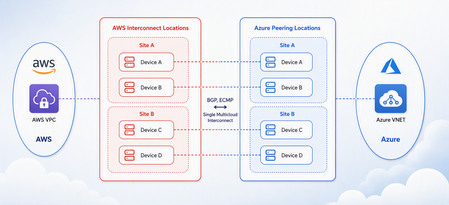
Multicloud is no longer the exception — it is how most enterprises operate. Teams run analytics in one cloud and applications in another, place workloads to meet data-residency requirements, and increasingly move large volumes of data between clouds to train and serve AI models. Yet the network that connects these environments has remained one of the hardest parts of a multicloud strategy to get right. Connecting Azure and AWS privately has traditionally meant stitching together Azure ExpressRoute, AWS Direct Connect, a connectivity provider or colocation footprint, customer-managed routers, BGP sessions, and link-layer encryption — then owning the resiliency design and day-to-day operations across all of it. The result is often slow to deliver, difficult to troubleshoot, and inconsistent in performance. Today, Microsoft and AWS are together introducing Azure Multicloud Interconnect, a jointly engineered, fully managed service that delivers private, high-throughput connectivity between Azure and AWS through a single logical resource. Both clouds coordinate provisioning, resiliency, encryption, and lifecycle operations, so the connection between your environments simply works — end to end. The challenge with connecting clouds today For most organizations, cross-cloud connectivity has been a build-it-yourself exercise. Establishing a private link between Azure and AWS typically requires provisioning an ExpressRoute circuit on one side and a Direct Connect circuit on the other, engaging a connectivity provider or securing space in a colocation facility to bridge them, and then configuring and maintaining the routers, BGP peering, and encryption that tie the two clouds together. Each of those pieces is owned by a different team or vendor, which makes the end-to-end path only as reliable as its least-managed component. When something breaks, isolating the root cause means coordinating across Microsoft, AWS, a network provider, and your own operations team — and mean time to resolution suffers as a result. Capacity planning is equally difficult: bandwidth is often provisioned for peak demand and left underused, while scaling up to meet a new AI or data initiative can take weeks. The outcome is a connectivity layer that is slow to stand up, expensive to operate, and hard to reason about — exactly the opposite of what a multicloud strategy is meant to deliver. Azure Multicloud Interconnect removes that complexity by turning cross-cloud connectivity into a managed service. What is Azure Multicloud Interconnect? Azure Multicloud Interconnect is a provider-managed, private intercloud connectivity service built on the proven foundations of Azure ExpressRoute and AWS Direct Connect. Instead of assembling and operating the underlying components yourself, you establish one interconnect resource and consume a private, dedicated path between your Azure and AWS environments. Under the covers, Microsoft and AWS coordinate the circuits, routing, and encryption on your behalf. You get the outcome you want — a reliable private connection between clouds — without becoming the systems integrator for it. Because the service builds on ExpressRoute and Direct Connect, it fits naturally into the connectivity models, tooling, and operational practices your teams already use in each cloud. One managed resource replaces a stack of circuits, routers, BGP sessions, and encryption you would otherwise build and operate yourself. Figure 1. Azure Multicloud Interconnect provides a single, managed private path between Azure and AWS, built on ExpressRoute and Direct Connect with a quad-redundant, 400G-class design and MACsec encryption. How it works Azure Multicloud Interconnect is engineered for the performance and availability that production and AI-scale workloads demand: A single logical connection. You provision and manage one interconnect resource. There are no customer-owned routers to rack, configure, or patch between the clouds. Quad-redundant, multi-site design. The data path is built across redundant devices and diverse sites — four Azure Microsoft Enterprise Edge (MSEE) routers and four AWS routers — so there is no single point of failure. High bandwidth backbone. A high-capacity LAG-based design provides the headroom needed for large-scale data movement and distributed AI traffic. Elastic bandwidth. Scale capacity up or down as demand changes, rather than provisioning for peak and paying for it year-round. Encryption by default. MACsec link-layer encryption is enabled automatically, so traffic between clouds is protected without extra configuration. Enterprise-ready networking. The service is IPv6-ready, supports APIPA addressing, and targets a 99.99% availability SLA. Routing and provisioning are coordinated by the platform, which removes the most common sources of cross-cloud connectivity errors — mismatched BGP configuration, inconsistent encryption settings, and asymmetric or fragile failover paths. A foundation you can trust Azure Multicloud Interconnect is not a new, unproven path — it extends two connectivity services that enterprises already rely on: Azure ExpressRoute and AWS Direct Connect. Both are private connectivity backbones trusted for mission-critical hybrid and cloud workloads, and the interconnect inherits their carrier-grade capacity, global edge presence, and operational maturity from day one. It also means your teams do not have to learn a separate model. The interconnect appears as a first-class resource governed by the identity, access, and monitoring controls each cloud already provides, and it can be automated with the tooling you use today. Extending trusted services, rather than introducing a parallel one, is what allows Microsoft and AWS to offer intercloud connectivity as a managed experience with confidence. Why this matters for your team Azure Multicloud Interconnect is designed to change the economics and the experience of running across clouds. Taken together, these benefits shift cross-cloud networking from a specialized, high-effort project to a repeatable, on-demand capability. Instead of dedicating senior engineers to build and babysit intercloud links, your team can direct that expertise toward the applications and data platforms that differentiate your business — while trusting that the connective tissue between clouds is reliable, secure, and ready to scale. Faster time to value. Turn up private Azure–AWS connectivity through a guided, managed workflow instead of a multi-week integration project spanning several vendors. Lower operational burden. Microsoft manages the infrastructure, resiliency, and lifecycle, so your networking team is freed from patching routers and diagnosing cross-cloud faults. Predictable, high performance. A dedicated, private path with high capacity that delivers the consistent throughput and low latency that public-internet or VPN paths cannot guarantee. Security you don’t have to assemble. Private connectivity plus default MACsec encryption keeps intercloud traffic off the public internet and protected in transit. A consistent experience in both clouds. Provision, monitor, and manage the interconnect using the native constructs and tooling your teams already rely on in Azure and AWS alike. Built for the way enterprises use multicloud “I've heard a very consistent message across many years of customer engagements - we are multi-cloud enterprise by design. With this announcement we are taking a burden on connecting clouds away from the customers." Igor Sakhnov, CVP Azure Networking Customers have told us where dedicated, managed intercloud connectivity makes the biggest difference. Azure Multicloud Interconnect is designed for scenarios such as: Distributed AI workloads. Move training data and model outputs between clouds at high throughput to feed pipelines wherever the compute lives. Large-scale data movement. Replicate datasets, back up across clouds, and support analytics that span Azure and AWS. Cross-cloud disaster recovery. Use a second cloud as a resilient recovery target over a private, reliable link. Hybrid and best-of-breed architectures. Run each application on the cloud that suits it best while keeping the connection between them private and performant. Regulated and sovereign workloads. Keep intercloud traffic on a private path to help meet data-residency and compliance requirements. Workload migration. Rehost or rebalance workloads between clouds without re-engineering connectivity for each move. Availability and what’s next Azure Multicloud Interconnect is launching first for Azure and AWS connectivity, the pairing customers ask about most often. Microsoft and AWS are starting with a preview so that you can validate the experience against your own architectures, with general availability to follow. This is the beginning of a broader journey. Building on existing multicloud connectivity capabilities, we plan to extend the managed interconnect model to additional clouds — including Google Cloud (coming soon)— so that a consistent, provider-managed experience can span your entire multicloud estate. As always, the roadmap will be guided by customer demand and real-world use. Our shared goal is simple: make the network the easiest part of your multicloud strategy, not the hardest. By delivering intercloud connectivity as a managed service, Microsoft and AWS want every organization — from a team moving its first dataset between clouds to an enterprise operating at AI scale — to connect Azure and AWS privately, securely, and with confidence, and to do it in minutes rather than months. Get started Learn more about Azure Multicloud Interconnect, Azure ExpressRoute, and AWS Direct Connect from Microsoft and AWS documentation, talk with your Microsoft or AWS account team about joining the preview, and tell us which cloud pairings and scenarios matter most for your organization. We are building this with your feedback. Azure Multicloud Interconnect is jointly delivered by Microsoft and AWS, built on Azure ExpressRoute and AWS Direct Connect. Feature availability, performance targets, and timelines may evolve as the service moves from preview to general availability.3.4KViews2likes0CommentsAzure Incident Retrospective - Please register! Session 2 - Tracking ID: ZJV6-SGG-BW8
Join our upcoming live webcast for a transparent discussion about this recent Azure service incident led by our engineering teams. Network connectivity issues in West US Tracking ID: ZJV6-SGG | Impacted: 23 July 2026 Same content presented in both sessions: pick the one that works best for your timezone! What to expect 📚 Understand What happened, how we responded, and what we learned 💬 Ask Live Q&A with our engineering experts throughout the session 🛠 Learn The fixes we've put in place and guidance for workload resiliency Choose your session Same content presented at both times: pick the one that works best for your timezone: Session 1 17:30 UTC Thursday, 27 Aug 2026 Register now → Session 2 05:30 UTC Friday, 28 Aug 2026 Register now → 10:30 AM US Pacific (PDT) 1:30 PM US Eastern (EDT) 6:30 PM London (BST) 1:30 AM +1 Beijing (CST) 3:30 AM +1 Sydney (AEDT) 5:30 AM +1 Auckland (NZDT) 10:30 PM -1 US Pacific (PDT) 1:30 AM US Eastern (EDT) 6:30 AM London (BST) 1:30 PM Beijing (CST) 3:30 PM Sydney (AEDT) 5:30 PM Auckland (NZDT) Our engineering leaders Jamie Gaudette Vice President Azure Networking Cloud+AI Engineering LinkedIn ↗ ⚠️ Prepare before the livestream Read the Post Incident Review (PIR) ahead of time so you can ask any follow up questions during the live Q&A Helpful resources 🔔 Azure Service Health Alerts Get alerts for relevant incidents by setting up notifications via email, SMS, or webhook 🎥 Past Retrospective Recordings Watch recordings of previous retrospective livestreams 📄 Azure Post Incident Reviews Learn more about PIRs and the retrospective program149Views0likes0CommentsAzure Incident Retrospective - Please register! Session 1 - Tracking ID: ZJV6-SGG-BW8
Join our upcoming live webcast for a transparent discussion about this recent Azure service incident led by our engineering teams. Network connectivity issues in West US Tracking ID: ZJV6-SGG | Impacted: 23 July 2026 Same content presented in both sessions: pick the one that works best for your timezone! What to expect 📚 Understand What happened, how we responded, and what we learned 💬 Ask Live Q&A with our engineering experts throughout the session 🛠 Learn The fixes we've put in place and guidance for workload resiliency Choose your session Same content presented at both times: pick the one that works best for your timezone: Session 1 17:30 UTC Thursday, 27 Aug 2026 Register now → Session 2 05:30 UTC Friday, 28 Aug 2026 Register now → 10:30 AM US Pacific (PDT) 1:30 PM US Eastern (EDT) 6:30 PM London (BST) 1:30 AM +1 Beijing (CST) 3:30 AM +1 Sydney (AEDT) 5:30 AM +1 Auckland (NZDT) 10:30 PM -1 US Pacific (PDT) 1:30 AM US Eastern (EDT) 6:30 AM London (BST) 1:30 PM Beijing (CST) 3:30 PM Sydney (AEDT) 5:30 PM Auckland (NZDT) Our engineering leaders Jamie Gaudette Vice President Azure Networking Cloud+AI Engineering LinkedIn ↗ ⚠️ Prepare before the livestream Read the Post Incident Review (PIR) ahead of time so you can ask any follow up questions during the live Q&A Helpful resources 🔔 Azure Service Health Alerts Get alerts for relevant incidents by setting up notifications via email, SMS, or webhook 🎥 Past Retrospective Recordings Watch recordings of previous retrospective livestreams 📄 Azure Post Incident Reviews Learn more about PIRs and the retrospective program161Views1like0CommentsLessons Learned #551: Azure SQL Connection Timeouts: Three Things to Check
An application starts reporting intermittent timeouts when connecting to Azure SQL Database. Some requests succeed, others fail, and a test from a developer’s laptop works perfectly. The database appears online, no recent deployment seems related, and the natural reaction is to ask: Is Azure SQL unavailable? Is the firewall blocking the connection? Should we increase the connection timeout? Should we change the driver or scale the database? Those are reasonable questions, but they may lead the investigation in the wrong direction. The most important lesson is simple: A timeout tells us how long the application waited. It does not tell us what the application was waiting for. Not every “SQL timeout” happens inside Azure SQL From the application’s point of view, opening a database connection may involve several operations: Resolving the server name. Reaching the SQL endpoint. Obtaining a Microsoft Entra access token. Waiting for an available pooled connection. Completing the SQL login. Executing the first command. When all these operations are reported through the same application method or log entry, it can look as though Azure SQL took thirty seconds to accept the connection. In reality, only part of that time may have been spent connecting to the database. In one anonymized support scenario, the application experienced problems mainly on its first connection. Network tests were successful and no corresponding SQL connection failure was identified. The investigation eventually showed that access-token acquisition was consuming a significant part of the available time. Increasing the SQL timeout or changing the firewall would not have addressed the real delay. Check 1: Capture the complete error and the exact time A screenshot containing only “Connection Timeout Expired” is rarely enough. Capture: The complete exception and inner exception. The operation being performed. The driver and version. The authentication method. The exact timestamp in UTC. Whether the issue affects every connection or only some of them. The wording around the timeout matters. For example, a timeout while obtaining a connection from the pool points toward the application’s pooling and concurrency behavior. A pre-login or TLS error belongs to a different investigation. A command timeout after the connection was established is usually a query-performance problem rather than a connection problem. Check 2: Measure the application timeline The application should record important operations separately. A simple timeline can completely change the investigation: 10:14:20.100 Token acquisition started 10:14:28.400 Token acquired 10:14:28.405 SQL connection started 10:14:29.050 SQL connection established The complete operation took almost nine seconds, but Azure SQL connection establishment took less than one second. Useful measurements include: Token-acquisition duration. Time waiting for a pooled connection. SQL connection-open duration. SQL command duration. Number of retry attempts. Applications using Microsoft Entra authentication must obtain an access token before authenticating to Azure SQL. Measuring that operation separately helps distinguish an identity delay from a database connectivity problem. This is particularly useful when the issue appears: On the first connection after startup. After a token expires. Only with Managed Identity or Workload Identity. Intermittently, while SQL authentication connections remain unaffected. Check 3: Test from the application environment A successful connection from a laptop does not validate the path used by an application running in: Azure App Service. Azure Functions. Azure Kubernetes Service. A virtual machine. An on-premises application server. A container or integration runtime. The laptop and the application may use different DNS servers, routes, firewalls, proxies and identities. Connectivity and DNS tests should therefore be performed from the environment that is actually failing. This becomes especially important when Private Endpoint is used. The application should continue connecting with: <server>.database.windows.net It should not use the Private Endpoint IP address or the privatelink.database.windows.net hostname directly. Direct login attempts using the private IP or the private-link FQDN fail; the normal logical-server FQDN must remain in the connection string. From the affected environment, confirm that: The expected DNS server answers the request. The server FQDN resolves to the expected private IP. The Private Endpoint connection is approved. The Private DNS zone is linked correctly. The resolved address is reachable through the intended route. A test from an unrelated machine is still useful for comparison, but it does not prove that the application path is healthy. Observed symptom Likely investigation area Timeout while obtaining a connection from the pool Application connection pooling Server name cannot be resolved DNS TCP connection to the endpoint cannot be established Network path, firewall or routing Error during the pre-login handshake TLS, driver, network interruption or pre-login processing Authentication or access-token error Microsoft Entra authentication, identity or token acquisition Timeout during the post-login phase Login completion, session initialization or server-side processing Execution or command timeout after connecting Query execution and database performance Avoid changing several things at once During a production incident, it is tempting to: Increase the timeout. Add firewall rules. Change the connection policy. Upgrade the driver. Restart the application. Clear connection pools. Applying several changes together makes it difficult to determine which one helped, and some may only hide the symptom. A better approach is to define one hypothesis: We believe DNS in the application environment is resolving the public endpoint instead of the Private Endpoint. Then define: The evidence supporting the hypothesis. One controlled change. The expected result. How the result will be measured. How the change will be reverted. Azure SQL supports Proxy and Redirect connection policies, which determine how traffic flows after reaching the Azure SQL gateway. The policy is configured for the logical server, so it should be verified before making firewall assumptions or changes. What should we collect before opening a support request? A small but precise evidence package can avoid several rounds of questions: Complete error and inner exception. Exact UTC timestamps. Application platform and location. Public or Private Endpoint. Server FQDN used by the application. Driver and version. Authentication method. Token, pool, connection and command durations. DNS result from the affected environment. Whether the issue is constant, intermittent or limited to the first connection. Recent application, network, identity or configuration changes.234Views0likes0Comments
Announcing Public Preview - Azure Private Link over IPv6
1. Overview Private Link over IPv6 (PL IPv6) enables customers to securely access Azure PaaS services over IPv6-based connectivity. This capability is critical for: IPv6 based PE connectivity to PaaS resources Enabling IPv6 in On-prem environments This document is intended to serve as guide to setup and test the On-prem connectivity from IPv6 customer address to Azure PaaS resources over Express Route via Private link. (IPv6 PE connectivity) Note: This feature is currently in public preview and is not recommended for production workloads. 2. Supported Scenarios Scenario A: Native Azure (Azure VM → PaaS via IPv6 Private Endpoint) IPv6 client VM in VNet → IPv6 Private Endpoint → Azure PaaS Scenario B: OnPrem Access via ExpressRoute On-prem IPv6 client → ExpressRoute → VNet Routing Appliance (VNRA) à IPv6 Private Endpoint → PaaS Supported via ER Circuits 3. Prerequisites 3.1 Supported Regions (Preview Scope) Limited preview regions West Central US East Asia UK South US Central North Europe 3.2 Supported Services (Preview) Azure Storage Azure SQL Azure Key Vault Azure Data Explorer 3.3. Subscription registration An Azure account with an active subscription. Create an account for free. Your subscription must be registered for the Private Link over IPv6 preview. Registration is mandatory before you configure any resources. You can self-register the subscription by running the following commands: az feature register --namespace Microsoft.Network --name SupportIPv6PrivateEndpoint --subscription <subscription-id> az provider register --namespace Microsoft.Network 4. Configurations 4.1 Azure VNET level configurations Please note that you will need to create: Dual-stack IPv6-enabled Vnet with a VM that is assigned both IPv4 and IPv6 address. For on-prem connectivity, this is the same Vnet where ER Gateway is created. Refer: Create an Azure virtual machine with a dual-stack network - Azure Virtual Network | Microsoft Learn PL scale enabled on VNET via configuration flags (refer config flags mentioned further in this section and bolded flags in the code snippet) Dual Stack (IPv4+ IPv6) Subnet Private Endpoints with IPv6 Refer these flags for enabling VNET with PL scale: Vnet level : "privateEndpointVNetPolicies": "Basic", Subnet level: “privateEndpointNetworkPolicies": "RouteTableEnabled" Refer Azure documentation for VNET creation: Quickstart: Create an Azure Virtual Network | Microsoft Learn 4.3 Private endpoint configuration: With the Private Link IPv6 support, we have introduced a new parameter in PE creation API/CLI, ‘ip VersionType’. Please ensure that this is set to ‘IPv6’ for enabling PL IPv6 traffic. Refer Azure documentation for PE creation: Quickstart: Create a private endpoint - Azure portal - Azure Private Link | Microsoft Learn Reference CLI: az network private-endpoint create \ --name <private-endpoint-name> \ --resource-group <resource-group-name> \ --vnet-name <vnet-name> \ --subnet <subnet-name> \ --private-connection-resource-id <resource-id-of-target-service> \ --group-id <group-id> \ --connection-name <connection-name> \ --location <region> \ --ip-version-type <Ipv4|Ipv6 > 4.4 DNS Configuration Ensure these points for DNS configurations: Create Private DNS Zone for each Service type Attach the respective DNS zone to the Private Endpoints. Ensure to check that after above steps completed PaaS FQDN resolves to PEIPv6 address. Refer Azure documentation for On-prem access via Private Link: Azure Private Endpoint DNS Integration Scenarios | Microsoft Learn Native Azure Connectivity (Azure VM → PaaS via IPv6) Validation: Ensure the Storage Account FQDN resolves to the IPv6 Private Endpoint address. Access the Storage Account using the standard service FQDN. From the dual-stack VM: nslookup <storageaccount>.blob.core.windows.net Expected Result: <storageaccount>.privatelink.blob.core.windows.net AAAA: <Private Endpoint IPv6 Address> Connectivity validation: curl https://<storageaccount>.blob.core.windows.net Test-NetConnection <storageaccount>.blob.core.windows.net -Port 443 Configurations specific to On-prem connectivity via ER circuit and Virtual Network Routing Appliance On-premises IPv6 clients access IPv6 private endpoints over ExpressRoute through a Virtual Network Routing Appliance (VNRA). ExpressRoute forwards traffic from on-premises IPv6 clients to the VNRA, which then routes the traffic to the target IPv6 private endpoint that's hosted by the Azure PaaS service. This connectivity requires the following components: An ExpressRoute circuit with the appropriate gateway SKU for your connectivity type (FastPath or standard). For more information, see Create and modify an ExpressRoute circuit. 4.5 Virtual Network Routing Appliance (VNRA) configurations To know more about VNRA, refer: Overview of Routing Appliances - Azure Virtual Network | Microsoft Learn We are leveraging VNRA to facilitate PL IPv6 ER traffic forwarding. User would be required to create a VNRA in the VNet. To facilitate the forwarding of PL IPv6 traffic via VNRA, a UDR would be required to be added in the gateway subnet with next hop as VNRA IPv6 address. Below are the guided steps to achieve all of this. Step 1: Create a VNRA in the VNet Create a VNRA in your resource group via Azure Preview portal. Search for Azure Virtual Network routing appliance on the Azure portal search Click on create: In the above creation page, choose your subscription and resource group, enter name, region, capacity (10-200 Gbps) & the VNet. Review and Create the VNRA. Step 2: Create User Defined Route (UDR) to VNRA The UDR will ensure ER PLIPv6 traffic is forwarded to VNRA which will further process & forward the traffic to the IPv6 Private Endpoint. 1.Create a new route table on Azure portal: 2. Choose the subscription, resource group and set ‘Gateway propagation’ as default (true) 3. Add a route in this route table to forward the on-prem PLIPv6 traffic to VNRA (for this please add route as shown in reference below) as per below details: Enter ‘Destination type’ as ‘IP Address’ Enter ‘Destination IP addresses/CIDR Ranges’ as Private Endpoint IPv6 subnet range - This is the subnet on which your Private Endpoint resides to which the traffic would be sent Enter ‘Next hop’ as “Virtual Appliance”, Give the ‘Next hop address’ as the IPv6 address of VNRA 4.Attach this route table to the Gateway subnet This completes the VNRA setup. 5. Validate Connectivity After establishing configuration and deploying your setup, you can run following validations: From OnPrem VM: Perform DNS lookup on PaaS FQDN → confirm IPv6 PE resolution Connect using PaaS FQDN Validation Checks VM → PE connectivity over IPv6 Data plane traffic successful 6. Preview Considerations Limited regional availability (Check preview regions above) Destination PaaS resource must be in the same region as the Private Endppint. Cross region connectivity is not supported in this release. Limited PaaS onboarding (Azure Storage, Azure SQL, Azure Key Vault, Azure Data Explorer) Current on-premises connectivity support is limited to ExpressRoute-based scenarios and does not currently include VPN, Virtual WAN (vWAN), or Network Virtual Appliances (NVAs). In Private Link IPv6 scenarios, the original client IPv6 address is not preserved in downstream service logs. Due to implicit NAT translation, logs will display the VNet-side translated source IP address instead. Link to Azure documentation: Configure Azure Private Link over IPv6 (Preview) - Azure Private Link | Microsoft Learn416Views0likes0CommentsAzure Virtual Network routing appliance is now generally available
Modern cloud networks are evolving faster than ever. Organizations are building larger AI platforms, connecting more services through private connectivity, adopting IPv6, and expanding applications across regions and business units. As these environments grow, the network becomes a critical foundation for delivering performance, resiliency, and operational simplicity. Today, we're excited to announce the general availability of Azure Virtual Network routing appliance, a managed, platform-native routing service designed to provide high-performance connectivity across Azure virtual networks at cloud scale. Virtual Network routing appliance brings together Azure-native operations, specialized networking infrastructure, built-in resiliency, and high-bandwidth forwarding to help organizations build the next generation of cloud network architectures. Built for the era of AI infrastructure AI is changing the scale at which networks operate. Training clusters, inference services, analytics platforms, data processing pipelines, and distributed application environments generate unprecedented volumes of east-west traffic. These workloads require high-performance connectivity between services, networks, and regions while maintaining operational simplicity. Virtual Network routing appliance provides a managed routing foundation for these environments, enabling organizations to scale network connectivity alongside their AI investments. Instead of building and operating custom routing infrastructure, teams can focus on accelerating innovation, deploying new services, and delivering business outcomes. Scale hub-and-spoke architectures Hub-and-spoke remains one of the most widely adopted network architectures in Azure because it provides centralized governance, simplified operations, and efficient connectivity. As organizations expand, however, these architectures often grow from a handful of virtual networks into hundreds or even thousands of connected environments. Virtual Network routing appliance enables customers to scale these architectures while maintaining a consistent operational model. By providing a dedicated routing layer within the hub, Virtual Network routing appliance simplifies connectivity between applications, shared services, and business units while supporting the scale required by modern enterprise environments. The result is a network architecture that remains manageable even as organizational growth accelerates. Unlock large-scale private connectivity Private connectivity has become the default connectivity model for modern cloud deployments. Applications, databases, platforms, shared services, and partner solutions increasingly depend on private communication patterns across Azure environments. Virtual Network routing appliance provides a centralized routing foundation that helps customers build and scale these architectures while maintaining a consistent private networking experience across their environments. Virtual Network routing appliance can also help scale Private Endpoint connectivity beyond the current 20,000-endpoint HSPE boundary. Looking ahead, it establishes a foundation for further accelerating private connectivity to on-premises environments, without introducing additional architectural specifics. As organizations continue consolidating services onto private connectivity models, Virtual Network routing appliance provides the performance and scale needed to support long-term growth. Accelerate your IPv6 journey IPv6 adoption continues to grow across enterprise, telecommunications, and cloud environments. Organizations increasingly need network architectures capable of supporting IPv4, IPv6, and dual-stack deployments while maintaining operational consistency. Virtual Network routing appliance supports IPv4, IPv6, and dual-stack virtual networks, enabling customers to modernize network architectures and expand address space without introducing new operational complexity. Whether organizations are beginning their IPv6 transition or building IPv6-first architectures, Virtual Network routing appliance provides a consistent routing foundation across both address families. Simplify multi-region architectures Modern applications rarely live within a single region. Organizations increasingly deploy workloads globally to improve performance, resiliency, business continuity, and regulatory compliance. These architectures require a networking foundation capable of supporting connectivity across regions while remaining simple to operate and govern. Virtual Network routing appliance helps customers build scalable multi-region network architectures by providing a centralized, high-performance routing layer that integrates naturally into Azure networking designs. This allows teams to focus on application architecture and customer experience rather than operational management of routing infrastructure. Built for enterprise scale As organizations continue to grow, networking teams face a common challenge: supporting increasing scale without increasing operational complexity. Virtual Network routing appliance was designed to meet this challenge by combining: High-performance routing using specialized Azure networking infrastructure Built-in resiliency and availability zone support Native Azure management and governance integration Support for IPv4, IPv6, and dual-stack deployments Integrated monitoring and observability through Azure Monitor metrics available Configurable bandwidth tiers for production workloads Future support for scaling Private Endpoints beyond 20,000 These capabilities allow customers to build large-scale networking architectures while maintaining a familiar Azure-native operational experience. Learn more Azure Virtual Network routing appliance is more than a new networking resource. It is a foundational building block for the next generation of Azure networking. Organizations are continuing to build larger AI platforms, expand private connectivity, increase multi-region deployments, and modernize network architectures. These transformations require a routing foundation that can scale alongside them. Virtual Network routing appliance provides that foundation, delivering the performance, scale, resiliency, and operational simplicity required for modern cloud networks. Whether you're building an AI platform, expanding a hub-and-spoke architecture, scaling private connectivity, enabling IPv6, or designing a global application footprint, Azure Virtual Network routing appliance helps simplify networking so you can focus on what matters most: delivering innovation faster. Overview of Routing Appliances - Azure Virtual Network | Microsoft Learn4.4KViews1like0Comments
Simplify secure, zone-resilient outbound connectivity with Azure Firewall and StandardV2 NAT Gateway
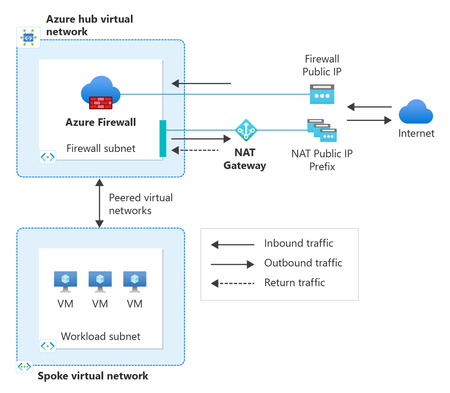
As organizations modernize their applications in Azure, secure and resilient outbound connectivity has become just as critical as inbound security. Workloads need reliable access to external APIs, SaaS services, operating system updates, and partner endpoints, while still meeting strong security controls, predictable egress IPs, and high availability. Achieving all of this consistently requires using the right networking services together. To make this easier, we’ve updated the Azure Firewall create experience in the Azure portal to include StandardV2 NAT Gateway directly in the deployment flow. This new experience makes it quick and seamless to adopt a secure, scalable, and zone‑resilient outbound architecture from day one by using Azure Firewall and Azure NAT Gateway together. In this post, we’ll cover: Why pairing Azure Firewall with StandardV2 NAT Gateway is a recommended design How this combination simplifies secure and resilient outbound connectivity What’s new in the Azure Firewall portal experience and how to get started Why Azure Firewall and StandardV2 NAT Gateway? Azure Firewall and Azure NAT Gateway are designed to complement each other, each focusing on what they do best: Azure Firewall provides centralized traffic inspection and policy enforcement, including IP address and FQDN filtering, threat intelligence, and logging. StandardV2 NAT Gateway delivers high‑scale outbound SNAT, static egress IPs, and built‑in zone redundancy. StandardV2 NAT Gateway is zone‑redundant by default, automatically spanning availability zones within a region. This means outbound connectivity remains available even during a zonal failure without requiring multiple zonal NAT gateways or additional routing configurations. Together, this pairing cleanly separates: Security policy and inspection handled by Azure Firewall Outbound scale, resiliency, and IP predictability handled by NAT Gateway This separation is key for modern, large‑scale cloud workloads. A recommended outbound architecture In a typical hub‑and‑spoke design: Workloads in spoke virtual networks route outbound traffic to Azure Firewall in the hub Firewall policies inspect and allow the traffic StandardV2 NAT Gateway is attached to the AzureFirewallSubnet in the Hub Approved traffic flows through StandardV2 NAT Gateway for SNAT Traffic exits Azure using static, predictable public IPs This approach provides several important benefits: Scalable SNAT capacity for high‑connection workloads Static outbound IPs for partner allow‑listing and compliance Zone‑resilient outbound connectivity by default For step-by-step architectural guidance, see Integrate NAT gateway with Azure Firewall in a hub and spoke architecture. Built for secure and resilient Azure environments As customers increasingly adopt availability zones, large‑scale VMSS or AKS deployments, and zero‑trust network models, outbound connectivity must be secure, predictable, and resilient. By pairing Azure Firewall with StandardV2 NAT Gateway—and now surfacing this pairing directly in the portal create experience—customers can start with a production‑ready outbound architecture that scales with their environment. What's new in the Azure Firewall create experience in the portal When creating a new Azure Firewall in the portal, customers can now: Select and associate a StandardV2 NAT Gateway during firewall deployment. Reduce post‑deployment configuration and manual touches. Start with a recommended zone-resilient outbound architecture by default. By bringing NAT Gateway directly into the Firewall create flow, the portal helps guide customers toward a more secure and scalable outbound setup—without requiring them to stitch services together after the fact. Get started You can try the updated experience today by creating a new Azure Firewall in the Azure portal and selecting StandardV2 NAT Gateway during deployment. With just a couple clicks of a button: In the Basics tab, configure your Firewall settings (ex., SKU, policy, virtual network). In the *new* Advanced tab, create a new or add an existing StandardV2 NAT gateway and associate StandardV2 public IP addresses or prefixes. The StandardV2 NAT gateway is automatically attached to the Firewall subnet—no additional routing or configuration required. Review and Create. Note: StandardV2 NAT Gateway is not yet available in all regions. If your selected region does not support StandardV2 NAT Gateway, the option to enable StandardV2 NAT gateway will not appear during Firewall creation. Refer to StandardV2 NAT Gateway limitations for more information. For more details, see: Integrate StandardV2 NAT Gateway with Azure Firewall Integrate NAT Gateway with Azure Firewall in a hub‑and‑spoke network Azure NAT Gateway SKUs260Views0likes0Comments