azure networking
124 TopicsAzure Front Door: Implementing lessons learned following October outages
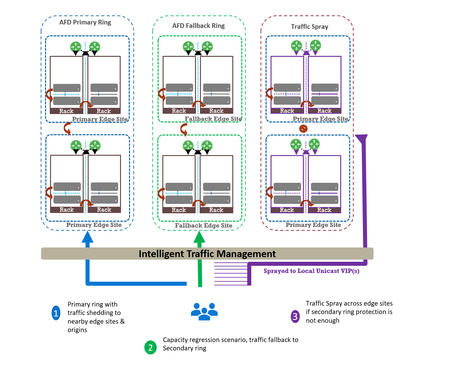
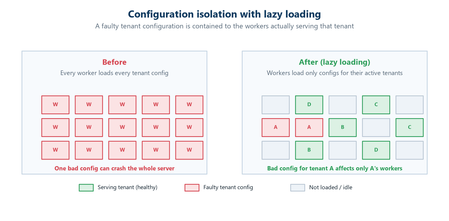
Abhishek Tiwari, Vice President of Engineering, Azure Networking Amit Srivastava, Principal PM Manager, Azure Networking Varun Chawla, Partner Director of Engineering Link to Part 2 - Azure Front Door Resiliency Series Link to Part 3 - Azure Front Door Resiliency Series Introduction Azure Front Door is Microsoft's advanced edge delivery platform encompassing Content Delivery Network (CDN), global security and traffic distribution into a single unified offering. By using Microsoft's extensive global edge network, Azure Front Door ensures efficient content delivery and advanced security through 210+ global and local points of presence (PoPs) strategically positioned closely to both end users and applications. As the central global entry point from the internet onto customer applications, we power mission critical customer applications as well as many of Microsoft’s internal services. We have a highly distributed resilient architecture, which protects against failures at the server, rack, site and even at the regional level. This resiliency is achieved by the use of our intelligent traffic management layer which monitors failures and load balances traffic at server, rack or edge sites level within the primary ring, supplemented by a secondary-fallback ring which accepts traffic in case of primary traffic overflow or broad regional failures. We also deploy a traffic shield as a terminal safety net to ensure that in the event of a managed or unmanaged edge site going offline, end user traffic continues to flow to the next available edge site. Like any large-scale CDN, we deploy each customer configuration across a globally distributed edge fleet, densely shared with thousands of other tenants. While this architecture enables global scale, it carries the risk that certain incompatible configurations, if not contained, can propagate broadly and quickly which can result in a large blast radius of impact. Here we describe how the two recent service incidents impacting Azure Front Door have reinforced the need to accelerate ongoing investments in hardening our resiliency, and tenant isolation strategy to mitigate likelihood and the scale of impact from this class of risk. October incidents: recap and key learnings Azure Front Door experienced two service incidents; on October 9 th and October 29 th , both with customer-impacting service degradation. On October 9 th : A manual cleanup of stuck tenant metadata bypassed our configuration protection layer, allowing incompatible metadata to propagate beyond our canary edge sites. This metadata was created on October 7 th , from a control-plane defect triggered by a customer configuration change. While the protection system initially blocked the propagation, the manual override operation bypassed our safeguards. This incompatible configuration reached the next stage and activated a latent data-plane defect in a subset of edge sites, causing availability impact primarily across Europe (~6%) and Africa (~16%). You can learn more about this issue in detail at https://aka.ms/AIR/QNBQ-5W8 On October 29 th : A different sequence of configuration changes across two control-plane versions produced incompatible metadata. Because the failure mode in the data-plane was asynchronous, the health checks validations embedded in our protection systems were all passed during the rollout. The incompatible customer configuration metadata successfully propagated globally through a staged rollout and also updated the “last known good” (LKG) snapshot. Following this global rollout, the asynchronous process in data-plane exposed another defect which caused crashes. This impacted connectivity and DNS resolutions for all applications onboarded to our platform. Extended recovery time amplified impact on customer applications and Microsoft services. You can learn more about this issue in detail at https://aka.ms/AIR/YKYN-BWZ We took away a number of clear and actionable lessons from these incidents, which are applicable not just to our service, but to any multi-tenant, high-density, globally distributed system. Configuration resiliency – Valid configuration updates should propagate safely, consistently, and predictably across our global edge, while ensuring that incompatible or erroneous configuration never propagate beyond canary environments. Data plane resiliency - Additionally, configuration processing in the data plane must not cause availability impact to any customer. Tenant isolation – Traditional isolation techniques such as hardware partitioning and virtualization are impractical at edge sites. This requires innovative sharding techniques to ensure single tenant-level isolation – a must-have to reduce potential blast radius. Accelerated and automated recovery time objective (RTO) – System should be able to automatically revert to last known good configuration in an acceptable RTO. In case of a service like Azure Front Door, we deem ~10 mins to be a practical RTO for our hundreds of thousands of customers at every edge site. Post outage, given the severity of impact which allowed an incompatible configuration to propagate globally, we made the difficult decision to temporarily block configuration changes in order to expedite rollout of additional safeguards. Between October 29 th to November 5 th , we prioritized and deployed immediate hardening steps before opening up the configuration change. We are confident that the system is stable, and we are continuing to invest in additional safeguards to further strengthen the platform's resiliency. Learning category Goal Repairs Status Safe customer configuration deployment Incompatible configuration never propagates beyond Canary · Control plane and data plane defect fixes · Forced synchronous configuration processing · Additional stages with extended bake time · Early detection of crash state Completed Data plane resiliency Configuration processing cannot impact data plane availability Manage data-plane lifecycle to prevent outages caused by configuration-processing defects. Completed Isolated work-process in every data plane server to process and load the configuration. January 2026 100% Azure Front Door resiliency posture for Microsoft internal services Microsoft operates an isolated, independent Active/Active fleet with automatic failover for critical Azure services Phase 1: Onboarded critical services batch impacted on Oct 29 th outage running on a day old configuration Completed Phase 2: Automation & hardening of operations, auto-failover and self-management of Azure Front Door onboarding for additional services March 2026 Recovery improvements Data plane crash recovery in under 10 minutes Data plane boot-up time optimized via local cache (~1 hour) Completed Accelerate recovery time < 10 minutes March 2026 Tenant isolation No configuration or traffic regression can impact other tenants Micro cellular Azure Front Door with ingress layered shards June 2026 This blog is the first in a multi-part series on Azure Front Door resiliency. In this blog, we will focus on configuration resiliency—how we are making the configuration pipeline safer and more robust. Subsequent blogs will cover tenant isolation and recovery improvements. How our configuration propagation works Azure Front Door configuration changes can be broadly classified into three distinct categories. Service code & data – these include all aspects of Azure Front Door service like management plane, control plane, data plane, configuration propagation system. Azure Front Door follows a safe deployment practice (SDP) process to roll out newer versions of management, control or data plane over a period of approximately 2-3 weeks. This ensures that any regression in software does not have a global impact. However, latent bugs that escape pre-validation and SDP rollout can remain undetected until a specific combination of customer traffic patterns or configuration changes trigger the issue. Web Application Firewall (WAF) & L7 DDoS platform data – These datasets are used by Azure Front Door to deliver security and load-balancing capabilities. Examples include GeoIP data, malicious attack signatures, and IP reputation signatures. Updates to these datasets occur daily through multiple SDP stages with an extended bake time of over 12 hours to minimize the risk of global impact during rollout. This dataset is shared across all customers and the platform, and it is validated immediately since it does not depend on variations in customer traffic or configuration steps. Customer configuration data – Examples of these are any customer configuration change—whether a routing rule update, backend pool modification, WAF rule change, or security policy change. Due to the nature of these changes, it is expected across the edge delivery / CDN industry to propagate these changes globally in 5-10 mins. Both outages stemmed from issues within this category. All configuration changes, including customer configuration data, are processed through a multi-stage pipeline designed to ensure correctness before global rollout across Azure Front Door’s 200+ edge locations. At a high level, Azure Front Door’s configuration propagation system has two distinct components - Control plane – Accepts customer API/portal changes (create/update/delete for profiles, routes, WAF policies, origins, etc.) and translates them into internal configuration metadata which the data plane can understand. Data plane – Globally distributed edge servers that terminate client traffic, apply routing/WAF logic, and proxy to origins using the configuration produced by the control plane. Between these two halves sits a multi-stage configuration rollout pipeline with a dedicated protection system (known as ConfigShield): Changes flow through multiple stages (pre-canary, canary, expanding waves to production) rather than going global at once. Each stage is health-gated: the data plane must remain within strict error and latency thresholds before proceeding. Each stage’s health check also rechecks previous stage’s health for any regressions. A successfully completed rollout updates a last known good (LKG) snapshot used for automated rollback. Historically, rollout targeted global completion in roughly 5–10 minutes, in line with industry standards. Customer configuration processing in Azure Front Door data plane stack Customer configuration changes in Azure Front Door traverse multiple layers—from the control plane through the deployment system—before being converted into FlatBuffers at each Azure Front Door node. These FlatBuffers are then loaded by the Azure Front Door data plane stack, which runs as Kubernetes pods on every node. FlatBuffer Composition: Each FlatBuffer references several sub-resources such as WAF and Rules Engine schematic files, SSL certificate objects, and URL signing secrets. Data plane architecture: o Master process: Accepts configuration changes (memory-mapped files with references) and manages the lifecycle of worker processes. o Workers: L7 proxy processes that serve customer traffic using the applied configuration. Processing flow for each configuration update: Load and apply in master: The transformed configuration is loaded and applied in the master process. Cleanup of unused references occurs synchronously except for certain categories à October 9 outage occurred during this step due to a crash triggered by incompatible metadata. Apply to workers: Configuration is applied to all worker processes without memory overhead (FlatBuffers are memory-mapped). Serve traffic: Workers start consuming new FlatBuffers for new requests; in-flight requests continue using old buffers. Old buffers are queued for cleanup post-completion. Feedback to deployment service: Positive feedback signals readiness for rollout.Cleanup: FlatBuffers are freed asynchronously by the master process after all workers load updates à October 29 outage occurred during this step due to a latent bug in reference counting logic. The October incidents showed we needed to strengthen key aspects of configuration validation, propagation safeguards, and runtime behavior. During the Azure Front Door incident on October 9 th , that protection system worked as intended but was later bypassed by our engineering team during a manual cleanup operation. During this Azure Front Door incident on October 29 th , the incompatible customer configuration metadata progressed through the protection system, before the delayed asynchronous processing task resulted in the crash. Configuration propagation safeguards Based on learnings from the incidents, we are implementing a comprehensive set of configuration resiliency improvements. These changes aim to guarantee that any sequence of configuration changes cannot trigger instability in the data plane, and to ensure quicker recovery in the event of anomalies. Strengthening configuration generation safety This improvement pivots on a ‘shift-left’ strategy where we want to ensure that we catch regression early before they propagate to production. It also includes fixing the latent defects which were the proximate cause of the outage. Fixing outage specific defects - We have fixed the control-plane defects that could generate incompatible tenant metadata under specific operation sequences. We have also remediated the associated data-plane defects. Stronger cross-version validation - We are expanding our test and validation suite to account for changes across multiple control plane build versions. This is expected to be fully completed by February 2026. Fuzz testing - Automated fuzzing and testing of metadata generation contract between the control plane and the data plane. This allows us to generate an expanded set of invalid/unexpected configuration combinations which might not be achievable by traditional test cases alone. This is expected to be fully completed by February 2026. Preventing incompatible configurations from being propagated This segment of the resiliency strategy strives to ensure that a potentially dangerous configuration change never propagates beyond canary stage. Protection system is “always-on” - Enhancements to operational procedures and tooling prevent bypass in all scenarios (including internal cleanup/maintenance), and any cleanup must flow through the same guarded stages and health checks as standard configuration changes. This is completed. Making rollout behavior more predictable and conservative - Configuration processing in the data plane is now fully synchronous. Every data plane issue due to incompatible meta data can be detected withing 10 seconds at every stage. This is completed. Enhancement to deployment pipeline - Additional stages during roll-out and extended bake time between stages serve as an additional safeguard during configuration propagation. This is completed. Recovery tool improvements now make it easier to revert to any previous version of LKG with a single click. This is completed. These changes significantly improve system safety. Post-outage we have increased the configuration propagation time to approximately 45 minutes. We are working towards reducing configuration propagation time closer to pre-incident levels once additional safeguards covered in the Data plane resiliency section below are completed by mid-January, 2026. Data plane resiliency The data plane recovery was the toughest part of recovery efforts during the October incidents. We must ensure fast recovery as well as resilience to configuration processing related issues for the data plane. To address this, we implemented changes that decouple the data plane from incompatible configuration changes. With these enhancements, the data plane continues operating on the last known good configuration—even if the configuration pipeline safeguards fail to protect as intended. Decoupling data plane from configuration changes Each server’s data plane consists of a master process which accepts configuration changes and manages lifecycle of multiple worker processes which serve customer traffic. One of the critical reasons for the prolonged outage in October was that due to latent defects in the data plane, when presented with a bad configuration the master process crashed. The master is a critical command-and-control process and when it crashes it takes down the entire data plane, in that node. Recovery of the master process involves reloading hundreds of thousands of configurations from scratch and took approximately 4.5 hours. We have since made changes to the system to ensure that even in the event of the master process crash due to any reason - including incompatible configuration data being presented - the workers remain healthy and able to serve traffic. During such an event, the workers would not be able to accept new configuration changes but will continue to serve customer traffic using the last known good configuration. This work is completed. Introducing Food Taster: strengthening config propagation resiliency In our efforts to further strengthen Azure Front Door’s configuration propagation system, we are introducing an additional configuration safeguard known internally as Food Taster which protects the master and worker processes from any configuration change related incidents, thereby ensuring data plane resiliency. The principle is simple: every data-plane server will have a redundant and isolated process – the Food Taster – whose only job is to ingest and process new configuration metadata first and then pass validated configuration changes to active data plane. This redundant worker does not accept any customer traffic. All configuration processing in this Food Taster is fully synchronous. That means we do all parsing, validation, and any expensive or risky work up front, and we do not move on until the Food Taster has either proven the configuration is safe or rejected it. Only when the Food Taster successfully loads the configuration and returns “Config OK” does the master process proceed to load the same config and then instruct the worker processes to do the same. If anything goes wrong in the Food Taster, the failure is contained to that isolated worker; the master and traffic-serving workers never see that invalid configuration. We expect this safeguard to reach production globally in January 2026 timeframe. Introduction of this component will also allow us to return closer to pre-incident level of configuration propagation while ensuring data plane safety. Closing This is the first in a series of planned blogs on Azure Front Door resiliency enhancements. We are continuously improving platform safety and reliability and will transparently share updates through this series. Upcoming posts will cover advancements in tenant isolation and improvements to recovery time objectives (RTO). We deeply value our customers’ trust in Azure Front Door. The October incidents reinforced how critical configuration resiliency is, and we are committed to exceeding industry expectations for safety, reliability, and transparency. By hardening our configuration pipeline, strengthening safety gates, and reinforcing isolation boundaries, we’re making Azure Front Door even more resilient so your applications can be too.19KViews25likes15Comments
Announcing the general availability of Route-Maps for Azure virtual WAN.
Route-maps is a feature that gives you the ability to control route advertisements and routing for Virtual WAN virtual hubs. Route-maps lets you have more control of the routing that enters and leaves Azure Virtual WAN site-to-site (S2S) VPN connections, User VPN point-to-site (P2S) connections, ExpressRoute connections, and virtual network (VNet) connections. Why use Route-maps? Route-maps can be used to summarize routes when you have on-premises networks connected to Virtual WAN via ExpressRoute or VPN and are limited by the number of routes that can be advertised from/to virtual hub. You can use Route-maps to control routes entering and leaving your Virtual WAN deployment among on-premises and virtual-networks. You can control routing decisions in your Virtual WAN deployment by modifying a BGP attribute such as AS-PATH to make a route more, or less preferable. This is helpful when there are destination prefixes reachable via multiple paths and customers want to use AS-PATH to control best path selection. You can easily tag routes using the BGP community attribute in order to manage routes. What is a Route-map? A Route-map is an ordered sequence of one or more rules that are applied to routes received or sent by the virtual hub. Each Route-map rule comprises of 3 sections: 1. Match conditions Route-maps allows you to match routes using Route-prefix, BGP community and AS-Path. These are the set of conditions that a processed route must meet in order to be considered as a match for the rule. Below are the supported match conditions. Property Criterion Value (example) Interpretation Route-prefix equals 10.1.0.0/16,10.2.0.0/16,10.3.0.0/16,10.4.0.0/16 Matches these 4 routes only. Specific prefixes under these routes won't be matched. Route-prefix contains 10.1.0.0/16,10.2.0.0/16, 192.168.16.0/24, 192.168.17.0/24 Matches all the specified routes and all prefixes underneath. (Example 10.2.1.0/24 is underneath 10.2.0.0/16) Community equals 65001:100,65001:200 Community property of the route must have both the communities. Order isn't relevant. Community contains 65001:100,65001:200 Community property of the route can have one or more of the specified communities. AS-Path equals 65001,65002,65003 AS-PATH of the routes must have ASNs listed in the specified order. AS-Path contains 65001,65002,65003 AS-PATH in the routes can contain one or more of the ASNs listed. Order isn't relevant. 2. Actions to be performed Route-Maps allows you to Drop or Modify routes. Below are the supported actions. Property Action Value Interpretation Route-prefix Drop 10.3.0.0/8,10.4.0.0/8 The routes specified in the rule are dropped. Route-prefix Replace 10.0.0.0/8,192.168.0.0/16 Replace all the matched routes with the routes specified in the rule. As-Path Add 64580,64581 Prepend AS-PATH with the list of ASNs specified in the rule. These ASNs are applied in the same order for the matched routes. As-Path Replace 65004,65005 AS-PATH will be set to this list in the same order, for every matched route. See key considerations for reserved AS numbers. As-Path Replace No value specified Remove all ASNs in the AS-PATH in the matched routes. Community Add 64580:300,64581:300 Add all the listed communities to all the matched routes community attribute. Community Replace 64580:300,64581:300 Replace community attribute for all the matched routes with the list provided. Community Replace No value specified Remove community attribute from all the matched routes. Community Remove 65001:100,65001:200 Remove any of the listed communities that are present in the matched routes’ Community attribute. 3. Apply to a Connection You can apply route-maps on each connection for the inbound, outbound, or both inbound and outbound directions. Where can I find Route-maps? Route-Maps can be found in the routing section of your virtual WAN hub. How do I troubleshoot Route-maps? The Route-Map Dashboard lets you views the routes for a connection. You can view the routes before or after a Route-Map is applied. Demo6.3KViews14likes2CommentsThe Deployment of Hollow Core Fiber (HCF) in Azure’s Network
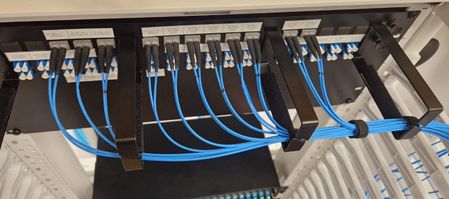
Co-authors: Jamie Gaudette, Frank Rey, Tony Pearson, Russell Ellis, Chris Badgley and Arsalan Saljoghei In the evolving Cloud and AI landscape, Microsoft is deploying state-of-the-art Hollow Core Fiber (HCF) technology in Azure’s network to optimize infrastructure and enhance performance for customers. By deploying cabled HCF technology together with HCF-supportable datacenter (DC) equipment, this solution creates ultra-low latency traffic routes with faster data transmission to meet the demands of Cloud & AI workloads. The successful adoption of HCF technology in Azure’s network relies on developing a new ecosystem to take full advantage of the solution, including new cables, field splicing, installation and testing… and Microsoft has done exactly that. Azure has collaborated with industry leaders to deliver components and equipment, cable manufacturing and installation. These efforts, along with advancements in HCF technology, have paved the way for its deployment in-field. HCF is now operational and carrying live customer traffic in multiple Microsoft Azure regions, proving it is as reliable as conventional fiber with no field failures or outages. This article will explore the installation activities, testing, and link performance of a recent HCF deployment, showcasing the benefits that Azure customers can leverage from HCF technology. HCF connected Azure DCs are ready for service The latest HCF cable deployment connects two Azure DCs in a major city, with two metro routes each over 20km long. The hybrid cables both include 32 HCF and 48 single mode fiber (SMF) strands, with HCFs delivering high-capacity Dense Wavelength Division Multiplexing (DWDM) transmission comparable to SMF. The cables are installed over two diverse paths (the red and blue lines shown in image 1), each with different entry points into the DC. Route diversity at the physical layer enhances network resilience and reliability by allowing traffic to be rerouted through alternate paths, minimizing the risk of network outage should there be a disruption. It also allows for increased capacity by distributing network traffic more evenly, improving overall network performance and operational efficiency. Image 1: Satellite image of two Azure DC sites (A & Z) within a metro region interconnected with new ultra-low latency HCF technology, using two diverse paths (blue & red) Image 2 shows the optical routing that the deployed HCF cables take through both Inside Plant (ISP) and Outside Plant (OSP), for interconnecting terminal equipment within key sites in the region (comprised of DCs, Network Gateways and PoPs). Image 2: Optical connectivity at the physical layer between DCA and DCZ The HCF OSP cables have been developed for outdoor use in harsh environments without degrading the propagation properties of the fiber. The cable technology is smaller, faster, and easier to install (using a blown installation method). Alongside cables, various other technologies have been developed and integrated to provide a reliable end-to-end HCF network solution. This includes dedicated HCF-compatible equipment (shown in image 3), such as custom cable joint enclosures, fusion splicing technology, HCF patch tails for cable termination in the DC, and a HCF custom-designed Optical Time Domain Reflectometer (OTDR) to locate faults in the link. These solutions work with commercially available transponders and DWDM technologies to deliver multi-Tb/s capacities for Azure customers. Looking more closely at a HCF cable installation, in image 4 the cable is installed by passing it through a blowing-head (1) and inserting it into pre-installed conduit in segments underground along the route. As with traditional installations with conventional cable, the conduit, cable entry/exit, and cable joints are accessible through pre-installed access chambers, typically a few hundred meters apart. The blowing head uses high-pressure air from a compressor to push the cable into the conduit. A single drum-length of cable can be re-fleeted above ground (2) at multiple access points and re-jetted (3) over several kilometers. After the cables are installed inside the conduit, they are jointed at pre-designated access chamber locations. These house the purpose designed cable joint enclosures. Image 4: Cable preparation and installation during in-field deployment Image 5 shows a custom HCF cable joint enclosure in the field, tailored to protect HCFs for reliable data transmission. These enclosures organize the many HCF splices inside and are placed in underground chambers across the link. Image 5: 1) HCF joint enclosure in a chamber in-field 2) Open enclosure showing fiber loop storage protected by colored tubes at the rear-side of the joint 3) Open enclosure showing HCF spliced on multiple splice tray layers Inside the DC, connectorized ‘plug-and-play’ HCF-specific patch tails have been developed and installed for use with existing DWDM solutions. The patch tails interface between the HCF transmission and SMF active and passive equipment, each containing two SMF compatible connectors, coupled to the ISP HCF cable. In image 6, this has been terminated to a patch panel and mated with existing DWDM equipment inside the DC. Image 6: HCF patch tail solution connected to DWDM equipment Testing To validate the end-to-end quality of the installed HCF links (post deployment and during its operation), field deployable solutions have been developed and integrated to ensure all required transmission metrics are met and to identify and restore any faults before the link is ready for customer traffic. One such solution is Microsoft’s custom-designed HCF-specific OTDR, which helps measure individual splice losses and verify attenuation in all cable sections. This is checked against rigorous Azure HCF specification requirements. The OTDR tool is invaluable for locating high splice losses or faults that need to be reworked before the link can be brought into service. The diagram below shows an OTDR trace detecting splice locations and splice loss levels (dB) across a single strand of installed HCF. The OTDR can also continuously monitor HCF links and quickly locate faults, such as cable cuts, for quick recovery and remediation. For this deployment, a mean splice loss of 0.16dB was achieved, with some splices as low as 0.04dB, comparable to conventional fiber. Low attenuation and splice loss helps to maintain higher signal integrity, supporting longer transmission reach and higher traffic capacity. There are ongoing Azure HCF roadmap programs to continually improve this. Performance Before running customer traffic on the link, the fiber is tested to ensure reliable, error-free data transmission across the operating spectrum by counting lost or error bits. Once confirmed, the link is moved into production, allowing customer traffic to flow on the route. These optical tests, tailored to HCF, are carried out by the installer to meet Azure’s acceptance requirements. Image 8 illustrates the flow of traffic across a HCF link, dictated by changing demand on capacity and routing protocols in the region, which fluctuate throughout the day. The HCF span supports varying levels of customer traffic from the point the link was made live, without incurring any outages or link flaps. A critical metric for measuring transmission performance over each HCF path is the instantaneous Pre-Forward Error Correction (FEC) Bit Error Rate (BER) level. Pre-FEC BERs measure errors in a digital data stream at the receiver before any error correction is applied. This is crucial for transmission quality when the link carries data traffic; lower levels mean fewer errors and higher signal quality, essential for reliable data transmission. The following graph (image 9) shows the evolution of the Pre-FEC BER level on a HCF span once the link is live. A single strand of HCF is represented by a color, with all showing minimal fluctuation. This demonstrates very stable Pre-FEC BER levels, well below < -3.4 (log 10 ), across all 400G optical transponders, operating over all channels during a 24-day period. This indicates the network can handle high-data transmission efficiently with no Post-FEC errors, leading to high customer traffic performance and reliability. Image 9: Very stable Pre-FEC BER levels across the HCF span over 20 days The graph below demonstrates the optical loss stability over one entire span which is comprised of two HCF strands. It was monitored continuously over 20 days using the inbuilt line system and measured in both directions to assess the optical health of the HCF link. The new HCF cable paths are live and carrying customer traffic across multiple Azure regions. Having demonstrated the end-to-end deployment capabilities and network compatibility of the HCF solution, it is possible to take full advantage of the ultra-stable, high performance and reliable connectivity HCF delivers to Azure customers. What’s next? Unlocking the full potential of HCF requires compatible, end-to-end solutions. This blog outlines the holistic and deployable HCF systems we have developed to better serve our customers. While we further integrate HCF into more Azure Regions, our development roadmap continues. Smaller cables with more fibers and enhanced systems components to further increase the capacity of our solutions, standardized and simplified deployment and operations, as well as extending the deployable distance of HCF long haul transmission solutions. Creating a more stable, higher capacity, faster network will allow Azure to better serve all its customers. Learn more about how hollow core fiber is accelerating AI. Recently published HCF research papers: Ultra high resolution and long range OFDRs for characterizing and monitoring HCF DNANFs Unrepeated HCF transmission over spans up to 301.7km14KViews10likes1CommentInspection Patterns in Hub-and-Spoke and vWAN Architectures
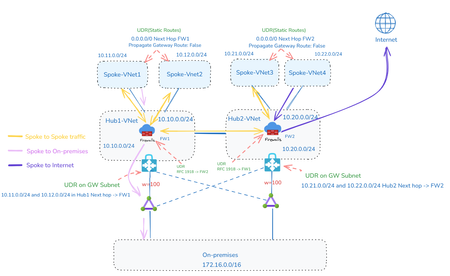
By shruthi_nair Mays_Algebary Inspection plays a vital role in network architecture, and each customer may have unique inspection requirements. This article explores common inspection scenarios in both Hub-and-Spoke and Virtual WAN (vWAN) topologies. We’ll walk through design approaches assuming a setup with two Hubs or Virtual Hubs (VHubs) connected to on-premises environments via ExpressRoute. The specific regions of the Hubs or VHubs are not critical, as the same design principles can be applied across regions. Scenario1: Hub-and-Spoke Inspection Patterns In the Hub-and-Spoke scenarios, the baseline architecture assumes the presence of two Hub VNets. Each Hub VNet is peered with its local spoke VNets as well as with the other Hub VNet (Hub2-VNet). Additionally, both Hub VNets are connected to both local and remote ExpressRoute circuits to ensure redundancy. Note: In Hub-and-Spoke scenarios, connectivity between virtual networks over ExpressRoute circuits across Hubs is intentionally disabled. This ensures that inter-Hub traffic uses VNet peering, which provides a more optimized path, rather than traversing the ExpressRoute circuit. In Scenario 1, we present two implementation approaches: a traditional method and an alternative leveraging Azure Virtual Network Manager (AVNM). Option1: Full Inspection A widely adopted design pattern is to inspect all traffic, both east-west and north-south, to meet security and compliance requirements. This can be implemented using a traditional Hub-and-Spoke topology with VNet Peering and User-Defined Routes (UDRs), or by leveraging AVNM with Connectivity Configurations and centralized UDR management. In the traditional approach: VNet Peering is used to connect each spoke to its local Hub, and to establish connectivity between the two Hubs. UDRs direct traffic to the firewall as the next hop, ensuring inspection before reaching its destination. These UDRs are applied at the Spoke VNets, the Gateway Subnet, and the Firewall Subnet (especially for inter-region scenarios), as shown in the below diagram. As your environment grows, managing individual UDRs and VNet Peerings manually can become complex. To simplify deployment and ongoing management at scale, you can use AVNM. With AVNM: Use the Hub-and-Spoke connectivity configuration to manage routing within a single Hub. Use the Mesh connectivity configuration to establish Inter-Hub connectivity between the two Hubs. AVNM also enables centralized creation, assignment, and management of UDRs, streamlining network configuration at scale. Connectivity Inspection Table Connectivity Scenario Inspected On-premises ↔ Azure ✅ Spoke ↔ Spoke ✅ Spoke ↔ Internet ✅ Option2: Selective Inspection Between Azure VNets In some scenarios, full traffic inspection is not required or desirable. This may be due to network segmentation based on trust zones, for example, traffic between trusted VNets may not require inspection. Other reasons include high-volume data replication, latency-sensitive applications, or the need to reduce inspection overhead and cost. In this design, VNets are grouped into trusted and untrusted zones. Trusted VNets can exist within the same Hub or across different Hubs. To bypass inspection between trusted VNets, you can connect them directly using VNet Peering or AVNM Mesh connectivity topology. It’s important to note that UDRs are still used and configured as described in the full inspection model (Option 1). However, when trusted VNets are directly connected, system routes (created by VNet Peering or Mesh connectivity) take precedence over custom UDRs. As a result, traffic between trusted VNets bypasses the firewall and flows directly. In contrast, traffic to or from untrusted zones follows the UDRs, ensuring it is routed through the firewall for inspection. t Connectivity Inspection Table Connectivity Scenario Inspected On-premises ↔ Azure ✅ Spoke ↔ Internet ✅ Spoke ↔ Spoke (Same Zones) ❌ Spoke ↔ Spoke (Across Zones) ✅ Option3: No Inspection to On-premises In cases where a firewall at the on-premises or colocation site already inspects traffic from Azure, customers typically aim to avoid double inspection. To support this in the above design, traffic destined for on-premises is not routed through the firewall deployed in Azure. For the UDRs applied to the spoke VNets, ensure that "Propagate Gateway Routes" is set to true, allowing traffic to follow the ExpressRoute path directly without additional inspection in Azure. Connectivity Inspection Table Connectivity Scenario Inspected On-premises ↔ Azure ❌ Spoke ↔ Spoke ✅ Spoke ↔ Internet ✅ Option4: Internet Inspection Only While not generally recommended, some customers choose to inspect only internet-bound traffic and allow private traffic to flow without inspection. In such cases, spoke VNets can be directly connected using VNet Peering or AVNM Mesh connectivity. To ensure on-premises traffic avoids inspection, set "Propagate Gateway Routes" to true in the UDRs applied to spoke VNets. This allows traffic to follow the ExpressRoute path directly without being inspected in Azure. Scenario2: vWAN Inspection Options Now we will explore inspection options using a vWAN topology. Across all scenarios, the base architecture assumes two Virtual Hubs (VHubs), each connected to its respective local spoke VNets. vWAN provides default connectivity between the two VHubs, and each VHub is also connected to both local and remote ExpressRoute circuits for redundancy. It's important to note that this discussion focuses on inspection in vWAN using Routing Intent. As a result, bypassing inspection for traffic to on-premises is not supported in this model. Option1: Full Inspection As noted earlier, inspecting all traffic, both east-west and north-south, is a common practice to fulfill compliance and security needs. In this design, enabling Routing Intent provides the capability to inspect both, private and internet-bound traffic. Unlike the Hub-and-Spoke topology, this approach does not require any UDR configuration. Connectivity Inspection Table Connectivity Scenario Inspected On-premises ↔ Azure ✅ Spoke ↔ Spoke ✅ Spoke ↔ Internet ✅ Option2: Using Different Firewall Flavors for Traffic Inspection Using different firewall flavors inside VHub for traffic inspection Some customers require specific firewalls for different traffic flows, for example, using Azure Firewall for East-West traffic while relying on a third-party firewall for North-South inspection. In vWAN, it’s possible to deploy both Azure Firewall and a third-party network virtual appliance (NVA) within the same VHub. However, as of this writing, deploying two different third-party NVAs in the same VHub is not supported. This behavior may change in the future, so it’s recommended to monitor the known limitations section for updates. With this design, you can easily control which firewall handles East-West versus North-South traffic using Routing Intent, eliminating the need for UDRs. Using different firewall flavors inside VHub for traffic inspection Deploying third-party firewalls in spoke VNets when VHub limitations apply If the third-party firewall you want to use is not supported within the VHub, or if the managed firewall available in the VHub lacks certain required features compared to the version deployable in a regular VNet, you can deploy the third-party firewall in a spoke VNet instead, while using Azure Firewall in the VHub. In this design, the third-party firewall (deployed in a spoke VNet) handles internet-bound traffic, and Azure Firewall (in the VHub) inspects East-West traffic. This setup is achieved by peering the third-party firewall VNet to the VHub, as well as directly peering it with the spoke VNets. These spoke VNets are also connected to the VHub, as illustrated in the diagram below. UDRs are required in the spoke VNets to forward internet-bound traffic to the third-party firewall VNet. East-West traffic routing, however, is handled using the Routing Intent feature, directing traffic through Azure Firewall without the need for UDRs. Deploying third-party firewalls in spoke VNets when VHub limitations apply Note: Although it is not required to connect the third-party firewall VNet to the VHub for traffic flow, doing so is recommended for ease of management and on-premises reachability. Connectivity Inspection Table Connectivity Scenario Inspected On-premises ↔ Azure ✅ Inspected using Azure Firewall Spoke ↔ Spoke ✅ Inspected using Azure Firewall Spoke ↔ Internet ✅ Inspected using Third Party Firewall Option3: Selective Inspection Between Azure VNets Similar to the Hub-and-Spoke topology, there are scenarios where full traffic inspection is not ideal. This may be due to Azure VNets being segmented into trusted and untrusted zones, where inspection is unnecessary between trusted VNets. Other reasons include large data replication between specific VNets or latency-sensitive applications that require minimizing inspection delays and associated costs. In this design, trusted and untrusted VNets can reside within the same VHub or across different VHubs. Routing Intent remains enabled to inspect traffic between trusted and untrusted VNets, as well as internet-bound traffic. To bypass inspection between trusted VNets, you can connect them directly using VNet Peering or AVNM Mesh connectivity. Unlike the Hub-and-Spoke model, this design does not require UDR configuration. Because trusted VNets are directly connected, system routes from VNet peering take precedence over routes learned through the VHub. Traffic destined for untrusted zones will continue to follow the Routing Intent and be inspected accordingly. Connectivity Inspection Table Connectivity Scenario Inspected On-premises ↔ Azure ✅ Spoke ↔ Internet ✅ Spoke ↔ Spoke (Same Zones) ❌ Spoke ↔ Spoke (Across Zones) ✅ Option4: Internet Inspection Only While not generally recommended, some customers choose to inspect only internet-bound traffic and bypass inspection of private traffic. In this design, you only enable the Internet Inspection option within Routing Intent, so private traffic bypasses the firewall entirely. The VHub manages both intra-and inter-VHub routing directly. Internet Inspection Only Connectivity Inspection Table Connectivity Scenario Inspected On-premises ↔ Azure ❌ Spoke ↔ Internet ✅ Spoke ↔ Spoke ❌4.1KViews9likes3CommentsNetwork Redundancy Between AVS, On-Premises, and Virtual Networks in a Multi-Region Design
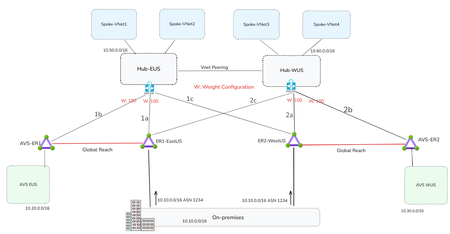
By Mays_Algebary shruthi_nair Establishing redundant network connectivity is vital to ensuring the availability, reliability, and performance of workloads operating in hybrid and cloud environments. Proper planning and implementation of network redundancy are key to achieving high availability and sustaining operational continuity. This article focuses on network redundancy in multi-region architecture. For details on single-region design, refer to this blog. The diagram below illustrates a common network design pattern for multi-region deployments, using either a Hub-and-Spoke or Azure Virtual WAN (vWAN) topology, and serves as the baseline for establishing redundant connectivity throughout this article. In each region, the Hub or Virtual Hub (VHub) extends Azure connectivity to Azure VMware Solution (AVS) via an ExpressRoute circuit. The regional Hub/VHub is connected to on-premises environments by cross-connecting (bowtie) both local and remote ExpressRoute circuits, ensuring redundancy. The concept of weight, used to influence traffic routing preferences, will be discussed in the next section. The diagram below illustrates the traffic flow when both circuits are up and running. Design Considerations If a region loses its local ExpressRoute connection, AVS in that region will lose connectivity to the on-premises environment. However, VNets will still retain connectivity to on-premises via the remote region’s ExpressRoute circuit. The solutions discussed in this article aim to ensure redundancy for both AVS and VNets. Looking at the diagram above, you might wonder: why do we need to set weights at all, and why do the AVS-ER connections (1b/2b) use the same weight as the primary on-premises connections (1a/2a)? Weight is used to influence routing decisions and ensure optimal traffic flow. In this scenario, both ExpressRoute circuits, ER1-EastUS and ER2-WestUS, advertise the same prefixes to the Azure ExpressRoute gateway. As a result, traffic from the VNet to on-premises would be ECMPed across both circuits. To avoid suboptimal routing and ensure that traffic from the VNets prefers the local ExpressRoute circuit, a higher weight is assigned to the local path. It’s also critical that the ExpressRoute gateway connection to on-premises (1a/2a) and to AVS (1b/2b), is assigned the same weight. Otherwise, traffic from the VNet to AVS will follow a less efficient route as AVS routes are also learned over ER1-EastUS via Global Reach. For instance, VNets in EastUS will connect to AVS EUS through ER1-EastUS circuit via Global Reach (as shown by the blue dotted line), instead of using the direct local path (orange line). This suboptimal routing is illustrated in the below diagram. Now let us see what solutions we can have to achieve redundant connectivity. The following solutions will apply to both Hub-and-Spoke and vWAN topology unless noted otherwise. Note: The diagrams in the upcoming solutions will focus only on illustrating the failover traffic flow. Solution1: Network Redundancy via ExpressRoute in Different Peering Location In the solution, deploy an additional ExpressRoute circuit in a different peering location within the same metro area (e.g., ER2–PeeringLocation2), and enable Global Reach between this new circuit and the existing AVS ExpressRoute (e.g., AVS-ER1). If you intend to use this second circuit as a failover path, apply prepends to the on-premises prefixes advertised over it. Alternatively, if you want to use it as an active-active redundant path, do not prepend routes, in this case, both AVS and Azure VNets will ECMP to distribute traffic across both circuits (e.g., ER1–EastUS and ER–PeeringLocation2) when both are available. Note: Compared to the Standard Topology, this design removes both the ExpressRoute cross-connect (bowtie) and weight settings. When adding a second circuit in the same metro, there's no benefit in keeping them, otherwise traffic from the Azure VNet will prefer the local AVS circuit (AVS-ER1/AVS-ER2) to reach on-premises due to the higher weight, as on-premises routes are also learned over AVS circuit (AVS-ER1/AVS-ER2) via Global Reach. Also, when connecting the new circuit (e.g., ER–Peering Location2), remove all weight settings across the connections. Traffic will follow the optimal path based on BGP prepending on the new circuit, or load-balance (ECMP) if no prepend is applied. Note: Use public ASN to prepend the on-premises prefix as AVS circuit (e.g., AVS-ER) will strip the private ASN toward AVS. Solution Insights Ideal for mission-critical applications, providing predictable throughput and bandwidth for backup. It could be cost prohibitive depending on the bandwidth of the second circuit. Solution2: Network Redundancy via ExpressRoute Direct In this solution, ExpressRoute Direct is used to provision multiple circuits from a single port pair in each region, for example, ER2-WestUS and ER4-WestUS are created from the same port pair. This allows you to dedicate one circuit for local traffic and another for failover to a remote region. To ensure optimal routing, prepend the on-premises prefixes using public ASN on the newly created circuit (e.g., ER3-EastUS and ER4-WestUS). Remove all weight settings across the connections; traffic will follow the optimal path based on BGP prepending on the new circuit. For instance, if ER1-EastUS becomes unavailable, traffic from AVS and VNets in the EastUS region will automatically route through ER4-WestUS circuit, ensuring continuity. Note: Compared to the Standard Topology, this design connects the newly created ExpressRoute circuits (e.g., ER3-EastUS/ER4-WestUS) to the remote region of ExpressRoute gateway (black dotted lines) instead of having the bowtie to the primary circuits (e.g., ER1-EastUS/ER2-WestUS). Solution Insights Easy to implement if you have ExpressRoute Direct. ExpressRoute Direct supports over- provisioning where you can create logical ExpressRoute circuits on top of your existing ExpressRoute Direct resource of 10-Gbps or 100-Gbps up to the subscribed Bandwidth of 20 Gbps or 200 Gbps. For example, you can create two 10-Gbps ExpressRoute circuits within a single 10-Gbps ExpressRoute Direct resource (port pair). Ideal for mission-critical applications, providing predictable throughput and bandwidth for backup. Solution3: Network Redundancy via ExpressRoute Metro Metro ExpressRoute is a new configuration that enables dual-homed connectivity to two different peering locations within the same city. This setup enhances resiliency by allowing traffic to continue flowing even if one peering location goes down, using the same circuit. Solution Insights Higher Resiliency: Provides increased reliability with a single circuit. Limited regional availability: Currently available in select regions, with more being added over time. Cost-effective: Offers redundancy without significantly increasing costs. Solution4: Deploy VPN as a Backup to ExpressRoute This solution mirrors solution 1 for a single region but extends it to multiple regions. In this approach, a VPN serves as the backup path for each region in the event of an ExpressRoute failure. In a Hub-and-Spoke topology, a backup path to and from AVS can be established by deploying Azure Route Server (ARS) in the hub VNet. ARS enables seamless transit routing between ExpressRoute and the VPN gateway. In vWAN topology, ARS is not required; the vHub's built-in routing service automatically provides transitive routing between the VPN gateway and ExpressRoute. In this design, you should not cross-connect ExpressRoute circuits (e.g., ER1-EastUS and ER2-WestUS) to the ExpressRoute gateways in the Hub VNets (e.g., Hub-EUS or Hub-WUS). Doing so will lead to routing issues, where the Hub VNet only programs the on-premises routes learned via ExpressRoute. For instance, in the EastUS region, if the primary circuit (ER1-EastUS) goes down, Hub-EUS will receive on-premises routes from both the VPN tunnel and the remote ER2-WestUS circuit. However, it will prefer and program only the ExpressRoute-learned routes from ER2-WestUS circuit. Since ExpressRoute gateways do not support route transitivity between circuits, AVS connected via AVS-ER will not receive the on-premises prefixes, resulting in routing failures. Note: In vWAN topology, to ensure optimal route convergence when failing back to ExpressRoute, you should prepend the prefixes advertised from on-premises over the VPN. Without route prepending, VNets may continue to use the VPN as the primary path to on-premises. If prepend is not an option, you can trigger the failover manually by bouncing the VPN tunnel. Solution Insights Cost-effective and straightforward to deploy. Increased Latency: The VPN tunnel over the internet adds latency due to encryption overhead. Bandwidth Considerations: Multiple VPN tunnels might be needed to achieve bandwidth comparable to a high-capacity ExpressRoute circuit (e.g., over 1G). For details on VPN gateway SKU and tunnel throughput, refer to this link. As you can't cross connect ExpressRoute circuits, VNets will utilize the VPN for failover instead of leveraging remote region ExpressRoute circuit. Solution5: Network Redundancy-Multiple On-Premises (split-prefix) In many scenarios, customers advertise the same prefix from multiple on-premises locations to Azure. However, if the customer can split prefixes across different on-premises sites, it simplifies the implementation of failover strategy using existing ExpressRoute circuits. In this design, each on-premises advertises region-specific prefixes (e.g., 10.10.0.0/16 for EastUS and 10.70.0.0/16 for WestUS), along with a common supernet (e.g., 10.0.0.0/8). Under normal conditions, AVS and VNets in each region use longest prefix match to route traffic efficiently to the appropriate on-premises location. For instance, if ER1-EastUS becomes unavailable, AVS and VNets in EastUS will automatically fail over to ER2-WestUS, routing traffic via the supernet prefix to maintain connectivity. Solution Insights Cost-effective: no additional deployment, using existing ExpressRoute circuits. Advertising specific prefixes over each region might need additional planning. Ideal for mission-critical applications, providing predictable throughput and bandwidth for backup. Solution6: Prioritize Network Redundancy for One Region Over Another If you're operating under budget constraints and can prioritize one region (such as hosting critical workloads in a single location) and want to continue using your existing ExpressRoute setup, this solution could be an ideal fit. In this design, assume AVS in EastUS (AVS-EUS) hosts the critical workloads. To ensure high availability, AVS-ER1 is configured with Global Reach connections to both the local ExpressRoute circuit (ER1-EastUS) and the remote circuit (ER2-WestUS). Make sure to prepend the on-premises prefixes advertised to ER2-WestUS using public ASN to ensure optimal routing (no ECMP) from AVS-EUS over both circuits (ER1-EastUS and ER2-WestUS). On the other hand, AVS in WestUS (AVS-WUS) is connected via Global Reach only to its local region ExpressRoute circuit (ER2-WestUS). If that circuit becomes unavailable, you can establish an on-demand Global Reach connection to ER1-EastUS, either manually or through automation (e.g., a triggered script). This approach introduces temporary downtime until the Global Reach link is established. You might be thinking, why not set up Global Reach between the AVS-WUS circuit and remote region circuits (like connecting AVS-ER2 to ER1-EastUS), just like we did for AVS-EUS? Because it would lead to suboptimal routing. Due to AS path prepending on ER2-WestUS, if both ER1-EastUS and ER2-WestUS are linked to AVS-ER2, traffic would favor the remote ER1-EastUS circuit since it presents a shorter AS path. As a result, traffic would bypass the local ER2-WestUS circuit, causing inefficient routing. That is why for AVS-WUS, it's better to use on-demand Global Reach to ER1-EastUS as a backup path, enabled manually or via automation, only when ER2-WestUS becomes unavailable. Note: VNets will failover via local AVS circuit. E.g., HUB-EUS will route to on-prem through AVS-ER1 and ER2-WestUS via Global Reach Secondary (purple line). Solution Insights Cost-effective Workloads hosted in AVS within the non-critical region will experience downtime if the local region ExpressRoute circuit becomes unavailable, until the on-demand Global Reach connection is established. Conclusion Each solution has its own advantages and considerations, such as cost-effectiveness, ease of implementation, and increased resiliency. By carefully planning and implementing these solutions, organizations can ensure operational continuity and optimal traffic routing in multi-region deployments.3.1KViews7likes0Comments
Subnet Peering
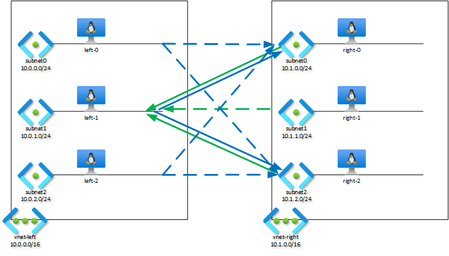
The Basics: VNET Peering Virtual Networks in Azure can be connected through VNET Peering. Peered VNETs become one routing domain, meaning that the entire IP space of each VNET is visible to and reachable from the other VNET. This is great for many applications: wire speed connectivity without gateways or other complexities. In this diagram, vnet-left and vnet-right are peered: This is what that looks like in the portal for vnet-left (with the righthand vnet similar): Effective routes of vm's in either vnet show the entire ip space of the peered vnet. For vm left-1 in vnet-left: az network nic show-effective-route-table -g sn-rg -n left-1701 -o table Source State Address Prefix Next Hop Type Next Hop IP -------- ------- ---------------- --------------- ------------- Default Active 10.0.0.0/16 VnetLocal Default Active 10.1.0.0/16 VNetPeering Default Active 0.0.0.0/0 Internet And for vm right-1 in vnet-right: az network nic show-effective-route-table -g sn-rg -n right-159 -o table Source State Address Prefix Next Hop Type Next Hop IP -------- ------- ---------------- --------------- ------------- Default Active 10.1.0.0/16 VnetLocal Default Active 10.0.0.0/16 VNetPeering Default Active 0.0.0.0/0 Internet The Problem There are situations where completely merging the address spaces of VNETs is not desirable. Think of micro-segmentation: only the front-end of a multi-tier application must be exposed and accessible from outside the VNET, with the application- and database tiers ideally remaining isolated. Network Security Groups are now used to achieve isolation; they can block access to the internal tiers from sources outside of the vnet's ip range, or the front-end subnet. Another scenario is IP address space exhaustion: private ip space is a scarce resource in many companies. There may not be enough free space available to assign each vnet a unique, routable, segment large enough to accomodate all resources hosted in each vnet. Again, there may not be a need for all resources to have a routable ip address as they do not need to be accessible from outside the vnet. The Solution: Subnet Peering The above scenario's could be solved for if it were possible to selectively share a vnet's address range across a peering. Enter Subnet Peering : this new capability allows selective sharing of IP address space across a peering at the subnet level. Subnet Peering is not yet available through the Azure portal, but can be configured through the Azure CLI. A few new parameters have been added to the existing az network vnet peering create command: --peer-complete-vnets {0, 1 (default), f, false, n, no, t, true, y, yes}: when set to 0, false or no configures peering at the subnet level in stead of at the vnet level. --local-subnet-names: list of subnets to be peered in the current vnet (i.e. the vnet called out in the --vnet-name parameter) - --remote-vnet-names: list of subnets to be peered in the remote vnet (i.e. the vnet called out in the --remote-vnet parameter) --enable-only-ipv6 {0(default), 1, f, false, n, no, t, true, y, yes}: if set to true, peers only ipv6 space in dual stack vnets. NB: Although Subnet Peering is available in all Azure regions, subscription allow-listing through this form is still required. Please read and be aware of the caveats under point 11 on the form. Segmentation This command peers subnet1 in vnet-left to subnet0 and subnet2 in right-vnet: az network vnet peering create -g sn-rg -n left0-right0 --vnet-name vnet-left --local-subnet-names subnet1 --remote-subnet-names subnet0 subnet2 --remote-vne vnet-right --peer-complete-vnets 0 --allow-vnet-access 1 Then establish the peering in the other direction: az network vnet peering create -g sn-rg -n right0-left0 --vnet-name vnet-right --local-subnet-names subnet0 subnet2 --remote-subnet-names subnet1 --remote-vne vnet-left --peer-complete-vnets 0 --allow-vnet-access This leaves subnet0 and subnet2 in vnet-left, and subnet1 in vnet-right disconnected, effectively creating segmentation between the peered vnets without the use of NSGs. Details of the peerings from left to right are below. Notice the localAddressSpace and remoteAddressSpace prefixes are those of the peered local and remote subnets. The other direction is similar - with localAddressSpace and remoteAddressSpace prefixes swapped of course. az network vnet peering show -g sn-rg -n left0-right0 --vnet-name vnet-left { "allowForwardedTraffic": false, "allowGatewayTransit": false, "allowVirtualNetworkAccess": true, "doNotVerifyRemoteGateways": false, "etag": "W/\"6a80a7da-36f4-404c-8bd8-d23e1b2bdd9a\"", "id": "/subscriptions/7cb39d93-f8a1-48a7-af6d-c8e12136f0ad/resourceGroups/sn-rg/providers/Microsoft.Network/virtualNetworks/vnet-left/virtualNetworkPeerings/left0-right0", "localAddressSpace": { "addressPrefixes": [ "10.0.1.0/24" ] }, "localSubnetNames": [ "subnet1" ], "localVirtualNetworkAddressSpace": { "addressPrefixes": [ "10.0.1.0/24" ] }, "name": "left0-right0", "peerCompleteVnets": false, "peeringState": "Connected", "peeringSyncLevel": "FullyInSync", "provisioningState": "Succeeded", "remoteAddressSpace": { "addressPrefixes": [ "10.1.0.0/24", "10.1.2.0/24" ] }, "remoteSubnetNames": [ "subnet0", "subnet2" ], "remoteVirtualNetwork": { "id": "/subscriptions/7cb39d93-f8a1-48a7-af6d-c8e12136f0ad/resourceGroups/sn-rg/providers/Microsoft.Network/virtualNetworks/vnet-right", "resourceGroup": "sn-rg" }, "remoteVirtualNetworkAddressSpace": { "addressPrefixes": [ "10.1.0.0/24", "10.1.2.0/24" ] }, "remoteVirtualNetworkEncryption": { "enabled": false, "enforcement": "AllowUnencrypted" }, "resourceGroup": "sn-rg", "resourceGuid": "eb63ec9e-aa48-023e-1514-152f8ab39ae7", "type": "Microsoft.Network/virtualNetworks/virtualNetworkPeerings", "useRemoteGateways": false } The peerings show in the portal as "normal" vnet peerings, as subnet peering is not yet supported by the portal. The only indication that this is not a full vnet peering, is the peered IP address space - this is the subnet IP range of the remote subnet(s). Inspecting the effective routes on vm left-1 shows it has routes for subnet0 and subnet2 but not for subnet1 in `vnet-right`: az network nic show-effective-route-table -g sn-rg -n left-1701 -o table Source State Address Prefix Next Hop Type Next Hop IP -------- ------- ---------------- --------------- ------------- Default Active 10.0.0.0/16 VnetLocal Default Active 172.16.0.0/24 VnetLocal Default Active 10.1.0.0/24 VNetPeering Default Active 10.1.2.0/24 VNetPeering Default Active 0.0.0.0/0 Internet Note that vm's left-0 and left-1 also have routes for the same subnets in vnet-right, even though their subnets were not listed in the --local-subnet-names parameter: az network nic show-effective-route-table -g sn-rg -n left-0681 -o table Source State Address Prefix Next Hop Type Next Hop IP -------- ------- ---------------- --------------- ------------- Default Active 10.0.0.0/16 VnetLocal Default Active 172.16.0.0/24 VnetLocal Default Active 10.1.0.0/24 VNetPeering Default Active 10.1.2.0/24 VNetPeering Default Active 0.0.0.0/0 Internet az network nic show-effective-route-table -g sn-rg -n left-2809 -o table Source State Address Prefix Next Hop Type Next Hop IP -------- ------- ---------------- --------------- ------------- Default Active 10.0.0.0/16 VnetLocal Default Active 172.16.0.0/24 VnetLocal Default Active 10.1.0.0/24 VNetPeering Default Active 10.1.2.0/24 VNetPeering Default Active 0.0.0.0/0 Internet In the current release of the feature, the ip space of the subnets listed in --remote-subnet-names is propagated to all subnets in the local vnet, not just to the subnets listed in --local-subnet-names. However, the subnets in vnet-right only have the address space of subnet1 in vnet-left propagated, as shows in the effective routes of the vm's on the right: az network nic show-effective-route-table -g sn-rg -n right-0814 -o table Source State Address Prefix Next Hop Type Next Hop IP -------- ------- ---------------- --------------- ------------- Default Active 10.1.0.0/16 VnetLocal Default Active 172.16.0.0/24 VnetLocal Default Active 10.0.1.0/24 VNetPeering Default Active 0.0.0.0/0 Internet az network nic show-effective-route-table -g sn-rg -n right-159 -o table Source State Address Prefix Next Hop Type Next Hop IP -------- ------- ---------------- --------------- ------------- Default Active 10.1.0.0/16 VnetLocal Default Active 172.16.0.0/24 VnetLocal Default Active 10.0.1.0/24 VNetPeering Default Active 0.0.0.0/0 Internet az network nic show-effective-route-table -g sn-rg -n right-2283 -o table Source State Address Prefix Next Hop Type Next Hop IP -------- ------- ---------------- --------------- ------------- Default Active 10.1.0.0/16 VnetLocal Default Active 172.16.0.0/24 VnetLocal Default Active 10.0.1.0/24 VNetPeering Default Active 0.0.0.0/0 Internet Bidrectional routing therefore only exists between subnet1 in vnet-left and subnet0 and subnet2 in vnet-right, as intended: This is demonstrated by testing with ping from `left-1` to the vm's on the right: to right-0: PING 10.1.0.4 (10.1.0.4) 56(84) bytes of data. 64 bytes from 10.1.0.4: icmp_seq=1 ttl=64 time=1.20 ms 64 bytes from 10.1.0.4: icmp_seq=2 ttl=64 time=1.24 ms 64 bytes from 10.1.0.4: icmp_seq=3 ttl=64 time=1.06 ms 64 bytes from 10.1.0.4: icmp_seq=4 ttl=64 time=1.56 ms ^C --- 10.1.0.4 ping statistics --- 4 packets transmitted, 4 received, 0% packet loss, time 3005ms to right-1: PING 10.1.1.4 (10.1.1.4) 56(84) bytes of data. ^C --- 10.1.1.4 ping statistics --- 5 packets transmitted, 0 received, 100% packet loss, time 4131ms to right-2: PING 10.1.2.4 (10.1.2.4) 56(84) bytes of data. 64 bytes from 10.1.2.4: icmp_seq=1 ttl=64 time=3.39 ms 64 bytes from 10.1.2.4: icmp_seq=2 ttl=64 time=0.968 ms 64 bytes from 10.1.2.4: icmp_seq=3 ttl=64 time=3.00 ms 64 bytes from 10.1.2.4: icmp_seq=4 ttl=64 time=2.47 ms ^C --- 10.1.2.4 ping statistics --- 4 packets transmitted, 4 received, 0% packet loss, time 3005ms Overlapping IP Space Now let's add overlapping ip space to both vnets. With the peerings removed, we add 172.16.0.0/16 to each vnet, create subnet3 with 172.16.3.0/24 and insert a vm. When we try to peer the full vnets, an error results because of the address space overlap: az network vnet peering create -g sn-rg -n left0-right0 --vnet-name vnet-left --remote-vnet vnet-right --peer-complete-vnets 1 --allow-vnet-access 1 (VnetAddressSpacesOverlap) Cannot create or update peering /subscriptions/7cb39d93-f8a1-48a7-af6d-c8e12136f0ad/resourceGroups/sn-rg/providers/Microsoft.Network/virtualNetworks/vnet-left/virtualNetworkPeerings/left0-right0. Virtual networks /subscriptions/7cb39d93-f8a1-48a7-af6d-c8e12136f0ad/resourceGroups/sn-rg/providers/Microsoft.Network/virtualNetworks/vnet-left and /subscriptions/7cb39d93-f8a1-48a7-af6d-c8e12136f0ad/resourceGroups/sn-rg/providers/Microsoft.Network/virtualNetworks/vnet-right cannot be peered because their address spaces overlap. Overlapping address prefixes: 172.16.0.0/16, 172.16.0.0/16 Code: VnetAddressSpacesOverlap Now we will again establish subnet-level peering as in the previous section: az network vnet peering create -g sn-rg -n left0-right0 --vnet-name vnet-left --local-subnet-names subnet1 --remote-subnet-names subnet0 subnet2 --remote-vne vnet-right --peer-complete-vnets 0 --allow-vnet-access 1 az network vnet peering create -g sn-rg -n right0-left0 --vnet-name vnet-right --local-subnet-names subnet0 subnet2 --remote-subnet-names subnet1 --remote-vne vnet-left --peer-complete-vnets 0 --allow-vnet-access 1 This completes successfully despite the presence of overlapping address space in both vnets. az network vnet peering show -g sn-rg -n left0-right0 --vnet-name vnet-left --query "[provisioningState, remoteAddressSpace]" [ "Succeeded", { "addressPrefixes": [ "10.1.0.0/24", "10.1.2.0/24" ] } ] az network vnet peering show -g sn-rg -n right0-left0 --vnet-name vnet-right --query "[provisioningState, remoteAddressSpace]" [ "Succeeded", { "addressPrefixes": [ "10.0.1.0/24" ] } ] Now let's try to include vnet-left subnet3, which overlaps with subnet3 on the right, in the peering: az network vnet peering create -g sn-rg -n left0-right0 --vnet-name vnet-left --local-subnet-names subnet1 subnet3 --remote-subnet-names subnet0 subnet2 --remote-vne vnet-right --peer-complete-vnets 0 --allow-vnet-access 1 (VnetAddressSpacesOverlap) Cannot create or update peering /subscriptions/7cb39d93-f8a1-48a7-af6d-c8e12136f0ad/resourceGroups/sn-rg/providers/Microsoft.Network/virtualNetworks/vnet-left/virtualNetworkPeerings/left0-right0. Virtual networks /subscriptions/7cb39d93-f8a1-48a7-af6d-c8e12136f0ad/resourceGroups/sn-rg/providers/Microsoft.Network/virtualNetworks/vnet-left and /subscriptions/7cb39d93-f8a1-48a7-af6d-c8e12136f0ad/resourceGroups/sn-rg/providers/Microsoft.Network/virtualNetworks/vnet-right cannot be peered because their address spaces overlap. Overlapping address prefixes: 172.16.3.0/24 Code: VnetAddressSpacesOverlap This demonstrates that subnet peering allows for the partial peering of vnets that contain overlapping ip space. As discussed, this can be very helpful in scenario's where private ip space is in short supply. Looking ahead Subnet peering is now available in all Azure regions: feel free to test, experiment and use in production. The feature is currently only available through the latest versions of the Azure CLI, Bicep, ARM Template, Terraform and Powershell. Portal support should be added soon. Meaningful next steps will be to integrate Subnet Peering in both Azure Virtual Network Manager (AVNM) and Virtual WAN, so that the advantages it brings can be leveraged at enterprise scale in nework foundations. I will continue to track developments and update this post as appropriate.6.5KViews7likes1CommentMicrosoft Azure scales Hollow Core Fiber (HCF) production through outsourced manufacturing
Introduction As cloud and AI workloads surge, the pressure on datacenter (DC), Metro and Wide Area Network (WAN) networks has never been greater. Microsoft is tackling the physical limits of traditional networking head-on. From pioneering research in microLED technologies to deploying Hollow Core Fiber (HCF) at global scale, Microsoft is reimagining connectivity to power the next era of cloud networking. Azure’s HCF journey has been one of relentless innovation, collaboration, and a vision to redefine the physical layer of the cloud. Microsoft’s HCF, based on the proprietary Double Nested Antiresonant Nodeless Fiber (DNANF) design, delivers up to 47% faster data transmission and approximately 33% lower latency compared to conventional Single Mode Fiber (SMF), bringing significant advantages to the network that powers Azure. Today, Microsoft is announcing a major milestone: the industrial scale-up of HCF production, powered by new strategic manufacturing collaborations with Corning Incorporated (Corning) and Heraeus Covantics (Heraeus). These collaborations will enable Azure to increase the global fiber production of HCF to meet the demands of the growing network infrastructure, advancing the performance and reliability customers expect for cloud and AI workloads. Real-world benefits for Azure customers Since 2023, Microsoft has deployed HCF across multiple Azure regions, with production links meeting performance and reliability targets. As manufacturing scales, Azure plans to expand deployment of the full end-to-end HCF network solution to help increase capacity, resiliency, and speed for customers, with the potential to set new benchmarks for latency and efficiency in fiber infrastructure. Why it matters Microsoft’s proprietary HCF design brings the following improvements for Azure customers: Increased data transmission speeds with up to 33% lower latency. Enhanced signal performance that improves data transmission quality for customers. Improved optical efficiency resulting in higher bandwidth rates compared to conventional fiber. How Microsoft is making it possible To operationalize HCF across Azure with production grade performance, Microsoft is: Deploying a standardized HCF solution with end-to-end systems and components for operational efficiency, streamlined network management, and reliable connectivity across Azure’s infrastructure. Ensuring interoperability with standard SMF environments, enabling seamless integration with existing optical infrastructure in the network for faster deployment and scalable growth. Creating a multinational production supply chain to scale next generation fiber production, ensuring the volumes and speed to market needed for widespread HCF deployment across the Azure network. Scaling up and out With Corning and Heraeus as Microsoft’s first HCF manufacturing collaborators, Azure plans to accelerate deployment to meet surging demand for high-performance connectivity. These collaborations underscore Microsoft’s commitment to enhancing its global infrastructure and delivering a reliable customer experience. They also reinforce Azure’s continued investment in deploying HCF, with a vision for this technology to potentially set the global benchmark for high-capacity fiber innovation. “This milestone marks a new chapter in reimagining the cloud’s physical layer. Our collaborations with Corning and Heraeus establish a resilient, global HCF supply chain so Azure can deliver a standardized, world-class customer experience with ultra-low latency and high reliability for modern AI and cloud workloads.” - Jamie Gaudette, Partner Cloud Network Engineering Manager at Microsoft To scale HCF production, Microsoft will utilize Corning’s established U.S. facilities, while Heraeus will produce out of its sites in both Europe and the U.S. "Corning is excited to expand our longtime collaboration with Microsoft, leveraging Corning’s fiber and cable manufacturing facilities in North Carolina to accelerate the production of Microsoft's Hollow Core Fiber. This collaboration not only strengthens our existing relationship but also underscores our commitment to advancing U.S. leadership in AI innovation and infrastructure. By working closely with Microsoft, we are poised to deliver solutions that meet the demands of AI workloads, setting new benchmarks for speed and efficiency in fiber infrastructure." - Mike O'Day, Senior Vice President and General Manager, Corning Optical Communications “We started our work on HCF a decade ago, teamed up with the Optoelectronics Research Centre (ORC) at the University of Southampton and then with Lumenisity prior to its acquisition. Now, we are excited to continue working with Microsoft on shaping the datacom industry. With leading solutions in glass, tube, preform, and fiber manufacturing, we are ready to scale this disruptive HCF technology to significant volumes. We’ll leverage our proven track record of taking glass and fiber innovations from the lab to widespread adoption, just as we did in the telecom industry, where approximately 2 billion kilometers of fiber are made using Heraeus products.” - Dr. Jan Vydra, Executive Vice President Fiber Optics, Heraeus Covantics Azure engineers are working alongside Corning and Heraeus to operationalize Microsoft manufacturing process intellectual property (IP), deliver targeted training programs, and drive the yield, metrology, and reliability improvements required for scaled production. The collaborations are foundational to a growing standardized, global ecosystem that supports: Glass preform/tubing supply Fiber production at scale Cable and connectivity for deployment into carrier‑grade environments Building on a foundation of innovation: Microsoft’s HCF program In 2022, Microsoft acquired Lumenisity, a spin‑out from the Optoelectronics Research Centre (ORC) at the University of Southampton, UK. That same year, Microsoft launched the world’s first state‑of‑the‑art HCF fabrication facility in the UK to expand production and drive innovation. This purpose-built site continues to support long‑term HCF research, prototyping, and testing, ensuring that Azure remains at the forefront of HCF technology. Working with industry leaders, Microsoft has developed a proven end‑to‑end ecosystem of components, equipment, and HCF‑specific hardware necessary and successfully proven in production deployments and operations. Pushing the boundaries: recent breakthrough research Today, the University of Southampton announced a landmark achievement in optical communications: in collaboration with Azure Fiber researchers, they have demonstrated the lowest signal loss ever recorded for optical fibers (<0.1 dB/km) using research-grade DNANF HCF technology (see figure 4). This breakthrough, detailed in a research paper published in Nature Photonics earlier this month, paves the way for a potential revolution in the field, enabling unprecedented data transmission capacities and longer unamplified spans. ecords at around 1550nm [1] 2002 Nagayama et al. 1 [2] 2025 Sato et al. 2 [3] 2025 research-grade DNANF HCF Petrovich et al. 3 This breakthrough highlights the potential for this technology to transform global internet infrastructure and DC connectivity. Expected benefits include: Faster: Approximately 47% faster, reducing latency, powering real-time AI inference, cloud gaming and other interactive workloads. More capacity: A wider optical spectrum window enabling exponentially greater bandwidth. Future-ready: Lays the groundwork for quantum-safe links, quantum computing infrastructure, advanced sensing, and remote laser delivery. Looking ahead: Unlocking the future of cloud networking The future of cloud networking is being built today! With record-breaking [3] fiber innovations, a rapidly expanding collaborative ecosystem, and the industrialized scale to deliver next-generation performance, Azure continues to evolve to meet the demands for speed, reliability, and connectivity. As we accelerate the deployment of HCF across our global network, we’re not just keeping pace with the demands of AI and cloud, we’re redefining what’s possible. References: [1] Nagayama, K., Kakui, M., Matsui, M., Saitoh, T. & Chigusa, Y. Ultra-low-loss (0.1484 dB/km) pure silica core fibre and extension of transmission distance. Electron. Lett. 38, 1168–1169 (2002). [2] Sato, S., Kawaguchi, Y., Sakuma, H., Haruna, T. & Hasegawa, T. Record low loss optical fiber with 0.1397 dB/km. In Proc. Optical Fiber Communication Conference (OFC) 2024 Tu2E.1 (Optica Publishing Group, 2024). [3] Petrovich, M., Numkam Fokoua, E., Chen, Y., Sakr, H., Isa Adamu, A., Hassan, R., Wu, D., Fatobene Ando, R., Papadimopoulos, A., Sandoghchi, S., Jasion, G., & Poletti, F. Broadband optical fibre with an attenuation lower than 0.1 decibel per kilometre. Nat. Photon. (2025). https://doi.org/10.1038/s41566-025-01747-5 Useful Links: The Deployment of Hollow Core Fiber (HCF) in Azure’s Network How hollow core fiber is accelerating AI | Microsoft Azure Blog Learn more about Microsoft global infrastructure13KViews6likes0Comments
DNS best practices for implementation in Azure Landing Zones
Why DNS architecture matters in Landing Zone A well-designed DNS layer is the glue that lets workloads in disparate subscriptions discover one another quickly and securely. Getting it right during your Azure Landing Zone rollout avoids painful refactoring later, especially once you start enforcing Zero-Trust and hub-and-spoke network patterns. Typical Landing-Zone topology Subscription Typical Role Key Resources Connectivity (Hub) Transit, routing, shared security Hub VNet, Azure Firewall / NVA, VPN/ER gateways, Private DNS Resolver Security Security tooling & SOC Sentinel, Defender, Key Vault (HSM) Shared Services Org-wide shared apps ADO and Agents, Automation Management Ops & governance Log Analytics, backup etc Identity Directory and auth services Extended domain controllers, Azure AD DS All five subscriptions contain a single VNet. Spokes (Security, Shared, Management, Identity) are peered to the Connectivity VNet, forming the classic hub-and-spoke. Centralized DNS with mandatory firewall inspection Objective: All network communication from a spoke must cross the firewall in the hub including DNS communication. Design Element Best-Practice Configuration Private DNS Zones Link only to the Connectivity VNet. Spokes have no direct zone links. Private DNS Resolver Deploy inbound + outbound endpoints in the Connectivity VNet. Link connectivity virtual network to outbound resolver endpoint. Spoke DNS Settings Set custom DNS servers on each spoke VNet equal to the inbound endpoint’s IPs. Forwarding Ruleset Create a ruleset, associate it with the outbound endpoint, and add forwarders: • Specific domains → on-prem / external servers • Wildcard “.” → on-prem DNS (for compliance scenarios) Firewall Rules Allow UDP/TCP 53 from spokes to Resolver-inbound, and from Resolver-outbound to target DNS servers Note: Azure private DNS zone is a global resource. Meaning single private DNS zone can be utilized to resolve DNS query for resources deployed in multiple regions. DNS private resolver is a regional resource. Meaning it can only link to virtual network within the same region. Traffic flow Spoke VM → Inbound endpoint (hub) Firewall receives the packet based on spoke UDR configuration and processes the packet before it sent to inbound endpoint IP. Resolver applies forwarding rules on unresolved DNS queries; unresolved queries leave via Outbound endpoint. DNS forwarding rulesets provide a way to route queries for specific DNS namespaces to designated custom DNS servers. Fallback to internet and NXDOMAIN redirect Azure Private DNS now supports two powerful features to enhance name resolution flexibility in hybrid and multi-tenant environments: Fallback to internet Purpose: Allows Azure to resolve DNS queries using public DNS if no matching record is found in the private DNS zone. Use case: Ideal when your private DNS zone doesn't contain all possible hostnames (e.g., partial zone coverage or phased migrations). How to enable: Go to Azure private DNS zones -> Select zone -> Virtual network link -> Edit option Ref article: https://learn.microsoft.com/en-us/azure/dns/private-dns-fallback Centralized DNS - when firewall inspection isn’t required Objective: DNS query is not monitored via firewall and DNS query can be bypassed from firewall. Link every spoke virtual directly to the required Private DNS Zones so that spoken can resolve PaaS resources directly. Keep a single Private DNS Resolver (optional) for on-prem name resolution; spokes can reach its inbound endpoint privately or via VNet peering. Spoke-level custom DNS This can point to extended domain controllers placed within identity virtual. This pattern reduces latency and cost but still centralizes zone management. Integrating on-premises active directory DNS Create conditional forwarders on each Domain Controller for every Private DNS Zone pointing it to DNS private resolver inbound endpoint IP Address. (e.g.,blob.core.windows.net database.windows.net). Do not include the literal privatelink label. Ref article: https://github.com/dmauser/PrivateLink/tree/master/DNS-Integration-Scenarios#43-on-premises-dns-server-conditional-forwarder-considerations Note: Avoid selecting the option “Store this conditional forwarder in Active Directory and replicate as follows” in environments with multiple Azure subscriptions and domain controllers deployed across different Azure environments. Key takeaways Linking zones exclusively to the connectivity subscription's virtual network keeps firewall inspection and egress control simple. Private DNS Resolver plus forwarding rulesets let you shape hybrid name resolution without custom appliances. When no inspection is needed, direct zone links to spokes cut hops and complexity. For on-prem AD DNS, the conditional forwarder is required pointing it to inbound endpoint IP, exclude privatelink name when creating conditional forwarder, and do not replicate conditional forwarder Zone with AD replication if customer has footprint in multiple Azure tenants. Plan your DNS early, bake it into your infrastructure-as-code, and your landing zone will scale cleanly no matter how many spokes join the hub tomorrow.10KViews6likes5Comments
Consistent DNS resolution in a hybrid hub spoke network topology
DNS is one of the most essential networking services, next to IP routing. A modern hybrid cloud network may have various sources of DNS: Azure Private DNS Zones, public DNS, domain controllers, etc. Some organizations may also prefer to route their public Internet DNS queries through a specific DNS provider. Therefore, it is crucial to ensure consistent DNS resolution across the whole (hybrid) network. This article describes how DNS Private Resolver can be leveraged to build such architecture.19KViews6likes5CommentsAzure Front Door: Resiliency Series – Part 3: Tenant isolation
Abhishek Tiwari, Vice President of Engineering, Azure Networking Amit Srivastava, Partner Director of PM, Azure Networking Varun Chawla, Partner Director of Engineering, Azure Networking Azure Front Door serves hundreds of thousands of tenants from hundreds of edge locations, densely sharing the globally distributed edge fleet. That density is exactly what allows us to deliver global scale, performance, and cost efficiency. It also means that, without strong isolation, a single tenant’s incompatible configuration or anomalous traffic can, in the worst case, affect many other tenants. The October 2025 incidents reinforced how important it is to contain this class of risk. Our goal for this tenant isolation is simple to state and hard to achieve: no single tenant’s configuration or traffic should be able to impact any other tenant. In Part 1 of our three part mini blog series, we outlined our four‑pillar strategy for improving the resiliency of Azure Front Door: configuration resiliency, data plane resiliency, tenant isolation, and accelerated Recovery Time Objective (RTO). Part 1 detailed how we would make configuration propagation safer and how the data plane keeps serving from a ‘last‑known‑good’ (LKG) configuration, even if an incompatible configuration change is propagated to the data plane. Part 2 turned to recovery, showing how we bring the system back to full operation in an accelerated, predictable, and in a bounded timeframe. In this final part, we turn to the tenant isolation pillar that ensures that any single tenant configuration or traffic issues are limited in scope to that tenant alone and do not impact other tenants. We will also show how Azure Front Door achieves single-tenant containment through configuration isolation, lazy loading, and a micro-cellular layered ingress-sharding architecture. Repair status: all outstanding items now complete Before we dive into tenant isolation, here is a final update on the overall repair items from the two October 2025 incidents (you can review the details in our Azure Incident Retrospective sessions for the October 9th and October 29th incidents). We are pleased to report that all outstanding work across every pillar is now complete and fully deployed in production – including the tenant isolation work described in this post. With these safeguards in place, we have also returned configuration propagation latency to pre‑incident levels while keeping platform stability our top priority. In the table below, “Completed” means broadly deployed in production. Learning category Goal Repairs Status Safe customer configuration deployment Incompatible configuration never propagates beyond ‘EUAP or canary regions’ Control plane and data plane defect fixes; forced synchronous configuration processing; additional stages with extended bake time; early detection of crash state Completed Data plane resiliency Configuration processing cannot impact data plane availability Manage data‑plane lifecycle to prevent outages caused by configuration‑processing defects; isolated work‑process in every data plane server to process and load the configuration Completed 100% Azure Front Door resiliency posture for Microsoft internal services Microsoft operates an isolated, independent Active/Active fleet with automatic failover for critical Azure services Phase 1: onboarded critical services batch impacted on Oct 29th outage running on a day‑old configuration; Phase 2: automation & hardening of operations, auto‑failover and self‑management of onboarding for additional services Completed Recovery improvements Data plane crash recovery in under 10 minutes Data plane boot‑up time optimized via local cache; recovery time accelerated to under 10 minutes Completed Tenant isolation No configuration or traffic regression can impact other tenants Micro‑cellular Azure Front Door with ingress layered shards Completed Why isolation at edge scale is deceptively hard Traditional isolation techniques such as dedicating separate hardware to each tenant or running every tenant inside its own virtual machine are impractical at the edge. Edge sites are constrained on space, power, and capacity. The entire premise of a modern, multi-tenant application delivery platform is that any tenant can be served from any site closest to the user. We cannot simply partition hundreds of thousands of tenants onto dedicated machines without giving up either proximity, scale, or the efficiency that make the edge fast and cost efficient. Isolation therefore, must be achieved in software, inside a multi-tenant fleet. What we already do today Azure Front Door already includes several layers of tenant isolation and partitioning. However, the incidents in October clearly highlighted that these techniques were not enough. Prior to the incidents, our protection mechanisms included: Infrastructure partitioning. Edge sites were organized into physically isolated primary and fallback traffic rings. Noisy‑neighbor protection. Fair‑share resource allocation, rate limiting, and anomaly-based load protection kept any single tenant from monopolizing shared resources such as CPU, memory, or network bandwidth on an Azure Front Door server. Circuit breakers. Circuit breakers shed costly work first and can disable a risky per‑tenant feature before it exhausts shared resources on a server. Real‑time crash protection. A crash‑analysis system correlates crash signatures across machines and can pinpoint and block crash patterns caused by tenant IPs or traffic patterns. While these protections are valuable, many of them are reactive and proved insufficient during the October incidents. The next generation of isolation makes single‑tenant containment a fundamental part of the platform which governs how configurations are loaded, and how traffic is served. Configuration isolation: loading only what is needed Part 2 introduced ‘lazy loading’ as a recovery optimization technique. It is also an important configuration‑isolation mechanism. Historically, every worker on every edge server had to be ready to serve any tenant, which meant each worker loaded a large set of tenant configurations. A single incompatible configuration could therefore ripple across many workers. With lazy loading, a worker loads a tenant’s configuration and its TLS certificates only when it actually receives traffic for that tenant. The practical consequence for isolation is powerful: a faulty configuration can only affect the workers that have loaded that specific tenant, never the entire server or fleet. Combined with per‑tenant validation on load, and the Food Taster safeguard from Part 1 (a sacrificial process that pretests every configuration change in isolation), configuration problems are caught early and contained to the smallest possible footprint. Figure 1: With lazy loading, an incompatible configuration is contained to the workers serving that tenant, instead of poisoning the whole server. Tenant isolation: a micro-cellular, layered ingress sharding architecture Configuration isolation limits the blast radius of an incompatible configuration. Traffic isolation addresses the other half of the problem: a tenant whose anomalous traffic incident, like a sudden surge, a pathological request pattern, or malicious activity, could degrade a shared worker. Our approach is a micro‑cellular architecture that combines multiple concepts working together. Worker‑process isolation. Each edge server already runs many independent worker processes. Instead of letting every worker serve every tenant, we assign tenants to specific groups of workers. Those worker group (shards) become the unit of isolation: if a tenant destabilizes its shard, the impact is contained to that shard’s workers while the rest of the server keeps serving normally. Ingress sharding. Rather than a handful of fixed shards, we compose shards from overlapping subsets of a server’s workers. Even a modest number of workers can be combined into an enormous number of distinct, overlapping shards – giving us a very large number of fine‑grained fault domains without dedicating hardware to every tenant. Figure 2: Tenants are randomly assigned to different shards on each server (layer). Even when a good tenant shares the noisy tenant’s shard on one layer, routing steers its traffic to healthy shards on the others. Multi‑layer ingress sharding. This is where ‘layered’ comes in. Each edge server is treated as an independent layer, and each tenant is assigned to a different, randomly chosen shard on every server. Because assignments are independent from one server to the next, two tenants that happen to share a shard on one server are extremely unlikely to share a shard again on another server. The chance of any good tenant repeatedly colliding with a noisy tenant across many servers becomes vanishingly small. Intelligent ingress routing. Tying it together is a routing layer that terminates each incoming connection, identifies the tenant, and steers the request to that tenant’s assigned, healthy shard. If a shard is unhealthy or saturated, traffic is directed to the tenant’s healthy shards on other layers. Figure 3: Intelligent Ingress Routing The combined effect is that when a noisy tenant overwhelms or crashes its shard on one server, only that shard is affected. Because every other tenant is spread across a different, randomized set of shards, they continue to find healthy paths, and the routing layer moves their traffic accordingly. A worst-case availability problem is downgraded to, at most, a small and redistributable capacity problem, that the routing layer smooths over. An in-depth technical analysis of layered ingress sharding is available here for reference. Shrinking the blast radius Taken together, these mechanisms fundamentally change the shape of failure. In a uniform, fully shared fleet, an incompatible tenant can, in the worst case, affect a large share of the tenants on a machine, in an edge location, or beyond. With configuration isolation and layered ingress sharding, the same failure is confined to a subset of workers serving the offending tenant. Our target for this tenant isolation pillar is effectively single‑tenant containment: a configuration or traffic anomaly caused by one tenant should never cause issues to any other tenants. Figure 4: From a shared fleet where a single tenant can affect many, to micro‑cellular shards that confine impact to the offending tenant. Validating isolation in practice As with our recovery work, we don’t simply design these boundaries and assume they hold, we test them. Through deliberate fault‑injections, we have pushed noisy and faulty tenants into the system and confirmed that impact stayed contained to the offending shard, that healthy tenants kept serving, and that the routing layer steered around unhealthy shards as intended. This turns isolation from a design claim into a well-drilled, and repeatable outcome. Closing This post concludes our three-part mini blog series on Azure Front Door resiliency. We have shared how we are making configuration propagation safer (Part 1), recovering faster when failures do occur (Part 2), and containing the blast radius stemming from any single tenant through configuration isolation and a micro‑cellular, layered‑sharding architecture (Part 3). Resiliency, however, is not a project with an end date. It is an ongoing commitment. While this series concludes the blog series of our response to the October 2025 incidents, our investments in Azure Front Door’s resiliency, isolation, and recovery will continue. As we make further improvements, we will keep sharing them with you. We deeply value our customers’ trust in Azure Front Door. We remain committed to exceeding expectations for security, reliability, and transparency.1.7KViews5likes0Comments